
Choisir la langue

MVR-618 Fillable PDF – North Carolina Weight Declaration Form

  1. Langue Anglais
  2. De campagne Etats-Unis
  3. Activité Immatriculation des véhicules
  4. État Caroline du Nord
Remplissez ce formulaire
MVR-618 Fillable PDF – North Carolina Weight Declaration Form

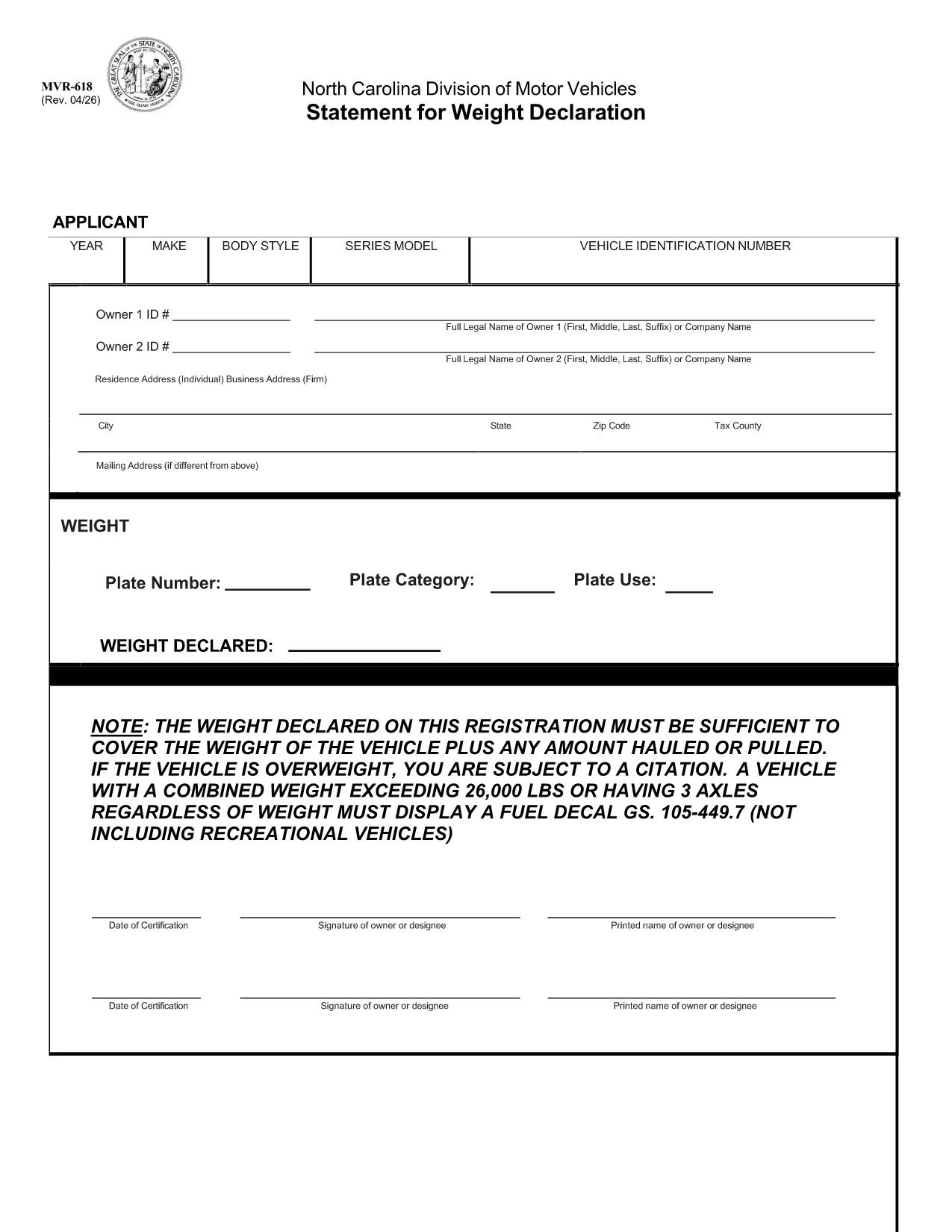
The MVR-618 is the North Carolina Division of Motor Vehicles (NCDMV) “Statement for Weight Declaration.” It is required whenever you register a vehicle that carries a load, pulls a trailer, or exceeds certain weight thresholds. The form ensures the declared weight covers the vehicle plus any hauled or pulled cargo, helping you stay compliant and avoid citations.

What is Form MVR-618?

Form MVR-618 captures the total weight of your vehicle and any additional load. North Carolina law mandates that the declared weight must be sufficient for the vehicle’s own weight plus any cargo. Vehicles over 26,000 lbs or with three axles must display a fuel decal (GS 105‑449.7). The form is part of the standard vehicle registration packet and is used by the Department of Motor Vehicles to verify compliance.

How to Fill Out MVR-618 Online

Instead of printing, printing, and scanning, you can complete the form instantly in your browser using Formize’s Fillable PDF tool. Follow the quick steps below:

  • Click the “Fill out this form” button on this page.
  • The Formize PDF Filler loads – no download required.
  • Enter the requested information (vehicle weight, cargo weight, axle count, etc.).
  • Review the data, then click **Submit** to generate a completed PDF.
  • Save or print the finished document for your records.

Common Mistakes & Tips

Even a small error can lead to a citation. Keep these tips in mind:

  • Double‑check the total weight. Add vehicle weight and cargo weight accurately.
  • Include all axles. Remember that three‑axle vehicles need a fuel decal regardless of weight.
  • Use pounds (lbs) only. The form does not accept kilograms.
  • Signature required. The online filler adds a digital signature field – sign before saving.
  • Keep a copy. Store the completed PDF in your vehicle records folder.

Download & Save the PDF

If you prefer a hard copy, the original fillable PDF is available for download below. The file is the official NCDOT version, fully compatible with Formize.

Download MVR-618 (Official PDF)

Whether you use the online filler or the printable PDF, Formize makes completing MVR-618 fast, accurate, and hassle‑free.

FAQ
  • Do I need to print the MVR-618 after filling it online?

    Printing is optional. You can keep the digital PDF for your records, but many DMV offices still require a printed copy. Use the “Print” button in the Formize filler if you need one.

  • What happens if my declared weight is too low?

    If the declared weight does not cover the vehicle plus any load, the DMV may issue a citation and you could be required to re‑register with a corrected weight declaration.

  • Can I edit the form after I’ve downloaded it?

    Once you download the completed PDF, it is locked for editing. If you need to make changes, return to the online filler, adjust the fields, and download a new version.

  • Is the Formize filler secure?

    Yes. Formize uses SSL encryption for data transmission, and the completed PDF is stored only in your browser session unless you choose to download it.

  • Do I need a fuel decal if my vehicle is under 26,000 lbs but has three axles?

    Yes. North Carolina law requires a fuel decal for any vehicle with three axles, regardless of total weight.

  • What if I lose the completed MVR-618?

    You can re‑fill the form online at any time using the same vehicle information. Keep a digital copy saved on your computer or cloud storage for easy access.

COMMENT

Comment remplir MVR-618 gratuitement, en ligne en 4 étapes simples :

  1. 1
    Open the Fillable Form
    Click the “Fill out this form” button on this page. The Formize PDF Filler loads directly in your browser – no software download needed.
  2. 2
    Enter Required Information
    Fill in the vehicle’s gross weight, cargo weight, axle count, and any other fields shown. All entries are saved automatically.
  3. 3
    Review and Sign
    Check the completed values for accuracy, then use the digital signature field to sign the form.
  4. 4
    Save or Print
    Click “Download” to save the completed PDF to your device, or select “Print” to obtain a hard copy for your records.
Formize l'application PDF Filler
À PROPOS

Formulaires d'immatriculation des véhicules

Si vous possédez ou louez un véhicule à moteur, une remorque ou un bateau, vous devez respecter certaines obligations pour garder votre véhicule légalement immatriculé et sécuritaire.

MVR-618 est l'un des formulaires d'immatriculation des véhicules qui sont des documents utilisés pour immatriculer un véhicule à moteur auprès de l'autorité nationale ou provinciale compétente. Ces formulaires sont généralement requis lorsqu'une personne achète un véhicule neuf ou d'occasion ou lorsqu'elle déménage dans un nouvel état ou une nouvelle province avec un véhicule.

Les exigences exactes et les formulaires nécessaires à l'immatriculation du véhicule peuvent varier selon le lieu, mais généralement, le processus implique de fournir des informations sur le véhicule, le propriétaire et tout privilège sur le véhicule.

Une fois les formulaires d'enregistrement et les frais soumis, l'autorité de l'État ou de la province délivrera un certificat d'immatriculation ou une plaque d'immatriculation au propriétaire du véhicule. Cette immatriculation permet au véhicule d'être légalement exploité sur les voies publiques et les autoroutes.

CARACTÉRISTIQUES

Remplisseur de PDF

Le moyen le plus simple de remplir des formulaires PDF en ligne

  • Remplissez rapidement MVR-618
    Vous cherchez un moyen de remplir rapidement MVR-618 en ligne ? Avec notre remplisseur de formulaire PDF gratuit en ligne, vous saurez comment éditer et remplir ce document pdf en moins d'une minute.
  • Éditeur PDF en ligne facile à utiliser
    Vous en avez assez d'imprimer des fichiers PDF pour pouvoir les modifier avant de les renumériser et de les renvoyer ? Modifiez des documents PDF gratuitement en ligne. Utilisez notre éditeur de pdf en ligne pour gagner du temps et du papier.
  • Excellents outils, toutes plateformes
    Vous vous demandez comment remplir MVR-618 sur un Mac, ou peut-être comment utiliser un remplisseur PDF gratuit ? Nos outils PDF en ligne fonctionnent sur toutes les plateformes.
  • Stockage de fichiers sécurisé
    Les fichiers "MVR-618" terminés sont stockés dans une base de données sécurisée gérée par l'hébergement Amazon Cloud. Vous pouvez supprimer vos fichiers de notre système à tout moment. Dans tous les cas, ces fichiers sont automatiquement supprimés après 24 heures.
  • Discutez avec MVR-618
    Discutez avec "MVR-618" sur Chatize qui est un assistant de lecture PDF gratuit. Posez des questions et obtenez des réponses de "MVR-618". Cliquez simplement sur le bouton Discuter avec un document ci-dessus.

Supprimer la session de remplissage

Supprimer la session de remplissage sélectionnée ? Dans ce cas, votre progression dans le remplissage du formulaire sera perdue.

Supprimer la session d'édition

Supprimer la session de modification sélectionnée ? Dans ce cas, votre progression dans la création et la modification du formulaire sera perdue.