
Choisir la langue

MVR-7 Fillable PDF – North Carolina DMV Form

  1. Langue Anglais
  2. De campagne Etats-Unis
  3. Activité Immatriculation des véhicules
  4. État Caroline du Nord
Remplissez ce formulaire
MVR-7 Fillable PDF – North Carolina DMV Form

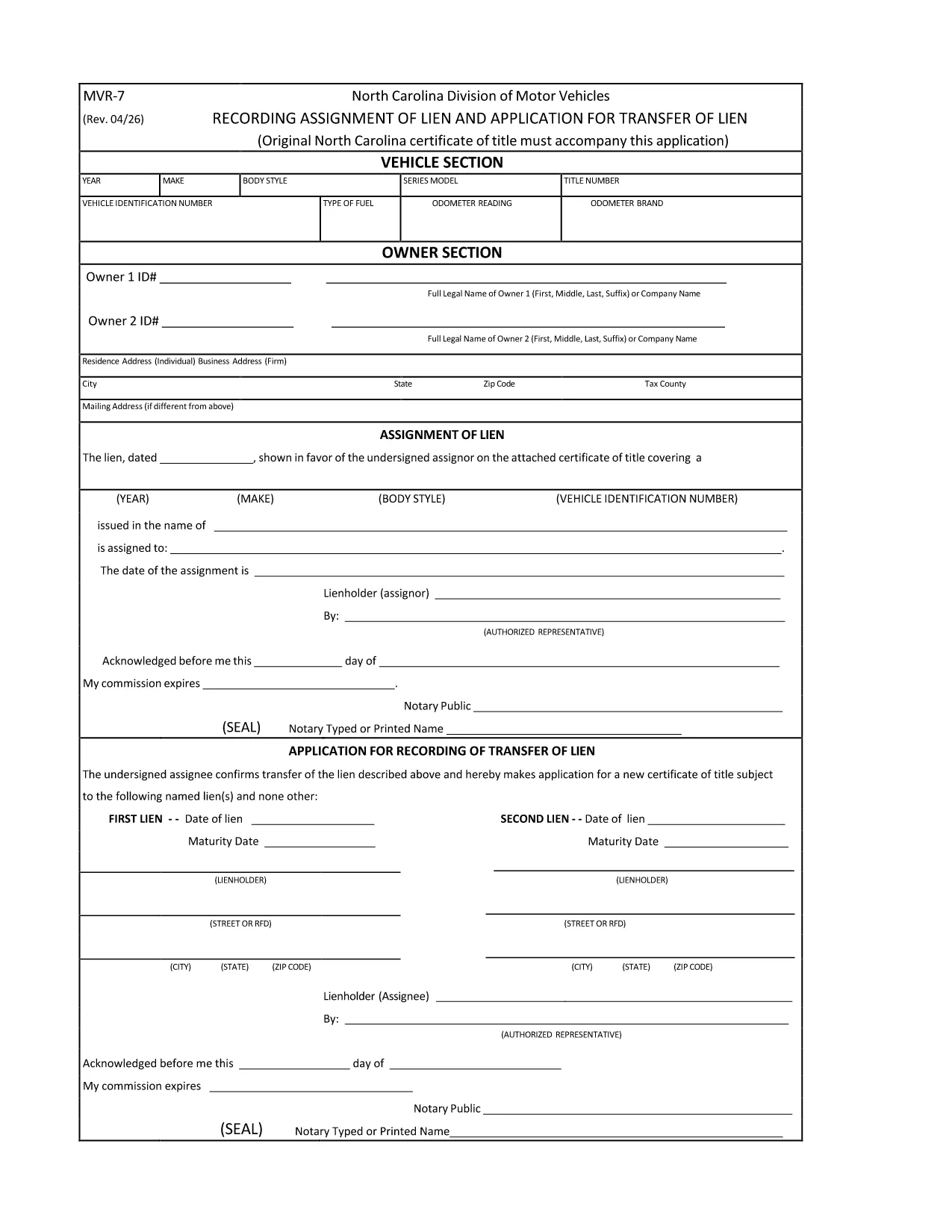
The MVR-7 is the North Carolina Department of Transportation (NCDOT) vehicle registration application used for new titles, transfers, and other title‑related actions. Historically you had to print, hand‑write, and mail the form, but with Formize you can fill it out instantly in a secure, browser‑based PDF filler.

What Is the MVR-7 Form?

The MVR-7 collects essential vehicle information such as VIN, make, model, year, odometer reading, and ownership details. It is required when you:

  • Apply for a new title for a newly purchased vehicle.
  • Transfer ownership of a used vehicle.
  • Correct title information or remove a lien.

How to Complete the MVR-7 Online with Formize

Follow these simple steps to fill out the form without printing a single page:

  1. Click the "Fill out this form" button below.
  2. The Formize PDF Filler app loads in your browser. All fields become interactive.
  3. Enter the required information, use the dropdowns where available, and upload any supporting documents.
  4. When finished, click Save & Download to get a completed PDF you can print or email to the NCDOT.

Common Mistakes to Avoid

  • Incorrect VIN: Double‑check the 17‑character VIN; a single typo can delay processing.
  • Missing signatures: Both buyer and seller must sign; the Formize app lets you add a digital signature.
  • Odometer disclosure errors: Provide the exact mileage at the time of sale; do not round.
  • Leaving optional fields blank: If a field is marked "required" by the NCDOT, the Formize validator will alert you before you can save.

Where to Submit the Completed MVR-7

After downloading the filled PDF, you have two options:

  • In‑person: Bring the form to any North Carolina DMV office.
  • Mail: Send it to the address listed on the form along with any required fees.

Using Formize ensures the PDF meets the NCDOT’s formatting standards, reducing the chance of a rejection.

FAQ
  • Is the MVR-7 form available as a fillable PDF?

    Yes. The original PDF from NCDOT can be used with Formize, which turns it into a fully interactive, fillable document.

  • Can I submit the MVR-7 electronically?

    North Carolina still requires a printed copy with signatures, but you can fill it out electronically, print, sign, and mail it.

  • Do I need a PDF editor to use the Formize filler?

    No. Formize works entirely in your web browser—no additional software or Adobe Acrobat is required.

  • How long does it take to fill out the MVR-7 with Formize?

    Most users complete the form in 5‑10 minutes, depending on how many details need to be entered.

  • What should I do if I make a mistake after saving?

    Open the saved PDF again with Formize, edit the incorrect fields, and re‑save. The app preserves all previous entries.

  • Are there any fees for using Formize?

    Formize’s online filler is free for standard PDF forms like the MVR‑7. Fees only apply for the DMV processing itself.

COMMENT

Comment remplir MVR-7 gratuitement, en ligne en 3 étapes simples :

  1. 1
    Click the Fill‑out Button
    Press the "Fill out this form" button on the page. The Formize PDF Filler will open in a new tab.
  2. 2
    Enter Your Information
    All fields become editable. Type the required data, select options from dropdowns, and upload any supporting documents.
  3. 3
    Save and Download
    When every field is complete, click "Save & Download". The finished MVR‑7 PDF is ready to print or email to the NCDOT.
Formize l'application PDF Filler
À PROPOS

Formulaires d'immatriculation des véhicules

Si vous possédez ou louez un véhicule à moteur, une remorque ou un bateau, vous devez respecter certaines obligations pour garder votre véhicule légalement immatriculé et sécuritaire.

MVR-7 est l'un des formulaires d'immatriculation des véhicules qui sont des documents utilisés pour immatriculer un véhicule à moteur auprès de l'autorité nationale ou provinciale compétente. Ces formulaires sont généralement requis lorsqu'une personne achète un véhicule neuf ou d'occasion ou lorsqu'elle déménage dans un nouvel état ou une nouvelle province avec un véhicule.

Les exigences exactes et les formulaires nécessaires à l'immatriculation du véhicule peuvent varier selon le lieu, mais généralement, le processus implique de fournir des informations sur le véhicule, le propriétaire et tout privilège sur le véhicule.

Une fois les formulaires d'enregistrement et les frais soumis, l'autorité de l'État ou de la province délivrera un certificat d'immatriculation ou une plaque d'immatriculation au propriétaire du véhicule. Cette immatriculation permet au véhicule d'être légalement exploité sur les voies publiques et les autoroutes.

CARACTÉRISTIQUES

Remplisseur de PDF

Le moyen le plus simple de remplir des formulaires PDF en ligne

  • Remplissez rapidement MVR-7
    Vous cherchez un moyen de remplir rapidement MVR-7 en ligne ? Avec notre remplisseur de formulaire PDF gratuit en ligne, vous saurez comment éditer et remplir ce document pdf en moins d'une minute.
  • Éditeur PDF en ligne facile à utiliser
    Vous en avez assez d'imprimer des fichiers PDF pour pouvoir les modifier avant de les renumériser et de les renvoyer ? Modifiez des documents PDF gratuitement en ligne. Utilisez notre éditeur de pdf en ligne pour gagner du temps et du papier.
  • Excellents outils, toutes plateformes
    Vous vous demandez comment remplir MVR-7 sur un Mac, ou peut-être comment utiliser un remplisseur PDF gratuit ? Nos outils PDF en ligne fonctionnent sur toutes les plateformes.
  • Stockage de fichiers sécurisé
    Les fichiers "MVR-7" terminés sont stockés dans une base de données sécurisée gérée par l'hébergement Amazon Cloud. Vous pouvez supprimer vos fichiers de notre système à tout moment. Dans tous les cas, ces fichiers sont automatiquement supprimés après 24 heures.
  • Discutez avec MVR-7
    Discutez avec "MVR-7" sur Chatize qui est un assistant de lecture PDF gratuit. Posez des questions et obtenez des réponses de "MVR-7". Cliquez simplement sur le bouton Discuter avec un document ci-dessus.

Supprimer la session de remplissage

Supprimer la session de remplissage sélectionnée ? Dans ce cas, votre progression dans le remplissage du formulaire sera perdue.

Supprimer la session d'édition

Supprimer la session de modification sélectionnée ? Dans ce cas, votre progression dans la création et la modification du formulaire sera perdue.