
Choisir la langue

VTR-265-SSF Fillable PDF – Self‑Service Storage Facility Lien Foreclosure

  1. Langue Anglais
  2. De campagne Etats-Unis
  3. Activité Immatriculation des véhicules
  4. État Texas
VTR-265-SSF Fillable PDF – Self‑Service Storage Facility Lien Foreclosure

The VTR-265-SSF is the Texas Department of Motor Vehicles (TxDMV) form used to verify title and registration when a self‑service storage facility forecloses on a lien. Whether you’re a storage operator, a lien holder, or the vehicle owner, this form is required to transfer ownership after a lien foreclosure.

What Is Form VTR-265-SSF?

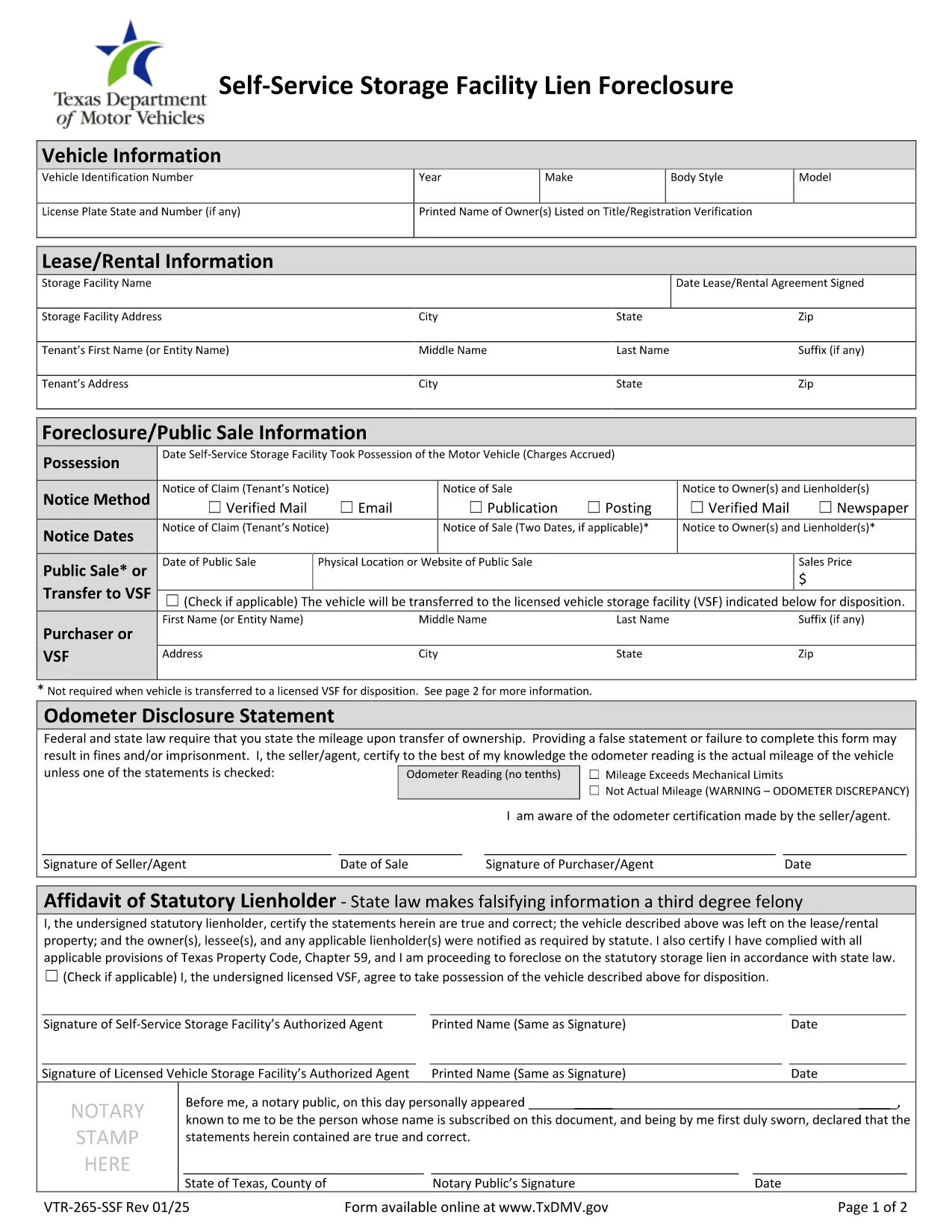
This form is officially titled Verification of Title and/or Registration – Self‑Service Storage Facility Lien Foreclosure. It collects:

  • Vehicle identification details (VIN, make, model, year)
  • Proof of lien foreclosure
  • Owner and lienholder signatures
  • Evidence that the title can be transferred

How to Complete the VTR-265-SSF Online

Instead of downloading, printing, and scanning, use Formize’s built‑in PDF filler:

  1. Click “Fill out this form” on the page.
  2. Wait a few seconds while the Formize PDF Filler app loads.
  3. Enter the required information in each fillable field. The app validates dates, VIN length, and required signatures.
  4. Review the completed form for accuracy.
  5. Save the filled PDF or submit it directly to the TxDMV portal if instructed.

Common Mistakes to Avoid

  • Incorrect VIN: Double‑check the 17‑character VIN; a single digit error will cause rejection.
  • Missing signatures: Both the lienholder and the vehicle owner must sign; electronic signatures are accepted in the Formize filler.
  • Wrong lien documentation: Attach the foreclosure notice and any court order before uploading.
  • Out‑of‑date form version: Use the PDF linked below – it is the current TxDMV version.

Where to Submit the Completed Form

After filling the form, you can:

  • Mail it to the Texas Department of Motor Vehicles, Vehicle Services Division.
  • Submit electronically through the TxDMV online portal if you have an account.
  • Deliver it in person to any TxDMV Regional Service Center.

Download the Official PDF

For reference or offline use, you can download the official VTR-265-SSF PDF directly from the Texas DMV website.

FAQ
  • Who needs to complete Form VTR-265-SSF?

    The form is required by storage facility owners, lienholders, and vehicle owners when a lien is foreclosed and title ownership must be transferred in Texas.

  • Can I submit the form electronically?

    Yes. After filling the form with Formize, you can upload the completed PDF to the TxDMV online portal or email it if the agency permits electronic submissions.

  • What documentation must accompany the form?

    Attach the foreclosure notice, any court order, and proof of notification (certified mail receipts). These documents verify the lien’s validity.

  • Is the PDF fillable on mobile devices?

    The Formize PDF Filler works on most modern smartphones and tablets, allowing you to complete the form on the go.

  • How long does the TxDMV take to process the form?

    Processing typically takes 7‑10 business days after receipt, provided all required fields and supporting documents are complete.

  • What if I make a mistake after submitting?

    Contact the TxDMV Vehicle Services Division to request a correction. You may need to submit a new VTR-265-SSF with the corrected information.

  • Is there a fee to file VTR-265-SSF?

    There is no filing fee for the VTR-265-SSF itself, but standard title transfer fees may apply when the new title is issued.

COMMENT

Comment remplir VTR-265-SSF gratuitement, en ligne en 4 étapes simples :

  1. 1
    Open the Fillable Form
    Click the “Fill out this form” button on the page. The Formize PDF Filler will open in your browser.
  2. 2
    Enter Required Information
    Fill in each field – VIN, owner details, lienholder information, and attach the foreclosure notice. The filler checks for correct formats.
  3. 3
    Review and Sign
    Double‑check all entries, then add electronic signatures for the owner and lienholder using the built‑in signature tool.
  4. 4
    Save or Submit
    Save the completed PDF to your computer or submit it directly to the TxDMV portal as instructed.
Formize l'application PDF Filler
À PROPOS

Formulaires d'immatriculation des véhicules

Si vous possédez ou louez un véhicule à moteur, une remorque ou un bateau, vous devez respecter certaines obligations pour garder votre véhicule légalement immatriculé et sécuritaire.

VTR-265-SSF est l'un des formulaires d'immatriculation des véhicules qui sont des documents utilisés pour immatriculer un véhicule à moteur auprès de l'autorité nationale ou provinciale compétente. Ces formulaires sont généralement requis lorsqu'une personne achète un véhicule neuf ou d'occasion ou lorsqu'elle déménage dans un nouvel état ou une nouvelle province avec un véhicule.

Les exigences exactes et les formulaires nécessaires à l'immatriculation du véhicule peuvent varier selon le lieu, mais généralement, le processus implique de fournir des informations sur le véhicule, le propriétaire et tout privilège sur le véhicule.

Une fois les formulaires d'enregistrement et les frais soumis, l'autorité de l'État ou de la province délivrera un certificat d'immatriculation ou une plaque d'immatriculation au propriétaire du véhicule. Cette immatriculation permet au véhicule d'être légalement exploité sur les voies publiques et les autoroutes.

CARACTÉRISTIQUES

Remplisseur de PDF

Le moyen le plus simple de remplir des formulaires PDF en ligne

  • Remplissez rapidement VTR-265-SSF
    Vous cherchez un moyen de remplir rapidement VTR-265-SSF en ligne ? Avec notre remplisseur de formulaire PDF gratuit en ligne, vous saurez comment éditer et remplir ce document pdf en moins d'une minute.
  • Éditeur PDF en ligne facile à utiliser
    Vous en avez assez d'imprimer des fichiers PDF pour pouvoir les modifier avant de les renumériser et de les renvoyer ? Modifiez des documents PDF gratuitement en ligne. Utilisez notre éditeur de pdf en ligne pour gagner du temps et du papier.
  • Excellents outils, toutes plateformes
    Vous vous demandez comment remplir VTR-265-SSF sur un Mac, ou peut-être comment utiliser un remplisseur PDF gratuit ? Nos outils PDF en ligne fonctionnent sur toutes les plateformes.
  • Stockage de fichiers sécurisé
    Les fichiers "VTR-265-SSF" terminés sont stockés dans une base de données sécurisée gérée par l'hébergement Amazon Cloud. Vous pouvez supprimer vos fichiers de notre système à tout moment. Dans tous les cas, ces fichiers sont automatiquement supprimés après 24 heures.
  • Discutez avec VTR-265-SSF
    Discutez avec "VTR-265-SSF" sur Chatize qui est un assistant de lecture PDF gratuit. Posez des questions et obtenez des réponses de "VTR-265-SSF". Cliquez simplement sur le bouton Discuter avec un document ci-dessus.

Supprimer la session de remplissage

Supprimer la session de remplissage sélectionnée ? Dans ce cas, votre progression dans le remplissage du formulaire sera perdue.

Supprimer la session d'édition

Supprimer la session de modification sélectionnée ? Dans ce cas, votre progression dans la création et la modification du formulaire sera perdue.