
Choisir la langue

VTR-71-6 – Application for Authority to Dispose of an Abandoned Vehicle (Fillable PDF)

  1. Langue Anglais
  2. De campagne Etats-Unis
  3. Activité Immatriculation des véhicules
  4. État Texas
VTR-71-6 – Application for Authority to Dispose of an Abandoned Vehicle (Fillable PDF)

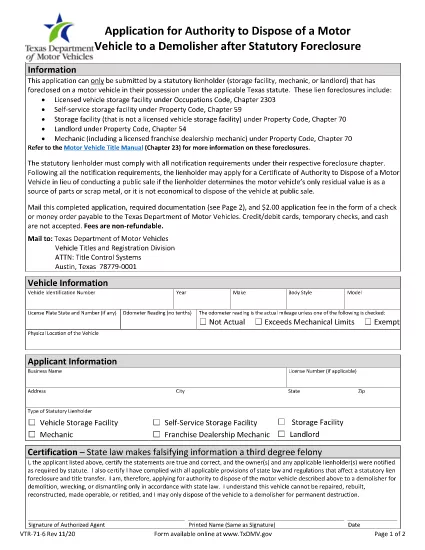
The Texas Department of Motor Vehicles (TxDMV) requires the VTR-71-6 form when you need official permission to dispose of an abandoned or public nuisance vehicle to a licensed demolisher. This fillable PDF is now available through Formize, so you can complete it securely in your browser—no extra software needed.

What Is the VTR-71-6 Form?

VTR-71-6, titled Application for Authority to Dispose of an Abandoned Nuisance Vehicle to a Demolisher, is used by vehicle owners, lienholders, or law‑enforcement agencies to certify that a vehicle meets the state’s criteria for demolition. The form collects:

  • Vehicle identification details (VIN, make, model, year)
  • Owner and lienholder information
  • Reason for disposal and supporting documentation
  • Signatures from the owner, lienholder and a law‑enforcement officer (if required)

How to Complete the VTR-71-6 Online with Formize

Instead of downloading the PDF, clicking “Fill out this form” on this page launches the Formize PDF Filler app. Follow the steps below to finish the form in minutes.

Common Mistakes to Avoid

  • Missing signatures: Every required signature must be entered; otherwise the TxDMV will reject the submission.
  • Incorrect VIN: Double‑check the VIN against the title and registration documents.
  • Incomplete supporting documents: Attach a copy of the notice to the owner and any police reports when applicable.

Where to Submit the Completed Form

After you finish the online form, you can:

  • Print the completed PDF and mail it to the TxDMV address listed on the form.
  • Upload the PDF through the TxDMV online filing portal.

Download the Official PDF

If you prefer the original document, you can download the official VTR-71-6 PDF directly from the TxDMV:

Download VTR-71-6 PDF

FAQ
  • Who can submit a VTR-71-6 form?

    The vehicle owner, a lienholder, or an authorized law‑enforcement agency may complete and submit the VTR-71-6.

  • Is the Formize filler free to use?

    Yes, Formize provides a free online filler for this PDF. No download or installation is required.

  • What happens after I submit the form?

    The TxDMV reviews the application. If approved, you’ll receive a Certificate of Authority, allowing the vehicle to be taken to a licensed demolisher.

  • Can I save my progress and finish later?

    The Formize app lets you save a draft locally. Click “Save Draft” before closing the browser, then reopen the saved file to continue.

  • Do I need a notarized signature?

    A notarized signature is not required for VTR-71-6, but all required parties must sign electronically.

  • How long does the approval process take?

    Processing typically takes 7‑10 business days after the TxDMV receives a complete, correctly signed form.

COMMENT

Comment remplir VTR-71-6 gratuitement, en ligne en 5 étapes simples :

  1. 1
    Open the Fillable Form
    Click the “Fill out this form” button on this page. The Formize PDF Filler app will load in a new window.
  2. 2
    Enter Vehicle Information
    Type the VIN, make, model, year, and license plate number into the highlighted fields.
  3. 3
    Provide Owner and Lienholder Details
    Fill in the owner’s name, address, and any lienholder information required by the form.
  4. 4
    Add Supporting Documents
    Upload a scanned copy of the notice to the owner and any police or law‑enforcement reports if applicable.
  5. 5
    Sign and Submit
    Use the electronic signature fields for the owner, lienholder, and law‑enforcement officer. When finished, click “Save & Download” to get the completed PDF.
Formize l'application PDF Filler
À PROPOS

Formulaires d'immatriculation des véhicules

Si vous possédez ou louez un véhicule à moteur, une remorque ou un bateau, vous devez respecter certaines obligations pour garder votre véhicule légalement immatriculé et sécuritaire.

VTR-71-6 est l'un des formulaires d'immatriculation des véhicules qui sont des documents utilisés pour immatriculer un véhicule à moteur auprès de l'autorité nationale ou provinciale compétente. Ces formulaires sont généralement requis lorsqu'une personne achète un véhicule neuf ou d'occasion ou lorsqu'elle déménage dans un nouvel état ou une nouvelle province avec un véhicule.

Les exigences exactes et les formulaires nécessaires à l'immatriculation du véhicule peuvent varier selon le lieu, mais généralement, le processus implique de fournir des informations sur le véhicule, le propriétaire et tout privilège sur le véhicule.

Une fois les formulaires d'enregistrement et les frais soumis, l'autorité de l'État ou de la province délivrera un certificat d'immatriculation ou une plaque d'immatriculation au propriétaire du véhicule. Cette immatriculation permet au véhicule d'être légalement exploité sur les voies publiques et les autoroutes.

CARACTÉRISTIQUES

Remplisseur de PDF

Le moyen le plus simple de remplir des formulaires PDF en ligne

  • Remplissez rapidement VTR-71-6
    Vous cherchez un moyen de remplir rapidement VTR-71-6 en ligne ? Avec notre remplisseur de formulaire PDF gratuit en ligne, vous saurez comment éditer et remplir ce document pdf en moins d'une minute.
  • Éditeur PDF en ligne facile à utiliser
    Vous en avez assez d'imprimer des fichiers PDF pour pouvoir les modifier avant de les renumériser et de les renvoyer ? Modifiez des documents PDF gratuitement en ligne. Utilisez notre éditeur de pdf en ligne pour gagner du temps et du papier.
  • Excellents outils, toutes plateformes
    Vous vous demandez comment remplir VTR-71-6 sur un Mac, ou peut-être comment utiliser un remplisseur PDF gratuit ? Nos outils PDF en ligne fonctionnent sur toutes les plateformes.
  • Stockage de fichiers sécurisé
    Les fichiers "VTR-71-6" terminés sont stockés dans une base de données sécurisée gérée par l'hébergement Amazon Cloud. Vous pouvez supprimer vos fichiers de notre système à tout moment. Dans tous les cas, ces fichiers sont automatiquement supprimés après 24 heures.
  • Discutez avec VTR-71-6
    Discutez avec "VTR-71-6" sur Chatize qui est un assistant de lecture PDF gratuit. Posez des questions et obtenez des réponses de "VTR-71-6". Cliquez simplement sur le bouton Discuter avec un document ci-dessus.

Supprimer la session de remplissage

Supprimer la session de remplissage sélectionnée ? Dans ce cas, votre progression dans le remplissage du formulaire sera perdue.

Supprimer la session d'édition

Supprimer la session de modification sélectionnée ? Dans ce cas, votre progression dans la création et la modification du formulaire sera perdue.