Choisir la langue

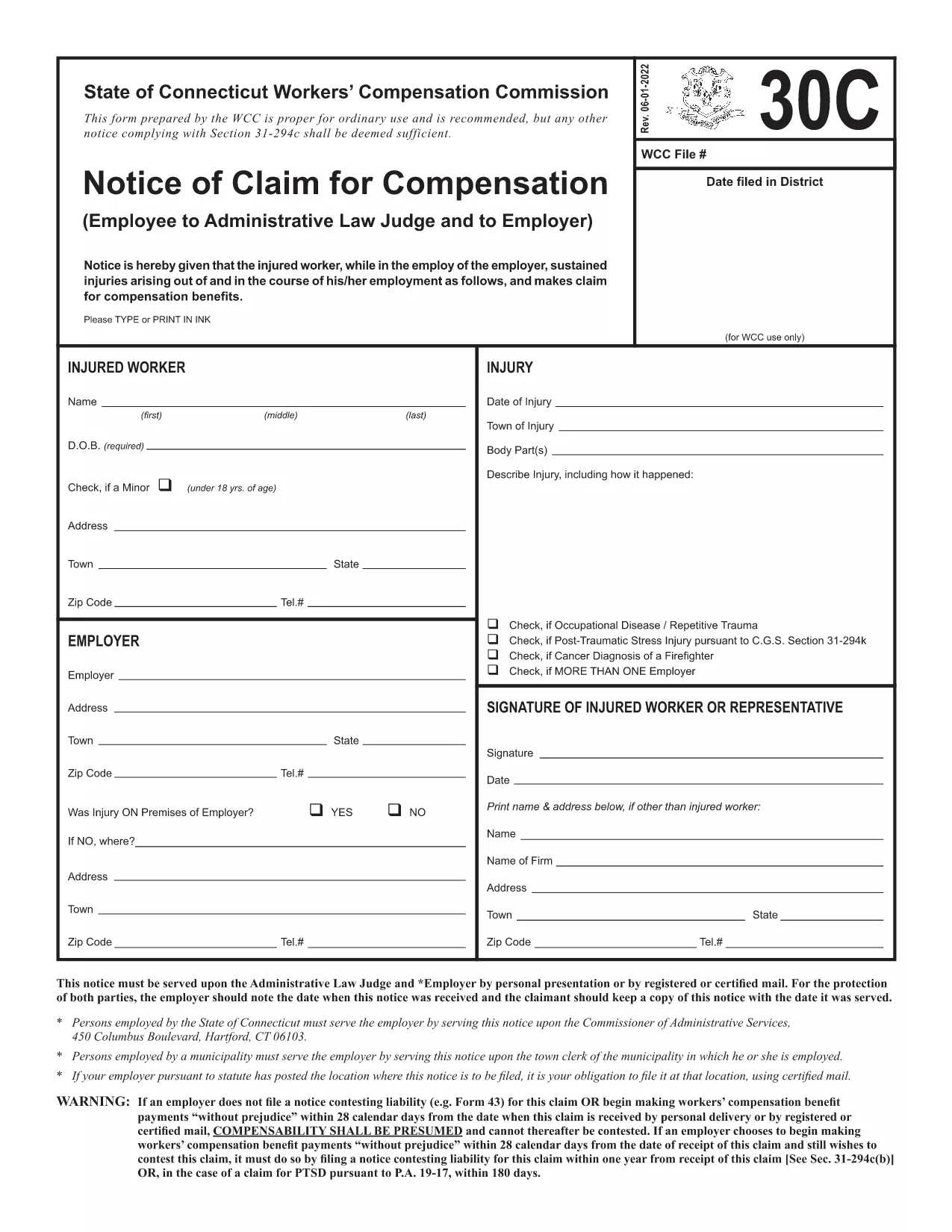
Form 30C – Notice of Claim for Workers’ Compensation

  1. Langue Anglais
  2. De campagne Etats-Unis
  3. département Workers' Compensation
  4. Activité Workers' Compensation Claims
Form 30C – Notice of Claim for Workers’ Compensation

The Form 30C is the official "Notice of Claim for Compensation" used in Connecticut workers’ compensation cases. It must be filed promptly after a work‑related injury or occupational disease to protect your right to benefits.

What Is Form 30C and When Is It Required?

Form 30C is required whenever an employee suffers an injury or illness that is believed to be job‑related. Connecticut law sets a filing deadline of one year from the date of injury (or three years from the first manifestation of a disease). Submitting this form starts the claims process with the Workers’ Compensation Commission (WCC).

How to Complete the Fillable Form 30C Online

Instead of downloading a static PDF, simply click the "Fill out this form" button on this page. The Formize PDF Filler app will load the fillable version of Form 30C, allowing you to type directly into each field, add dates, and sign electronically.

  • Step 1: Click the blue "Fill out this form" button.
  • Step 2: Wait a few seconds while the Formize PDF Filler loads.
  • Step 3: Complete every required field – the app highlights missing information.
  • Step 4: Save your progress or submit the form directly to the WCC district office and your employer.

Common Mistakes to Avoid When Filing Form 30C

Even a small error can delay your claim. Keep these tips in mind:

  • Missing signatures: Both the employee and employer must sign.
  • Incorrect dates: Verify the injury date and the date you are filing.
  • Incomplete contact info: Provide a current phone number and mailing address.
  • Failing to attach supporting documents: Include medical reports or accident reports when required.

Using the online fillable version reduces these errors because required fields are flagged in real time.

Need a printable copy? You can still download the original PDF below, but we highly recommend the online filler for a faster, error‑free experience.

FAQ
  • What is the filing deadline for Form 30C?

    You must file Form 30C within one year of the injury date, or within three years from the first symptom of an occupational disease.

  • Can I file Form 30C online?

    Yes. Using the Formize PDF Filler, you can complete the fillable version directly in your browser without downloading a static PDF.

  • Do I need a lawyer to fill out Form 30C?

    A lawyer is not required to complete the form, but you may consult one if you have complex medical or legal questions.

  • What happens if I miss the filing deadline?

    Missing the deadline may result in a denial of benefits. In some cases, you can request an extension, but it must be approved by the Workers’ Compensation Commission.

  • Do I need to attach supporting documents?

    Yes. Include any medical reports, accident reports, or employer statements that support your claim.

  • Can I print the completed form for my records?

    After completing the form online, you can download a PDF copy and print it for your personal records.

  • Where do I send the completed Form 30C?

    Send a copy to the appropriate WCC district office and provide a copy to your employer. The online filler can generate the correct mailing addresses.

COMMENT

Comment remplir Form 30C gratuitement, en ligne en 3 étapes simples :

  1. 1
    Open the Fillable Form
    Click the "Fill out this form" button on the page. The Formize PDF Filler will open the fillable Form 30C in your browser.
  2. 2
    Enter Your Information
    Type directly into each highlighted field. The filler validates dates, signatures, and required sections in real time.
  3. 3
    Save or Submit
    When all fields are complete, either save a copy for your records or submit the form electronically to the Connecticut Workers’ Compensation Commission and your employer.
Formize l'application PDF Filler
À PROPOS

modèle Form 30C

Avec l'ensemble traditionnel de fonctionnalités pour afficher et remplir un document PDF, combiné aux avantages d'une application Web et d'une mise en page réactive, vous pouvez compléter Form 30C en quelques minutes.

CARACTÉRISTIQUES

Remplisseur de PDF

Le moyen le plus simple de remplir des formulaires PDF en ligne

  • Remplissez rapidement Form 30C
    Vous cherchez un moyen de remplir rapidement Form 30C en ligne ? Avec notre remplisseur de formulaire PDF gratuit en ligne, vous saurez comment éditer et remplir ce document pdf en moins d'une minute.
  • Éditeur PDF en ligne facile à utiliser
    Vous en avez assez d'imprimer des fichiers PDF pour pouvoir les modifier avant de les renumériser et de les renvoyer ? Modifiez des documents PDF gratuitement en ligne. Utilisez notre éditeur de pdf en ligne pour gagner du temps et du papier.
  • Excellents outils, toutes plateformes
    Vous vous demandez comment remplir Form 30C sur un Mac, ou peut-être comment utiliser un remplisseur PDF gratuit ? Nos outils PDF en ligne fonctionnent sur toutes les plateformes.
  • Stockage de fichiers sécurisé
    Les fichiers "Form 30C" terminés sont stockés dans une base de données sécurisée gérée par l'hébergement Amazon Cloud. Vous pouvez supprimer vos fichiers de notre système à tout moment. Dans tous les cas, ces fichiers sont automatiquement supprimés après 24 heures.
  • Discutez avec Form 30C
    Discutez avec "Form 30C" sur Chatize qui est un assistant de lecture PDF gratuit. Posez des questions et obtenez des réponses de "Form 30C". Cliquez simplement sur le bouton Discuter avec un document ci-dessus.

Supprimer la session de remplissage

Supprimer la session de remplissage sélectionnée ? Dans ce cas, votre progression dans le remplissage du formulaire sera perdue.

Supprimer la session d'édition

Supprimer la session de modification sélectionnée ? Dans ce cas, votre progression dans la création et la modification du formulaire sera perdue.