
בחר שפה

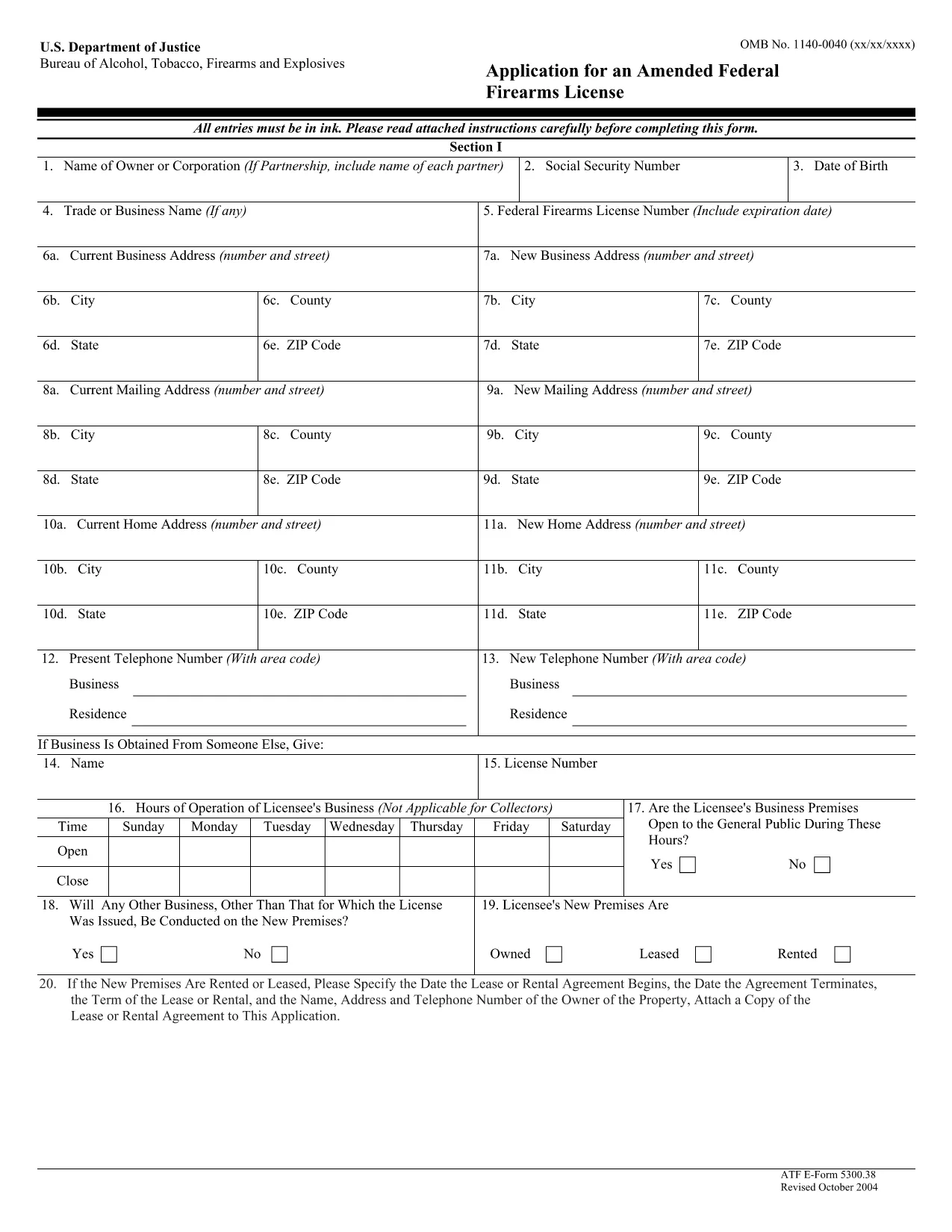
ATF Form 5300.38 – Amended Federal Firearms License Application

  1. שפה אנגלית
  2. מדינה ארה"ב
  3. מַחלָקָה ברוא של אלכוהול, טבק, כלי נשק וחומרי נפץ
  4. מִגזָר כלי נשק
ATF Form 5300.38 – Amended Federal Firearms License Application

The ATF Form 5300.38 is the official application used to request an amendment to an existing Federal Firearms License (FFL). Whether you need to add a new class of firearms, change your business address, or update other license details, this form is required by the Bureau of Alcohol, Tobacco, Firearms and Explosives (ATF).

Formize.com offers a 100% fillable, searchable PDF version of the ATF Form 5300.38. You can either download the PDF to complete it offline or use our integrated online PDF filler to fill it out instantly in your browser—no extra software needed.

What is ATF Form 5300.38?

This form is titled “Application for an Amended Federal Firearms License” and is governed by 18 U.S.C. Chapter 44. It is used by existing FFL holders to request any change to their license that does not require a completely new application.

How to Fill Out the Form Online

Follow the simple steps below to complete the form securely with Formize’s PDF Filler:

  • Click the “Fill out this form” button on this page.
  • Wait a few seconds while the Formize PDF Filler loads the fillable ATF Form 5300.38.
  • Enter your information directly into each field. The filler validates dates, phone numbers, and required fields in real time.
  • Review the completed form, sign electronically if required, and click “Download” or “Print”.
  • Mail the signed form to the ATF Federal Firearms Licensing Center as instructed.

Common Mistakes to Avoid

Even a small error can delay processing. Keep these tips in mind:

  • Incorrect ATF Number: Double‑check your current FFL number.
  • Missing Signatures: All required signatures must be original or an accepted electronic signature.
  • Out‑of‑Date Addresses: Use the exact mailing address listed on your current license.
  • Incomplete Attachments: If you’re adding a new class, include the appropriate supplemental pages.

Where to Submit Your Application

After completing the form, mail it to:

Chief, Federal Firearms Licensing Center
2600 Century Parkway NE
Atlanta, GA 30345
United States

Use certified mail or a reputable courier to ensure delivery tracking.

Download the Official PDF

If you prefer to fill out the form offline, click the download button below to get the official ATF Form 5300.38 PDF directly from the government source.

Download ATF Form 5300.38 PDF

שאלות נפוצות
  • Is the ATF Form 5300.38 available as a fillable PDF?

    Yes. Formize provides a fully fillable PDF version that you can complete online or download for offline use.

  • Do I need a digital signature for this form?

    The ATF accepts electronic signatures for most sections, but the final signature line often requires a wet ink signature. Check the instructions on the form.

  • How long does it take for the ATF to process an amendment?

    Processing times vary, but most amended license requests are reviewed within 4‑6 weeks after receipt.

  • Can I submit the form electronically?

    The ATF still requires a hard‑copy submission by mail. You can, however, fill out the form electronically and print it for mailing.

  • What should I do if I make a mistake after printing?

    Cross out the error with a single line, initial the change, and complete the rest of the form. For major errors, it’s best to start a new copy.

  • Is there a fee for filing an amendment?

    Generally, there is no additional fee for amending an existing FFL unless the amendment adds a new class of firearms, which may incur a fee.

  • Where can I find the official ATF instructions for Form 5300.38?

    The official instruction sheet is included as the first page of the PDF linked above or can be accessed on the ATF website.

  • Do I need to attach any supporting documents?

    Depending on the amendment, you may need to attach a copy of your current license, a new business location map, or other relevant documentation.

איך ל

כיצד למלא את ATF Form 5300.38 בחינם, באינטרנט ב-5 שלבים פשוטים:

  1. 1
    Click the Fill‑out Button
    Press the “Fill out this form” button on this page to launch the Formize PDF Filler.
  2. 2
    Wait for the Filler to Load
    The fillable ATF Form 5300.38 will appear in your browser within a few seconds.
  3. 3
    Enter Your Information
    Complete each field. The tool validates entries and highlights required sections.
  4. 4
    Review and Sign
    Check the completed form for accuracy, add an electronic signature if allowed, and save.
  5. 5
    Download or Print
    Download the finished PDF or print it to mail to the ATF Federal Firearms Licensing Center.
Formize אפליקציית מילוי PDF
על אודות

טפסי אלכוהול, טבק, נשק חם וחומרי נפץ (ATF).

ATF Form 5300.38 הוא אחד מהטפסים הרשמיים המשמשים את ATF, סוכנות אכיפת חוק פדרלית במשרד המשפטים של ארצות הברית. ה-ATF אחראי על אכיפת החוקים והתקנות הפדרליים הקשורים לאלכוהול, טבק, כלי נשק וחומרי נפץ. טפסים אלו משמשים למטרות שונות, לרבות רישום, רישוי והסדרה של עסקים ואנשים פרטיים העוסקים בענפים אלו. להלן כמה דוגמאות לטפסי ATF:

טופס ATF 4473: טופס זה משמש לתהליך בדיקת הרקע כאשר אדם רוכש כלי נשק מסוחר נשק חם פדרלי. הוא אוסף מידע על זהותו, הרקע והזכאות של הרוכש להחזיק בנשק חם.

טופס ATF 1: טופס זה משמש להגשת בקשה לייצור ורישום של נשק חם. הוא משמש בדרך כלל לאנשים שרוצים לייצר נשק חם לשימוש אישי או להמיר נשק קיים לתצורה אחרת.

טופס ATF 4: טופס זה משמש להעברה ורישום של נשק חם מאדם או ישות אחת לאחרת. הוא משמש בדרך כלל בתהליך של רכישת נשק מגורם פרטי או העברת נשק לנאמנות או תאגיד.

טופס ATF 6: טופס זה משמש לייבוא ​​של כלי נשק, תחמושת ופריטים מסוימים אחרים המוסדרים על ידי ה-ATF. זה נדרש עבור אנשים פרטיים או עסקים שרוצים לייבא פריטים כאלה לארצות הברית.

טופס ATF 7: טופס זה משמש להגשת בקשה וחידוש של רישיון נשק פדרלי (FFL). זה נדרש עבור אנשים פרטיים או עסקים העוסקים בעסק של ייצור, סחר או ייבוא ​​של כלי נשק.

טופס ATF 5320.20: טופס זה משמש להודעה ואישור של הובלת כלי ירייה או מכשירים הרסניים מעבר לקווי המדינה.

טופס ATF 5400.13: טופס זה משמש לרישום ודיווח של חומרים ומכשירי נפץ.

אלו הן רק כמה דוגמאות לטפסי ATF המשמשים למטרות שונות הקשורות לרגולציה ואכיפה של חוקים פדרליים המסדירים אלכוהול, טבק, נשק חם וחומרי נפץ. הטפסים הספציפיים הנדרשים תלויים בפעילות הספציפית או העסקה הנעשית ובתקנות החלות. חשוב לעיין באתר הרשמי של הלשכה לאלכוהול, טבק, כלי נשק וחומרי נפץ (www.atf.gov) או לבקש הדרכה מקצועית לקבלת מידע מדויק ועדכני לגבי טפסי ה-ATF הספציפיים הרלוונטיים למצבך.

תכונות

מילוי PDF

הדרך הקלה ביותר למלא טפסי PDF באינטרנט

  • מלא במהירות את ATF Form 5300.38
    מחפש דרך למלא במהירות את ATF Form 5300.38 באינטרנט? עם מילוי טופס ה-PDF המקוון שלנו בחינם, תדע כיצד לערוך ולמלא את מסמך ה-PDF הזה תוך פחות מדקה.
  • עורך PDF מקוון קל לשימוש
    נמאס לך להדפיס קבצי PDF כדי שתוכל לערוך אותם, לפני סריקה מחדש ושליחה חזרה? ערוך מסמכי PDF בחינם באינטרנט. השתמש בעורך ה-PDF המקוון שלנו כדי לחסוך בזמן ובנייר.
  • כלים מעולים, כל הפלטפורמות
    תוהה כיצד למלא את ATF Form 5300.38 ב-Mac, או אולי איך להשתמש בחומר מילוי PDF בחינם? כלי ה-PDF המקוונים שלנו פועלים בכל הפלטפורמות.
  • אחסון קבצים מאובטח
    קבצי "ATF Form 5300.38" שהושלמו מאוחסנים במסד נתונים מאובטח המנוהל על ידי אירוח Amazon Cloud. אתה יכול למחוק את הקבצים שלך מהמערכת שלנו בכל עת. בכל מקרה, קבצים אלו נמחקים אוטומטית לאחר 24 שעות.
  • צ'אט עם ATF Form 5300.38
    צ'אט עם "ATF Form 5300.38" ב-Chatize שהוא עוזר לקורא PDF בחינם. שאל שאלות וקבל תשובות מ-"ATF Form 5300.38". פשוט לחץ על הלחצן צ'אט עם מסמך למעלה.

מחק הפעלת מילוי

למחוק את הפעלת המילוי שנבחרה? במקרה זה, ההתקדמות שלך במילוי הטופס תאבד.

מחק סשן עריכה

למחוק את סשן העריכה שנבחר? במקרה זה, ההתקדמות שלך ביצירה ועריכה של הטופס תאבד.