
בחר שפה

ATF Form 5310.12 & 5310.16 Fillable PDF – Download & Complete Online

  1. שפה אנגלית
  2. מדינה ארה"ב
  3. מַחלָקָה ברוא של אלכוהול, טבק, כלי נשק וחומרי נפץ
  4. מִגזָר כלי נשק
ATF Form 5310.12 & 5310.16 Fillable PDF – Download & Complete Online

Whether you are applying for a new Federal Firearms License (FFL) or need to add a responsible person to an existing license, the ATF’s Form 5310.12 and Form 5310.16 are essential. Formize provides a secure, fillable PDF that lets you complete both forms directly in your browser – no extra software required.

What Is ATF Form 5310.12?

Form 5310.12 is the official application used to request any type of FFL (Dealer, Manufacturer, Importer, etc.). It collects business information, background details, and the specific license class you are seeking.

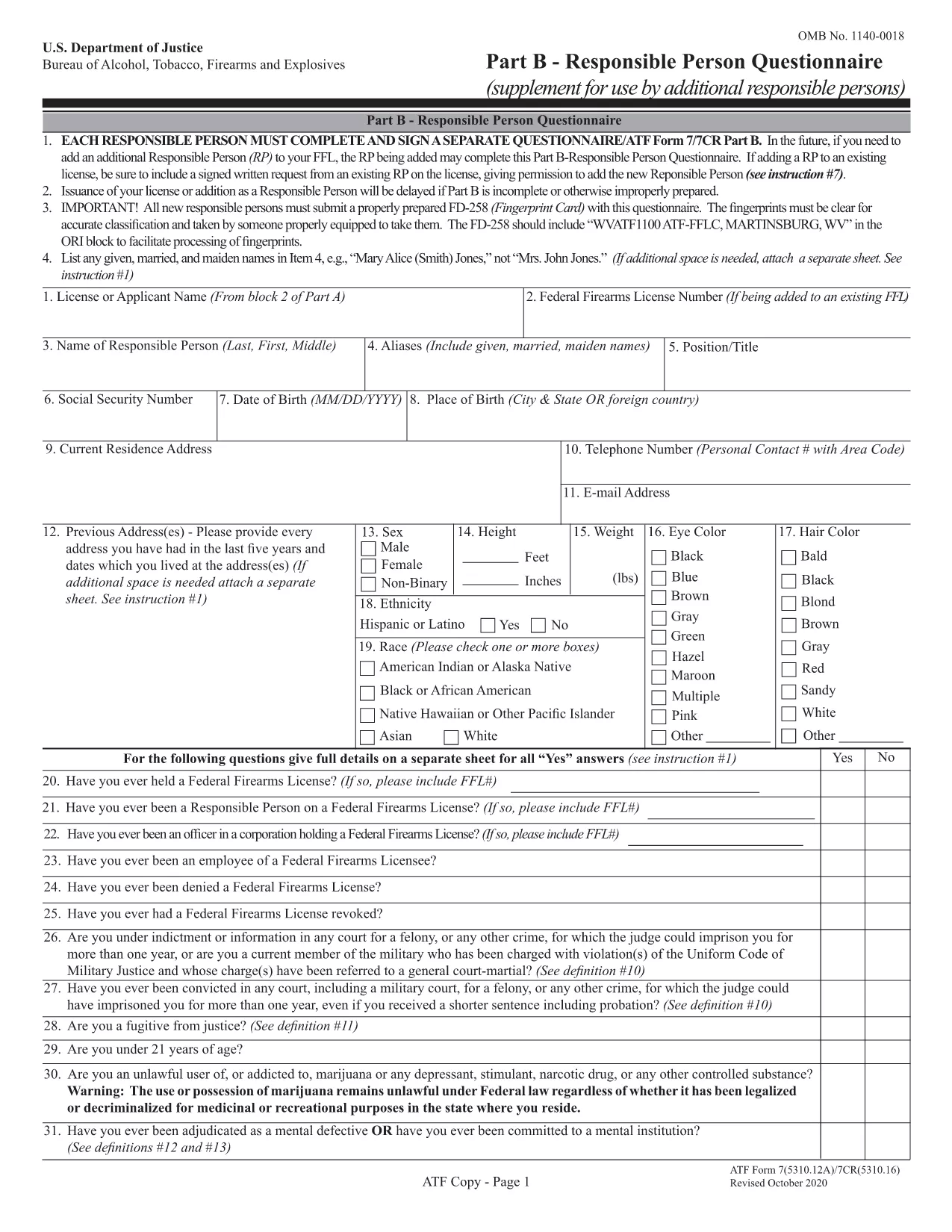
Understanding Form 5310.16 – Responsible Person Questionnaire

Form 5310.16 (also known as Part B) is a questionnaire that must be completed by every responsible person added to an FFL. It includes personal background questions, fingerprint instructions, and a photo requirement.

How to Fill Out the Forms Online with Formize

Follow the simple steps below to fill the PDF without leaving the page.

  • Click the "Fill out this form" button on the page.
  • Wait a few seconds while the Formize PDF Filler app loads.
  • Enter your information directly into the fillable fields.
  • Use the Save button to download a completed copy or Print it for mailing.
  • Mail the printed form to the ATF address shown on the form instructions.

Common Mistakes to Avoid

  • Leaving required fields blank – the filler highlights empty mandatory sections.
  • Using an outdated form version – our PDF is the latest revision (effective 2022).
  • Submitting the wrong mailing address – double‑check the address on the form’s last page.
  • Forgetting the fingerprint card for Form 5310.16 – attach it before mailing.

Where to Submit Your Completed Forms

After completing the forms, mail them to the ATF’s Federal Firearms Licensing Center (FFLC) at the address printed on the last page of each form. For expedited processing, consider using certified mail with tracking.

Need more help? Review the ATF’s official instructions linked on each form or consult a qualified firearms attorney.

שאלות נפוצות
  • Do I need to fill out both Form 5310.12 and 5310.16?

    Form 5310.12 is required for a new FFL. Form 5310.16 is only needed when adding or updating a responsible person on an existing FFL.

  • Can I submit the forms electronically?

    The ATF currently requires a hard‑copy submission for these forms. Use the online filler to complete them, then print and mail.

  • Is the PDF fillable on mobile devices?

    Yes. The Formize filler works on most modern smartphones and tablets, though a larger screen makes data entry easier.

  • What address should I use for mailing?

    The correct mailing address is printed on the last page of each form. For Form 5310.12, use the Federal Firearms Licensing Center address; for Form 5310.16, use the ATF address shown in the questionnaire instructions.

  • How long does it take the ATF to process my application?

    Processing times vary, but most FFL applications are reviewed within 60‑90 days after receipt.

  • Do I need a fingerprint card for Form 5310.16?

    Yes. Every responsible person must submit a fingerprint card (FD‑258) along with the completed questionnaire.

  • What if I make a mistake after mailing?

    Contact the ATF’s Federal Firearms Licensing Center immediately. They may allow a corrected form to be resubmitted before final approval.

איך ל

כיצד למלא את ATF Form 5310.12 בחינם, באינטרנט ב-5 שלבים פשוטים:

  1. 1
    Click the Fill Out Button
    Press the "Fill out this form" button on the page to launch the Formize PDF Filler.
  2. 2
    Wait for the Filler to Load
    A short loading screen appears while the secure fillable PDF is prepared.
  3. 3
    Enter Your Information
    Type directly into each highlighted field. Use the navigation tabs to jump between sections.
  4. 4
    Save or Print Your Completed Form
    When finished, click "Save" to download a copy or "Print" to produce a hard‑copy for mailing.
  5. 5
    Mail to the ATF
    Attach any required fingerprint cards or photos and mail the form to the address shown on the last page.
Formize אפליקציית מילוי PDF
על אודות

טפסי אלכוהול, טבק, נשק חם וחומרי נפץ (ATF).

ATF Form 5310.12 הוא אחד מהטפסים הרשמיים המשמשים את ATF, סוכנות אכיפת חוק פדרלית במשרד המשפטים של ארצות הברית. ה-ATF אחראי על אכיפת החוקים והתקנות הפדרליים הקשורים לאלכוהול, טבק, כלי נשק וחומרי נפץ. טפסים אלו משמשים למטרות שונות, לרבות רישום, רישוי והסדרה של עסקים ואנשים פרטיים העוסקים בענפים אלו. להלן כמה דוגמאות לטפסי ATF:

טופס ATF 4473: טופס זה משמש לתהליך בדיקת הרקע כאשר אדם רוכש כלי נשק מסוחר נשק חם פדרלי. הוא אוסף מידע על זהותו, הרקע והזכאות של הרוכש להחזיק בנשק חם.

טופס ATF 1: טופס זה משמש להגשת בקשה לייצור ורישום של נשק חם. הוא משמש בדרך כלל לאנשים שרוצים לייצר נשק חם לשימוש אישי או להמיר נשק קיים לתצורה אחרת.

טופס ATF 4: טופס זה משמש להעברה ורישום של נשק חם מאדם או ישות אחת לאחרת. הוא משמש בדרך כלל בתהליך של רכישת נשק מגורם פרטי או העברת נשק לנאמנות או תאגיד.

טופס ATF 6: טופס זה משמש לייבוא ​​של כלי נשק, תחמושת ופריטים מסוימים אחרים המוסדרים על ידי ה-ATF. זה נדרש עבור אנשים פרטיים או עסקים שרוצים לייבא פריטים כאלה לארצות הברית.

טופס ATF 7: טופס זה משמש להגשת בקשה וחידוש של רישיון נשק פדרלי (FFL). זה נדרש עבור אנשים פרטיים או עסקים העוסקים בעסק של ייצור, סחר או ייבוא ​​של כלי נשק.

טופס ATF 5320.20: טופס זה משמש להודעה ואישור של הובלת כלי ירייה או מכשירים הרסניים מעבר לקווי המדינה.

טופס ATF 5400.13: טופס זה משמש לרישום ודיווח של חומרים ומכשירי נפץ.

אלו הן רק כמה דוגמאות לטפסי ATF המשמשים למטרות שונות הקשורות לרגולציה ואכיפה של חוקים פדרליים המסדירים אלכוהול, טבק, נשק חם וחומרי נפץ. הטפסים הספציפיים הנדרשים תלויים בפעילות הספציפית או העסקה הנעשית ובתקנות החלות. חשוב לעיין באתר הרשמי של הלשכה לאלכוהול, טבק, כלי נשק וחומרי נפץ (www.atf.gov) או לבקש הדרכה מקצועית לקבלת מידע מדויק ועדכני לגבי טפסי ה-ATF הספציפיים הרלוונטיים למצבך.

תכונות

מילוי PDF

הדרך הקלה ביותר למלא טפסי PDF באינטרנט

  • מלא במהירות את ATF Form 5310.12
    מחפש דרך למלא במהירות את ATF Form 5310.12 באינטרנט? עם מילוי טופס ה-PDF המקוון שלנו בחינם, תדע כיצד לערוך ולמלא את מסמך ה-PDF הזה תוך פחות מדקה.
  • עורך PDF מקוון קל לשימוש
    נמאס לך להדפיס קבצי PDF כדי שתוכל לערוך אותם, לפני סריקה מחדש ושליחה חזרה? ערוך מסמכי PDF בחינם באינטרנט. השתמש בעורך ה-PDF המקוון שלנו כדי לחסוך בזמן ובנייר.
  • כלים מעולים, כל הפלטפורמות
    תוהה כיצד למלא את ATF Form 5310.12 ב-Mac, או אולי איך להשתמש בחומר מילוי PDF בחינם? כלי ה-PDF המקוונים שלנו פועלים בכל הפלטפורמות.
  • אחסון קבצים מאובטח
    קבצי "ATF Form 5310.12" שהושלמו מאוחסנים במסד נתונים מאובטח המנוהל על ידי אירוח Amazon Cloud. אתה יכול למחוק את הקבצים שלך מהמערכת שלנו בכל עת. בכל מקרה, קבצים אלו נמחקים אוטומטית לאחר 24 שעות.
  • צ'אט עם ATF Form 5310.12
    צ'אט עם "ATF Form 5310.12" ב-Chatize שהוא עוזר לקורא PDF בחינם. שאל שאלות וקבל תשובות מ-"ATF Form 5310.12". פשוט לחץ על הלחצן צ'אט עם מסמך למעלה.

מחק הפעלת מילוי

למחוק את הפעלת המילוי שנבחרה? במקרה זה, ההתקדמות שלך במילוי הטופס תאבד.

מחק סשן עריכה

למחוק את סשן העריכה שנבחר? במקרה זה, ההתקדמות שלך ביצירה ועריכה של הטופס תאבד.