
בחר שפה

Form 1413 – Fillable Declaration in Relation to Managed Funds

  1. שפה אנגלית
  2. מדינה אוֹסטְרַלִיָה
  3. פעילות עסקים והשקעות
Form 1413 – Fillable Declaration in Relation to Managed Funds

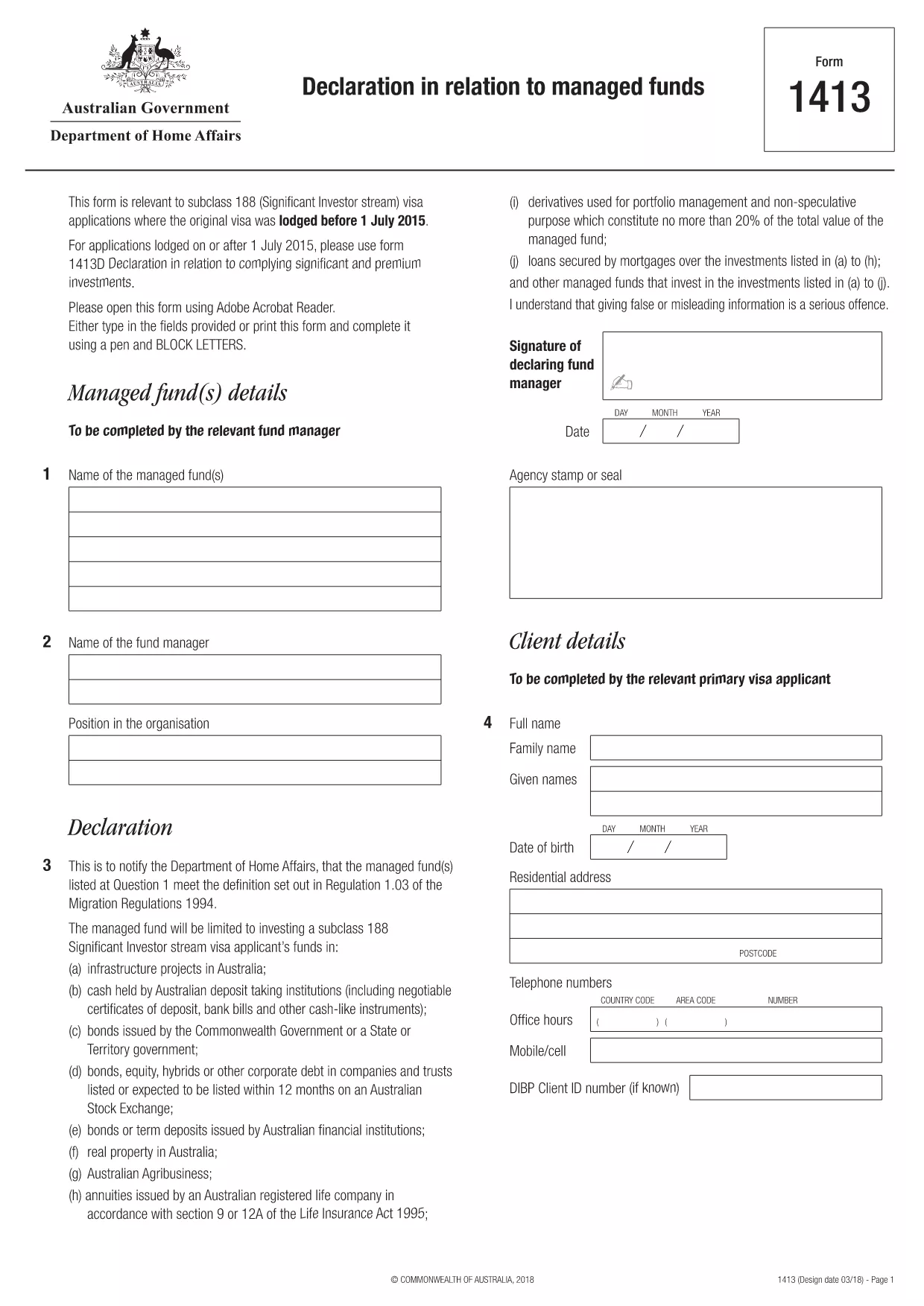
Form 1413 is the official Declaration in relation to managed funds required by the Australian Department of Home Affairs for certain visa subclasses, such as the Subclass 188 Significant Investor stream. The form must be completed accurately and submitted with your visa application.

With Formize you can open the original PDF as a fully fillable, interactive form directly in your browser – no extra software needed. Simply click the “Fill out this form” button, enter your details, and download the completed PDF ready for submission.

What Is Form 1413?

This declaration confirms the applicant’s investments in Australian managed funds and verifies that the funds meet the government‑specified criteria. It is used to satisfy the financial requirements of the Significant Investor visa and related immigration pathways.

How to Complete Form 1413 Online with Formize

Follow the quick steps below to fill out the form without printing or scanning:

  • Click the Fill out this form button on this page.
  • Wait a few seconds while the Formize PDF Filler app loads the document.
  • Enter your information into each highlighted field – the app automatically saves your progress.
  • Use the built‑in validation to catch formatting errors before you finish.
  • When you’re done, click Download Completed PDF and save it to your device.
  • Attach the saved PDF to your visa application or email it to the Department of Home Affairs as instructed.

Common Mistakes to Avoid

  • Leaving mandatory fields blank – the form will not be accepted.
  • Entering dates in the wrong format (DD/MM/YYYY).
  • Using unofficial fund names – the exact legal name must match the fund’s registration.
  • Forgetting to sign and date the declaration.

Why Choose Formize’s Fillable PDF

  • Secure cloud processing – your data never leaves your browser.
  • Auto‑save prevents loss of information if the page reloads.
  • Built‑in field validation reduces errors.
  • Completely free for this government form.

Where to Submit the Completed Form

After downloading the filled PDF, attach it to your visa application through ImmiAccount or email it to the address specified in your visa instructions. Keep a copy for your records.

שאלות נפוצות
  • Is Form 1413 required for all visa subclasses?

    No. Form 1413 is specifically required for visa subclasses that involve a managed‑fund investment, such as Subclass 188 (Significant Investor) applications lodged before 1 July 2015.

  • Can I print the form and fill it by hand?

    You can, but a hand‑filled form is more prone to errors and may be rejected. Using the fillable PDF ensures legibility and automatic validation.

  • Do I need Adobe Acrobat to fill Form 1413?

    No. Formize’s online PDF filler works in any modern browser – no extra software is required.

  • How can I be sure my data is secure?

    Formize processes the PDF entirely in your browser; no data is stored on external servers, keeping your personal information private.

  • What should I do if I make a mistake after downloading?

    Open the downloaded PDF again in Formize, make the correction, and re‑download the updated version before submission.

  • Is there a fee to use the fillable version of Form 1413?

    No. Formize provides this government form free of charge.

  • Where can I find guidance on the financial thresholds for managed funds?

    The Department of Home Affairs website provides detailed investment criteria; the form itself includes reference notes for each required amount.

  • Can I save my progress and finish the form later?

    Yes. The Formize filler auto‑saves your entries locally; you can close the browser and return later to continue.

איך ל

כיצד למלא את form 1413 בחינם, באינטרנט ב-5 שלבים פשוטים:

  1. 1
    Click the Fill‑out Button
    Press the “Fill out this form” button on the page to launch the Formize PDF Filler.
  2. 2
    Wait for the App to Load
    A few seconds later the fillable version of Form 1413 appears in your browser.
  3. 3
    Enter Your Details
    Complete each highlighted field. The app validates entries in real time.
  4. 4
    Download the Completed PDF
    When all sections are filled, click “Download Completed PDF” and save the file.
  5. 5
    Submit with Your Visa Application
    Attach the saved PDF to your ImmiAccount submission or email it as instructed.
Formize אפליקציית מילוי PDF
על אודות

טפסי עסקים והשקעות

form 1413 הוא אחד מהצורות המשמשות בהקשר של פתיחה, ניהול או השקעה בעסק. טפסים אלה נדרשים לעתים קרובות על ידי סוכנויות ממשלתיות, מוסדות פיננסיים או גופים רגולטוריים כדי לאסוף מידע, להקים ישויות משפטיות או לציית לכללים ולתקנות ספציפיים הקשורים לפעילות עסקית והשקעות. הטפסים הספציפיים יכולים להשתנות בהתאם לאופי העסק או פעילות ההשקעה. להלן כמה דוגמאות לטפסי "עסקים והשקעות":

טפסי רישום עסק: טפסים אלה משמשים לרישום ישות עסקית בסוכנות הממשלתית המתאימה. הם אוספים מידע על שם העסק, המבנה המשפטי (למשל, בעלות יחידה, שותפות, תאגיד), כתובת העסק, פרטי בעלות ומידע הכרחי אחר הנדרש להכרה משפטית.

מסמכי התאגדות: אם מקימים תאגיד או חברה, יש להגיש מסמכים שונים כדי ליצור את הישות המשפטית. מסמכים אלה כוללים בדרך כלל תקנון, תקנון, הסכמי בעלי מניות וצורות קשורות אחרות.

יישומי רישיונות עסקיים: בהתאם לתעשייה ולמיקום, עסקים מסוימים דורשים רישיונות או אישורים ספציפיים כדי לפעול באופן חוקי. בקשות לרישיון עסק אוספות מידע על אופי העסק, מיקומו, פרטי בעלות ועמידה בתקנות הרלוונטיות.

טפסי פתיחת חשבון השקעה: משקיעים המעוניינים לפתוח חשבונות השקעה במוסדות פיננסיים או בחברות תיווך עשויים להצטרך למלא טפסי פתיחת חשבון. טפסים אלו אוספים מידע אישי, יעדי השקעה, סובלנות סיכונים ופרטים רלוונטיים אחרים להקמת החשבון של המשקיע.

הסכמי שותפות: כאשר נכנסים לשותפות, שותפים יוצרים בדרך כלל הסכם שותפות המתאר את התנאים וההגבלות של הקשר העסקי שלהם. הסכם זה עשוי לכלול הוראות הקשורות לחלוקת רווחים, קבלת החלטות, תרומות והיבטים אחרים של השותפות.

הסכמי סודיות (NDA): הסכם סודיות משמש בדרך כלל בעסקאות עסקיות כדי להגן על מידע רגיש או סודות מסחריים. הסכמים אלו מבטיחים שצדדים המעורבים בעסקת עסק או השקעה שומרים על סודיות לגבי מידע ספציפי המשותף במהלך העסקה.

טופסי בקשה להלוואה או מימון: עסקים המחפשים מימון או הלוואות ממוסדות פיננסיים עשויים להצטרך למלא טפסי בקשה להלוואה. טפסים אלה אוספים מידע על המצב הפיננסי של העסק, היסטוריית האשראי, הביטחונות ופרטים אחרים הדרושים לתהליך אישור ההלוואה.

הגשת ניירות ערך: עבור עסקים המעורבים בהנפקת ניירות ערך, כגון מניות או אג"ח, ייתכן שיידרשו הגשות שונות לניירות ערך כדי לעמוד בחוקים ותקנות ניירות ערך. טפסים אלה כוללים תשקיפים, הצהרות רישום, דוחות שנתיים וגילויים אחרים.

הטפסים והדרישות הספציפיות עשויות להשתנות בהתאם למדינה, לתעשייה ולפעילות העסקית או ההשקעה הספציפית. חשוב להיוועץ בסוכנויות הממשלתיות הרלוונטיות, אנשי מקצוע משפטיים או מוסדות פיננסיים כדי לקבל מידע מדויק ועדכני לגבי הטפסים הדרושים לפעילויות עסקיות או השקעות ספציפיות.

תכונות

מילוי PDF

הדרך הקלה ביותר למלא טפסי PDF באינטרנט

  • מלא במהירות את form 1413
    מחפש דרך למלא במהירות את form 1413 באינטרנט? עם מילוי טופס ה-PDF המקוון שלנו בחינם, תדע כיצד לערוך ולמלא את מסמך ה-PDF הזה תוך פחות מדקה.
  • עורך PDF מקוון קל לשימוש
    נמאס לך להדפיס קבצי PDF כדי שתוכל לערוך אותם, לפני סריקה מחדש ושליחה חזרה? ערוך מסמכי PDF בחינם באינטרנט. השתמש בעורך ה-PDF המקוון שלנו כדי לחסוך בזמן ובנייר.
  • כלים מעולים, כל הפלטפורמות
    תוהה כיצד למלא את form 1413 ב-Mac, או אולי איך להשתמש בחומר מילוי PDF בחינם? כלי ה-PDF המקוונים שלנו פועלים בכל הפלטפורמות.
  • אחסון קבצים מאובטח
    קבצי "form 1413" שהושלמו מאוחסנים במסד נתונים מאובטח המנוהל על ידי אירוח Amazon Cloud. אתה יכול למחוק את הקבצים שלך מהמערכת שלנו בכל עת. בכל מקרה, קבצים אלו נמחקים אוטומטית לאחר 24 שעות.
  • צ'אט עם form 1413
    צ'אט עם "form 1413" ב-Chatize שהוא עוזר לקורא PDF בחינם. שאל שאלות וקבל תשובות מ-"form 1413". פשוט לחץ על הלחצן צ'אט עם מסמך למעלה.

מחק הפעלת מילוי

למחוק את הפעלת המילוי שנבחרה? במקרה זה, ההתקדמות שלך במילוי הטופס תאבד.

מחק סשן עריכה

למחוק את סשן העריכה שנבחר? במקרה זה, ההתקדמות שלך ביצירה ועריכה של הטופס תאבד.