
בחר שפה

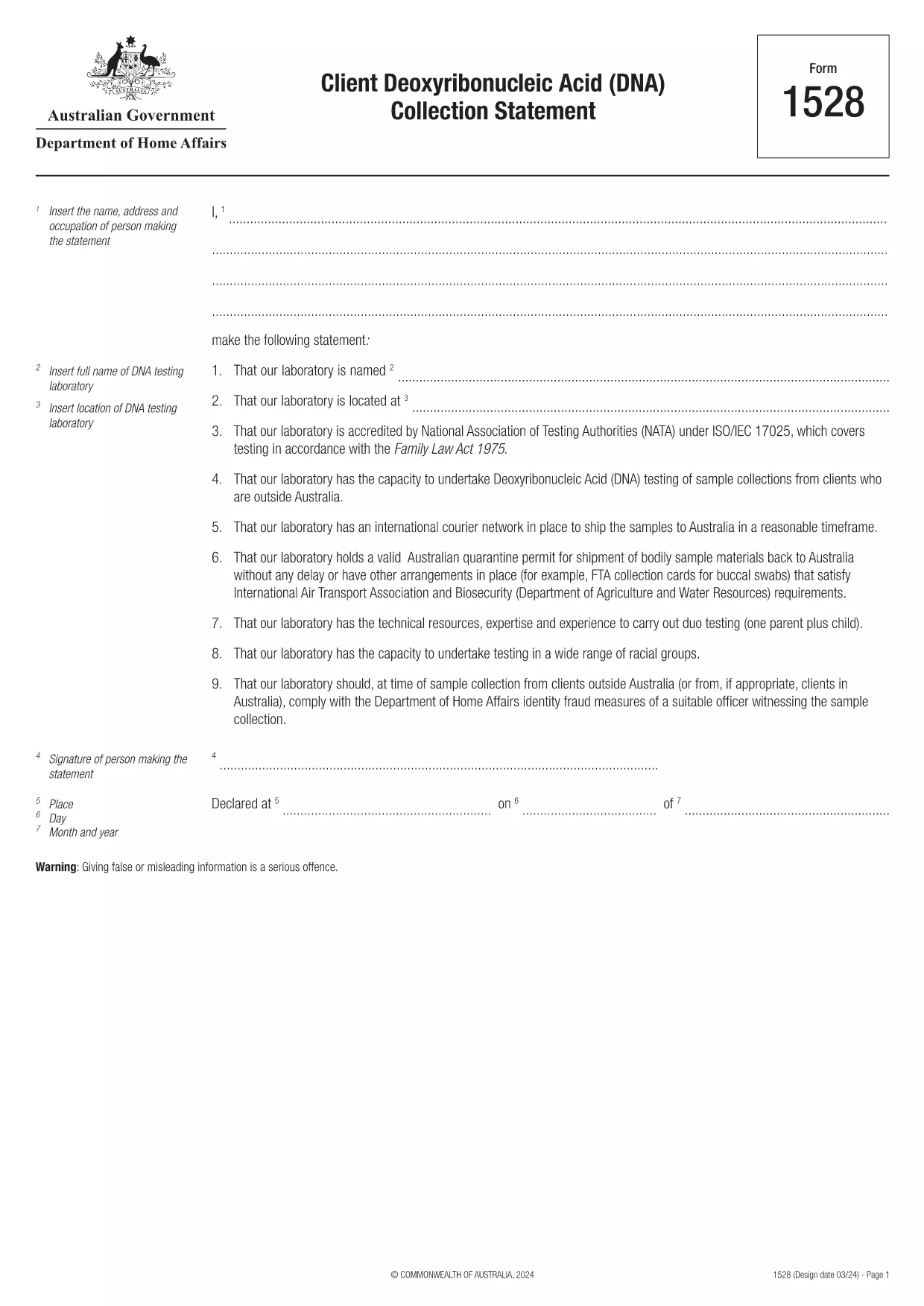
Form 1528 – Client DNA Collection Statement (Fillable PDF)

  1. מדינה אוֹסטְרַלִיָה
  2. שפה אנגלית
  3. פעילות אופי או זהות
Form 1528 – Client DNA Collection Statement (Fillable PDF)

Form 1528 is the official Client Deoxyribonucleic Acid (DNA) Collection Statement required by the Australian Department of Home Affairs. The form captures the name, address and occupation of the person making the statement, as well as details of the DNA testing laboratory.

What Is Form 1528?

This form is used when an individual must provide a DNA sample for immigration, visa, or forensic purposes. It must be completed by the person providing the sample and signed by an authorised DNA testing laboratory.

How to Fill Out Form 1528 with Formize

Instead of printing, scanning, or editing the PDF manually, simply click the “Fill out this form” button on this page. The Formize PDF Filler app will load the fillable version, letting you enter data, add signatures, and save the completed document in seconds.

Common Mistakes & Tips

  • Leave no blank fields – the Department rejects forms with empty required sections.
  • Use the exact laboratory name and address as it appears on the lab’s official letterhead.
  • Check date formats – use DD/MM/YYYY throughout.
  • Sign electronically only after all information is verified; a digital signature is accepted.

Where to Submit the Completed Form

After you download the completed PDF, you can upload it through your online visa portal, email it to the requesting officer, or deliver a printed copy to the nearest Australian Visa Application Centre.

Need More Help?

For detailed guidance, review the instructions on the Department of Home Affairs website or contact your DNA testing laboratory for clarification on laboratory‑specific fields.

שאלות נפוצות
  • Is an electronic signature accepted on Form 1528?

    Yes. The Department of Home Affairs accepts a clear electronic signature created with the Formize PDF Filler.

  • Can I print the form after filling it online?

    Absolutely. After completing the form, you can download the PDF and print a hard copy if you prefer a physical submission.

  • What if I make a mistake after saving the form?

    Open the saved PDF again in Formize, edit the incorrect fields, and re‑save. The fillable PDF allows unlimited edits before final submission.

  • Do I need to attach any supporting documents?

    Typically, the DNA laboratory will provide a separate certification letter. Attach that letter alongside the completed Form 1528 when you submit your application.

  • How long does it take to process Form 1528?

    Processing time varies by case, but the Department generally reviews the statement within 5‑10 business days after receipt.

  • Is there a fee for using Formize’s PDF filler?

    Formize offers a free basic fillable version for Form 1528. Advanced features such as bulk signing require a paid plan, but are not needed for a single submission.

  • Can I fill out Form 1528 on a mobile device?

    Yes. The Formize PDF Filler works on smartphones and tablets, allowing you to complete the form anywhere.

  • What format should I use when uploading the completed form?

    Upload the final document as a PDF file. Ensure the file size does not exceed the portal’s limit (usually 5 MB).

איך ל

כיצד למלא את Form 1528 בחינם, באינטרנט ב-5 שלבים פשוטים:

  1. 1
    Open the Fillable Form
    Click the “Fill out this form” button on the page. The Formize PDF Filler app will launch in a new tab with the fillable version of Form 1528.
  2. 2
    Enter Your Information
    Type the required details – personal data, laboratory name, and address – directly into the highlighted fields.
  3. 3
    Add Electronic Signatures
    Use the signature tool to sign the statement and, if required, the laboratory representative’s signature.
  4. 4
    Review & Validate
    Double‑check every field for accuracy, especially dates and laboratory information.
  5. 5
    Download or Submit
    When you’re satisfied, click “Save & Download” to get the completed PDF, or use the built‑in “Submit” button to send it directly to the Home Affairs portal.
Formize אפליקציית מילוי PDF
על אודות

טפסי דמות או זהות

Form 1528 הוא אחד מהמסמכים המשמשים לאיסוף מידע על אופיו או תכונותיו האישיות של אדם. טפסים אלה עשויים לשמש במצבים שונים, כגון תעסוקה, דיור או הליכים משפטיים, כדי להעריך את התאמתו או אמינותו של אדם. הנה כמה דוגמאות לצורות שעשויות להיחשב כ"צורות תווים" בהקשרים שונים:

טפסי התייחסות לדמות: טפסים אלה משמשים לאיסוף מידע מאנשים שיכולים להעיד על אופיו, כישוריו וכישוריו של אדם. לעתים קרובות הם מתבקשים במסגרת בקשות לעבודה, בקשות להשכרה או הליכים משפטיים. הטפסים בדרך כלל מבקשים פרטים על מערכת היחסים עם הפונה, דעתו על אופיו של הפונה וכל התנסויות או תצפיות רלוונטיות.

טופסי הצהרה אישית: במצבים מסוימים, אנשים עשויים להתבקש לספק הצהרה או חיבור אישי כדי להעביר את אופיים, ערכיו ומניעיהם. זה עשוי להידרש עבור קבלה למכללה, בקשות למלגות או תהליכי רישוי מקצועיים.

טפסי עדות של עד אופי: בהליכים משפטיים, ניתן לזמן עד אופי למסור עדות לגבי אופיו, המוניטין או התנהגותו של אדם. למרות שלא בצורה טיפוסית בצורה של מסמך מוגדר מראש, עשויים להיות טפסים או תבניות מסופקים כדי להנחות את העד בבניית עדותו.

טפסי גילוי והרשאה של בדיקות רקע: בהקשרים מסוימים, כגון בקשות לעבודה, אנשים עשויים להתבקש למלא טפסים המאשרים בדיקת רקע. טפסים אלה עשויים לכלול שאלות לגבי הפניות לדמויות, עבר פלילי קודם או מידע אישי רלוונטי אחר.

חשוב לציין שהטפסים הספציפיים המשמשים להערכת אופיו של אדם יכולים להשתנות בהתאם להקשר ולדרישות הארגון או המוסד המעורבים. לכן, מומלץ לעיין בטפסים הספציפיים שסופקו על ידי הגורם הרלוונטי כדי להבין את המידע המבוקש וכיצד למלא את הטפסים בצורה מדויקת.

תכונות

מילוי PDF

הדרך הקלה ביותר למלא טפסי PDF באינטרנט

  • מלא במהירות את Form 1528
    מחפש דרך למלא במהירות את Form 1528 באינטרנט? עם מילוי טופס ה-PDF המקוון שלנו בחינם, תדע כיצד לערוך ולמלא את מסמך ה-PDF הזה תוך פחות מדקה.
  • עורך PDF מקוון קל לשימוש
    נמאס לך להדפיס קבצי PDF כדי שתוכל לערוך אותם, לפני סריקה מחדש ושליחה חזרה? ערוך מסמכי PDF בחינם באינטרנט. השתמש בעורך ה-PDF המקוון שלנו כדי לחסוך בזמן ובנייר.
  • כלים מעולים, כל הפלטפורמות
    תוהה כיצד למלא את Form 1528 ב-Mac, או אולי איך להשתמש בחומר מילוי PDF בחינם? כלי ה-PDF המקוונים שלנו פועלים בכל הפלטפורמות.
  • אחסון קבצים מאובטח
    קבצי "Form 1528" שהושלמו מאוחסנים במסד נתונים מאובטח המנוהל על ידי אירוח Amazon Cloud. אתה יכול למחוק את הקבצים שלך מהמערכת שלנו בכל עת. בכל מקרה, קבצים אלו נמחקים אוטומטית לאחר 24 שעות.
  • צ'אט עם Form 1528
    צ'אט עם "Form 1528" ב-Chatize שהוא עוזר לקורא PDF בחינם. שאל שאלות וקבל תשובות מ-"Form 1528". פשוט לחץ על הלחצן צ'אט עם מסמך למעלה.

מחק הפעלת מילוי

למחוק את הפעלת המילוי שנבחרה? במקרה זה, ההתקדמות שלך במילוי הטופס תאבד.

מחק סשן עריכה

למחוק את סשן העריכה שנבחר? במקרה זה, ההתקדמות שלך ביצירה ועריכה של הטופס תאבד.