בחר שפה

APS Application Form – Fillable PDF

  1. שפה אנגלית
  2. מדינה אוֹסטְרַלִיָה
  3. פעילות Employment
  4. מַחלָקָה Infrastructure
APS Application Form – Fillable PDF

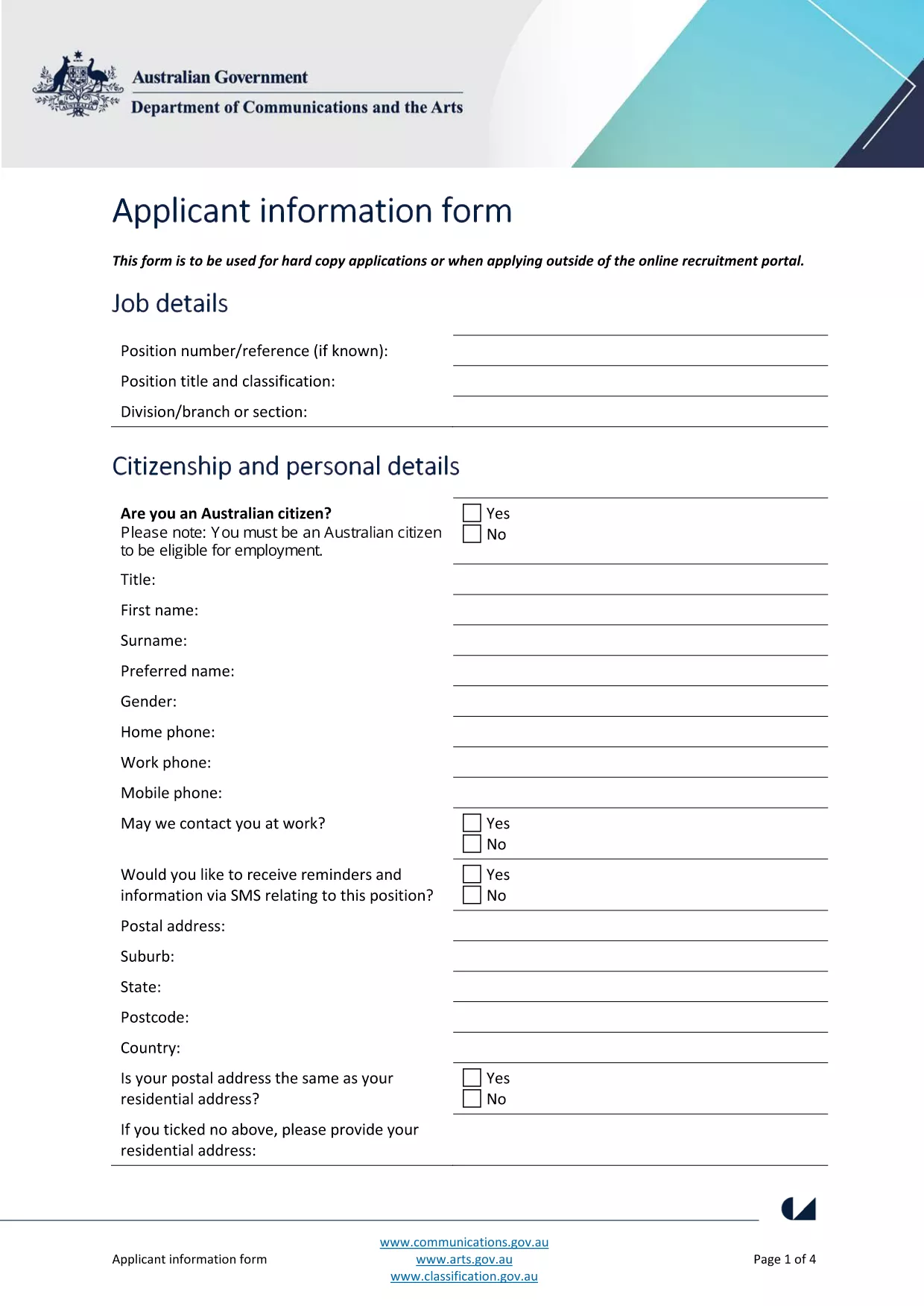
The Australian Public Service (APS) uses a standard Application Form for most entry‑level and graduate roles. This fillable PDF lets you enter your personal details, work experience, and qualifications directly on the page, then submit the completed file to the hiring agency.

What Is the APS Application Form?

The form is a government‑issued document that collects the information required to assess your suitability for APS positions. It includes sections for:

  • Personal details (name, contact, residency)
  • Education and qualifications
  • Employment history and achievements
  • Skills, competencies and security declarations

How to Complete the Form with Formize

Instead of downloading the PDF and opening a separate editor, simply click the "Fill out this form" button on this page. The Formize PDF Filler app loads in your browser, letting you:

  1. Enter data in each field with keyboard or drop‑down menus.
  2. Save a copy to your computer at any time.
  3. Validate required fields before submitting.

When you’re done, click **Submit** to download the completed PDF or email it directly to the recruiting agency.

Common Mistakes & Tips for a Perfect Submission

  • Missing required fields: The Formize filler highlights empty mandatory sections in red.
  • Incorrect date formats: Use DD/MM/YYYY as shown in the example fields.
  • Spelling errors: Run the built‑in spell‑check before saving.
  • Oversized files: Keep attachments (e.g., resumes) under 2 MB to avoid upload errors.

Where to Send Your Completed Application

After saving the filled PDF, follow the specific job posting instructions. Most APS vacancies request the file as an attachment in the online recruitment portal, or via a designated government email address.

Need more guidance? Review the official applicant information guide for detailed eligibility criteria.

שאלות נפוצות
  • Do I need Adobe Acrobat to fill the APS form?

    No. Formize’s online PDF filler works in any modern browser, so you don’t need Acrobat or any extra software.

  • Can I edit the form after I’ve saved it?

    Yes. Open the saved PDF again with Formize, make changes, and re‑save. All data remains editable.

  • Is my personal data safe when I use Formize?

    Formize processes the PDF locally in your browser; no data is stored on external servers, ensuring privacy and security.

  • What if the PDF won’t load?

    Refresh the page and click the "Fill out this form" button again. If the problem persists, clear your browser cache or try a different browser.

  • Can I print a hard‑copy after filling the form?

    Absolutely. After saving, open the PDF in any viewer and print it like any standard document.

  • Do I need to sign the PDF digitally?

    The APS form accepts a scanned signature or a typed name in the signature field. Upload a scanned signature if required.

איך ל

כיצד למלא את APS application form בחינם, באינטרנט ב-4 שלבים פשוטים:

  1. 1
    Open the Fillable Form
    Click the "Fill out this form" button on the page. The Formize PDF Filler loads instantly in your browser.
  2. 2
    Enter Your Information
    Type directly into each highlighted field. Use drop‑down menus for dates, states, and yes/no answers.
  3. 3
    Validate and Save
    The filler checks required fields automatically. When all sections are green, click "Save" to download the completed PDF.
  4. 4
    Submit Your Application
    Attach the saved PDF to the APS vacancy posting or email it to the address listed in the job advert.
Formize אפליקציית מילוי PDF
על אודות

תבנית APS application form

עם סט התכונות המסורתי לצפייה ומילוי של מסמך PDF, בשילוב עם היתרונות של אפליקציית אינטרנט ופריסה רספונסיבית, תוכל להשלים את APS application form בתוך דקות.

תכונות

מילוי PDF

הדרך הקלה ביותר למלא טפסי PDF באינטרנט

  • מלא במהירות את APS application form
    מחפש דרך למלא במהירות את APS application form באינטרנט? עם מילוי טופס ה-PDF המקוון שלנו בחינם, תדע כיצד לערוך ולמלא את מסמך ה-PDF הזה תוך פחות מדקה.
  • עורך PDF מקוון קל לשימוש
    נמאס לך להדפיס קבצי PDF כדי שתוכל לערוך אותם, לפני סריקה מחדש ושליחה חזרה? ערוך מסמכי PDF בחינם באינטרנט. השתמש בעורך ה-PDF המקוון שלנו כדי לחסוך בזמן ובנייר.
  • כלים מעולים, כל הפלטפורמות
    תוהה כיצד למלא את APS application form ב-Mac, או אולי איך להשתמש בחומר מילוי PDF בחינם? כלי ה-PDF המקוונים שלנו פועלים בכל הפלטפורמות.
  • אחסון קבצים מאובטח
    קבצי "APS application form" שהושלמו מאוחסנים במסד נתונים מאובטח המנוהל על ידי אירוח Amazon Cloud. אתה יכול למחוק את הקבצים שלך מהמערכת שלנו בכל עת. בכל מקרה, קבצים אלו נמחקים אוטומטית לאחר 24 שעות.
  • צ'אט עם APS application form
    צ'אט עם "APS application form" ב-Chatize שהוא עוזר לקורא PDF בחינם. שאל שאלות וקבל תשובות מ-"APS application form". פשוט לחץ על הלחצן צ'אט עם מסמך למעלה.

מחק הפעלת מילוי

למחוק את הפעלת המילוי שנבחרה? במקרה זה, ההתקדמות שלך במילוי הטופס תאבד.

מחק סשן עריכה

למחוק את סשן העריכה שנבחר? במקרה זה, ההתקדמות שלך ביצירה ועריכה של הטופס תאבד.