
בחר שפה

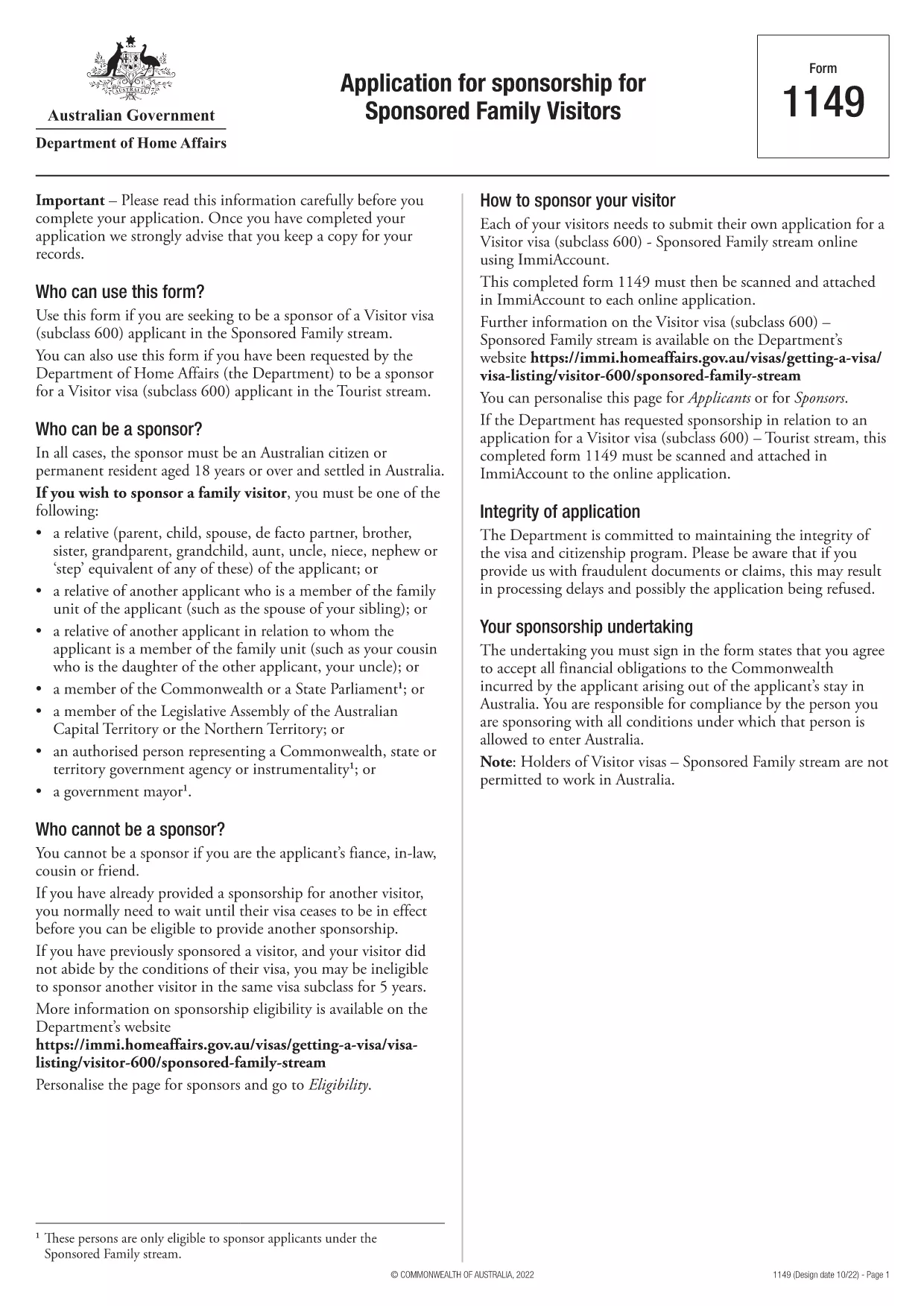
Form 1149 – Application for Sponsorship of a Family Visitor (Visitor Visa 600)

  1. מדינה אוֹסטְרַלִיָה
  2. שפה אנגלית
  3. פעילות הצטרפו או הביאו משפחה
Form 1149 – Application for Sponsorship of a Family Visitor (Visitor Visa 600)

Form 1149 is the official Application for Sponsorship for Sponsored Family Visitors used by Australian citizens or permanent residents who wish to sponsor a relative, a member of the Commonwealth, or a state parliamentarian for a Visitor visa (subclass 600). The form outlines the sponsor’s obligations, eligibility criteria, and any security bond requirements.

Traditionally the form is a static PDF that must be printed, handwritten, and mailed. With Formize you can complete the same form entirely online – just click Fill out this form and let our secure PDF filler do the work.

What Is Form 1149?

Form 1149 collects detailed information about the sponsor (name, address, citizenship status), the invited visitor (relationship, passport details, travel dates), and the financial support the sponsor will provide. It also asks about any previous sponsorships and the sponsor’s ability to meet the visa conditions.

Who Needs to Complete This Form?

  • Australian citizens or permanent residents sponsoring a family member for a Visitor visa (subclass 600).
  • Members of the Commonwealth or state parliament who are inviting a guest for official duties.
  • Anyone required to provide a security bond for the visitor’s stay.

How to Fill Form 1149 Online with Formize

Follow these simple steps to complete the form without printing:

  1. Click the Fill out this form button on this page.
  2. Wait a few seconds while the Formize PDF Filler loads the fillable version of Form 1149.
  3. Enter all required details in the highlighted fields. The filler validates dates, passport numbers, and numeric entries in real‑time.
  4. Review the summary page, correct any highlighted errors, and click Submit to download the completed PDF.
  5. Print the signed PDF (if a physical signature is required) and attach it to your visa application package.

Common Mistakes to Avoid

  • Incorrect passport numbers: Double‑check each digit; a single typo can delay processing.
  • Missing sponsor’s financial details: Provide clear evidence of income or savings to satisfy the bond requirement.
  • Leaving optional fields blank: If a field asks for “previous sponsorships”, answer “None” rather than leaving it empty.
  • Using an outdated version: Always use the latest PDF – the link on this page points to the current 2024 version.

Where to Submit the Completed Form

After filling and printing the form, include it with the Visitor visa (subclass 600) application packet and submit to the Department of Home Affairs either online via ImmiAccount or by post to the address indicated in the visa instructions.

Using Formize’s online filler saves time, reduces errors, and ensures you are working with the most up‑to‑date version of Form 1149.

שאלות נפוצות
  • Who can act as a sponsor on Form 1149?

    Only Australian citizens or permanent residents may sponsor a family visitor for a subclass 600 visa. Commonwealth or state parliament members may also sponsor for official visits.

  • Do I need to provide a security bond?

    A bond is required if the sponsor cannot demonstrate sufficient financial capacity. The amount is determined by the Department of Home Affairs based on the visitor’s length of stay and circumstances.

  • Can I submit the form electronically?

    Yes. Fill the form online with Formize, download the completed PDF, and attach it to your ImmiAccount submission. Some cases may still require a printed, signed copy.

  • How long is Form 1149 valid?

    The form does not have an expiry date, but you should use the latest version available on the Department of Home Affairs website.

  • What common errors cause delays?

    Incorrect passport numbers, missing financial information, and leaving optional fields blank are the most frequent reasons for processing delays.

  • Is there a fee to use Formize’s PDF filler?

    Formize offers a free basic filler for most government forms, including Form 1149. Premium features are optional and not required for this form.

  • Do I need to sign the PDF digitally?

    A digital signature is accepted for most online submissions. If you submit a paper application, print the PDF and sign it with a pen.

איך ל

כיצד למלא את Form 1149 בחינם, באינטרנט ב-5 שלבים פשוטים:

  1. 1
    Open the Fillable Form
    Click the "Fill out this form" button on this page. The Formize PDF Filler will open in a new tab.
  2. 2
    Enter Your Details
    Fill each highlighted field with accurate information. The tool validates entries in real time.
  3. 3
    Review and Correct Errors
    Check the summary page for any highlighted errors, correct them, and confirm the data.
  4. 4
    Download the Completed PDF
    Click "Submit" to download the fully completed PDF. Print and sign if a physical signature is required.
  5. 5
    Attach to Your Visa Application
    Include the signed PDF with your Visitor visa (subclass 600) application and submit to the Department of Home Affairs.
Formize אפליקציית מילוי PDF
על אודות

הצטרפו או הביאו טפסי משפחה

Form 1149 הוא אחד מטפסי הבקשה שאנשים משתמשים בהם כדי לתת חסות ולהקל על הגירה או איחוד מחדש של בני משפחתם במדינה אחרת. טפסים אלה קשורים לעתים קרובות לתוכניות הגירה מבוססות-משפחה או למדיניות המאפשרות לאנשים שכבר מתגוררים במדינה מסוימת להביא את בני משפחתם הקרובים להצטרף אליהם. הטפסים הספציפיים עשויים להשתנות בהתאם למדינה ולמערכת ההגירה שלה, אבל הנה כמה דוגמאות נפוצות:

טופס בקשה לחסות משפחה: זהו הטופס העיקרי המשמש אנשים המעוניינים לתת חסות לבני משפחתם להגירה. היא אוספת מידע על נותן החסות (האדם שכבר מתגורר בארץ) ועל בני המשפחה הנתמכים, לרבות מערכת היחסים שלהם, פרטים אישיים ותיעוד תומך.

טופס בקשה לויזה תלויה: במערכות הגירה מסוימות, אנשים שכבר מתגוררים במדינה יכולים להגיש בקשה לקבלת אשרות תלויות כדי להביא את בני משפחתם הקרובים, כגון בני זוג, ילדים או הורים. טופס הבקשה לויזה תלויה אוסף מידע על נותן החסות, בני המשפחה התלויים, מערכת היחסים ביניהם ותיעוד תומך.

תצהיר תמיכה: במדינות מסוימות, נותני החסות עשויים להידרש להגיש תצהיר תמיכה, שהוא מסמך משפטי המאשר את אחריותם הכלכלית לבני המשפחה הממומנים. מסמך זה כולל לרוב פרטים על הכנסתו של נותן החסות, נכסיו ויכולתו לפרנס את בני המשפחה כלכלית.

טפסי בדיקה רפואית: בני משפחה המקבלים חסות להגירה עשויים להידרש לעבור בדיקה רפואית כדי לוודא שהם עומדים בדרישות הבריאות של מדינת היעד. טפסי בדיקה רפואית אוספים את המידע הבריאותי הדרוש ותוצאות הבדיקות.

טופסי תיעוד זוגיות: על מנת להוכיח את הקשר המשפחתי בין נותן החסות לבני המשפחה הנתמכים, ייתכן שיידרשו מסמכים שונים. אלה יכולים לכלול תעודות לידה, תעודות נישואין, מסמכי אימוץ או ראיות תומכות אחרות לקשר המשפחתי.

חשוב לציין שהטפסים והדרישות הספציפיות עשויות להשתנות באופן משמעותי בהתאם למדינה ולחוקי ההגירה ולמדיניות שלה. רצוי להתייעץ באתר הרשמי של רשות ההגירה או לפנות לייעוץ משפטי לקבלת מידע מדויק ועדכני לגבי הטפסים והתהליכים הדרושים למתן חסות או הבאת בני משפחה למדינה מסוימת.

תכונות

מילוי PDF

הדרך הקלה ביותר למלא טפסי PDF באינטרנט

  • מלא במהירות את Form 1149
    מחפש דרך למלא במהירות את Form 1149 באינטרנט? עם מילוי טופס ה-PDF המקוון שלנו בחינם, תדע כיצד לערוך ולמלא את מסמך ה-PDF הזה תוך פחות מדקה.
  • עורך PDF מקוון קל לשימוש
    נמאס לך להדפיס קבצי PDF כדי שתוכל לערוך אותם, לפני סריקה מחדש ושליחה חזרה? ערוך מסמכי PDF בחינם באינטרנט. השתמש בעורך ה-PDF המקוון שלנו כדי לחסוך בזמן ובנייר.
  • כלים מעולים, כל הפלטפורמות
    תוהה כיצד למלא את Form 1149 ב-Mac, או אולי איך להשתמש בחומר מילוי PDF בחינם? כלי ה-PDF המקוונים שלנו פועלים בכל הפלטפורמות.
  • אחסון קבצים מאובטח
    קבצי "Form 1149" שהושלמו מאוחסנים במסד נתונים מאובטח המנוהל על ידי אירוח Amazon Cloud. אתה יכול למחוק את הקבצים שלך מהמערכת שלנו בכל עת. בכל מקרה, קבצים אלו נמחקים אוטומטית לאחר 24 שעות.
  • צ'אט עם Form 1149
    צ'אט עם "Form 1149" ב-Chatize שהוא עוזר לקורא PDF בחינם. שאל שאלות וקבל תשובות מ-"Form 1149". פשוט לחץ על הלחצן צ'אט עם מסמך למעלה.

מחק הפעלת מילוי

למחוק את הפעלת המילוי שנבחרה? במקרה זה, ההתקדמות שלך במילוי הטופס תאבד.

מחק סשן עריכה

למחוק את סשן העריכה שנבחר? במקרה זה, ההתקדמות שלך ביצירה ועריכה של הטופס תאבד.