בחר שפה

Application Form No. 4 – Fillable PDF

  1. שפה אנגלית
  2. מדינה אוֹסטְרַלִיָה
  3. מַחלָקָה Queensland Building and Construction Commission
  4. פעילות Notifiable Work
Application Form No. 4 – Fillable PDF

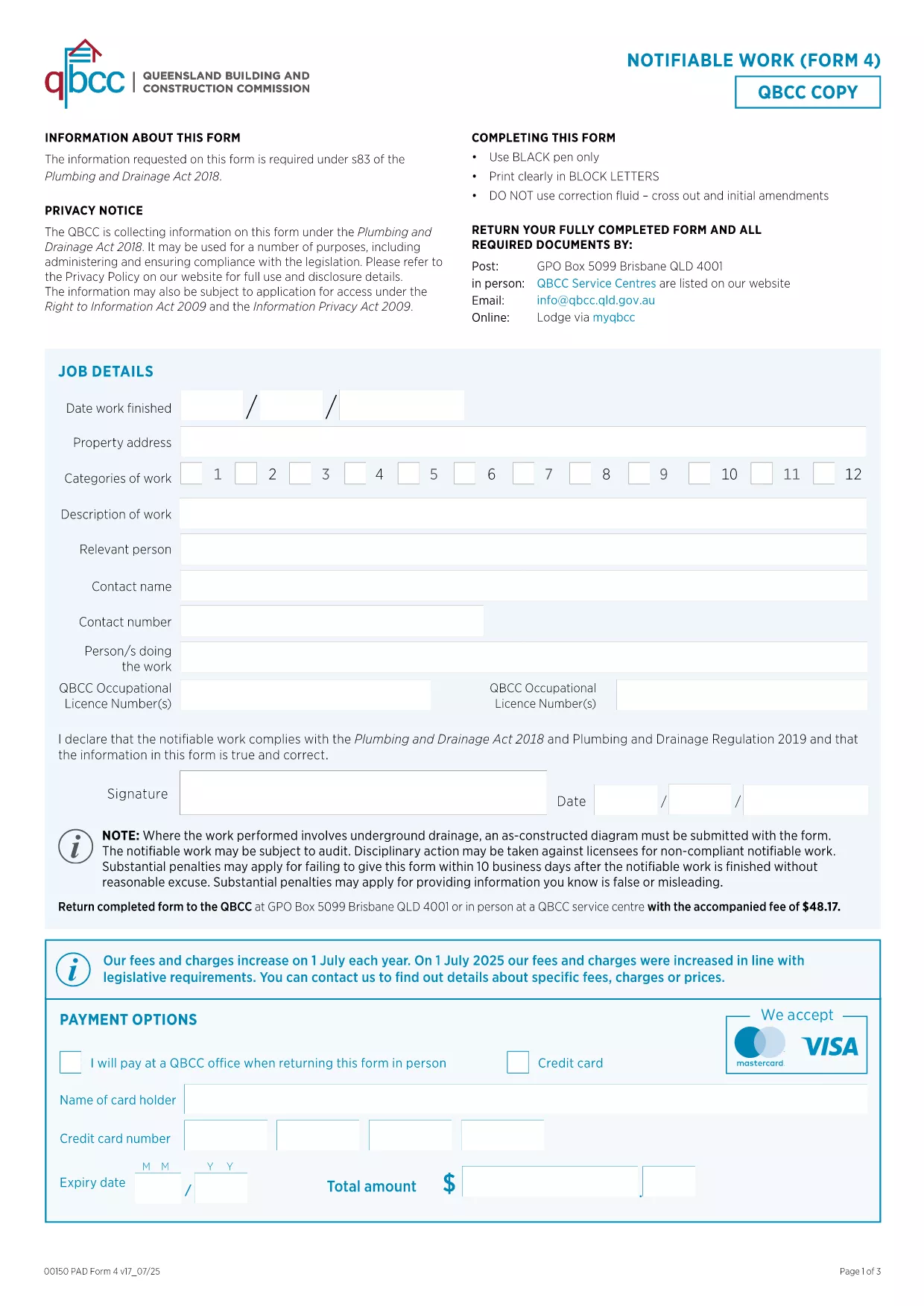
Form 4 is the standard application form no. 4 used for notifiable work in Queensland. Whether you are a contractor, builder, or property owner, this form lets you register work that must be reported to the Queensland Building and Construction Commission (QBCC).

What Is Form 4 and When Is It Used?

The QBCC requires a Form 4 for any construction activity that meets the notifiable work criteria – for example, structural alterations, demolition, or work exceeding a certain monetary threshold. Submitting the form on time helps you avoid penalties and keeps your project compliant.

How to Complete the Form Online

With Formize you can fill out the PDF directly in your browser. No Adobe Acrobat or other editor is required:

  1. Click the blue “Fill out this form” button on this page.
  2. Wait a few seconds while the Formize PDF Filler loads.
  3. Enter the required details – project name, address, contractor information, and the type of work.
  4. Save your progress at any time or submit the completed form in one click.

Common Mistakes to Avoid

  • Leaving fields blank: Every required field is marked with an asterisk. Incomplete forms are rejected.
  • Incorrect dates: Use the format DD/MM/YYYY as shown in the example.
  • Mismatched contractor details: Ensure the name and licence number match the QBCC records.

Where to Submit the Completed Form

After you finish, click the “Submit” button in the Formize interface. The system will automatically email the filled PDF to the QBCC portal and provide you with a receipt reference number.

Frequently Asked Questions

Below are quick answers to the most common queries about Form 4.

שאלות נפוצות
  • Do I need Adobe Acrobat to fill Form 4?

    No. Formize’s online filler works in any modern browser, so you can complete the form without installing additional software.

  • Can I save the form and finish it later?

    Yes. The filler automatically saves your progress. When you return, simply reopen the link and continue where you left off.

  • What happens if I submit the form with missing information?

    The QBCC will reject the submission and email you a notice of the missing fields. You can correct and resubmit through Formize.

  • Is there a fee to use the Formize filler?

    Formize offers free filling for public government forms like Form 4. No hidden charges apply.

  • How do I know my submission was received?

    After you click “Submit,” you’ll receive an on‑screen confirmation and an email receipt with a reference number.

איך ל

כיצד למלא את application form 4 בחינם, באינטרנט ב-4 שלבים פשוטים:

  1. 1
    Open the Fillable Form
    Click the bright “Fill out this form” button on the page. The Formize PDF Filler will open in a new tab.
  2. 2
    Enter Your Information
    Type the required details into each field. The form auto‑saves as you go.
  3. 3
    Validate and Submit
    Review the highlighted required fields, then press “Submit” to send the completed PDF directly to the QBCC.
  4. 4
    Download a Copy
    After submission, download a PDF copy for your records and note the receipt number provided.
Formize אפליקציית מילוי PDF
על אודות

תבנית application form 4

עם סט התכונות המסורתי לצפייה ומילוי של מסמך PDF, בשילוב עם היתרונות של אפליקציית אינטרנט ופריסה רספונסיבית, תוכל להשלים את application form 4 בתוך דקות.

תכונות

מילוי PDF

הדרך הקלה ביותר למלא טפסי PDF באינטרנט

  • מלא במהירות את application form 4
    מחפש דרך למלא במהירות את application form 4 באינטרנט? עם מילוי טופס ה-PDF המקוון שלנו בחינם, תדע כיצד לערוך ולמלא את מסמך ה-PDF הזה תוך פחות מדקה.
  • עורך PDF מקוון קל לשימוש
    נמאס לך להדפיס קבצי PDF כדי שתוכל לערוך אותם, לפני סריקה מחדש ושליחה חזרה? ערוך מסמכי PDF בחינם באינטרנט. השתמש בעורך ה-PDF המקוון שלנו כדי לחסוך בזמן ובנייר.
  • כלים מעולים, כל הפלטפורמות
    תוהה כיצד למלא את application form 4 ב-Mac, או אולי איך להשתמש בחומר מילוי PDF בחינם? כלי ה-PDF המקוונים שלנו פועלים בכל הפלטפורמות.
  • אחסון קבצים מאובטח
    קבצי "application form 4" שהושלמו מאוחסנים במסד נתונים מאובטח המנוהל על ידי אירוח Amazon Cloud. אתה יכול למחוק את הקבצים שלך מהמערכת שלנו בכל עת. בכל מקרה, קבצים אלו נמחקים אוטומטית לאחר 24 שעות.
  • צ'אט עם application form 4
    צ'אט עם "application form 4" ב-Chatize שהוא עוזר לקורא PDF בחינם. שאל שאלות וקבל תשובות מ-"application form 4". פשוט לחץ על הלחצן צ'אט עם מסמך למעלה.

מחק הפעלת מילוי

למחוק את הפעלת המילוי שנבחרה? במקרה זה, ההתקדמות שלך במילוי הטופס תאבד.

מחק סשן עריכה

למחוק את סשן העריכה שנבחר? במקרה זה, ההתקדמות שלך ביצירה ועריכה של הטופס תאבד.