
בחר שפה

Form 866C – Application for a Protection Visa (Fillable PDF)

  1. שפה אנגלית
  2. מדינה אוֹסטְרַלִיָה
  3. פעילות פליט והומניטרי
Form 866C – Application for a Protection Visa (Fillable PDF)

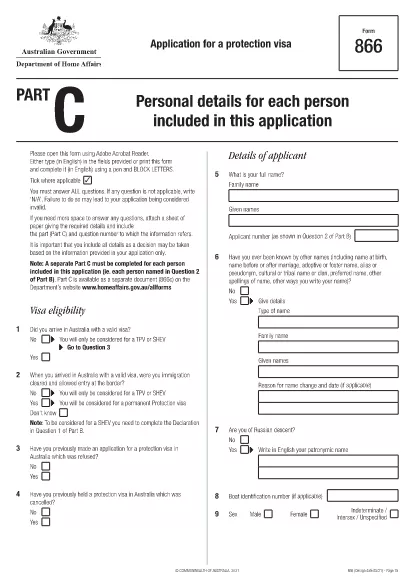
Form 866C is the Australian Application for a Protection Visa. It is required when you are seeking protection under the Australian Migration Act. The form must be completed in English, using block letters, and signed where indicated.

At Formize.com you can open the official Form 866C PDF directly in our secure PDF Filler – no extra software needed. The fillable version lets you type, upload a passport‑size photograph, and sign digitally.

What is Form 866C?

Form 866C gathers personal details, travel history, family connections, education, employment, and any criminal matters relevant to your protection claim. It is part of the broader protection visa (subclass 866) application package.

How to Complete Form 866C Online

Simply click the “Fill out this form” button on this page. The Formize PDF Filler app loads, presenting each field in a clear, editable format. Follow the on‑screen prompts, upload your photograph, and sign with your mouse or finger.

Common Mistakes to Avoid

  • Leaving any mandatory field blank.
  • Using cursive or non‑block letters.
  • Submitting an outdated or blurred photograph.
  • Providing inconsistent dates or travel details.
  • Forgetting to sign the declaration at the end.

Where to Submit Your Completed Form

After saving the filled PDF, print a hard copy and attach it to your complete protection‑visa application package. Submit the package to the Department of Home Affairs – either by post to the address on the Department’s website or via an authorised migration agent.

Download the Official PDF

The official, up‑to‑date Form 866C can be downloaded directly from the Australian Department of Home Affairs:

https://immi.homeaffairs.gov.au/form-listing/forms/866c.pdf

Use Formize’s online filler to avoid the hassle of printing, scanning, or re‑typing. Your completed form is ready for submission in minutes.

שאלות נפוצות
  • Is Form 866C available as a fillable PDF?

    Yes. The official form is a PDF that can be opened in Formize’s online filler, allowing you to type, upload a photo, and sign digitally.

  • Can I submit the PDF electronically?

    The Department of Home Affairs requires a printed, signed copy as part of the protection visa package. Use the online filler to create a clean, printable version.

  • What language must I use on Form 866C?

    All entries must be in English, written in block (capital) letters.

  • Do I need a passport‑size photograph?

    Yes. Attach a recent passport‑size photo in the designated area and certify it according to the form’s instructions.

  • How long does it take to fill out Form 866C?

    Using the fillable PDF typically takes 20‑30 minutes, depending on how much information you have prepared.

  • Where should I send the completed form?

    Include the printed Form 866C with the rest of your protection visa application and send it to the Department of Home Affairs address listed on their website.

  • Can I correct mistakes after saving?

    Yes. Open the saved PDF again in Formize, edit the necessary fields, and re‑save before printing.

  • Is there a fee to download Form 866C?

    No. The form is provided free of charge by the Australian Department of Home Affairs.

איך ל

כיצד למלא את Form 866C בחינם, באינטרנט ב-5 שלבים פשוטים:

  1. 1
    Click the Fill button
    Press the “Fill out this form” button on the page. The Formize PDF Filler loads the official Form 866C.
  2. 2
    Enter your information
    Type your personal details, travel history, and other required data directly into the fillable fields. Use block letters.
  3. 3
    Upload your photograph
    Click the photo placeholder and upload a recent passport‑size image that meets the Department’s specifications.
  4. 4
    Sign digitally
    Use your mouse, trackpad, or finger to add a digital signature in the designated area.
  5. 5
    Save and download
    When all fields are completed, click “Save”. Download the filled PDF, print a hard copy, and include it with your visa application.
Formize אפליקציית מילוי PDF
על אודות

צורות פליטים והומניטריות

Form 866C הוא אחד מטפסי הבקשה המשמשים בתהליך של חיפוש מעמד פליט או הגנה הומניטרית. טפסים אלו מנוצלים על ידי אנשים הנמלטים מרדיפות, מעימות או מנסיבות אחרות מסכנות חיים ומחפשים הגנה וסיוע בינלאומיים. הצורות והתהליכים הספציפיים יכולים להשתנות בהתאם למדינה ולמדיניות ההגירה שלה, כמו גם לאמנות והסכמים בינלאומיים המסדירים הגנה על פליטים והומניטריים. להלן כמה דוגמאות לטפסים של "פליטים והומניטריים":

טופס בקשה לפליטים: זהו הטופס העיקרי המשמש אנשים המבקשים מעמד של פליט. הוא אוסף מידע אישי, פרטים על הנסיבות והסיבות של האדם לבקשת הגנה, וכל תיעוד או ראיה תומכים.

טופס בקשת מקלט: במדינות שבהן המונח "מקלט" משמש להתייחסות להגנה המשפטית הניתנת לאנשים שנמלטים מרדיפות, מלא טופס בקשת מקלט. הוא כולל מידע על זהותו של המבקש, הרקע והסיבות לבקשת מקלט, וכן כל מסמכים תומכים רלוונטיים.

טופס בקשה ליישוב מחדש: חלק מהאנשים, במיוחד אלו החיים במחנות פליטים או במצבים מעורפלים, עשויים להגיש בקשה ליישוב מחדש למדינה שלישית. טפסי בקשה ליישוב מחדש אוספים מידע על הפרטים האישיים והמשפחתיים של המבקש, הרקע והסיבות לבקשת יישוב מחדש.

טפסי איחוד משפחות: עבור אנשים שקיבלו מעמד של פליט או הומניטרי במדינה מסוימת, עשויים להיות טפסים ותהליכים להגשת בקשה לבני משפחה להצטרף אליהם. טפסים אלה דורשים בדרך כלל מידע על נותן החסות (האדם שכבר קיבל הגנה) ועל בני המשפחה הנתמכים, וכן תיעוד תומך לביסוס הקשר המשפחתי.

טופס בקשה למסמכי נסיעה: פליטים או יחידים בעלי הגנה הומניטארית שצריכים לנסוע לחו"ל עשויים להידרש להגיש בקשה למסמך נסיעה. טופס הבקשה אוסף מידע אישי ופרטים על תוכניות הנסיעה.

טופס בקשה להגנה זמנית: במצבים מסוימים, מדינות עשויות להציע הגנה זמנית לאנשים שאינם עומדים בקריטריונים למעמד פליט אך אינם מסוגלים לחזור לארץ מולדתם עקב סכסוך או נסיבות חריגות אחרות. טפסי בקשה להגנה זמנית אוספים מידע על מצבו של המבקש וסיבות לבקשת הגנה זמנית.

חשוב לציין שהטפסים והתהליכים הספציפיים להגנה על פליטים והומניטריים יכולים להשתנות באופן משמעותי בהתאם למדינה ולמדיניות ההגירה שלה, כמו גם להסכמים ואמנות בינלאומיות. מומלץ להיוועץ ברשויות הממשלתיות הרלוונטיות, ארגונים לתמיכה בפליטים או אנשי מקצוע משפטיים לקבלת מידע מדויק ועדכני לגבי הטפסים והתהליכים הדרושים לבקשת הגנה לפליטים או הומניטריים במדינה מסוימת.

תכונות

מילוי PDF

הדרך הקלה ביותר למלא טפסי PDF באינטרנט

  • מלא במהירות את Form 866C
    מחפש דרך למלא במהירות את Form 866C באינטרנט? עם מילוי טופס ה-PDF המקוון שלנו בחינם, תדע כיצד לערוך ולמלא את מסמך ה-PDF הזה תוך פחות מדקה.
  • עורך PDF מקוון קל לשימוש
    נמאס לך להדפיס קבצי PDF כדי שתוכל לערוך אותם, לפני סריקה מחדש ושליחה חזרה? ערוך מסמכי PDF בחינם באינטרנט. השתמש בעורך ה-PDF המקוון שלנו כדי לחסוך בזמן ובנייר.
  • כלים מעולים, כל הפלטפורמות
    תוהה כיצד למלא את Form 866C ב-Mac, או אולי איך להשתמש בחומר מילוי PDF בחינם? כלי ה-PDF המקוונים שלנו פועלים בכל הפלטפורמות.
  • אחסון קבצים מאובטח
    קבצי "Form 866C" שהושלמו מאוחסנים במסד נתונים מאובטח המנוהל על ידי אירוח Amazon Cloud. אתה יכול למחוק את הקבצים שלך מהמערכת שלנו בכל עת. בכל מקרה, קבצים אלו נמחקים אוטומטית לאחר 24 שעות.
  • צ'אט עם Form 866C
    צ'אט עם "Form 866C" ב-Chatize שהוא עוזר לקורא PDF בחינם. שאל שאלות וקבל תשובות מ-"Form 866C". פשוט לחץ על הלחצן צ'אט עם מסמך למעלה.

מחק הפעלת מילוי

למחוק את הפעלת המילוי שנבחרה? במקרה זה, ההתקדמות שלך במילוי הטופס תאבד.

מחק סשן עריכה

למחוק את סשן העריכה שנבחר? במקרה זה, ההתקדמות שלך ביצירה ועריכה של הטופס תאבד.