
בחר שפה

Form 157N – Student Guardian Arrangement (Fillable PDF)

  1. שפה אנגלית
  2. מדינה אוֹסטְרַלִיָה
  3. פעילות לימוד
Form 157N – Student Guardian Arrangement (Fillable PDF)

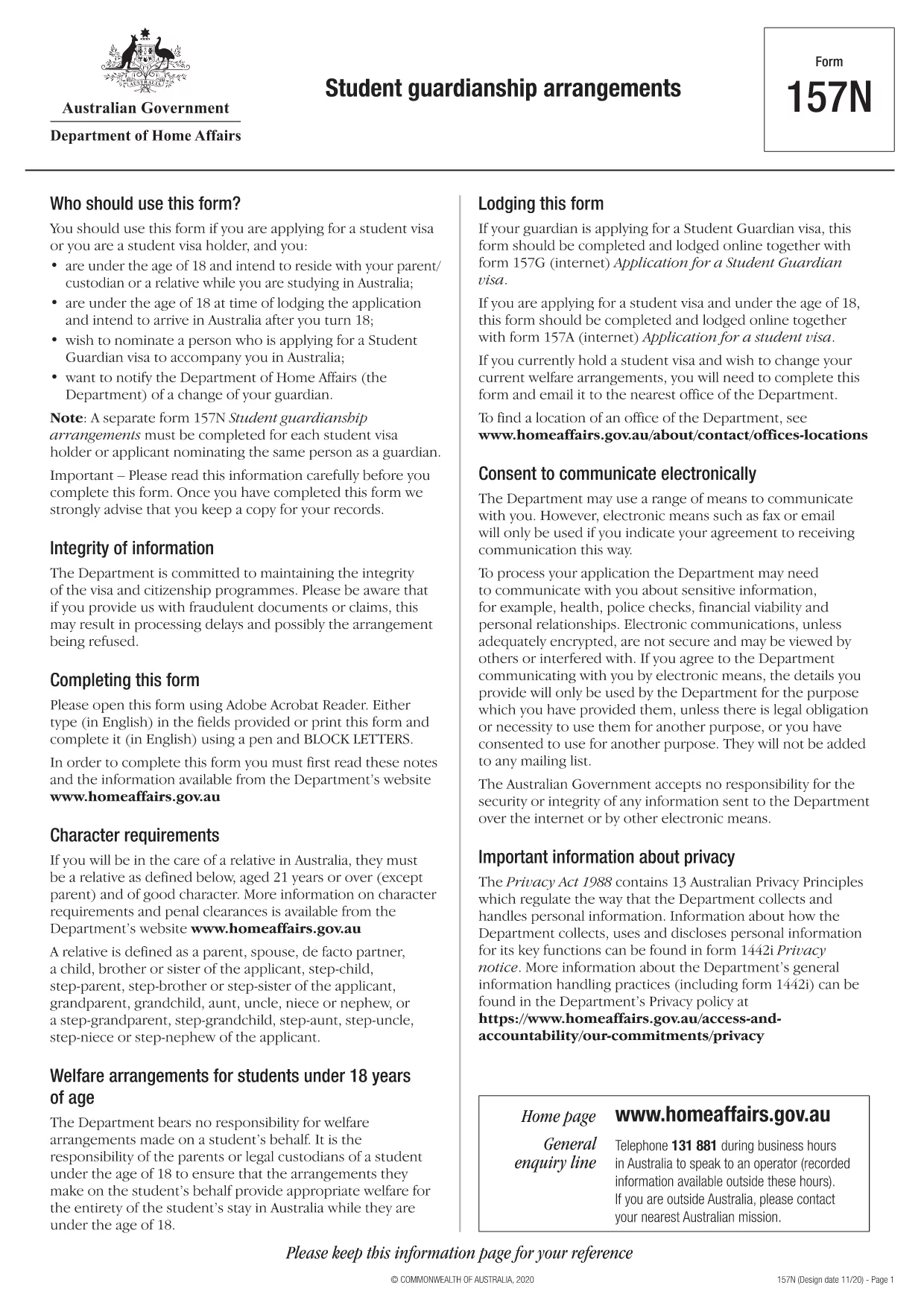
Form 157N is the official Australian document used to nominate a guardian for a student visa holder. Whether you are a parent, legal guardian, or an approved welfare provider, this form must be completed for every student who requires a guardian while studying in Australia.

What is Form 157N?

The Student Guardianship Arrangements – Form 157N captures details about the student, the proposed guardian, and the nature of the guardianship agreement. It is required by the Department of Home Affairs for visa subclasses 500, 590, and related student visas.

When and Who Must Complete Form 157N

  • Any new student visa applicant who needs a guardian in Australia.
  • Current visa holders who change their guardian or wish to add a second guardian.
  • Educational institutions acting on behalf of a student to nominate a welfare provider.

How to Fill Out Form 157N with Formize

Instead of downloading the PDF and editing it manually, use our Formize PDF Filler – a fast, secure, and fully fillable online solution.

Common Mistakes to Avoid

  • Leaving any mandatory field blank (marked with an asterisk *).
  • Submitting an outdated passport number for the guardian.
  • Providing an Australian address that does not belong to the guardian.
  • Failing to sign and date the form in the correct places.

Where to Submit the Completed Form

After you have filled the form online, download the completed PDF and attach it to your visa application through ImmiAccount, or email it to your education provider if they handle the submission.

Need help? Review our step‑by‑step guide below or check the FAQs for quick answers.

שאלות נפוצות
  • Do I need to fill out a separate Form 157N for each student?

    Yes. Every student visa holder who nominates a guardian must have an individual Form 157N, even if the same guardian is named for multiple students.

  • Can I use the same PDF for a change of guardian?

    For a change of guardian you must complete a new Form 157N (sometimes referenced as Form 157N‑N). Submit the new form together with supporting evidence of the change.

  • Is an electronic signature accepted?

    The Department of Home Affairs accepts electronic signatures made within an approved PDF filler such as Formize. Ensure the signature field is marked as signed before downloading.

  • What happens if I forget to sign the form?

    An unsigned Form 157N will be rejected, causing delays in visa processing. The Formize validator will alert you to any missing signatures.

  • Do I need to provide proof of the guardian’s relationship to the student?

    Yes. Attach supporting documents (e.g., birth certificate, adoption papers, or legal guardianship order) alongside the completed Form 157N.

  • Can I save my progress and finish later?

    Formize allows you to save a draft locally. Click **Save Draft** before closing the browser, then reopen the saved file to continue.

  • Is there a fee to use Formize’s PDF filler?

    No. Formize provides free online filling for government forms like Form 157N. There are no hidden charges.

  • What if I submit the wrong guardian’s details?

    You must submit a corrected Form 157N as soon as the error is discovered. The Department will treat the new submission as the official record.

איך ל

כיצד למלא את Form 157N בחינם, באינטרנט ב-5 שלבים פשוטים:

  1. 1
    Open the Fillable Form
    Click the **Fill out this form** button on this page. The Formize PDF Filler app will load the Form 157N directly in your browser.
  2. 2
    Enter Your Details
    Complete each field—student information, guardian details, and signatures—using your keyboard. All fields are interactive and save automatically.
  3. 3
    Review and Validate
    Use the built‑in validation to check for missing or incorrectly formatted data. Correct any highlighted errors before proceeding.
  4. 4
    Download the Completed PDF
    When you’re satisfied, click **Download PDF**. The file will be saved with all your entries intact, ready for upload to ImmiAccount.
  5. 5
    Submit with Your Visa Application
    Attach the downloaded PDF to your student visa application or provide it to your education provider as instructed.
Formize אפליקציית מילוי PDF
על אודות

טפסי לימוד

Form 157N הוא אחד מהמסמכים המשמשים בהקשר של לימודים חינוכיים או אקדמיים. טפסים אלה משמשים בדרך כלל על ידי סטודנטים, מוסדות חינוך או ארגוני מחקר כדי לאסוף ולנהל מידע הקשור למחקרים, פרויקטים מחקריים או תהליכים אקדמיים. הטפסים הספציפיים שבהם נעשה שימוש עשויים להשתנות בהתאם לאופי המחקר או המחקר הנערך. להלן כמה דוגמאות לטפסי לימוד:

טופסי בקשה: טפסים אלו משמשים את הסטודנטים בעת הגשת בקשה להתקבל למוסדות חינוך או לתוכניות לימוד ספציפיות. הם אוספים מידע אישי, רקע אקדמי ופרטים נוספים הנדרשים לתהליך הקבלה.

טפסי רישום לקורסים: סטודנטים צריכים לרוב למלא טפסי רישום לקורסים כדי להירשם לקורסים או נושאים ספציפיים. טפסים אלה מאפשרים לסטודנטים לבחור את הקורסים המועדפים עליהם לסמסטר הקרוב או לשנת הלימודים האקדמית.

טופסי הצעת מחקר: בעת ייזום פרויקט מחקר, ייתכן שהחוקרים יידרשו להגיש טופס הצעת מחקר. טופס זה מתאר את המטרות, המתודולוגיה, ציר הזמן והמשאבים הנדרשים למחקר המוצע.

טפסי הסכמה מדעת: במחקר הכולל נבדקים אנושיים, נעשה שימוש בטפסי הסכמה מדעת על מנת להבטיח שהמשתתפים מקבלים מידע מלא לגבי המטרה, הסיכונים, היתרונות והנהלים של המחקר. המשתתפים מספקים את הסכמתם על ידי חתימה על טפסים אלה לפני ההשתתפות במחקר.

טפסי סקר או שאלון: חוקרים משתמשים לעתים קרובות בטפסי סקר או שאלון כדי לאסוף נתונים ממשתתפי המחקר. טפסים אלה מכילים סדרה של שאלות שנועדו לאסוף מידע ספציפי הקשור למחקר המחקר.

טופסי דוחות התקדמות במחקר: בתכניות חינוכיות מסוימות או בפרויקטי מחקר מסוימים, ייתכן שסטודנטים או חוקרים יידרשו להגיש דוחות התקדמות קבועים. טפסים אלה עוקבים אחר ההתקדמות, ההישגים, האתגרים והשלבים הבאים של המחקר או המחקר.

טפסי תזה או עבודת גמר: סטודנטים הלומדים לתארים מתקדמים עשויים להזדקק למלא טפסים שונים הקשורים לתזה או עבודת הגמר שלהם. טפסים אלה כוללים טפסי הצעה, טפסי אישור ועדות וטפסי הגשה סופיים, בין היתר.

טופסי בקשה ללימודים בחו"ל: סטודנטים הפונים לתוכניות לימודים בחו"ל צריכים לעתים קרובות למלא טפסי בקשה ספציפיים האוספים מידע על יעד הלימוד המיועד להם, יעדים אקדמיים, שליטה בשפה ופרטים רלוונטיים אחרים.

אלו הן רק כמה דוגמאות לצורות לימוד הנפוצות במסגרות חינוכיות או מחקריות. הטפסים והדרישות הספציפיות עשויות להשתנות בהתאם למוסד, לתוכנית או לפרויקט המחקר. חשוב להיוועץ במוסד החינוכי או בארגון המחקר לקבלת מידע מדויק ועדכני לגבי טפסי הלימוד הדרושים לעשייה אקדמית או מחקרית מסוימת.

תכונות

מילוי PDF

הדרך הקלה ביותר למלא טפסי PDF באינטרנט

  • מלא במהירות את Form 157N
    מחפש דרך למלא במהירות את Form 157N באינטרנט? עם מילוי טופס ה-PDF המקוון שלנו בחינם, תדע כיצד לערוך ולמלא את מסמך ה-PDF הזה תוך פחות מדקה.
  • עורך PDF מקוון קל לשימוש
    נמאס לך להדפיס קבצי PDF כדי שתוכל לערוך אותם, לפני סריקה מחדש ושליחה חזרה? ערוך מסמכי PDF בחינם באינטרנט. השתמש בעורך ה-PDF המקוון שלנו כדי לחסוך בזמן ובנייר.
  • כלים מעולים, כל הפלטפורמות
    תוהה כיצד למלא את Form 157N ב-Mac, או אולי איך להשתמש בחומר מילוי PDF בחינם? כלי ה-PDF המקוונים שלנו פועלים בכל הפלטפורמות.
  • אחסון קבצים מאובטח
    קבצי "Form 157N" שהושלמו מאוחסנים במסד נתונים מאובטח המנוהל על ידי אירוח Amazon Cloud. אתה יכול למחוק את הקבצים שלך מהמערכת שלנו בכל עת. בכל מקרה, קבצים אלו נמחקים אוטומטית לאחר 24 שעות.
  • צ'אט עם Form 157N
    צ'אט עם "Form 157N" ב-Chatize שהוא עוזר לקורא PDF בחינם. שאל שאלות וקבל תשובות מ-"Form 157N". פשוט לחץ על הלחצן צ'אט עם מסמך למעלה.

מחק הפעלת מילוי

למחוק את הפעלת המילוי שנבחרה? במקרה זה, ההתקדמות שלך במילוי הטופס תאבד.

מחק סשן עריכה

למחוק את סשן העריכה שנבחר? במקרה זה, ההתקדמות שלך ביצירה ועריכה של הטופס תאבד.