בחר שפה

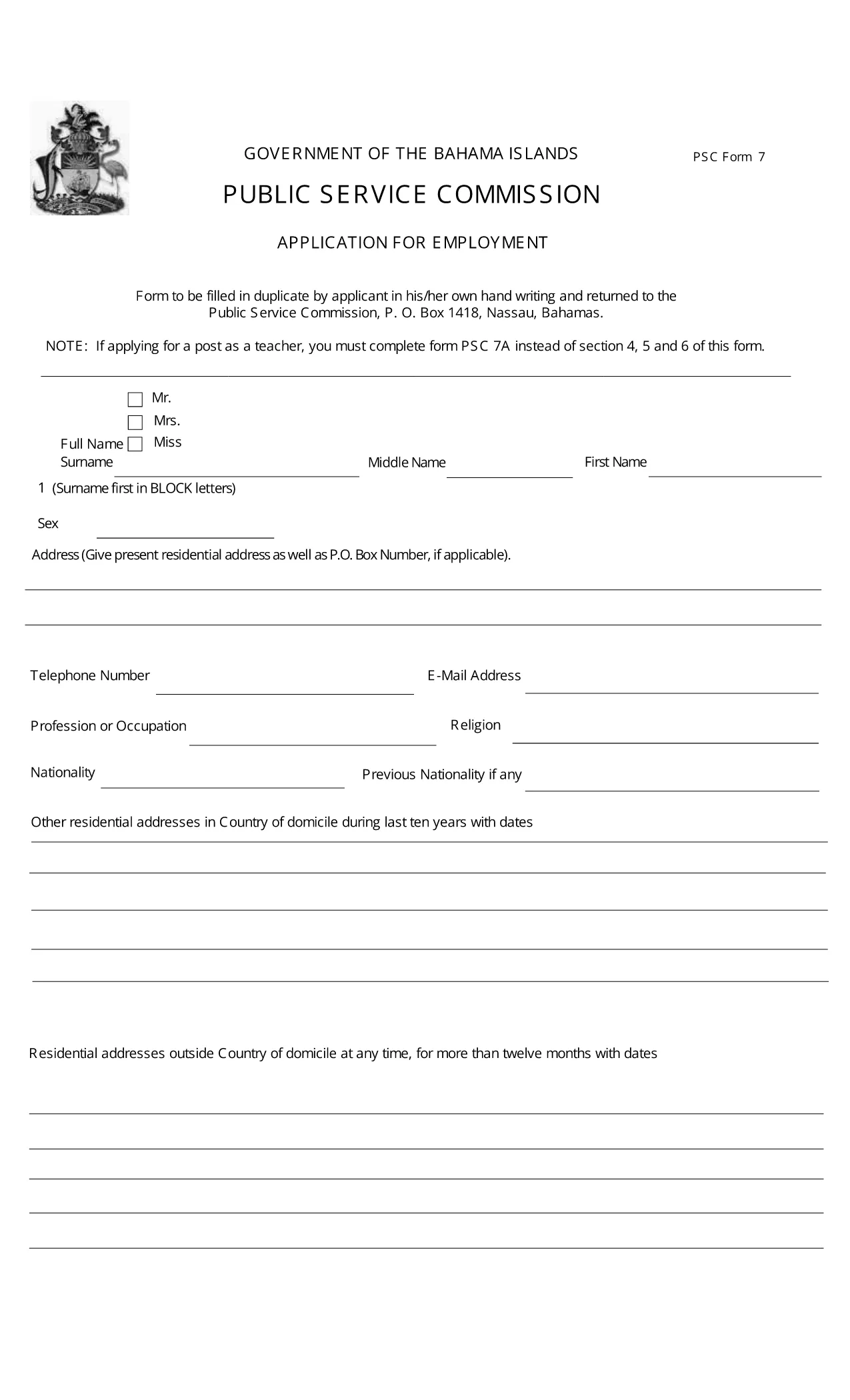
PSC Form 7 – Application for Employment (Fillable PDF)

  1. שפה אנגלית
  2. מדינה Bahamas
  3. פעילות Employment
  4. מַחלָקָה Public Service Commission
PSC Form 7 – Application for Employment (Fillable PDF)

The PSC Form 7 is the standard application used by the Bahamas Public Service Commission (PSC) for all civil‑service positions. This fillable PDF lets you complete the form directly in your browser, eliminating the need for printing, scanning, or third‑party editors.

What Is PSC Form 7?

PSC Form 7 collects personal details, qualifications, work experience, and references required for a public‑service job. It is mandatory for every applicant seeking employment with a government department in the Bahamas.

How to Fill Out the PSC Application Online

Simply click the "Fill out this form" button on this page. The Formize PDF Filler will load, allowing you to type directly into each field, add checkmarks, and save your progress.

  • All fields are searchable and auto‑saved.
  • Use the toolbar to add signatures or attach supporting documents.
  • When finished, download the completed PDF and send it to the address listed in the submission section.

Key Sections & Required Attachments

Make sure you have the following items ready before you start:

  • Copy of passport or birth certificate
  • Police record (if required)
  • Academic certificates and transcripts
  • Three professional references
  • Medical certificate (if requested)

Common Mistakes to Avoid

  • Leaving any field blank – every question must be answered.
  • Using the wrong paper size – the form is designed for legal (8½" x 14") size, but the online filler handles sizing automatically.
  • Forgetting to sign the last page – the digital signature is accepted.
  • Submitting outdated attachments – ensure all documents are current.

Where to Submit Your Completed Form

After completing the form, email the PDF to psc@bahamas.gov.bs or mail a printed copy to:

Public Service Commission
P.O. Box N‑1418
Nassau, Bahamas

Keep a copy for your records in case the PSC requests additional information.

שאלות נפוצות
  • Is the PSC Form 7 available for free?

    Yes. The official PSC Form 7 PDF is free to download and fill out using the Formize filler.

  • Can I edit the form on a mobile device?

    The Formize PDF Filler works on most modern smartphones and tablets. For best results, use a tablet or laptop.

  • Do I need to print the form after filling it online?

    A digital signature is accepted, but you may print a hard copy if the specific department requires a physical document.

  • What should I do if I make a mistake after saving?

    Open the saved PDF again in the Formize filler, correct the error, and re‑save before submitting.

  • How long does the PSC take to process my application?

    Processing time varies by position, but most applications are reviewed within 2‑4 weeks after receipt.

  • Are there any fees for using the Formize filler?

    No. Formize provides free access to fillable PDFs for public‑service forms like PSC Form 7.

איך ל

כיצד למלא את PSC Form 7 בחינם, באינטרנט ב-4 שלבים פשוטים:

  1. 1
    Open the Fillable Form
    Click the "Fill out this form" button on the page. The Formize PDF Filler app will launch in a new tab.
  2. 2
    Complete Each Section
    Enter your information directly into the highlighted fields. Use the toolbar to add a digital signature or attach supporting documents.
  3. 3
    Save and Download
    When all fields are completed, click the "Save" icon, then download the finished PDF to your computer.
  4. 4
    Submit to the PSC
    Email the PDF to psc@bahamas.gov.bs or mail a printed copy to the address provided in the form instructions.
Formize אפליקציית מילוי PDF
על אודות

תבנית PSC Form 7

עם סט התכונות המסורתי לצפייה ומילוי של מסמך PDF, בשילוב עם היתרונות של אפליקציית אינטרנט ופריסה רספונסיבית, תוכל להשלים את PSC Form 7 בתוך דקות.

תכונות

מילוי PDF

הדרך הקלה ביותר למלא טפסי PDF באינטרנט

  • מלא במהירות את PSC Form 7
    מחפש דרך למלא במהירות את PSC Form 7 באינטרנט? עם מילוי טופס ה-PDF המקוון שלנו בחינם, תדע כיצד לערוך ולמלא את מסמך ה-PDF הזה תוך פחות מדקה.
  • עורך PDF מקוון קל לשימוש
    נמאס לך להדפיס קבצי PDF כדי שתוכל לערוך אותם, לפני סריקה מחדש ושליחה חזרה? ערוך מסמכי PDF בחינם באינטרנט. השתמש בעורך ה-PDF המקוון שלנו כדי לחסוך בזמן ובנייר.
  • כלים מעולים, כל הפלטפורמות
    תוהה כיצד למלא את PSC Form 7 ב-Mac, או אולי איך להשתמש בחומר מילוי PDF בחינם? כלי ה-PDF המקוונים שלנו פועלים בכל הפלטפורמות.
  • אחסון קבצים מאובטח
    קבצי "PSC Form 7" שהושלמו מאוחסנים במסד נתונים מאובטח המנוהל על ידי אירוח Amazon Cloud. אתה יכול למחוק את הקבצים שלך מהמערכת שלנו בכל עת. בכל מקרה, קבצים אלו נמחקים אוטומטית לאחר 24 שעות.
  • צ'אט עם PSC Form 7
    צ'אט עם "PSC Form 7" ב-Chatize שהוא עוזר לקורא PDF בחינם. שאל שאלות וקבל תשובות מ-"PSC Form 7". פשוט לחץ על הלחצן צ'אט עם מסמך למעלה.

מחק הפעלת מילוי

למחוק את הפעלת המילוי שנבחרה? במקרה זה, ההתקדמות שלך במילוי הטופס תאבד.

מחק סשן עריכה

למחוק את סשן העריכה שנבחר? במקרה זה, ההתקדמות שלך ביצירה ועריכה של הטופס תאבד.