
בחר שפה

RTB‑2 Review Consideration Form – Fillable PDF for BC Tenancy Disputes

  1. שפה אנגלית
  2. מדינה קנדה
  3. פעילות חֲכִירָה
  4. מדינה קולומביה הבריטית
RTB‑2 Review Consideration Form – Fillable PDF for BC Tenancy Disputes

What Is the RTB‑2 Form?

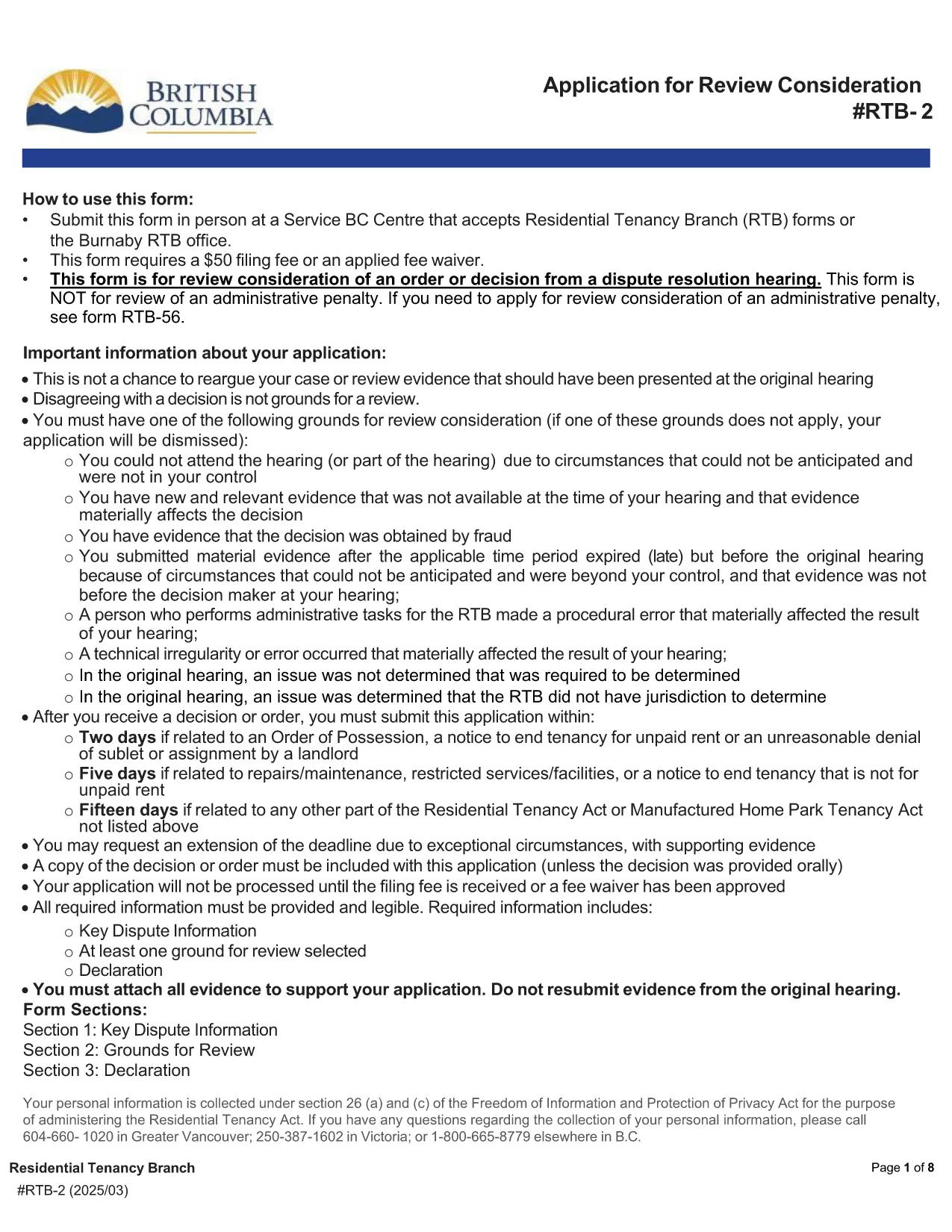
The RTB‑2, or Review Consideration Form, is the official application used in British Columbia to request a review of an order or decision issued after a Residential Tenancy Branch (RTB) dispute resolution hearing. Landlords and tenants use this form when they believe the decision was made in error or when new evidence is available.

How to Complete the RTB‑2 Online

Formize makes the RTB‑2 completely fillable directly in your browser. Follow these simple steps:

  1. Click the "Fill out this form" button on this page.
  2. Wait a few seconds while the Formize PDF Filler app loads the fillable RTB‑2.
  3. Enter all required information – party details, hearing date, reasons for review, and any supporting documents.
  4. Use the built‑in validation to catch missing fields before you submit.
  5. When finished, click Submit to download the completed PDF, then print or email it as required.

Common Mistakes to Avoid

  • Leaving required fields blank: The form will not validate until every mandatory field is filled.
  • Incorrect filing fee amount: The standard fee is $50 unless you qualify for a fee waiver.
  • Submitting the wrong version: Always use the latest PDF (linked below) to ensure compliance with current RTB rules.
  • Missing supporting evidence: Attach any new documents that justify a review request.

Where to Submit the Completed Form

After you download the filled‑out RTB‑2, you can submit it in one of the following ways:

  • In person at any Service BC Centre that accepts RTB forms.
  • By mail to the RTB office listed on the form.
  • Electronically via the RTB’s online portal (if you have an account).

Remember to include the $50 filing fee or a completed fee‑waiver request.

Download the Official PDF

If you prefer to work offline, you can download the official, government‑issued RTB‑2 PDF directly from the link below. The file is fully fillable with Adobe Reader or any modern PDF viewer.

Download RTB‑2 Form (PDF)

שאלות נפוצות
  • Who can use the RTB‑2 form?

    Both landlords and tenants in British Columbia may use the RTB‑2 to request a review of a dispute resolution decision.

  • Is there a fee to file the RTB‑2?

    Yes, the standard filing fee is $50. A fee waiver can be requested if you meet the eligibility criteria outlined on the form.

  • Can I edit the PDF after I download it?

    Yes, the PDF is fully fillable. You can edit it using Formize online or any PDF editor like Adobe Acrobat Reader.

  • What supporting documents should I attach?

    Attach any new evidence, correspondence, or records that were not considered in the original hearing and that support your request for review.

  • How long do I have to submit the RTB‑2 after the decision?

    You must file the RTB‑2 within 30 days of receiving the original decision, unless an extension is granted by the RTB.

  • Can I submit the form electronically?

    Yes, if you have an RTB online account you can upload the completed PDF directly through the RTB portal.

  • What happens after I submit the RTB‑2?

    The RTB will review your application, may schedule a new hearing, and will issue a written decision on the review request.

איך ל

כיצד למלא את RTB-2 בחינם, באינטרנט ב-5 שלבים פשוטים:

  1. 1
    Click the Fill‑out Button
    Press the "Fill out this form" button on the page to launch the Formize PDF Filler.
  2. 2
    Wait for the Form to Load
    A few seconds later the fillable RTB‑2 PDF will appear in the browser.
  3. 3
    Enter All Required Information
    Complete each field, attach supporting documents, and double‑check the filing fee details.
  4. 4
    Validate and Review
    Use the built‑in validation to ensure no required fields are missing.
  5. 5
    Download or Submit
    When satisfied, click "Submit" to download the completed PDF and follow the submission instructions.
Formize אפליקציית מילוי PDF
על אודות

טפסים להצעות למשכירים ו/או שוכרים לפעולה הנוגעת להסכמי שכירות.

RTB-2 הוא אחד מטפסי שכירות המתייחסים למסמכים המשמשים בתהליך הקמת וניהול הסכם שכירות. טפסים אלה משמשים בדרך כלל בעלי בית, מנהלי נכסים או שוכרים כדי לתאר את התנאים וההגבלות של השכירות. להלן כמה צורות שכירות נפוצות:

הסכם שכירות: הסכם השכירות, המכונה גם הסכם השכירות או הסכם השכירות, הוא חוזה משפטי מחייב בין המשכיר לשוכר. הוא מפרט את הזכויות והחובות של שני הצדדים, לרבות משך השכירות, גובה השכירות, תנאי תשלום, פיקדון, אחריות תחזוקה וכל תנאי אחר ספציפי לשכירות.

בקשה להשכרה: שוכרים פוטנציאליים בדרך כלל ממלאים טופס בקשה להשכרה בעת הגשת בקשה לנכס להשכרה. טופס זה אוסף מידע אישי על המבקש, כגון שמו, פרטי התקשרות, היסטוריית תעסוקה, היסטוריית השכרות והפניות. יישום ההשכרה מסייע למשכירים להעריך את התאמתם של השוכרים ולקבל החלטות מושכלות.

הודעה לפינוי: טופס זה משמש את בעל הבית או את השוכר כדי לספק הודעה על כוונה לסיים את השכירות. תקופת ההודעה המוקדמת הנדרשת עשויה להשתנות בהתאם לחוקים המקומיים ולתנאי הסכם השכירות.

הודעה על העלאת שכר הדירה: אם בעל הדירה מתכוון להעלות את שכר הדירה במהלך השכירות, בדרך כלל הוא מספק הודעה על העלאת שכר הדירה לשוכר. הודעה זו מיידעת את השוכר על התאמת שכר הדירה הקרובה ועומדת בדרישות החוק לגבי העלאות שכר דירה.

טופסי בקשת תחזוקה ותיקון: טפסים אלו מאפשרים לדיירים לדווח על בעיות תחזוקה או תיקון לבעל הבית או למנהל הנכס. הטופס מפרט את פרטי התקלה, התיקונים המבוקשים וכל מידע רלוונטי אחר.

הסכמה לבדיקת רקע או בדיקת אשראי: בעלי בית עשויים לדרוש מהשוכרים למלא טופס הסכמה המאשר בדיקת רקע או בדיקת אשראי. טופס זה מאפשר לבעל הבית לאמת את הרקע של השוכר, את כושר האשראי והיסטוריית ההשכרה.

דוח מלאי ומצב: טופס זה משמש לתיעוד מצב הנכס המושכר בתחילת וסיום השכירות. הוא מפרט את מצבו של כל חדר וכל הנזק הקיים, ומבטיח שלשני הצדדים יש תיעוד של מצב הנכס כדי לפתור מחלוקות בנוגע להפקדות ביטחון או תביעות נזק.

אלו הן כמה דוגמאות לטפסי שכירות הנפוצים בתהליך ההשכרה. הטפסים והדרישות הספציפיות עשויים להשתנות בהתאם לחוקים המקומיים ולנסיבות הספציפיות של השכירות. חשוב להתייעץ עם התקנות המקומיות ולבקש ייעוץ מקצועי כדי להבטיח ציות ולהשתמש בטפסים המתאימים להסכם השכירות הספציפי שלך.

תכונות

מילוי PDF

הדרך הקלה ביותר למלא טפסי PDF באינטרנט

  • מלא במהירות את RTB-2
    מחפש דרך למלא במהירות את RTB-2 באינטרנט? עם מילוי טופס ה-PDF המקוון שלנו בחינם, תדע כיצד לערוך ולמלא את מסמך ה-PDF הזה תוך פחות מדקה.
  • עורך PDF מקוון קל לשימוש
    נמאס לך להדפיס קבצי PDF כדי שתוכל לערוך אותם, לפני סריקה מחדש ושליחה חזרה? ערוך מסמכי PDF בחינם באינטרנט. השתמש בעורך ה-PDF המקוון שלנו כדי לחסוך בזמן ובנייר.
  • כלים מעולים, כל הפלטפורמות
    תוהה כיצד למלא את RTB-2 ב-Mac, או אולי איך להשתמש בחומר מילוי PDF בחינם? כלי ה-PDF המקוונים שלנו פועלים בכל הפלטפורמות.
  • אחסון קבצים מאובטח
    קבצי "RTB-2" שהושלמו מאוחסנים במסד נתונים מאובטח המנוהל על ידי אירוח Amazon Cloud. אתה יכול למחוק את הקבצים שלך מהמערכת שלנו בכל עת. בכל מקרה, קבצים אלו נמחקים אוטומטית לאחר 24 שעות.
  • צ'אט עם RTB-2
    צ'אט עם "RTB-2" ב-Chatize שהוא עוזר לקורא PDF בחינם. שאל שאלות וקבל תשובות מ-"RTB-2". פשוט לחץ על הלחצן צ'אט עם מסמך למעלה.

מחק הפעלת מילוי

למחוק את הפעלת המילוי שנבחרה? במקרה זה, ההתקדמות שלך במילוי הטופס תאבד.

מחק סשן עריכה

למחוק את סשן העריכה שנבחר? במקרה זה, ההתקדמות שלך ביצירה ועריכה של הטופס תאבד.