
בחר שפה

IMM 5476 – Use of a Representative (Canada)

  1. מדינה קנדה
  2. שפה אנגלית צָרְפָתִית
  3. פעילות אשרות
IMM 5476 – Use of a Representative (Canada)

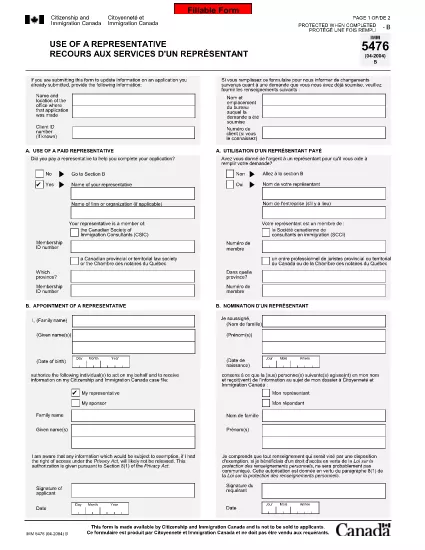
The IMM 5476 – Use of a Representative form allows you to officially appoint an immigration consultant, lawyer, or another authorized person to act on your behalf with Immigration, Refugees and Citizenship Canada (IRCC) and the Canada Border Services Agency (CBSA). This form is required for most permanent‑resident, temporary‑resident, and citizenship applications.

What Is the IMM 5476 Form?

IMM 5476 is a government‑issued PDF that records the details of your chosen representative, their contact information, and the scope of authority you are granting. It is available in both English and French and must be signed by both you (the applicant) and your representative.

How to Fill Out IMM 5476 Online

Instead of downloading the PDF and editing it manually, simply click the "Fill out this form" button on the page. Our Formize PDF Filler app will load the fillable version instantly, letting you complete the form directly in your browser.

Common Mistakes to Avoid

  • Incorrect Representative Details: Double‑check the name, address, and CRA‑issued client number of your representative.
  • Missing Signatures: Both the applicant and the representative must sign; unsigned forms are rejected.
  • Wrong Language Version: Use the official English or French version that matches the rest of your application package.
  • Out‑of‑Date Form: Always use the latest version – the link below always points to the current PDF.

When to Submit the Form

Attach IMM 5476 to the same package as your main application (e.g., Express Entry, Study Permit, Visitor Visa). If you change representatives later, submit a new, signed IMM 5476 with your updated request.

Need More Help?

While Formize does not provide live support, you can find detailed guidance on the IRCC website or consult a licensed immigration professional.

שאלות נפוצות
  • Do I need a lawyer to fill out IMM 5476?

    No. You can appoint any authorized representative, such as a licensed immigration consultant, lawyer, or family member, as long as they have a valid client number.

  • Can I change my representative after submitting the form?

    Yes. Submit a new, signed IMM 5476 with the updated representative’s details and include a brief letter explaining the change.

  • Is a digital signature accepted?

    IRCC accepts electronic signatures generated within a fillable PDF application like Formize, provided the signature field is clearly marked.

  • What happens if I forget to sign the form?

    An unsigned IMM 5476 will be considered incomplete and may delay processing of your entire application.

  • Do I need to submit both English and French versions?

    Submit only the language version that matches the rest of your application package. IRCC does not require both versions.

  • Is there a fee to use the Formize PDF Filler?

    No. Formize provides free access to fillable PDFs for government forms like IMM 5476.

  • Can I print the form after filling it online?

    Yes. Once you finish, click "Download PDF" and print a hard copy if your submission requires a physical signature.

  • Where can I find the latest version of IMM 5476?

    The link on this page always points to the most recent version published by Immigration, Refugees and Citizenship Canada.

איך ל

כיצד למלא את IMM 5476 בחינם, באינטרנט ב-5 שלבים פשוטים:

  1. 1
    Open the Fillable Form
    Click the "Fill out this form" button on the page. The Formize PDF Filler app will load the IMM 5476 form directly in your browser.
  2. 2
    Enter Applicant Information
    Fill in your full name, client ID, and contact details in the Applicant section. All fields are required.
  3. 3
    Enter Representative Details
    Provide the representative’s name, firm, address, phone, and email. Make sure the CRA client number matches the one on record.
  4. 4
    Add Signatures
    Use the built‑in signature fields to sign electronically. Both you and your representative must sign before saving.
  5. 5
    Download or Submit
    After completing the form, click "Download PDF" to save a copy for your records, then attach it to your immigration application package.
Formize אפליקציית מילוי PDF
על אודות

טפסי ויזה

IMM 5476 הוא אחד מטפסי ויזה שהם מסמכים המשמשים להגשת בקשה לאשרת כניסה למדינה זרה. ויזה היא מסמך המאפשר לאזרח זר להיכנס, לשהות ולעיתים לעבוד במדינה זרה למשך פרק זמן מוגדר. הטפסים והדרישות המדויקות לקבלת ויזה משתנים בהתאם למדינה ולסוג הויזה.

טופסי ויזה דורשים בדרך כלל מידע אישי כגון שם, תאריך לידה ומידע על דרכון, כמו גם מידע על מטרת ואורך הטיול, היעד המיועד, והאם למבקש סורבה בעבר ויזה או גורש ממדינה. הטפסים עשויים לדרוש גם מסמכים תומכים כגון דרכון, תמונות והוכחה לתמיכה כספית.

בארצות הברית, טפסי הויזה הנפוצים ביותר הם הטפסים DS-160 ו-DS-260. טופס DS-160 משמש להגשת בקשה לאשרת מהגר, בעוד טופס DS-260 משמש להגשת בקשה לאשרת מהגר. טפסים אלה דורשים מידע מפורט על ההיסטוריה האישית והנסיעות של המבקש, כמו גם תיעוד תומך כגון דרכון, מסלול טיול ורישומים פיננסיים.

למדינות אחרות עשויות להיות צורות ודרישות שונות של ויזה, אך התהליך הבסיסי כולל בדרך כלל מילוי בקשת ויזה, מתן תיעוד תומך והשתתפות בראיון עם קצין קונסולרי בשגרירות או קונסוליה של ארה"ב. חשוב לציין שתהליך הגשת בקשה לויזה יכול להיות מורכב ואורך זמן, ומומלץ לאנשים המבקשים לויזה להתייעץ עם עורך דין הגירה או איש מקצוע מוסמך אחר על מנת לוודא שכל הטפסים והדרישות הנדרשים מתקיימים.

תכונות

מילוי PDF

הדרך הקלה ביותר למלא טפסי PDF באינטרנט

  • מלא במהירות את IMM 5476
    מחפש דרך למלא במהירות את IMM 5476 באינטרנט? עם מילוי טופס ה-PDF המקוון שלנו בחינם, תדע כיצד לערוך ולמלא את מסמך ה-PDF הזה תוך פחות מדקה.
  • עורך PDF מקוון קל לשימוש
    נמאס לך להדפיס קבצי PDF כדי שתוכל לערוך אותם, לפני סריקה מחדש ושליחה חזרה? ערוך מסמכי PDF בחינם באינטרנט. השתמש בעורך ה-PDF המקוון שלנו כדי לחסוך בזמן ובנייר.
  • כלים מעולים, כל הפלטפורמות
    תוהה כיצד למלא את IMM 5476 ב-Mac, או אולי איך להשתמש בחומר מילוי PDF בחינם? כלי ה-PDF המקוונים שלנו פועלים בכל הפלטפורמות.
  • אחסון קבצים מאובטח
    קבצי "IMM 5476" שהושלמו מאוחסנים במסד נתונים מאובטח המנוהל על ידי אירוח Amazon Cloud. אתה יכול למחוק את הקבצים שלך מהמערכת שלנו בכל עת. בכל מקרה, קבצים אלו נמחקים אוטומטית לאחר 24 שעות.
  • צ'אט עם IMM 5476
    צ'אט עם "IMM 5476" ב-Chatize שהוא עוזר לקורא PDF בחינם. שאל שאלות וקבל תשובות מ-"IMM 5476". פשוט לחץ על הלחצן צ'אט עם מסמך למעלה.

מחק הפעלת מילוי

למחוק את הפעלת המילוי שנבחרה? במקרה זה, ההתקדמות שלך במילוי הטופס תאבד.

מחק סשן עריכה

למחוק את סשן העריכה שנבחר? במקרה זה, ההתקדמות שלך ביצירה ועריכה של הטופס תאבד.