
בחר שפה

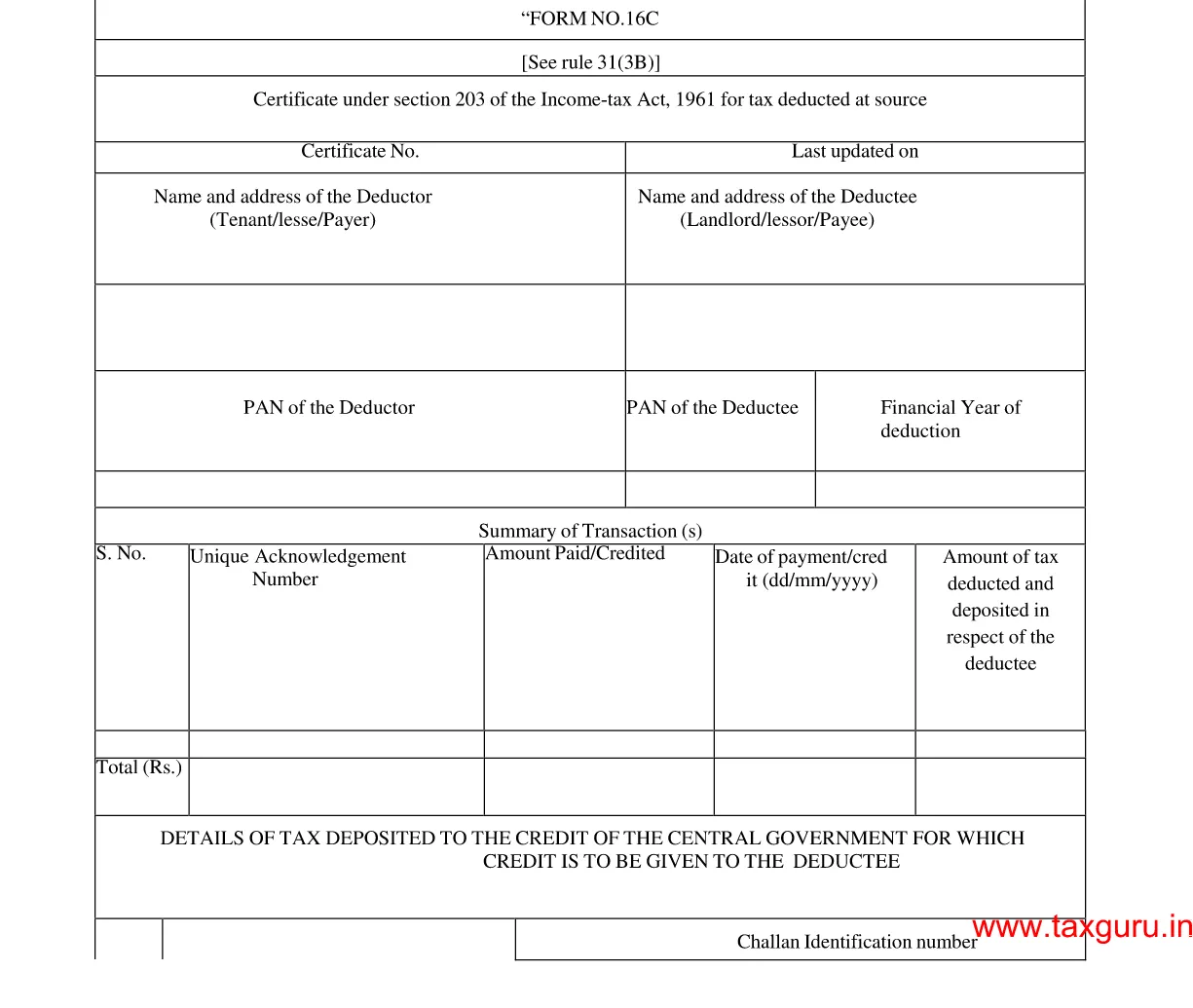
Form 16C – Fillable Tax Deduction Statement (Section 194‑IB)

  1. מדינה הוֹדוּ
  2. שפה אנגלית
  3. מַחלָקָה Income Tax Department
  4. פעילות מיסים
Form 16C – Fillable Tax Deduction Statement (Section 194‑IB)

Form 16C is the official statement used by deductors to report tax deducted at source (TDS) under Section 194‑IB of the Income Tax Act, India. It details the amount deducted, the recipient’s PAN, and the date of deduction. With Formize’s fillable PDF, you can complete and submit the form in minutes—no paper, no hassle.

What is Form 16C?

Form 16C serves as a challan‑cum‑statement that records TDS on payments such as interest on securities, dividends, and other specified incomes. The form must be filed electronically with the Income Tax Department after the deduction is made.

Who Needs to File Form 16C?

  • Any person or entity deducting tax under Section 194‑IB.
  • Financial institutions, mutual funds, and companies paying interest or dividend income.
  • Businesses that have made taxable payments to residents or non‑residents.

How to Fill Form 16C Online

Follow these simple steps to complete the form without leaving the page:

  1. Click the "Fill out this form" button below.
  2. The Formize PDF Filler app loads automatically in your browser.
  3. Enter the required details (deductor name, PAN, amount, etc.) in the fillable fields.
  4. Review the information, then click Save or Download to get a completed PDF.

Common Mistakes to Avoid

  • Incorrect PAN: Double‑check the PAN of both deductor and deductee.
  • Wrong financial year: Ensure the year matches the period of deduction.
  • Missing signatures: The form requires the signature of the person responsible for deduction.
  • Incomplete head codes: Use the correct major and minor head codes as per the Income Tax rules.

Download the Fillable PDF

Ready to start? Click the button below to open the fillable version of Form 16C directly in your browser.

Fill out this form

שאלות נפוצות
  • What is the purpose of Form 16C?

    Form 16C records tax deducted at source under Section 194‑IB and serves as a challan‑cum‑statement for the Income Tax Department.

  • Who is required to file Form 16C?

    Any person or entity that deducts tax on interest, dividends, or similar payments under Section 194‑IB must file Form 16C.

  • Can I edit the PDF on a mobile device?

    Yes. The Formize PDF Filler works on all modern browsers, including mobile Chrome and Safari.

  • Do I need a digital signature to submit Form 16C?

    A physical signature is required on the printed form. For electronic filing, the form can be uploaded without a digital signature, but the deductor’s signature must be present on the original copy.

  • What are the major and minor head codes?

    These codes classify the nature of the payment. For example, major head code 2 and minor head code 0 are commonly used for interest payments.

  • How do I correct a mistake after submission?

    File a revised Form 16C with the corrected details before the end of the financial year, and inform the deductee of the changes.

איך ל

כיצד למלא את Form 16C בחינם, באינטרנט ב-4 שלבים פשוטים:

  1. 1
    Open the Fillable Form
    Click the "Fill out this form" button. The Formize PDF Filler loads instantly in your browser.
  2. 2
    Enter Required Information
    Complete each fillable field—deductor details, PAN, amount deducted, and the applicable head codes.
  3. 3
    Validate and Save
    Review the entered data, ensure no fields are missing, then click Save to store the completed PDF on your device.
  4. 4
    Submit to the Tax Department
    Upload the saved PDF through the Income Tax e‑filing portal as per the filing deadline.
Formize אפליקציית מילוי PDF
על אודות

טפסי מס

Form 16C הוא אחד מטפסי מס שהם מסמכים המשמשים לדיווח על מידע הקשור למיסים לרשות המס הרלוונטית. ישנם סוגים שונים של טפסי מס, כולל טפסי מס פדרליים, מדינתיים ומקומיים, שיכולים להשתנות בהתאם לנסיבות ולמיקומו של משלם המסים.

תכונות

מילוי PDF

הדרך הקלה ביותר למלא טפסי PDF באינטרנט

  • מלא במהירות את Form 16C
    מחפש דרך למלא במהירות את Form 16C באינטרנט? עם מילוי טופס ה-PDF המקוון שלנו בחינם, תדע כיצד לערוך ולמלא את מסמך ה-PDF הזה תוך פחות מדקה.
  • עורך PDF מקוון קל לשימוש
    נמאס לך להדפיס קבצי PDF כדי שתוכל לערוך אותם, לפני סריקה מחדש ושליחה חזרה? ערוך מסמכי PDF בחינם באינטרנט. השתמש בעורך ה-PDF המקוון שלנו כדי לחסוך בזמן ובנייר.
  • כלים מעולים, כל הפלטפורמות
    תוהה כיצד למלא את Form 16C ב-Mac, או אולי איך להשתמש בחומר מילוי PDF בחינם? כלי ה-PDF המקוונים שלנו פועלים בכל הפלטפורמות.
  • אחסון קבצים מאובטח
    קבצי "Form 16C" שהושלמו מאוחסנים במסד נתונים מאובטח המנוהל על ידי אירוח Amazon Cloud. אתה יכול למחוק את הקבצים שלך מהמערכת שלנו בכל עת. בכל מקרה, קבצים אלו נמחקים אוטומטית לאחר 24 שעות.
  • צ'אט עם Form 16C
    צ'אט עם "Form 16C" ב-Chatize שהוא עוזר לקורא PDF בחינם. שאל שאלות וקבל תשובות מ-"Form 16C". פשוט לחץ על הלחצן צ'אט עם מסמך למעלה.

מחק הפעלת מילוי

למחוק את הפעלת המילוי שנבחרה? במקרה זה, ההתקדמות שלך במילוי הטופס תאבד.

מחק סשן עריכה

למחוק את סשן העריכה שנבחר? במקרה זה, ההתקדמות שלך ביצירה ועריכה של הטופס תאבד.