
בחר שפה

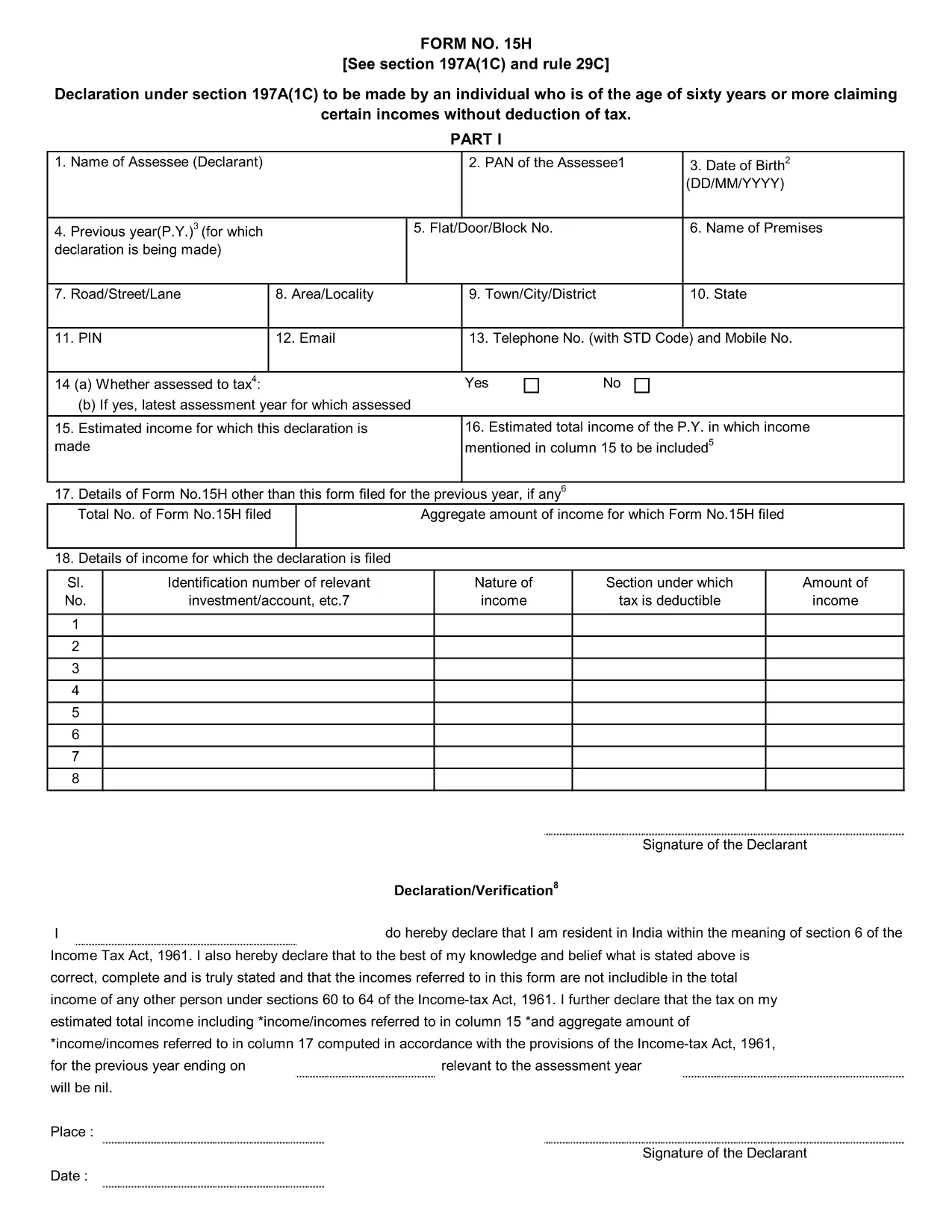
Form 15H – Senior Citizens’ Interest Income Declaration (Fillable PDF)

  1. שפה אנגלית
  2. מדינה הוֹדוּ
  3. פעילות מיסים
Form 15H – Senior Citizens’ Interest Income Declaration (Fillable PDF)

Form 15H is a declaration under sub‑section (1C) of section 197A of the Income‑Tax Act, 1961. It allows senior citizens (aged 60 years or more) to request that tax be **not deducted at source (TDS)** on interest earned from bank or post‑office deposits, provided they meet certain income thresholds.

Who Can Use Form 15H?

  • Resident individuals aged 60 years or above.
  • Those whose total taxable income does not exceed the limits set by the Act (₹3 lakhs for ages 60‑79, ₹5 lakhs for 80 years and above).
  • Taxpayers who receive interest income from banks, post offices, or cooperative societies.

Eligibility & Income Limits

The Income‑Tax Department defines two income caps:

  • Age 60‑79: Taxable income ≤ ₹300,000 per financial year.
  • Age 80 and above: Taxable income ≤ ₹500,000 per financial year.

If your interest earnings are below ₹50,000 in a year, you are not required to submit Form 15H – the bank will not deduct TDS automatically.

How to Fill Form 15H Online

Instead of downloading the PDF and editing it locally, simply click the "Fill out this form" button on this page. The Formize PDF Filler app will load in your browser, allowing you to complete the declaration in a few easy steps:

  1. Enter your name, PAN, and address as they appear on your PAN card.
  2. Provide your bank account details where the interest is credited.
  3. Declare the total interest earned and confirm it is within the eligible limit.
  4. Sign electronically (or print, sign, and scan if you prefer a hard copy).
  5. Submit the form to your bank or download it for manual submission.

Common Mistakes to Avoid

  • Entering an incorrect PAN – the bank will reject the form.
  • Mis‑calculating total taxable income; always include salary, rent, and other earnings.
  • Submitting the form after the interest has already been taxed – it must be given **before** the bank deducts TDS.
  • Leaving the "Signature" field blank; an electronic signature is acceptable in most banks.

Download & Save the Fillable PDF

If you prefer a local copy, you can download the official fillable PDF below. The file retains the original layout and can be opened with any modern PDF reader.

Download Form 15H – Fillable PDF

Using Formize’s online filler saves time, reduces errors, and lets you submit the declaration instantly to your bank.

שאלות נפוצות
  • What is the purpose of Form 15H?

    Form 15H allows senior citizens (60 years or older) to request that TDS be **not deducted** on interest income when their total taxable income is below the specified thresholds.

  • Can I use Form 15H if I am below 60 years?

    No. Individuals under 60 should use Form 15G, which serves the same purpose for younger taxpayers.

  • Do I need to submit Form 15H every financial year?

    Yes. The declaration is valid only for the financial year in which it is submitted. A new Form 15H must be provided each year you wish to claim the exemption.

  • What if my interest income exceeds ₹50,000?

    If interest exceeds ₹50,000, the bank will automatically deduct TDS unless you submit a valid Form 15H before the interest is credited.

  • Is an electronic signature accepted?

    Most banks accept an electronic signature entered via the Formize PDF Filler. If your bank requires a handwritten signature, print, sign, and scan the completed form.

  • Can I submit Form 15H online to the Income‑Tax Department?

    Form 15H is submitted to the **bank or post‑office** where the interest is credited, not directly to the Income‑Tax Department.

  • What happens if I submit an incorrect PAN?

    The bank will reject the form and may still deduct TDS. Ensure the PAN matches the one on your PAN card.

  • Do I need to attach any supporting documents?

    Generally no. The form itself is sufficient, but keep your interest statements handy in case the bank requests verification.

איך ל

כיצד למלא את Form 15H בחינם, באינטרנט ב-5 שלבים פשוטים:

  1. 1
    Click the Fill‑out Button
    Press the "Fill out this form" button on the page. The Formize PDF Filler loads instantly in your browser.
  2. 2
    Enter Your Details
    Provide your name, PAN, address, bank account number, and total interest earned as prompted.
  3. 3
    Verify Income Limits
    The filler will automatically check that your total taxable income is within the ₹3 Lakh or ₹5 Lakh limits based on age.
  4. 4
    Add Your Signature
    Use the electronic signature tool or upload a scanned signature image.
  5. 5
    Submit or Download
    Send the completed form directly to your bank via their portal, or download the PDF for manual submission.
Formize אפליקציית מילוי PDF
על אודות

טפסי מחלקת מס הכנסה

Form 15H הוא אחד מהטפסים הרשמיים המשמשים את מחלקת מס ההכנסה של הודו לניהול וגביית מס הכנסה. טפסים אלו משמשים את הנישומים לדיווח על הכנסותיהם, ניכויים וחבות המס לרשויות המס.

להלן כמה טפסים נפוצים של מחלקת מס הכנסה בהודו:

ITR-1 (Sahaj): טופס זה משמש על ידי אנשים שיש להם הכנסה ממשכורת, נכס בבית אחד ומקורות אחרים כמו ריבית, פנסיה או פנסיה משפחתית. זה חל על אנשים עם הכנסה כוללת של עד Rs. 50 לאק.

ITR-2: טופס זה משמש יחידים והינדים משפחות בלתי מחולקות (HUF) בעלות הכנסה ממקורות שאינם עסק או מקצוע. זה חל על אנשים שיש להם הכנסה כוללת העולה על Rs. 50 לאך או בעל נכסים/הכנסה זרה.

ITR-3: טופס זה משמש אנשים פרטיים ו-HUFs בעל הכנסה מעסק או מקצוע. זה חל על אנשים שיש להם הכנסה מחברת שותפות ואנשי מקצוע העוסקים במקצוע.

ITR-4 (Sugam): טופס זה משמש על ידי יחידים, HUFs וחברות (מלבד LLP) שבחרו בשיטת המיסוי החזוי לפי סעיפים 44AD, 44ADA או 44AE של חוק מס הכנסה.

טופס 16: טופס זה מסופק על ידי מעסיקים לעובדים ומכיל פרטים של משכורת, מס שנוכה במקור (TDS) ומידע קשור אחר. זה עוזר לעובדים בהגשת דוחות מס הכנסה במדויק.

טופס 26AS: זה אינו טופס אלא הצהרת מס מאוחדת שנתית המספק סיכום מידע הקשור למס כמו TDS, מס מראש ומס שומה עצמית ששולם על ידי הנישום. זה עוזר לנישומים לאמת את חובות המס שלהם תוך הגשת דוחות מס הכנסה.

אלו הן רק כמה דוגמאות לטפסים של מחלקת מס הכנסה בהודו. הטפסים והדרישות הספציפיות עשויות להשתנות בהתאם לאופי ההכנסה, קטגוריית משלמי המסים וחוקי המס הרווחים בהודו. חשוב לעיין באתר הרשמי של מחלקת מס ההכנסה של הודו (www.incometaxindia.gov.in) או לפנות לייעוץ מקצועי כדי לקבל מידע מדויק ועדכני לגבי טפסי מס הכנסה ספציפיים הרלוונטיים למצב המס שלך בהודו.

תכונות

מילוי PDF

הדרך הקלה ביותר למלא טפסי PDF באינטרנט

  • מלא במהירות את Form 15H
    מחפש דרך למלא במהירות את Form 15H באינטרנט? עם מילוי טופס ה-PDF המקוון שלנו בחינם, תדע כיצד לערוך ולמלא את מסמך ה-PDF הזה תוך פחות מדקה.
  • עורך PDF מקוון קל לשימוש
    נמאס לך להדפיס קבצי PDF כדי שתוכל לערוך אותם, לפני סריקה מחדש ושליחה חזרה? ערוך מסמכי PDF בחינם באינטרנט. השתמש בעורך ה-PDF המקוון שלנו כדי לחסוך בזמן ובנייר.
  • כלים מעולים, כל הפלטפורמות
    תוהה כיצד למלא את Form 15H ב-Mac, או אולי איך להשתמש בחומר מילוי PDF בחינם? כלי ה-PDF המקוונים שלנו פועלים בכל הפלטפורמות.
  • אחסון קבצים מאובטח
    קבצי "Form 15H" שהושלמו מאוחסנים במסד נתונים מאובטח המנוהל על ידי אירוח Amazon Cloud. אתה יכול למחוק את הקבצים שלך מהמערכת שלנו בכל עת. בכל מקרה, קבצים אלו נמחקים אוטומטית לאחר 24 שעות.
  • צ'אט עם Form 15H
    צ'אט עם "Form 15H" ב-Chatize שהוא עוזר לקורא PDF בחינם. שאל שאלות וקבל תשובות מ-"Form 15H". פשוט לחץ על הלחצן צ'אט עם מסמך למעלה.

מחק הפעלת מילוי

למחוק את הפעלת המילוי שנבחרה? במקרה זה, ההתקדמות שלך במילוי הטופס תאבד.

מחק סשן עריכה

למחוק את סשן העריכה שנבחר? במקרה זה, ההתקדמות שלך ביצירה ועריכה של הטופס תאבד.