בחר שפה

Form 26QE – Fillable PDF for Tax Deduction Statements

  1. שפה אנגלית
  2. מדינה הוֹדוּ
  3. פעילות מיסים
למלא טופס זה
Form 26QE – Fillable PDF for Tax Deduction Statements

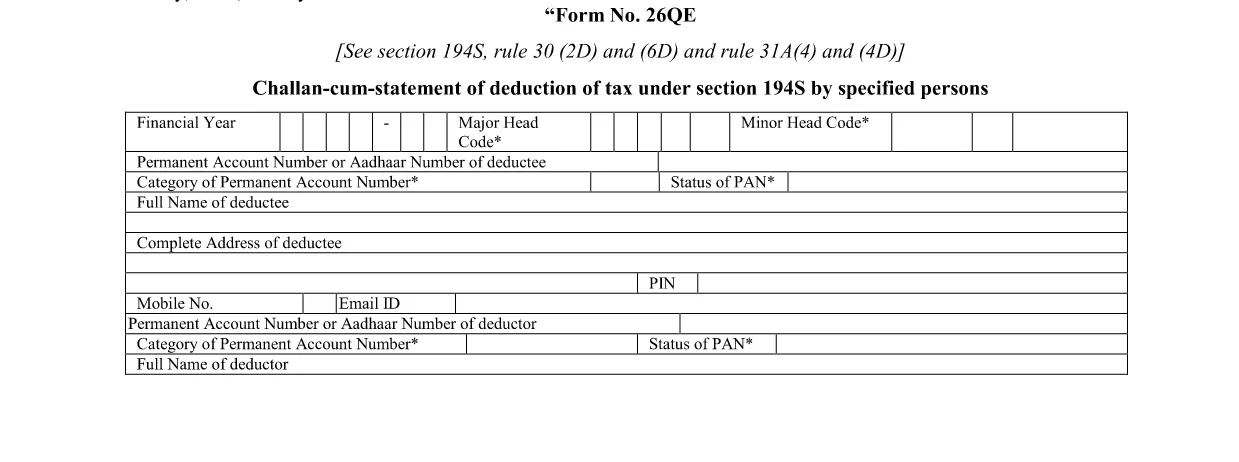
Form 26QE is the official statement used by specified persons to report tax deducted at source under Section 194S. The form must be filed electronically and submitted with the corresponding challan.

What Is Form 26QE?

Form 26QE captures details of deductions made on payments to non‑resident entities, such as interest, royalties, and technical fees. It is required when the payer is obligated to deduct tax under Indian law.

Key Sections and When to Use It

  • Section 194S: Tax deducted at source on payments to non‑residents.
  • Rule 30(2D) & 6D: Specifies the rates and thresholds.
  • Rule 31A: Details the filing timeline and penalties.

How to Fill Form 26QE Online

Instead of downloading and editing the PDF in a separate editor, simply click the “Fill out this form” button on this page. The Formize PDF Filler will load automatically, allowing you to:

  1. Enter payer and payee details.
  2. Specify the amount of tax deducted.
  3. Upload supporting documents.
  4. Validate the data and generate a completed PDF.

Common Mistakes to Avoid

  • Leaving the PAN of the payee blank – the form will be rejected.
  • Mismatching the deduction rate with the applicable rule.
  • Submitting after the statutory deadline, which incurs penalties.
  • Not attaching the required challan‑cum‑statement.

Download & Save the Official PDF

If you prefer to keep a copy of the original form, you can download the official fillable PDF below. It is the same document used by the Formize filler.

Download Form 26QE (Fillable PDF)

שאלות נפוצות
  • What is the purpose of Form 26QE?

    Form 26QE is used to report tax deducted at source on payments made to non‑resident persons under Section 194S of the Indian Income Tax Act.

  • Who must file Form 26QE?

    Any specified person who deducts tax on payments to non‑resident entities (e.g., interest, royalty, technical fees) must file Form 26QE.

  • Can I edit the PDF after filling it online?

    Yes. Once you complete the form in the Formize filler, you can download the filled PDF and reopen it in any standard PDF editor if further changes are needed.

  • What is the filing deadline for Form 26QE?

    The form must be filed by the 15th day of the month following the month in which tax was deducted, unless an extension is granted.

  • Is there a fee to use the Formize PDF Filler?

    No. Formize provides a free online filler for this form; you only need an internet connection and a compatible browser.

  • What happens if I submit an incomplete Form 26QE?

    The tax authority will reject the submission, and you may be subject to penalties for late or inaccurate filing.

איך ל

כיצד למלא את Form 26QE בחינם, באינטרנט ב-4 שלבים פשוטים:

  1. 1
    Click the Fill‑out Button
    On this page, locate the “Fill out this form” button and click it to launch the Formize PDF Filler.
  2. 2
    Wait for the Filler to Load
    The Formize app will open in a new window. A short loading indicator lets you know the form is being prepared.
  3. 3
    Enter the Required Information
    Complete each section – payer details, payee PAN, amount deducted, and attach any supporting documents.
  4. 4
    Save or Download the Completed Form
    After validation, click “Save” to store the PDF in your device or “Download” to keep a copy for your records.
Formize אפליקציית מילוי PDF
על אודות

טפסי מחלקת מס הכנסה

Form 26QE הוא אחד מהטפסים הרשמיים המשמשים את מחלקת מס ההכנסה של הודו לניהול וגביית מס הכנסה. טפסים אלו משמשים את הנישומים לדיווח על הכנסותיהם, ניכויים וחבות המס לרשויות המס.

להלן כמה טפסים נפוצים של מחלקת מס הכנסה בהודו:

ITR-1 (Sahaj): טופס זה משמש על ידי אנשים שיש להם הכנסה ממשכורת, נכס בבית אחד ומקורות אחרים כמו ריבית, פנסיה או פנסיה משפחתית. זה חל על אנשים עם הכנסה כוללת של עד Rs. 50 לאק.

ITR-2: טופס זה משמש יחידים והינדים משפחות בלתי מחולקות (HUF) בעלות הכנסה ממקורות שאינם עסק או מקצוע. זה חל על אנשים שיש להם הכנסה כוללת העולה על Rs. 50 לאך או בעל נכסים/הכנסה זרה.

ITR-3: טופס זה משמש אנשים פרטיים ו-HUFs בעל הכנסה מעסק או מקצוע. זה חל על אנשים שיש להם הכנסה מחברת שותפות ואנשי מקצוע העוסקים במקצוע.

ITR-4 (Sugam): טופס זה משמש על ידי יחידים, HUFs וחברות (מלבד LLP) שבחרו בשיטת המיסוי החזוי לפי סעיפים 44AD, 44ADA או 44AE של חוק מס הכנסה.

טופס 16: טופס זה מסופק על ידי מעסיקים לעובדים ומכיל פרטים של משכורת, מס שנוכה במקור (TDS) ומידע קשור אחר. זה עוזר לעובדים בהגשת דוחות מס הכנסה במדויק.

טופס 26AS: זה אינו טופס אלא הצהרת מס מאוחדת שנתית המספק סיכום מידע הקשור למס כמו TDS, מס מראש ומס שומה עצמית ששולם על ידי הנישום. זה עוזר לנישומים לאמת את חובות המס שלהם תוך הגשת דוחות מס הכנסה.

אלו הן רק כמה דוגמאות לטפסים של מחלקת מס הכנסה בהודו. הטפסים והדרישות הספציפיות עשויות להשתנות בהתאם לאופי ההכנסה, קטגוריית משלמי המסים וחוקי המס הרווחים בהודו. חשוב לעיין באתר הרשמי של מחלקת מס ההכנסה של הודו (www.incometaxindia.gov.in) או לפנות לייעוץ מקצועי כדי לקבל מידע מדויק ועדכני לגבי טפסי מס הכנסה ספציפיים הרלוונטיים למצב המס שלך בהודו.

תכונות

מילוי PDF

הדרך הקלה ביותר למלא טפסי PDF באינטרנט

  • מלא במהירות את Form 26QE
    מחפש דרך למלא במהירות את Form 26QE באינטרנט? עם מילוי טופס ה-PDF המקוון שלנו בחינם, תדע כיצד לערוך ולמלא את מסמך ה-PDF הזה תוך פחות מדקה.
  • עורך PDF מקוון קל לשימוש
    נמאס לך להדפיס קבצי PDF כדי שתוכל לערוך אותם, לפני סריקה מחדש ושליחה חזרה? ערוך מסמכי PDF בחינם באינטרנט. השתמש בעורך ה-PDF המקוון שלנו כדי לחסוך בזמן ובנייר.
  • כלים מעולים, כל הפלטפורמות
    תוהה כיצד למלא את Form 26QE ב-Mac, או אולי איך להשתמש בחומר מילוי PDF בחינם? כלי ה-PDF המקוונים שלנו פועלים בכל הפלטפורמות.
  • אחסון קבצים מאובטח
    קבצי "Form 26QE" שהושלמו מאוחסנים במסד נתונים מאובטח המנוהל על ידי אירוח Amazon Cloud. אתה יכול למחוק את הקבצים שלך מהמערכת שלנו בכל עת. בכל מקרה, קבצים אלו נמחקים אוטומטית לאחר 24 שעות.
  • צ'אט עם Form 26QE
    צ'אט עם "Form 26QE" ב-Chatize שהוא עוזר לקורא PDF בחינם. שאל שאלות וקבל תשובות מ-"Form 26QE". פשוט לחץ על הלחצן צ'אט עם מסמך למעלה.

מחק הפעלת מילוי

למחוק את הפעלת המילוי שנבחרה? במקרה זה, ההתקדמות שלך במילוי הטופס תאבד.

מחק סשן עריכה

למחוק את סשן העריכה שנבחר? במקרה זה, ההתקדמות שלך ביצירה ועריכה של הטופס תאבד.