
בחר שפה

Form 1040‑NR Schedule NEC (SP) – Fillable PDF

  1. מדינה ארה"ב
  2. שפה ספרדית
  3. פעילות מיסים
  4. מַחלָקָה מס הכנסה
Form 1040‑NR Schedule NEC (SP) – Fillable PDF

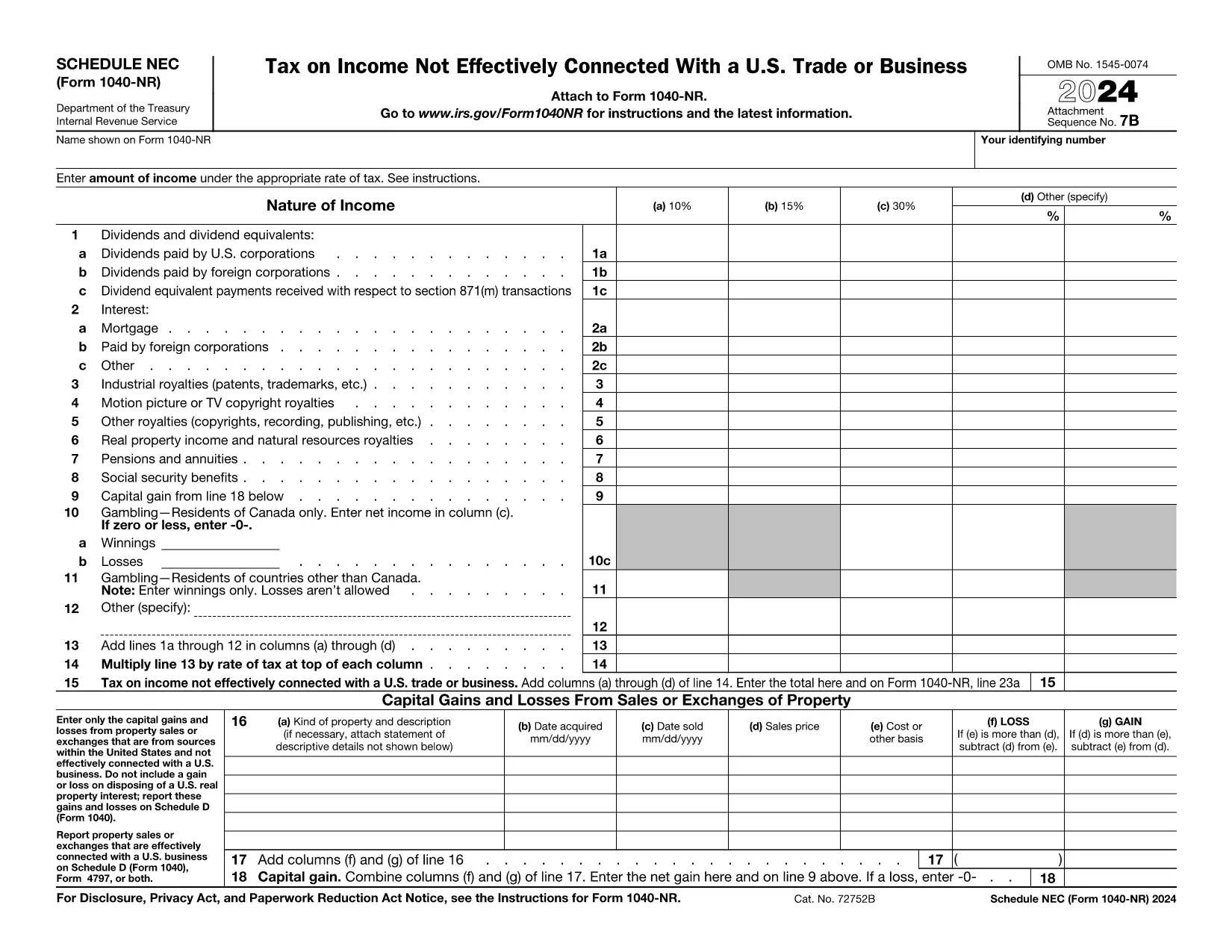
The Schedule NEC (SP) is the supplemental page attached to the Form 1040‑NR that reports income not effectively connected with a U.S. trade or business (non‑ECI). It is used by nonresident aliens to calculate the tax on U.S. source income such as dividends, interest, and certain capital gains.

This page lets you access a fillable PDF version of Schedule NEC (SP) that works directly with Formize’s online PDF Filler. No extra software is required – simply click the button, fill in your numbers, and download the completed form.

What Is Schedule NEC (SP)?

Schedule NEC (SP) separates taxable U.S. source income into three rate columns (10 %, 15 %, 30 % or a treaty‑adjusted rate). Each line corresponds to a specific type of income, allowing you to apply the correct withholding or treaty rate before the total is carried to Form 1040‑NR.

How to Fill Out Schedule NEC (SP) Online

Using Formize’s PDF filler, the process is streamlined:

  • Enter your personal information at the top of the form.
  • Select the appropriate tax‑rate column for each income item.
  • Enter the dollar amount for each line (dividends, interest, royalties, etc.).
  • The filler automatically totals each column and calculates the overall tax liability.
  • Save or download the completed PDF to attach to your Form 1040‑NR filing.

Common Mistakes to Avoid

  • Mixing ECI with non‑ECI income: Only non‑effectively connected items belong on Schedule NEC.
  • Using the wrong tax‑rate column: Verify treaty rates before selecting columns (a‑d).
  • Leaving lines blank: Even a $0 entry should be entered to keep the form complete.
  • Forgetting to attach Schedule NEC to Form 1040‑NR: The Schedule is not filed separately.

Where to Find Tax Treaty Information

The IRS maintains a list of current U.S. tax treaties. Visit the IRS Tax Treaties page to confirm the reduced rate or exemption that applies to your country of residence.

Download the Fillable PDF

Ready to start? Click the button below, let Formize load the fillable version of Schedule NEC (SP), and complete your non‑resident tax reporting in minutes.

הוראות

שאלות נפוצות
  • Who must file Schedule NEC (SP) with Form 1040‑NR?

    Any nonresident alien who has U.S. source income that is not effectively connected with a U.S. trade or business must report that income on Schedule NEC (SP).

  • What is the difference between columns (a)–(d) on the schedule?

    Columns (a)–(c) represent the standard 10 %, 15 %, and 30 % tax rates. Column (d) is for a treaty‑adjusted rate or another special rate specified by a tax treaty.

  • Can I use the same PDF for the 2023 and 2024 tax years?

    The Schedule NEC layout changes only rarely. Verify the year on the PDF header; the linked fillable version is the most recent version available.

  • Do I need to attach supporting documents for each income line?

    Generally, you do not attach separate documents to Schedule NEC, but keep the source statements (e.g., 1099‑INT, 1099‑DIV) in case the IRS requests verification.

  • How do I know which treaty rate applies to me?

    Check the IRS “U.S. Tax Treaties” webpage for the treaty between the United States and your country of residence. The treaty will specify reduced rates or exemptions for each type of income.

  • Is the fillable PDF compatible with Mac and Windows?

    Yes. Formize’s online filler works in all modern browsers on macOS, Windows, and Linux without additional software.

איך ל

כיצד למלא את Form 1040-NR Schedule NEC בחינם, באינטרנט ב-5 שלבים פשוטים:

  1. 1
    Open the Fillable Form
    Click the “Fill out this form” button on the page. The Formize PDF Filler will open in a new window.
  2. 2
    Wait for the Filler to Load
    A brief loading screen appears while the fillable PDF is prepared. This only takes a few seconds.
  3. 3
    Enter Your Information
    Type your personal details and income amounts directly into the fields. The filler automatically formats numbers and totals columns.
  4. 4
    Review and Save
    Double‑check all entries, then click “Save” or “Download” to obtain the completed Schedule NEC (SP) PDF.
  5. 5
    Attach to Form 1040‑NR
    Print or electronically attach the finished Schedule NEC to your Form 1040‑NR when filing your U.S. nonresident tax return.
Formize אפליקציית מילוי PDF
על אודות

טפסי מס

Form 1040-NR Schedule NEC הוא אחד מטפסי מס שהם מסמכים המשמשים לדיווח על הכנסות, ניכויים וחבות מס לרשות המס הרלוונטית. טפסים אלו הם חלק חיוני מתהליך הגשת המס ומשמשים כדי להבטיח שאנשים ועסקים עומדים בחוקי המס וחישוב מדויק של חובות המס שלהם.

טפסי המס הספציפיים הנדרשים עשויים להשתנות בהתאם לגורמים כגון סטטוס הגשה של אדם, מקורות הכנסה וחוקי המס במדינה. עם זאת, הנה כמה סוגים נפוצים של טפסי מס:

טפסי מס הכנסה ליחיד: טפסים אלה, כגון 1040 series בארצות הברית, משמשים על ידי יחידים לדווח על הכנסתם, לתבוע ניכויים וזיכויים ולחשב את חבות המס שלהם.

טפסי מס לעסקים: עסקים, לרבות בעלות יחידה, שותפויות, תאגידים ועצמאים, עשויים להצטרך להגיש טפסים שונים כדי לדווח על ההכנסות, ההוצאות והמסים המגיעים להם. דוגמאות כוללות את לוח ג' (רווח או הפסד מעסקים) וטופס 1120 (החזר מס הכנסה של תאגידים בארה"ב).

טפסי מס עבודה: מעסיקים נדרשים לדווח על שכר עובדים ולמנוע ולמסור מס שכר. למטרה זו נעשה שימוש בטפסים כגון W-2 (הצהרת שכר ומס) ו-941 (החזר מס רבעוני של המעסיק).

טפסי חשבון השקעות ופרישה: טפסים אלה משמשים לדיווח על הכנסות מהשקעות, רווחי הון והפסדים, כמו גם תרומות והפצות מחשבונות פרישה. דוגמאות כוללות טופס 1099-DIV (דיבידנדים והפצות) וטופס 5498 (מידע על תרומה של IRA).

טפסי מס עיזבון ומתנות: כאשר אדם נפטר או נותן מתנות משמעותיות, טפסים ספציפיים כגון טופס 706 a> (החזר מס של ארצות הברית (והעברה מדלגת דורות)) וטופס 709 (מתנה לארצות הברית (ודור- דילוג על העברה) החזר מס) משמשים לדיווח וחישוב כל מיסי עיזבון או מתנות החלים.

חשוב לציין שחוקי המס והטפסים יכולים להשתנות עם הזמן, ולכן אנשים ועסקים צריכים להתייעץ עם רשות המס הרלוונטית או לפנות לייעוץ מס מקצועי כדי להבטיח עמידה בדרישות הנוכחיות.

תכונות

מילוי PDF

הדרך הקלה ביותר למלא טפסי PDF באינטרנט

  • מלא במהירות את Form 1040-NR Schedule NEC
    מחפש דרך למלא במהירות את Form 1040-NR Schedule NEC באינטרנט? עם מילוי טופס ה-PDF המקוון שלנו בחינם, תדע כיצד לערוך ולמלא את מסמך ה-PDF הזה תוך פחות מדקה.
  • עורך PDF מקוון קל לשימוש
    נמאס לך להדפיס קבצי PDF כדי שתוכל לערוך אותם, לפני סריקה מחדש ושליחה חזרה? ערוך מסמכי PDF בחינם באינטרנט. השתמש בעורך ה-PDF המקוון שלנו כדי לחסוך בזמן ובנייר.
  • כלים מעולים, כל הפלטפורמות
    תוהה כיצד למלא את Form 1040-NR Schedule NEC ב-Mac, או אולי איך להשתמש בחומר מילוי PDF בחינם? כלי ה-PDF המקוונים שלנו פועלים בכל הפלטפורמות.
  • אחסון קבצים מאובטח
    קבצי "Form 1040-NR Schedule NEC" שהושלמו מאוחסנים במסד נתונים מאובטח המנוהל על ידי אירוח Amazon Cloud. אתה יכול למחוק את הקבצים שלך מהמערכת שלנו בכל עת. בכל מקרה, קבצים אלו נמחקים אוטומטית לאחר 24 שעות.
  • צ'אט עם Form 1040-NR Schedule NEC
    צ'אט עם "Form 1040-NR Schedule NEC" ב-Chatize שהוא עוזר לקורא PDF בחינם. שאל שאלות וקבל תשובות מ-"Form 1040-NR Schedule NEC". פשוט לחץ על הלחצן צ'אט עם מסמך למעלה.

מחק הפעלת מילוי

למחוק את הפעלת המילוי שנבחרה? במקרה זה, ההתקדמות שלך במילוי הטופס תאבד.

מחק סשן עריכה

למחוק את סשן העריכה שנבחר? במקרה זה, ההתקדמות שלך ביצירה ועריכה של הטופס תאבד.