
בחר שפה

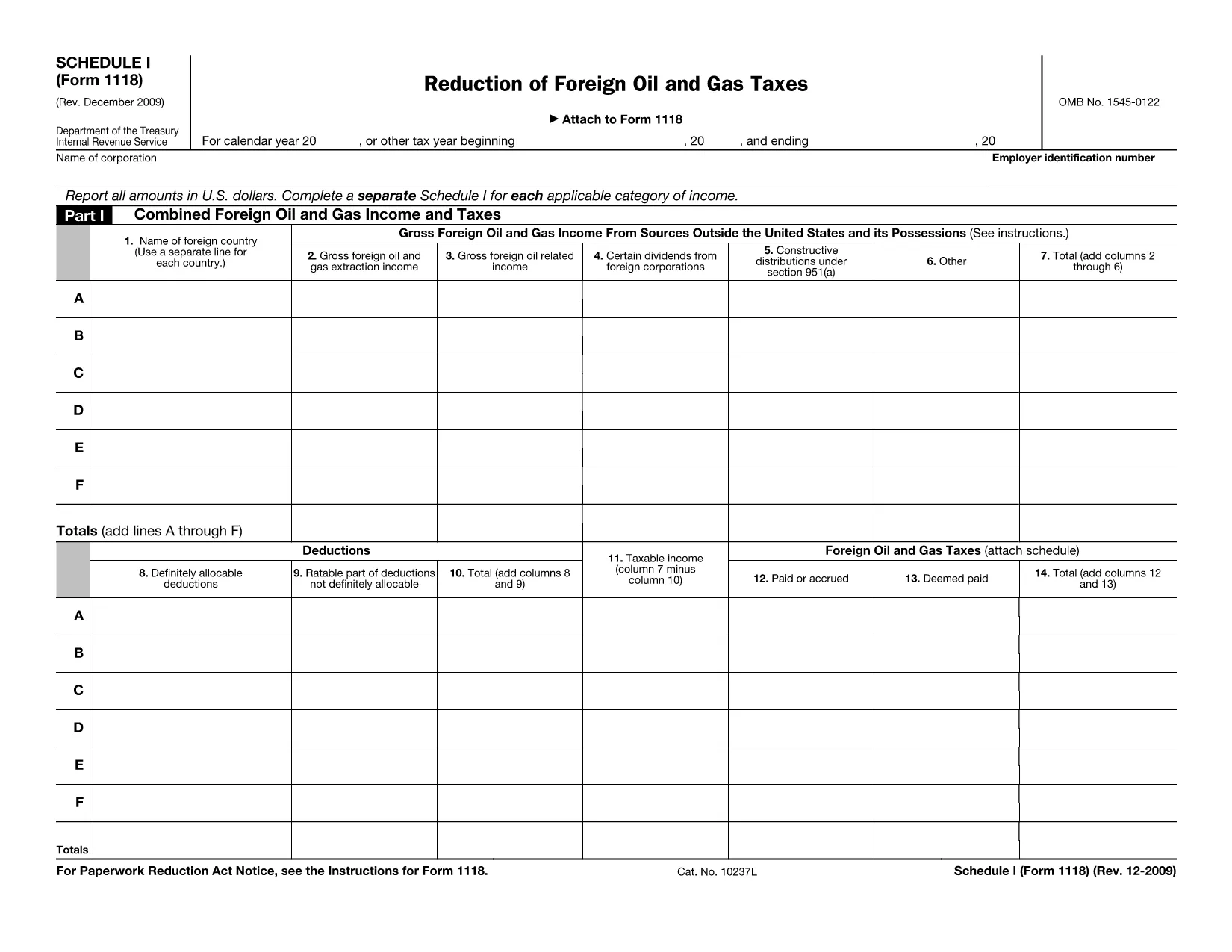
Form 1118 Schedule I – Fillable PDF

  1. מדינה ארה"ב
  2. שפה אנגלית
  3. פעילות מיסים
  4. מַחלָקָה מס הכנסה
Form 1118 Schedule I – Fillable PDF

Form 1118 Schedule I is part of the IRS Form 1118 series used by U.S. corporations to claim a foreign tax credit for oil and gas taxes paid abroad. This schedule specifically reports reductions of foreign oil and gas taxes, allowing you to calculate the credit you can apply against your U.S. tax liability.

Our fillable PDF version lets you complete Schedule I directly in your browser—no extra software needed. Simply click the "Fill out this form" button, enter your numbers, and download the completed file for your tax return.

Below you’ll find a quick guide on how to use the form, common pitfalls to watch for, and answers to the most frequent questions.

שאלות נפוצות
  • Who needs to file Form 1118 Schedule I?

    U.S. corporations that paid foreign oil and gas taxes and want to claim a reduction of those taxes as a foreign tax credit must complete Schedule I.

  • Can I use the fillable PDF for a paper return?

    Yes. After filling out the form online, download the completed PDF and attach it to your paper Form 1118 submission.

  • What is the difference between Schedule I and Schedule II?

    Schedule I deals with reductions of foreign oil and gas taxes, while Schedule II reports other foreign tax credits not related to oil and gas.

  • Do I need a tax professional to complete Schedule I?

    While many corporations can complete it themselves, complex foreign tax situations may benefit from professional advice.

  • How do I correct a mistake after I’ve downloaded the PDF?

    Open the saved PDF in the Formize PDF Filler again, make the correction, and re‑download the updated version.

  • Is there a filing deadline for Schedule I?

    Schedule I must be filed with Form 1118 by the corporate tax return due date, including extensions.

  • What supporting documents should I keep?

    Retain foreign tax payment statements, oil and gas production reports, and any calculations used to determine the reduction.

איך ל

כיצד למלא את Form 1118 Schedule I בחינם, באינטרנט ב-5 שלבים פשוטים:

  1. 1
    Click the Fill‑out Button
    On the page, locate the blue “Fill out this form” button and click it. This launches the Formize PDF Filler app.
  2. 2
    Wait for the Formize PDF Filler to Load
    The filler loads a secure, cloud‑based editor. This usually takes a few seconds.
  3. 3
    Enter Your Information
    Type directly into each field of Schedule I. Use the instructions on the form to know which numbers belong in each line.
  4. 4
    Review and Validate
    Double‑check every entry for accuracy. The filler will highlight any required fields you missed.
  5. 5
    Save or Download the Completed Form
    When you’re satisfied, click “Save” to store the file in your Formize account or “Download” to get a PDF copy you can attach to your tax return.
Formize אפליקציית מילוי PDF
על אודות

טפסי מס הכנסה (IRS).

Form 1118 Schedule I הוא אחד מטפסי המס הרשמיים המשמשים בארצות הברית כדי לדווח על הכנסות, לתבוע ניכויים וזיכויים, לחשב חבות מס ולמילוי התחייבויות אחרות הקשורות למס. ה-IRS היא הסוכנות הפדרלית האחראית על ניהול ואכיפת חוקי ההכנסות הפנימיות בארצות הברית.

להלן כמה דוגמאות לטפסים של מס הכנסה:

טופס 1040: זהו טופס החזר מס הכנסה אישי ראשוני המשמש את רוב משלמי המסים. הוא משמש לדיווח על סוגים שונים של הכנסות, לתביעת ניכויים וזיכויים, לחישוב חבות מס, ולקבוע האם הנישום חייב במס נוסף או זכאי להחזר.

טופס 1099: ישנן וריאציות שונות של טופס 1099, כגון 1099-MISC, 1099-INT, 1099-DIV וכו'. טפסים אלו משמשים לדיווח על הכנסות שקיבלו אנשים פרטיים או עסקים ממקורות שונים מלבד עבודה, כגון עבודה עצמאית הכנסה, הכנסה מריבית, הכנסה מדיבידנד והכנסה מדמי שכירות.

טופס W-2: טופס זה משמש את המעסיקים לדיווח על שכר ששולם לעובדים ועל המסים נמכו משכרם. עובדים משתמשים במידע בטופס W-2 כדי להשלים את החזרי המס האישיים שלהם.

טופס 941: מעסיקים משתמשים בטופס זה כדי לדווח על מיסי עבודה, לרבות מס הכנסה פדרלי במקור, מס ביטוח לאומי ומס Medicare, עבור העובדים שלהם.

טופס 1065: טופס זה משמש שותפויות לדיווח על הכנסות, ניכויים וחבות מס. שותפויות עצמן אינן משלמות מס הכנסה; במקום זאת, השותפים מדווחים על חלקם בהכנסות השותפות בהחזרי המס האישיים שלהם.

טופס 1120: זהו טופס החזר מס הכנסה לחברות המשמש את תאגידי C לדיווח על הכנסותיהם, ניכויים, וחבות מס.

טופס 990: טופס זה משמש ארגונים פטורים ממס, כגון עמותות וארגוני צדקה, כדי לדווח על המידע הפיננסי שלהם, פעילויותיהם ועמידתם בחוקי המס.

טופס 8862: טופס זה משמש נישומים אשר תבעו בעבר את זיכוי מס הכנסה (EITC) אבל אסרו את זה, ועכשיו רוצים לתבוע את זה שוב.

אלו הן רק כמה דוגמאות לטפסי מס הכנסה רבים שקיימים למילוי התחייבויות שונות הקשורות למס. הטפסים הספציפיים הנדרשים לאדם או לעסק תלויים בנסיבות הייחודיות, מקורות ההכנסה והניכויים שלהם. מומלץ להתייעץ באתר הרשמי של מס הכנסה (www.irs.gov) או לפנות לייעוץ מס מקצועי כדי לקבל מידע מדויק ועדכני לגבי מס הכנסה ספציפי טפסים הרלוונטיים למצב המס שלך.

תכונות

מילוי PDF

הדרך הקלה ביותר למלא טפסי PDF באינטרנט

  • מלא במהירות את Form 1118 Schedule I
    מחפש דרך למלא במהירות את Form 1118 Schedule I באינטרנט? עם מילוי טופס ה-PDF המקוון שלנו בחינם, תדע כיצד לערוך ולמלא את מסמך ה-PDF הזה תוך פחות מדקה.
  • עורך PDF מקוון קל לשימוש
    נמאס לך להדפיס קבצי PDF כדי שתוכל לערוך אותם, לפני סריקה מחדש ושליחה חזרה? ערוך מסמכי PDF בחינם באינטרנט. השתמש בעורך ה-PDF המקוון שלנו כדי לחסוך בזמן ובנייר.
  • כלים מעולים, כל הפלטפורמות
    תוהה כיצד למלא את Form 1118 Schedule I ב-Mac, או אולי איך להשתמש בחומר מילוי PDF בחינם? כלי ה-PDF המקוונים שלנו פועלים בכל הפלטפורמות.
  • אחסון קבצים מאובטח
    קבצי "Form 1118 Schedule I" שהושלמו מאוחסנים במסד נתונים מאובטח המנוהל על ידי אירוח Amazon Cloud. אתה יכול למחוק את הקבצים שלך מהמערכת שלנו בכל עת. בכל מקרה, קבצים אלו נמחקים אוטומטית לאחר 24 שעות.
  • צ'אט עם Form 1118 Schedule I
    צ'אט עם "Form 1118 Schedule I" ב-Chatize שהוא עוזר לקורא PDF בחינם. שאל שאלות וקבל תשובות מ-"Form 1118 Schedule I". פשוט לחץ על הלחצן צ'אט עם מסמך למעלה.

מחק הפעלת מילוי

למחוק את הפעלת המילוי שנבחרה? במקרה זה, ההתקדמות שלך במילוי הטופס תאבד.

מחק סשן עריכה

למחוק את סשן העריכה שנבחר? במקרה זה, ההתקדמות שלך ביצירה ועריכה של הטופס תאבד.