בחר שפה

IRS Form 14335 – VITA/TCE Grant Contact Information (Fillable PDF)

  1. מדינה ארה"ב
  2. שפה אנגלית
  3. פעילות מיסים
  4. מַחלָקָה מס הכנסה
IRS Form 14335 – VITA/TCE Grant Contact Information (Fillable PDF)

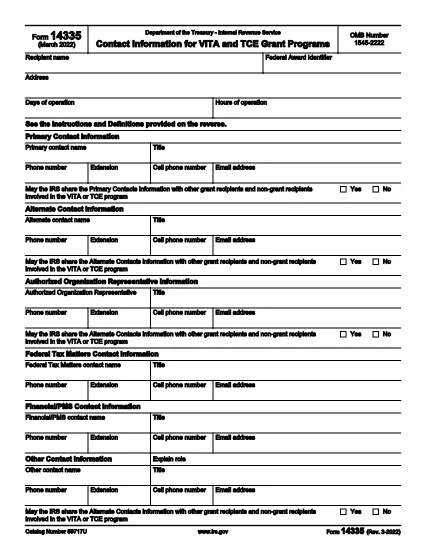
Form 14335 is the official IRS document used by VITA (Volunteer Income Tax Assistance) and TCE (Tax Counseling for the Elderly) grant programs to collect contact information for individuals who can answer questions about the grant. This fillable PDF lets you enter the required details quickly, save a copy for your records, and submit the form electronically.

What Is IRS Form 14335?

The form requests the names, phone numbers, email addresses, and mailing addresses of a primary contact and at least one alternate contact. It also includes a brief definition of each contact’s role and a certification section for the grant recipient.

How to Fill Out Form 14335 Online

Instead of downloading the PDF and opening a separate editor, simply click the "Fill out this form" button on this page. The Formize PDF Filler app will load directly in your browser, providing a seamless, fillable experience.

  • Step 1: Click the button and wait for the filler to appear.
  • Step 2: Complete each field—required fields are marked with an asterisk.
  • Step 3: Review your entries for accuracy.
  • Step 4: Click Save to download a copy or Submit if the grant program offers direct upload.

Common Mistakes to Avoid

  • Leaving the alternate contact section blank – the IRS requires at least one backup contact.
  • Using outdated phone numbers or email addresses.
  • Forgetting to sign the certification section; an unsigned form will be rejected.
  • Entering information that does not match the grant award documentation.

Where to Submit the Completed Form

After filling out Form 14335, follow the instructions provided in your grant award letter. Typically you will either:

  1. Email the PDF to the designated grant administrator.
  2. Upload it through the grant’s online portal.
  3. Mail a printed copy to the address listed in the award notice.

Download the Fillable PDF

If you prefer to work offline, you can still download the official IRS PDF version below. The file is the same document that powers the online filler.

Download IRS Form 14335 (PDF)

שאלות נפוצות
  • What is the purpose of IRS Form 14335?

    Form 14335 collects contact details for individuals who can answer questions about a VITA or TCE grant. It ensures the IRS can reach the right people if clarification is needed.

  • Do I need to provide both a primary and an alternate contact?

    Yes. The IRS requires at least one primary contact and one alternate contact to guarantee continuity of communication.

  • Can I fill out Form 14335 on a mobile device?

    Absolutely. The Formize PDF Filler is responsive and works on smartphones, tablets, and desktop browsers.

  • Is there a filing fee for Form 14335?

    No. Form 14335 is a free, government‑provided document used solely for grant‑related contact information.

  • What should I do if I make a mistake after submitting?

    Contact the grant administrator immediately and provide a corrected version of the form. Keep a signed copy for your records.

  • Do I need to print and mail the form?

    Only if the grant award instructions specify a paper submission. Many programs now accept an electronic PDF upload or email.

  • How long should I keep a copy of the completed form?

    Retain the signed PDF for at least three years, the same period required for most tax‑related records.

  • Is the PDF downloadable if I prefer offline editing?

    Yes. Use the direct download link at the bottom of the page to obtain the official IRS PDF.

איך ל

כיצד למלא את Form 14335 בחינם, באינטרנט ב-5 שלבים פשוטים:

  1. 1
    Click the Fill Out Button
    Press the “Fill out this form” button on this page. The Formize PDF Filler will open in a new browser window.
  2. 2
    Wait for the Filler to Load
    A short loading indicator will appear while the fillable version of Form 14335 is prepared.
  3. 3
    Enter Your Information
    Complete each required field. Use the tab key or click to move between sections.
  4. 4
    Save or Submit
    When finished, click “Save” to download a copy for your records, or click “Submit” if the grant program allows direct upload.
  5. 5
    Confirm Submission
    Check your email for a confirmation message or follow the grant’s instructions to ensure the form was received.
Formize אפליקציית מילוי PDF
על אודות

טפסי מס

Form 14335 הוא אחד מטפסי מס שהם מסמכים המשמשים לדיווח על מידע הקשור למיסים לרשות המס הרלוונטית. ישנם סוגים שונים של טפסי מס, כולל טפסי מס פדרליים, מדינתיים ומקומיים, שיכולים להשתנות בהתאם לנסיבות ולמיקומו של משלם המסים.

תכונות

מילוי PDF

הדרך הקלה ביותר למלא טפסי PDF באינטרנט

  • מלא במהירות את Form 14335
    מחפש דרך למלא במהירות את Form 14335 באינטרנט? עם מילוי טופס ה-PDF המקוון שלנו בחינם, תדע כיצד לערוך ולמלא את מסמך ה-PDF הזה תוך פחות מדקה.
  • עורך PDF מקוון קל לשימוש
    נמאס לך להדפיס קבצי PDF כדי שתוכל לערוך אותם, לפני סריקה מחדש ושליחה חזרה? ערוך מסמכי PDF בחינם באינטרנט. השתמש בעורך ה-PDF המקוון שלנו כדי לחסוך בזמן ובנייר.
  • כלים מעולים, כל הפלטפורמות
    תוהה כיצד למלא את Form 14335 ב-Mac, או אולי איך להשתמש בחומר מילוי PDF בחינם? כלי ה-PDF המקוונים שלנו פועלים בכל הפלטפורמות.
  • אחסון קבצים מאובטח
    קבצי "Form 14335" שהושלמו מאוחסנים במסד נתונים מאובטח המנוהל על ידי אירוח Amazon Cloud. אתה יכול למחוק את הקבצים שלך מהמערכת שלנו בכל עת. בכל מקרה, קבצים אלו נמחקים אוטומטית לאחר 24 שעות.
  • צ'אט עם Form 14335
    צ'אט עם "Form 14335" ב-Chatize שהוא עוזר לקורא PDF בחינם. שאל שאלות וקבל תשובות מ-"Form 14335". פשוט לחץ על הלחצן צ'אט עם מסמך למעלה.

מחק הפעלת מילוי

למחוק את הפעלת המילוי שנבחרה? במקרה זה, ההתקדמות שלך במילוי הטופס תאבד.

מחק סשן עריכה

למחוק את סשן העריכה שנבחר? במקרה זה, ההתקדמות שלך ביצירה ועריכה של הטופס תאבד.