
בחר שפה

IRS Form 14392 – Continuing Education Waiver (Fillable PDF)

  1. מדינה ארה"ב
  2. שפה אנגלית
  3. פעילות מיסים
  4. מַחלָקָה מס הכנסה
IRS Form 14392 – Continuing Education Waiver (Fillable PDF)

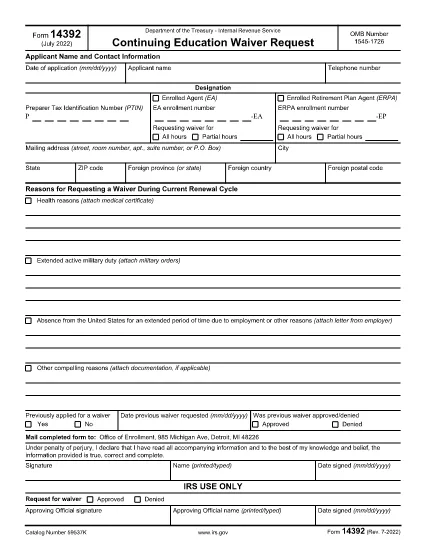
Form 14392 is the official Continuing Education Waiver Request used by tax professionals who need an exemption from the IRS’s continuing education requirements. The form is available as a fillable PDF, so you can complete it online, save a copy, and submit it without printing.

What Is Form 14392?

This IRS form allows eligible individuals to request a waiver for the annual continuing education (CE) mandate. It is typically used by:

  • Enrolled agents who meet specific hardship criteria
  • Tax practitioners with documented medical or religious exemptions
  • Those who have completed an equivalent state‑approved program

How to Complete the Fillable PDF

Instead of downloading the PDF and opening a separate editor, simply click the "Fill out this form" button on this page. The Formize PDF Filler app will load instantly, providing a smooth, browser‑based experience.

Common Mistakes & Tips

  • Missing signatures: The waiver is invalid without a handwritten signature or an authorized electronic signature.
  • Incorrect tax year: Ensure the year on the form matches the tax period you are requesting a waiver for.
  • Incomplete supporting documents: Attach any medical or religious documentation before submitting.

Where to Submit the Waiver

After completing the form, you can:

  • Print, sign, and mail it to the address listed in the instructions.
  • Upload the signed PDF through the IRS e‑services portal (if you have an account).

Download the Official PDF

If you prefer the original IRS version, you can download it directly from the link below. The file is the same document that the Formize filler uses.

Download IRS Form 14392 (PDF)

שאלות נפוצות
  • Who is eligible for a Form 14392 waiver?

    Enrolled agents, CPAs, and other tax practitioners who have a documented medical, religious, or hardship reason that prevents them from completing the standard CE requirements.

  • Can I submit Form 14392 electronically?

    Yes. After completing and signing the fillable PDF, you can upload the file through the IRS e‑services portal if you have an active account.

  • Do I need to attach supporting documents?

    Supporting documentation (medical letters, religious statements, etc.) must be attached before you submit the waiver. Failure to include them will delay processing.

  • How long does the IRS take to process the waiver?

    Processing times vary, but most waivers are reviewed within 30‑45 days after receipt of a complete application.

  • Is there a fee to file Form 14392?

    No. The IRS does not charge a fee for submitting a Continuing Education Waiver request.

  • What happens if I make a mistake on the form?

    The IRS will reject the submission and request a corrected form. Review all entries carefully and use the "Common Mistakes & Tips" section above.

איך ל

כיצד למלא את Form 14392 בחינם, באינטרנט ב-5 שלבים פשוטים:

  1. 1
    Open the Fillable Form
    Click the "Fill out this form" button on this page. The Formize PDF Filler will open in your browser.
  2. 2
    Wait for the Loader
    Allow a few seconds for the filler app to load all form fields. No download or installation is required.
  3. 3
    Enter Your Information
    Type directly into each field, using the TAB key to navigate. All required fields are marked with an asterisk (*).
  4. 4
    Save and Sign
    When finished, click "Save" to download a copy, then add your handwritten or electronic signature as required.
  5. 5
    Submit the Waiver
    Print and mail the signed PDF, or upload it via the IRS e‑services portal, following the instructions on the form.
Formize אפליקציית מילוי PDF
על אודות

טפסי מס

Form 14392 הוא אחד מטפסי מס שהם מסמכים המשמשים לדיווח על הכנסות, ניכויים וחבות מס לרשות המס הרלוונטית. טפסים אלו הם חלק חיוני מתהליך הגשת המס ומשמשים כדי להבטיח שאנשים ועסקים עומדים בחוקי המס וחישוב מדויק של חובות המס שלהם.

טפסי המס הספציפיים הנדרשים עשויים להשתנות בהתאם לגורמים כגון סטטוס הגשה של אדם, מקורות הכנסה וחוקי המס במדינה. עם זאת, הנה כמה סוגים נפוצים של טפסי מס:

טפסי מס הכנסה ליחיד: טפסים אלה, כגון 1040 series בארצות הברית, משמשים על ידי יחידים לדווח על הכנסתם, לתבוע ניכויים וזיכויים ולחשב את חבות המס שלהם.

טפסי מס לעסקים: עסקים, לרבות בעלות יחידה, שותפויות, תאגידים ועצמאים, עשויים להצטרך להגיש טפסים שונים כדי לדווח על ההכנסות, ההוצאות והמסים המגיעים להם. דוגמאות כוללות את לוח ג' (רווח או הפסד מעסקים) וטופס 1120 (החזר מס הכנסה של תאגידים בארה"ב).

טפסי מס עבודה: מעסיקים נדרשים לדווח על שכר עובדים ולמנוע ולמסור מס שכר. למטרה זו נעשה שימוש בטפסים כגון W-2 (הצהרת שכר ומס) ו-941 (החזר מס רבעוני של המעסיק).

טפסי חשבון השקעות ופרישה: טפסים אלה משמשים לדיווח על הכנסות מהשקעות, רווחי הון והפסדים, כמו גם תרומות והפצות מחשבונות פרישה. דוגמאות כוללות טופס 1099-DIV (דיבידנדים והפצות) וטופס 5498 (מידע על תרומה של IRA).

טפסי מס עיזבון ומתנות: כאשר אדם נפטר או נותן מתנות משמעותיות, טפסים ספציפיים כגון טופס 706 a> (החזר מס של ארצות הברית (והעברה מדלגת דורות)) וטופס 709 (מתנה לארצות הברית (ודור- דילוג על העברה) החזר מס) משמשים לדיווח וחישוב כל מיסי עיזבון או מתנות החלים.

חשוב לציין שחוקי המס והטפסים יכולים להשתנות עם הזמן, ולכן אנשים ועסקים צריכים להתייעץ עם רשות המס הרלוונטית או לפנות לייעוץ מס מקצועי כדי להבטיח עמידה בדרישות הנוכחיות.

תכונות

מילוי PDF

הדרך הקלה ביותר למלא טפסי PDF באינטרנט

  • מלא במהירות את Form 14392
    מחפש דרך למלא במהירות את Form 14392 באינטרנט? עם מילוי טופס ה-PDF המקוון שלנו בחינם, תדע כיצד לערוך ולמלא את מסמך ה-PDF הזה תוך פחות מדקה.
  • עורך PDF מקוון קל לשימוש
    נמאס לך להדפיס קבצי PDF כדי שתוכל לערוך אותם, לפני סריקה מחדש ושליחה חזרה? ערוך מסמכי PDF בחינם באינטרנט. השתמש בעורך ה-PDF המקוון שלנו כדי לחסוך בזמן ובנייר.
  • כלים מעולים, כל הפלטפורמות
    תוהה כיצד למלא את Form 14392 ב-Mac, או אולי איך להשתמש בחומר מילוי PDF בחינם? כלי ה-PDF המקוונים שלנו פועלים בכל הפלטפורמות.
  • אחסון קבצים מאובטח
    קבצי "Form 14392" שהושלמו מאוחסנים במסד נתונים מאובטח המנוהל על ידי אירוח Amazon Cloud. אתה יכול למחוק את הקבצים שלך מהמערכת שלנו בכל עת. בכל מקרה, קבצים אלו נמחקים אוטומטית לאחר 24 שעות.
  • צ'אט עם Form 14392
    צ'אט עם "Form 14392" ב-Chatize שהוא עוזר לקורא PDF בחינם. שאל שאלות וקבל תשובות מ-"Form 14392". פשוט לחץ על הלחצן צ'אט עם מסמך למעלה.

מחק הפעלת מילוי

למחוק את הפעלת המילוי שנבחרה? במקרה זה, ההתקדמות שלך במילוי הטופס תאבד.

מחק סשן עריכה

למחוק את סשן העריכה שנבחר? במקרה זה, ההתקדמות שלך ביצירה ועריכה של הטופס תאבד.