
בחר שפה

IRS Form 433‑B – Fillable PDF Collection Statement for Businesses

  1. מדינה ארה"ב
  2. שפה אנגלית
  3. פעילות מיסים
  4. מַחלָקָה מס הכנסה
IRS Form 433‑B – Fillable PDF Collection Statement for Businesses

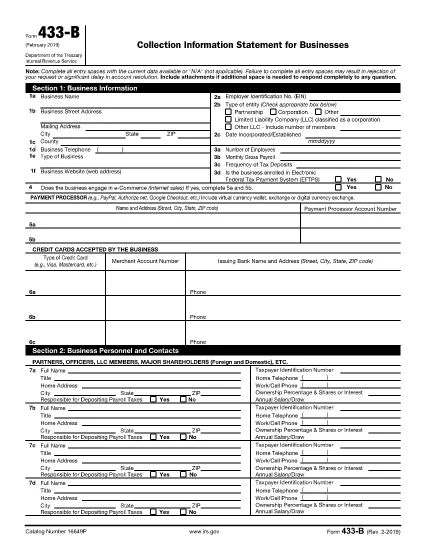
Form 433‑B, Collection Information Statement for Businesses, is the IRS’s standard form for gathering detailed financial data from corporations, partnerships, LLCs, and other business entities that owe tax. Completing this form accurately is essential when you are pursuing an Offer in Compromise, requesting a payment plan, or negotiating any other tax‑relief option.

What Is Form 433‑B and Who Needs It?

The form captures business information, assets, income, expenses, and the minimum offer amount the IRS will accept. It is required for:

  • Corporations (C‑corp, S‑corp)
  • Partnerships
  • LLCs taxed as corporations or partnerships
  • Any other entity with unpaid federal tax liabilities

Step‑by‑Step Guide to Fill Out Form 433‑B

Follow these simple steps using Formize’s built‑in PDF filler:

  1. Open the Fillable Form – Click the “Fill out this form” button on this page. The Formize PDF Filler loads automatically.
  2. Enter Business Information – Provide the legal name, EIN, address, phone, and a brief description of your business.
  3. Provide Officer/Owner Details – List each partner, officer, or member with name, title, ownership percentage, and salary.
  4. Report Assets – Include cash, bank accounts, real‑estate, equipment, vehicles, and any other valuable assets.
  5. Report Income & Expenses – Fill in monthly gross receipts, cost of goods sold, payroll, rent, utilities, and other operating costs.
  6. Calculate Minimum Offer – The form automatically totals the data; use the built‑in calculator to see the IRS‑required minimum offer amount.
  7. Review & Sign – Double‑check every field, then add the authorized signature and date.

Common Mistakes to Avoid

  • Leaving required fields blank – the IRS will reject the form.
  • Using outdated asset valuations – provide current market values.
  • Misclassifying the business entity – select the correct box for corporation, partnership, or LLC.
  • Forgetting to attach supporting documents – statements, depreciation schedules, and loan agreements are often required.

How to Submit the Completed Form

Once you finish, you have three options:

  • Download PDF and mail it to the IRS address indicated in the instructions.
  • Print & fax a hard copy to the appropriate IRS office.
  • Save securely and upload it through your IRS online account if you are working with a tax professional.

Using Formize ensures the PDF stays fillable and printable without losing formatting.

שאלות נפוצות
  • What types of businesses must use Form 433‑B?

    Corporations, partnerships, and LLCs (taxed as corporations or partnerships) with unpaid federal tax liabilities are required to complete Form 433‑B.

  • Can I use Form 433‑B for a sole proprietorship?

    No. Sole proprietors should use Form 433‑A, the collection statement for wage earners and self‑employed individuals.

  • Is the PDF on Formize really fillable?

    Yes. The PDF retains all fillable fields, and the Formize online filler lets you type, save, and print without altering the original layout.

  • Do I need to attach supporting documents?

    Attach recent bank statements, asset appraisals, loan balances, and depreciation schedules as referenced in the form’s instructions.

  • How long does the IRS take to process a completed Form 433‑B?

    Processing time varies, but expect 30‑60 days for the IRS to review the information and respond to your request.

  • Can I submit the form electronically?

    The IRS does not accept an electronic upload for Form 433‑B directly. You must mail or fax the printed form, or provide it to your tax professional for electronic submission through the IRS portal.

  • What happens if I make a mistake on the form?

    Correct any errors before signing. If you discover a mistake after submission, send a revised form with “Amended” noted at the top of the first page.

איך ל

כיצד למלא את IRS Form 433-B בחינם, באינטרנט ב-5 שלבים פשוטים:

  1. 1
    Open the Fillable Form
    Click the “Fill out this form” button on this page. The Formize PDF Filler loads in your browser, no download required.
  2. 2
    Enter Business Information
    Type the legal name, EIN, address, phone number, and a short description of your business into the highlighted fields.
  3. 3
    Add Asset and Income Details
    Provide current values for cash, bank accounts, real‑estate, equipment, and vehicles. Then enter monthly income and expense figures.
  4. 4
    Review Calculations
    Use the built‑in calculator to verify the minimum offer amount and ensure all totals are correct.
  5. 5
    Submit or Print
    When you’re satisfied, click “Save PDF” to download a completed copy, or print directly from the filler to mail to the IRS.
Formize אפליקציית מילוי PDF
על אודות

טפסי מס

IRS Form 433-B הוא אחד מטפסי מס שהם מסמכים המשמשים לדיווח מידע על הכנסה, ניכויים וחבות מס של אדם פרטי או עסק לרשות המס הרלוונטית. טפסים אלו נחוצים כדי לעמוד בחוקי המס ולמלא חובות מס. טפסי מס משתנים בהתאם למדינה ולדרישות המס הספציפיות הקיימות. להלן כמה סוגים נפוצים של טפסי מס:

טופסי מס פרטניים: טפסים אלה משמשים משלמי מס בודדים לדיווח על הכנסתם האישית ולתבוע ניכויים, זיכויים ופטורים. דוגמאות כוללות את טופס 1040 בארצות הברית או את טופס החזר מס להערכה עצמית בבריטניה.

טופסי מס לעסקים: טופסי מס לעסקים משמשים חברות, שותפויות או עצמאים כדי לדווח על הכנסות העסק, ההוצאות ומידע אחר הקשור למס. דוגמאות כוללות את הטופס Schedule C (רווח או הפסד מעסקים) בארצות הברית או טופס CT600 (החזר מס חברה) בבריטניה.

טפסי מס שכר: טפסים אלה משמשים מעסיקים לדיווח על השכר, המשכורות והמסים שנמשכו מתלושי השכר של העובדים שלהם. דוגמאות כוללות טופס W-2 בארצות הברית או טופס P60 בבריטניה.

טפסי מס מכירה: טפסי מס מכירה משמשים עסקים לדיווח ולשליחת מס מכירה שנגבה על סחורות או שירותים החייבים במס. טפסי מס המכירה הספציפיים משתנים לפי תחום שיפוט.

טפסי מס ערך מוסף (מע"מ): טפסי מע"מ משמשים במדינות המטילות מס ערך מוסף כדי לדווח ולהעביר מע"מ שנגבה על מכירות ולתבוע זיכויים במע"מ על רכישות. דוגמאות כוללות את טפסי החזרי מע"מ המשמשים במדינות רבות.

טפסי מס משוער: טפסי מס משוער משמשים לדיווח ולשלם מסים משוערים על הכנסה שאינה כפופה לניכוי במקור, כגון הכנסה מעצמאים או הכנסה מהשקעות.

אלו הן רק כמה דוגמאות לטפסי מס רבים שעשויים להתקיים. הטפסים הספציפיים הנדרשים תלויים בחוקי המס ובתקנות במדינה או בשטח השיפוט שלך. חשוב לעיין בהנחיות רשות המסים או לפנות לייעוץ מקצועי כדי לקבוע אילו טפסים מתאימים למצבך.

תכונות

מילוי PDF

הדרך הקלה ביותר למלא טפסי PDF באינטרנט

  • מלא במהירות את IRS Form 433-B
    מחפש דרך למלא במהירות את IRS Form 433-B באינטרנט? עם מילוי טופס ה-PDF המקוון שלנו בחינם, תדע כיצד לערוך ולמלא את מסמך ה-PDF הזה תוך פחות מדקה.
  • עורך PDF מקוון קל לשימוש
    נמאס לך להדפיס קבצי PDF כדי שתוכל לערוך אותם, לפני סריקה מחדש ושליחה חזרה? ערוך מסמכי PDF בחינם באינטרנט. השתמש בעורך ה-PDF המקוון שלנו כדי לחסוך בזמן ובנייר.
  • כלים מעולים, כל הפלטפורמות
    תוהה כיצד למלא את IRS Form 433-B ב-Mac, או אולי איך להשתמש בחומר מילוי PDF בחינם? כלי ה-PDF המקוונים שלנו פועלים בכל הפלטפורמות.
  • אחסון קבצים מאובטח
    קבצי "IRS Form 433-B" שהושלמו מאוחסנים במסד נתונים מאובטח המנוהל על ידי אירוח Amazon Cloud. אתה יכול למחוק את הקבצים שלך מהמערכת שלנו בכל עת. בכל מקרה, קבצים אלו נמחקים אוטומטית לאחר 24 שעות.
  • צ'אט עם IRS Form 433-B
    צ'אט עם "IRS Form 433-B" ב-Chatize שהוא עוזר לקורא PDF בחינם. שאל שאלות וקבל תשובות מ-"IRS Form 433-B". פשוט לחץ על הלחצן צ'אט עם מסמך למעלה.

מחק הפעלת מילוי

למחוק את הפעלת המילוי שנבחרה? במקרה זה, ההתקדמות שלך במילוי הטופס תאבד.

מחק סשן עריכה

למחוק את סשן העריכה שנבחר? במקרה זה, ההתקדמות שלך ביצירה ועריכה של הטופס תאבד.