
בחר שפה

Form 720‑CS Fillable PDF – Bulk Transport Excise Tax Return

  1. מדינה ארה"ב
  2. שפה אנגלית
  3. פעילות מיסים
  4. מַחלָקָה מס הכנסה
Form 720‑CS Fillable PDF – Bulk Transport Excise Tax Return

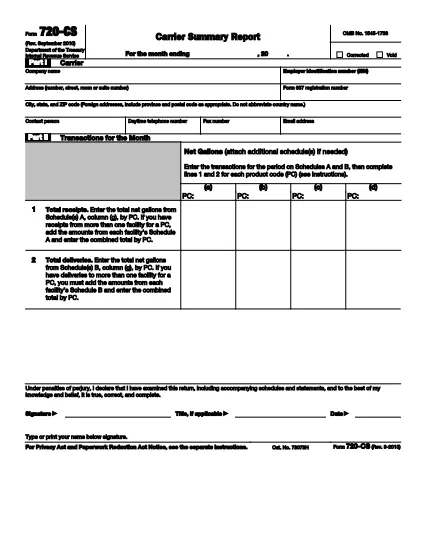
The IRS Form 720‑CS is the official quarterly report used by bulk‑transport carriers, pipelines, and barge owners to disclose receipts and disbursements of liquid products. With Formize’s online PDF filler, you can fill, sign, and save the form without printing a single page.

What Is Form 720‑CS?

Form 720‑CS provides detailed guidance for reporting excise tax obligations on liquid product transportation. It is required for carriers that have designated storage locations and Facility Control Numbers (FCNs). The form must be filed electronically through the Excise Summary Terminal Activity Reporting System (ExSTARS).

How to Complete the Fillable 720‑CS Form

Follow the simple steps below to finish the form online. All fields are interactive, and validation helps you avoid errors.

  • Click the **"Fill out this form"** button on this page.
  • Wait a few seconds while the Formize PDF Filler app loads.
  • Enter the required information in each highlighted field (e.g., EIN, FCN, monthly receipts).
  • Use the built‑in calculator to total your tax liability.
  • Save, download, or e‑sign the form directly within the app.

Common Mistakes to Avoid

  • Hand‑written entries: The form must be typed; handwritten PDFs are rejected.
  • Missing FCN: Verify your Facility Control Number before you start.
  • Incorrect quarter: Double‑check the quarter‑ending date; the IRS rejects mismatched periods.
  • Forgot to sign: Use Formize’s e‑signature feature to make the filing legally binding.

Where to Submit Your Completed Form

After you finish, submit the form through the IRS’s ExSTARS portal. Keep a copy of the confirmation receipt for your records. If you need to mail a paper copy, follow the instructions in the PDF’s “Submission” section.

הוראות

שאלות נפוצות
  • Who must file Form 720‑CS?

    Any bulk‑transport carrier, pipeline, or barge owner that handles liquid products and has a Facility Control Number (FCN) is required to file Form 720‑CS each quarter.

  • Can I file Form 720‑CS on paper?

    Paper filing is allowed only as a backup method. The IRS strongly encourages electronic filing through ExSTARS for faster processing.

  • Is the Formize filler free to use?

    Yes, Formize offers a free online filler for IRS PDFs. You can fill, sign, and download the form at no cost.

  • What happens if I make a mistake on the form?

    Mistakes can delay processing and may result in penalties. Use the validation checks in Formize and review the PDF’s instruction sheet before submitting.

  • How long should I keep a copy of my filed Form 720‑CS?

    Retain the completed form and the electronic receipt for at least three years, as required by IRS record‑keeping rules.

  • Do I need a digital signature for the form?

    Yes. An electronic signature is legally binding for Form 720‑CS when using a certified PDF filler like Formize.

  • Where can I find the official instructions for Form 720‑CS?

    The official instructions are included in the PDF linked below and are also available on the IRS website.

איך ל

כיצד למלא את Form 720‑CS בחינם, באינטרנט ב-4 שלבים פשוטים:

  1. 1
    Open the Fillable Form
    Click the **"Fill out this form"** button on the page. The Formize PDF Filler will open in a new window.
  2. 2
    Load the PDF
    Wait a few seconds while the fillable PDF loads. All fields become editable automatically.
  3. 3
    Enter Your Information
    Complete each section—EIN, FCN, quarterly receipts, and tax calculations—using the on‑screen prompts.
  4. 4
    Sign and Save
    Use the built‑in e‑signature tool, then download or save the completed form to your device.
Formize אפליקציית מילוי PDF
על אודות

טפסי מס פדרליים

Form 720‑CS הוא אחד מטפסי המס הפדרליים שהם מסמכים המשמשים לדיווח ולהגשת מס הכנסה פדרלי ל-Internal Revenue Service (IRS) בארצות הברית. טפסים אלו משמשים אנשים פרטיים, עסקים וארגונים כדי לדווח על הכנסותיהם, הניכויים ומידע רלוונטי אחר הדרוש לחישוב חבות המס הפדרלית שלהם.

טופס המס הפדרלי הנפוץ ביותר הוא טופס 1040, המשמש משלמי מס בודדים לדיווח על מס ההכנסה האישי שלהם. טפסים אחרים הנפוצים כוללים את טופס 1065 לשותפויות, טופס 1120 עבור תאגידים, וטופס 990 עבור ארגונים פטורים ממס.

טפסי מס פדרליים מחייבים בדרך כלל משלמי המסים לדווח על מקורות הכנסה שונים, כגון שכר, משכורות וטיפים, כמו גם הכנסות מהשקעות, נכסים להשכרה ומקורות אחרים. הטפסים גם מאפשרים לנישומים לתבוע ניכויים וזיכויים עבור הוצאות שונות, כגון תרומות לצדקה, ריבית על משכנתא והוצאות בריאות.

חשוב להגיש טפסי מס פדרליים במדויק ובזמן, שכן אי ביצוע זה עלול לגרום לקנסות וחיובי ריבית מ-IRS.

תכונות

מילוי PDF

הדרך הקלה ביותר למלא טפסי PDF באינטרנט

  • מלא במהירות את Form 720‑CS
    מחפש דרך למלא במהירות את Form 720‑CS באינטרנט? עם מילוי טופס ה-PDF המקוון שלנו בחינם, תדע כיצד לערוך ולמלא את מסמך ה-PDF הזה תוך פחות מדקה.
  • עורך PDF מקוון קל לשימוש
    נמאס לך להדפיס קבצי PDF כדי שתוכל לערוך אותם, לפני סריקה מחדש ושליחה חזרה? ערוך מסמכי PDF בחינם באינטרנט. השתמש בעורך ה-PDF המקוון שלנו כדי לחסוך בזמן ובנייר.
  • כלים מעולים, כל הפלטפורמות
    תוהה כיצד למלא את Form 720‑CS ב-Mac, או אולי איך להשתמש בחומר מילוי PDF בחינם? כלי ה-PDF המקוונים שלנו פועלים בכל הפלטפורמות.
  • אחסון קבצים מאובטח
    קבצי "Form 720‑CS" שהושלמו מאוחסנים במסד נתונים מאובטח המנוהל על ידי אירוח Amazon Cloud. אתה יכול למחוק את הקבצים שלך מהמערכת שלנו בכל עת. בכל מקרה, קבצים אלו נמחקים אוטומטית לאחר 24 שעות.
  • צ'אט עם Form 720‑CS
    צ'אט עם "Form 720‑CS" ב-Chatize שהוא עוזר לקורא PDF בחינם. שאל שאלות וקבל תשובות מ-"Form 720‑CS". פשוט לחץ על הלחצן צ'אט עם מסמך למעלה.

מחק הפעלת מילוי

למחוק את הפעלת המילוי שנבחרה? במקרה זה, ההתקדמות שלך במילוי הטופס תאבד.

מחק סשן עריכה

למחוק את סשן העריכה שנבחר? במקרה זה, ההתקדמות שלך ביצירה ועריכה של הטופס תאבד.