
בחר שפה

Form 8453‑WH – Fillable PDF for Withholding Agent Signature

  1. מדינה ארה"ב
  2. שפה אנגלית
  3. פעילות מיסים
  4. מַחלָקָה מס הכנסה
Form 8453‑WH – Fillable PDF for Withholding Agent Signature

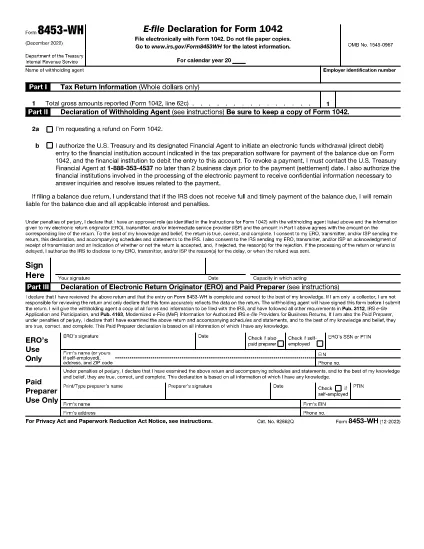
Form 8453‑WH is the “Authorization for Withholding Agent to Sign a 1042 Return” used when a withholding agent files a Form 1042 electronically. The form authenticates the return, authorizes the electronic return originator (ERO), and records the taxpayer’s signature.

What Is Form 8453‑WH?

This IRS form is required when a withholding agent files a TIP (Tax Information Return) through an ERO and prefers to sign the return with a personal identification number (PIN) rather than a handwritten signature. It replaces the paper signature on the 1042 return and ensures compliance with e‑file rules.

How to Complete the Fillable PDF

Our online Formize PDF Filler lets you fill out Form 8453‑WH without downloading a separate editor. Follow the simple steps below.

Common Mistakes & Tips

  • Do not leave the PIN field blank – a valid PIN is required for e‑signature.
  • Verify that the taxpayer’s name and EIN match the information on Form 1042.
  • Double‑check the date format (MM/DD/YYYY) before submitting.
  • Save a copy of the completed PDF for your records.

Where to Submit the Completed Form

After you finish the form in the Formize filler, download the signed PDF and upload it to your ERO portal or attach it to the electronic 1042 filing as instructed by the IRS.

שאלות נפוצות
  • Who must file Form 8453‑WH?

    Any withholding agent who files a Form 1042 TIP return electronically and needs to provide an authorized signature using a PIN must submit Form 8453‑WH.

  • Can I sign Form 8453‑WH with a handwritten signature?

    When filing electronically, the IRS requires a PIN‑based e‑signature. A handwritten signature is only accepted on paper filings.

  • Is there a fee to download the fillable PDF?

    No. The fillable PDF for Form 8453‑WH is free to download and complete using Formize.

  • What if I make a mistake after saving?

    Open the saved PDF again in the Formize filler, correct the error, and re‑save. Keep the latest version for submission.

  • Do I need to print the form after filling it online?

    Printing is optional. Most EROs accept the electronic PDF directly. Print only if your specific filing process requires a hard copy.

  • How long is the PIN valid for the e‑signature?

    The PIN is valid for the specific tax year’s filing. It cannot be reused for another year’s return.

  • Where can I find more information about Form 8453‑WH?

    Visit the official IRS page linked below or consult the IRS Publication 1635 for detailed e‑file instructions.

איך ל

כיצד למלא את Form 8453‑WH בחינם, באינטרנט ב-5 שלבים פשוטים:

  1. 1
    Step 1 – Click “Fill out this form”
    On the page, press the bright “Fill out this form” button. The Formize PDF Filler app will open in a new tab.
  2. 2
    Step 2 – Wait for the filler to load
    The filler loads the fillable version of Form 8453‑WH automatically. A loading bar confirms when the document is ready.
  3. 3
    Step 3 – Complete each field
    Enter the taxpayer’s name, EIN, PIN, and any required dates. All fields are interactive; simply type or select from the calendar.
  4. 4
    Step 4 – Review and save
    Use the “Preview” button to double‑check your entries. When satisfied, click “Save PDF” to download the signed form.
  5. 5
    Step 5 – Submit to your ERO
    Upload the saved PDF to your electronic return originator’s portal or attach it to the e‑file submission as instructed by the IRS.
Formize אפליקציית מילוי PDF
על אודות

טפסי מס

Form 8453‑WH הוא אחד מטפסי מס שהם מסמכים המשמשים לדיווח על הכנסות, ניכויים וחבות מס לרשות המס הרלוונטית. טפסים אלו הם חלק חיוני מתהליך הגשת המס ומשמשים כדי להבטיח שאנשים ועסקים עומדים בחוקי המס וחישוב מדויק של חובות המס שלהם.

טפסי המס הספציפיים הנדרשים עשויים להשתנות בהתאם לגורמים כגון סטטוס הגשה של אדם, מקורות הכנסה וחוקי המס במדינה. עם זאת, הנה כמה סוגים נפוצים של טפסי מס:

טפסי מס הכנסה ליחיד: טפסים אלה, כגון 1040 series בארצות הברית, משמשים על ידי יחידים לדווח על הכנסתם, לתבוע ניכויים וזיכויים ולחשב את חבות המס שלהם.

טפסי מס לעסקים: עסקים, לרבות בעלות יחידה, שותפויות, תאגידים ועצמאים, עשויים להצטרך להגיש טפסים שונים כדי לדווח על ההכנסות, ההוצאות והמסים המגיעים להם. דוגמאות כוללות את לוח ג' (רווח או הפסד מעסקים) וטופס 1120 (החזר מס הכנסה של תאגידים בארה"ב).

טפסי מס עבודה: מעסיקים נדרשים לדווח על שכר עובדים ולמנוע ולמסור מס שכר. למטרה זו נעשה שימוש בטפסים כגון W-2 (הצהרת שכר ומס) ו-941 (החזר מס רבעוני של המעסיק).

טפסי חשבון השקעות ופרישה: טפסים אלה משמשים לדיווח על הכנסות מהשקעות, רווחי הון והפסדים, כמו גם תרומות והפצות מחשבונות פרישה. דוגמאות כוללות טופס 1099-DIV (דיבידנדים והפצות) וטופס 5498 (מידע על תרומה של IRA).

טפסי מס עיזבון ומתנות: כאשר אדם נפטר או נותן מתנות משמעותיות, טפסים ספציפיים כגון טופס 706 a> (החזר מס של ארצות הברית (והעברה מדלגת דורות)) וטופס 709 (מתנה לארצות הברית (ודור- דילוג על העברה) החזר מס) משמשים לדיווח וחישוב כל מיסי עיזבון או מתנות החלים.

חשוב לציין שחוקי המס והטפסים יכולים להשתנות עם הזמן, ולכן אנשים ועסקים צריכים להתייעץ עם רשות המס הרלוונטית או לפנות לייעוץ מס מקצועי כדי להבטיח עמידה בדרישות הנוכחיות.

תכונות

מילוי PDF

הדרך הקלה ביותר למלא טפסי PDF באינטרנט

  • מלא במהירות את Form 8453‑WH
    מחפש דרך למלא במהירות את Form 8453‑WH באינטרנט? עם מילוי טופס ה-PDF המקוון שלנו בחינם, תדע כיצד לערוך ולמלא את מסמך ה-PDF הזה תוך פחות מדקה.
  • עורך PDF מקוון קל לשימוש
    נמאס לך להדפיס קבצי PDF כדי שתוכל לערוך אותם, לפני סריקה מחדש ושליחה חזרה? ערוך מסמכי PDF בחינם באינטרנט. השתמש בעורך ה-PDF המקוון שלנו כדי לחסוך בזמן ובנייר.
  • כלים מעולים, כל הפלטפורמות
    תוהה כיצד למלא את Form 8453‑WH ב-Mac, או אולי איך להשתמש בחומר מילוי PDF בחינם? כלי ה-PDF המקוונים שלנו פועלים בכל הפלטפורמות.
  • אחסון קבצים מאובטח
    קבצי "Form 8453‑WH" שהושלמו מאוחסנים במסד נתונים מאובטח המנוהל על ידי אירוח Amazon Cloud. אתה יכול למחוק את הקבצים שלך מהמערכת שלנו בכל עת. בכל מקרה, קבצים אלו נמחקים אוטומטית לאחר 24 שעות.
  • צ'אט עם Form 8453‑WH
    צ'אט עם "Form 8453‑WH" ב-Chatize שהוא עוזר לקורא PDF בחינם. שאל שאלות וקבל תשובות מ-"Form 8453‑WH". פשוט לחץ על הלחצן צ'אט עם מסמך למעלה.

מחק הפעלת מילוי

למחוק את הפעלת המילוי שנבחרה? במקרה זה, ההתקדמות שלך במילוי הטופס תאבד.

מחק סשן עריכה

למחוק את סשן העריכה שנבחר? במקרה זה, ההתקדמות שלך ביצירה ועריכה של הטופס תאבד.