
בחר שפה

IRS Form 8827 – Minimum Tax Credit Fillable PDF

  1. מדינה ארה"ב
  2. שפה אנגלית
  3. פעילות מיסים
  4. מַחלָקָה מס הכנסה
IRS Form 8827 – Minimum Tax Credit Fillable PDF

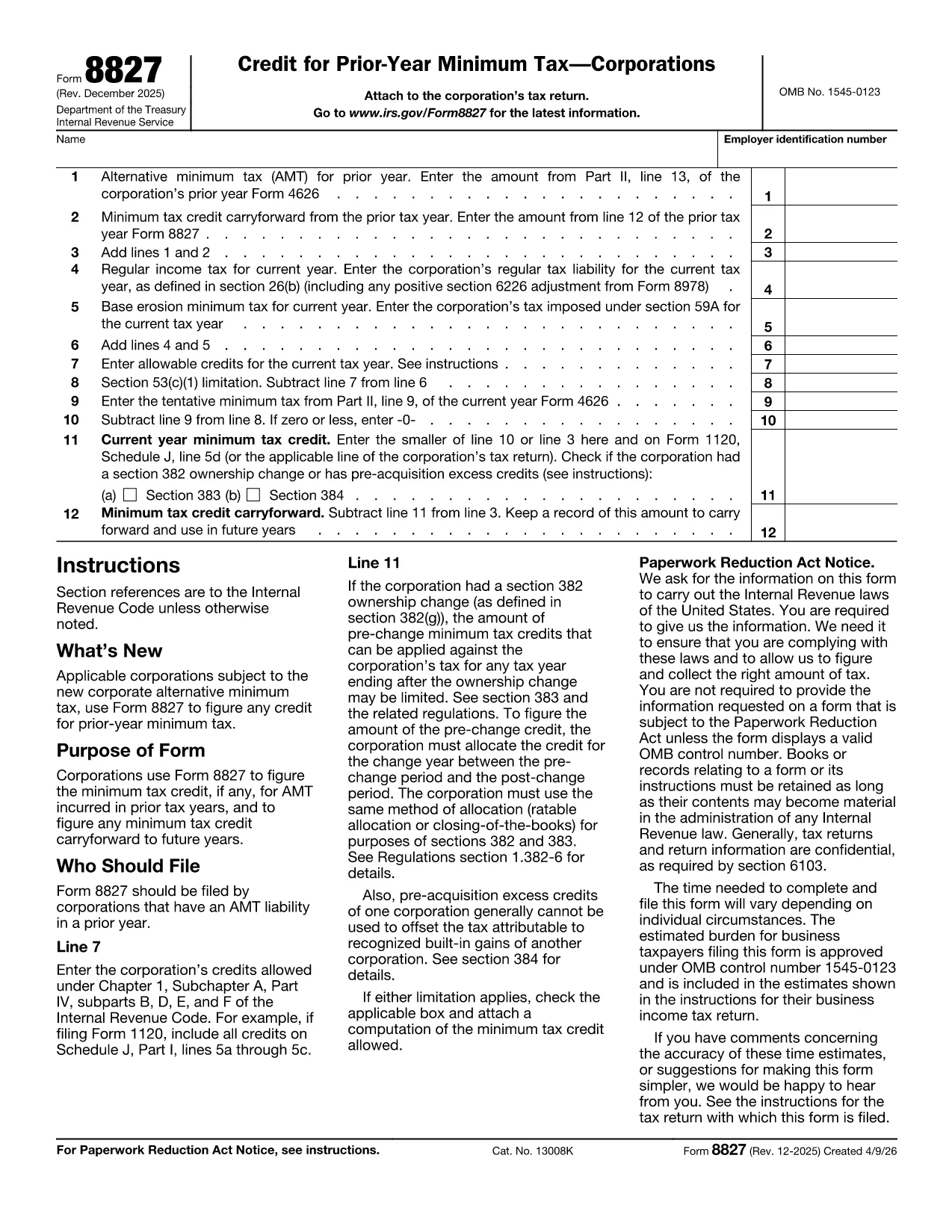
Form 8827, "Credit for Prior Year Minimum Tax (Corporations)," is the IRS form corporations use to claim a credit for alternative minimum tax (AMT) paid in earlier years and to track any credit carryforward. By completing this form correctly, businesses can reduce future regular tax liabilities.

What Is Form 8827 and Who Needs It?

This form is required for any corporation that has incurred AMT in a prior tax year and wishes to claim the resulting credit. The credit can be applied against regular tax in the current year and any unused portion can be carried forward indefinitely.

How to Fill Out Form 8827 Online with Formize

Instead of downloading the PDF and editing it manually, simply click the "Fill out this form" button on the page. The Formize PDF Filler app will load, letting you type directly into each field, save progress, and export a completed PDF.

Common Mistakes to Avoid on Form 8827

  • Entering the prior‑year AMT amount from the wrong line of Form 4626.
  • Leaving the reserved line (Line 2) blank when the form requires a zero entry.
  • Mismatching the EIN on the form with the one on the corporate tax return.
  • Forgetting to subtract the credit from the tentative minimum tax correctly, which can cause an overstated credit.

Where to Find the Official PDF and Additional Resources

The official, up‑to‑date fillable PDF is hosted by the IRS. You can download it directly or use our integrated Formize filler for a smoother experience.

For detailed line‑by‑line instructions, refer to the IRS Instructions for Form 8827, which explain each calculation and provide examples.

שאלות נפוצות
  • Who must file Form 8827?

    Any corporation that paid alternative minimum tax (AMT) in a previous year and wants to claim a credit against current‑year regular tax must file Form 8827.

  • Can I carry forward an unused minimum tax credit?

    Yes. Unused credits can be carried forward indefinitely until they are fully utilized against regular tax.

  • Do I need to attach Form 8827 to my Form 1120?

    Yes. The completed Form 8827 should be attached to your corporate income tax return (Form 1120) when filing.

  • What line on Form 4626 provides the prior‑year AMT amount?

    Use the amount shown on line 13 of Form 4626 from the prior tax year as the prior‑year AMT input on Form 8827, line 1.

  • Is there a paper‑only version of Form 8827?

    A printable PDF is available, but using the fillable version through Formize reduces errors and speeds up filing.

  • What happens if I enter the wrong EIN?

    An incorrect EIN can delay processing of your credit. Verify the EIN matches the one on your corporate tax return before submitting.

  • Can I amend a previously filed Form 8827?

    Yes. File an amended corporate return (Form 1120‑X) and include a corrected Form 8827.

  • Is there a deadline to claim the credit?

    The credit must be claimed on the corporate return for the tax year in which you want to use it. There is no separate filing deadline.

איך ל

כיצד למלא את Form 8827 בחינם, באינטרנט ב-5 שלבים פשוטים:

  1. 1
    Open the Fillable Form
    Click the "Fill out this form" button on the page. The Formize PDF Filler will open in a new tab.
  2. 2
    Enter Corporate Information
    Type your corporation’s name, EIN, and prior‑year AMT amounts into the highlighted fields.
  3. 3
    Calculate the Credit
    Follow the on‑screen prompts to add lines, subtract credits, and let the calculator display the current‑year credit and any carryforward.
  4. 4
    Review and Save
    Check each entry for accuracy, then click "Save" to download the completed PDF or store it in your Formize account.
  5. 5
    Submit with Your Tax Return
    Attach the finished Form 8827 to your corporate tax return (Form 1120) when filing electronically or by mail.
Formize אפליקציית מילוי PDF
על אודות

טפסי מס

Form 8827 הוא אחד מטפסי מס שהם מסמכים המשמשים לדיווח על מידע הקשור למיסים לרשות המס הרלוונטית. ישנם סוגים שונים של טפסי מס, כולל טפסי מס פדרליים, מדינתיים ומקומיים, שיכולים להשתנות בהתאם לנסיבות ולמיקומו של משלם המסים.

תכונות

מילוי PDF

הדרך הקלה ביותר למלא טפסי PDF באינטרנט

  • מלא במהירות את Form 8827
    מחפש דרך למלא במהירות את Form 8827 באינטרנט? עם מילוי טופס ה-PDF המקוון שלנו בחינם, תדע כיצד לערוך ולמלא את מסמך ה-PDF הזה תוך פחות מדקה.
  • עורך PDF מקוון קל לשימוש
    נמאס לך להדפיס קבצי PDF כדי שתוכל לערוך אותם, לפני סריקה מחדש ושליחה חזרה? ערוך מסמכי PDF בחינם באינטרנט. השתמש בעורך ה-PDF המקוון שלנו כדי לחסוך בזמן ובנייר.
  • כלים מעולים, כל הפלטפורמות
    תוהה כיצד למלא את Form 8827 ב-Mac, או אולי איך להשתמש בחומר מילוי PDF בחינם? כלי ה-PDF המקוונים שלנו פועלים בכל הפלטפורמות.
  • אחסון קבצים מאובטח
    קבצי "Form 8827" שהושלמו מאוחסנים במסד נתונים מאובטח המנוהל על ידי אירוח Amazon Cloud. אתה יכול למחוק את הקבצים שלך מהמערכת שלנו בכל עת. בכל מקרה, קבצים אלו נמחקים אוטומטית לאחר 24 שעות.
  • צ'אט עם Form 8827
    צ'אט עם "Form 8827" ב-Chatize שהוא עוזר לקורא PDF בחינם. שאל שאלות וקבל תשובות מ-"Form 8827". פשוט לחץ על הלחצן צ'אט עם מסמך למעלה.

מחק הפעלת מילוי

למחוק את הפעלת המילוי שנבחרה? במקרה זה, ההתקדמות שלך במילוי הטופס תאבד.

מחק סשן עריכה

למחוק את סשן העריכה שנבחר? במקרה זה, ההתקדמות שלך ביצירה ועריכה של הטופס תאבד.