בחר שפה

IRS Form 8834 – Fillable PDF for Qualified Electric Vehicle Credit

  1. מדינה ארה"ב
  2. שפה אנגלית
  3. פעילות מיסים
  4. מַחלָקָה מס הכנסה
IRS Form 8834 – Fillable PDF for Qualified Electric Vehicle Credit

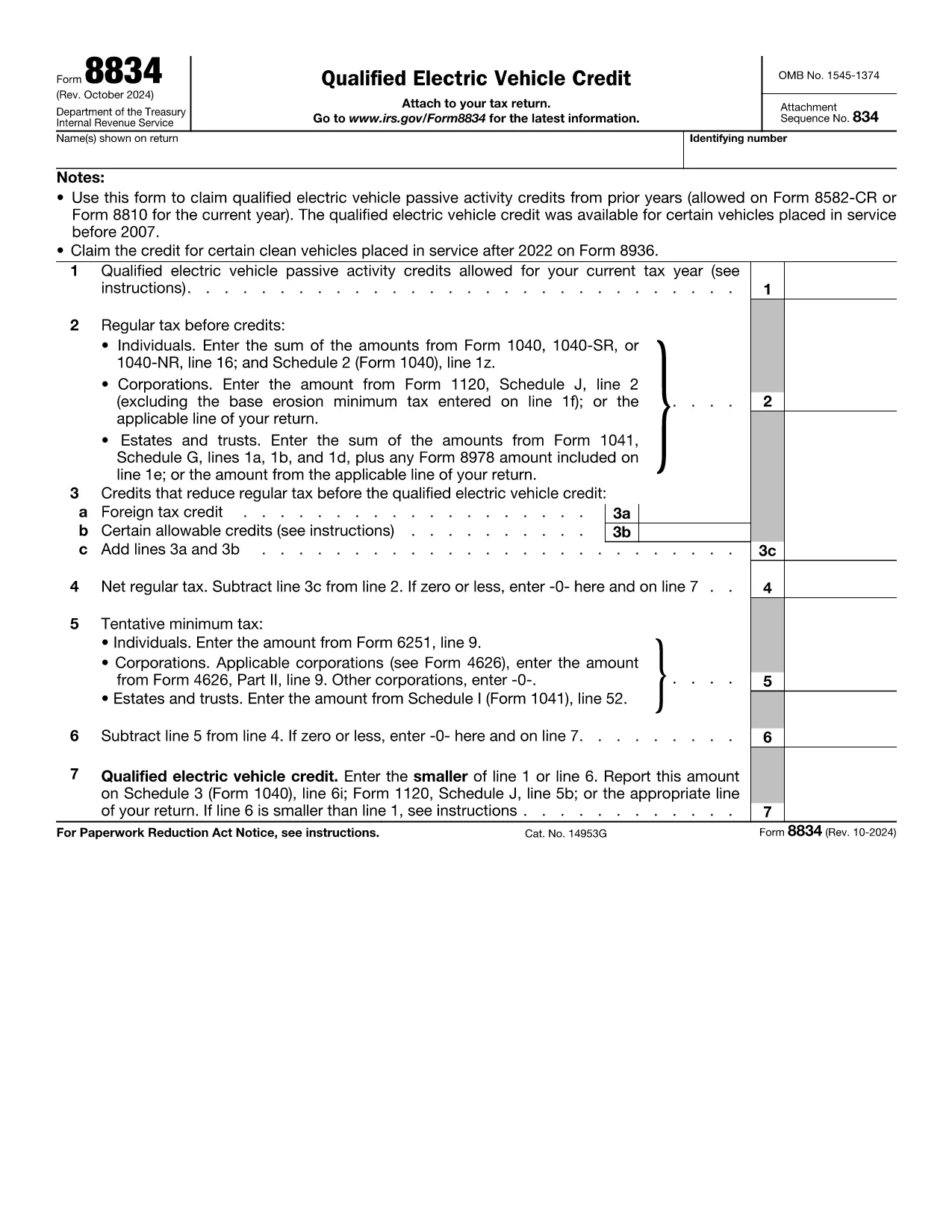
Form 8834, officially titled Qualified Electric Vehicle Credit, is used by taxpayers to claim passive activity credits from qualified electric vehicles placed in service before 2007. Although newer EV credits are reported on Form 8936, many taxpayers still have carry‑forward credits that belong on Form 8834.

What Is Form 8834?

This one‑page IRS form calculates the amount of qualified electric vehicle passive activity credit you can apply to your current tax year. It interacts with other forms such as Form 8582‑CR (individuals) or Form 8810 (corporations) to determine the credit limit.

How to Complete Form 8834 Online

Instead of downloading the PDF and editing it manually, simply click the "Fill out this form" button on this page. The Formize PDF Filler app will load instantly, allowing you to enter data directly in your browser.

  • Enter taxpayer information (name, SSN/EIN) exactly as it appears on your tax return.
  • Provide the credit amount allowed from prior years (Line 1).
  • Input your regular tax before credits (Line 2) and any other credits that reduce your tax (Line 3).
  • Follow the automatic calculations for net regular tax, tentative minimum tax, and the final credit amount.

Common Mistakes to Avoid

  • Using the wrong form: Form 8834 is only for pre‑2007 EV credits. New EV purchases require Form 8936.
  • Incorrect credit limit: Always reference the latest Form 8582‑CR or Form 8810 for the allowable amount.
  • Mismatching tax year: Credits must be claimed in the year you are allowed to use them, not the year the vehicle was purchased.
  • Leaving lines blank: Even a zero value must be entered to avoid IRS processing delays.

Where to Submit the Completed Form

After you finish in Formize, download the completed PDF. Attach it to your federal tax return:

  • Individuals – attach to Schedule 3 (Form 1040), line 6i.
  • Corporations – attach to Form 1120, Schedule J.
  • Estates & Trusts – attach to Form 1041, Schedule G.

Download the Fillable PDF

If you prefer to work offline, you can download the official IRS fillable PDF below. The same file is used by the Formize online filler.

שאלות נפוצות
  • Who should use Form 8834?

    Taxpayers who have qualified electric vehicle passive activity credits from vehicles placed in service before 2007 and need to claim any unused credit in the current tax year.

  • Can I use Form 8834 for a 2023 EV purchase?

    No. Vehicles placed in service after 2022 are claimed on Form 8936. Form 8834 only covers pre‑2007 credits.

  • Do I need to attach supporting schedules?

    Yes. Include the relevant credit limitation schedules (Form 8582‑CR for individuals or Form 8810 for corporations) that show the allowable credit amount.

  • What if my regular tax is lower than the credit amount?

    The credit you can claim is the lesser of the allowable credit (Line 1) or your net regular tax after other credits (Line 6). Any excess can be carried forward.

  • Is the Formize filler secure?

    Formize uses SSL encryption and processes data locally in your browser, ensuring your personal information remains private.

  • Can I e‑file Form 8834?

    Most commercial tax software accepts the completed PDF as an attachment. Check your software’s instructions for attaching supplemental forms.

  • What common errors cause IRS rejections?

    Missing SSN/EIN, entering a zero on Line 1 when a credit exists, or failing to include the required supporting schedules.

איך ל

כיצד למלא את Form 8834 בחינם, באינטרנט ב-6 שלבים פשוטים:

  1. 1
    Click the Fill‑out Button
    Press the “Fill out this form” button on the page to launch the Formize PDF Filler.
  2. 2
    Wait for the Filler to Load
    The web‑based filler loads in seconds; no download or installation is required.
  3. 3
    Enter Your Information
    Fill in taxpayer name, SSN/EIN, credit amounts, and tax liability fields exactly as shown on your return.
  4. 4
    Review Calculations
    The filler automatically computes net regular tax, tentative minimum tax, and the final credit amount.
  5. 5
    Save or Download
    When finished, click “Save” to store the completed PDF in your browser or “Download” to get a copy for your records.
  6. 6
    Submit with Your Tax Return
    Attach the completed Form 8834 to the appropriate schedule of your federal tax return and file as usual.
Formize אפליקציית מילוי PDF
על אודות

טפסי מס

Form 8834 הוא אחד מטפסי מס שהם מסמכים המשמשים לדיווח על מידע הקשור למיסים לרשות המס הרלוונטית. ישנם סוגים שונים של טפסי מס, כולל טפסי מס פדרליים, מדינתיים ומקומיים, שיכולים להשתנות בהתאם לנסיבות ולמיקומו של משלם המסים.

תכונות

מילוי PDF

הדרך הקלה ביותר למלא טפסי PDF באינטרנט

  • מלא במהירות את Form 8834
    מחפש דרך למלא במהירות את Form 8834 באינטרנט? עם מילוי טופס ה-PDF המקוון שלנו בחינם, תדע כיצד לערוך ולמלא את מסמך ה-PDF הזה תוך פחות מדקה.
  • עורך PDF מקוון קל לשימוש
    נמאס לך להדפיס קבצי PDF כדי שתוכל לערוך אותם, לפני סריקה מחדש ושליחה חזרה? ערוך מסמכי PDF בחינם באינטרנט. השתמש בעורך ה-PDF המקוון שלנו כדי לחסוך בזמן ובנייר.
  • כלים מעולים, כל הפלטפורמות
    תוהה כיצד למלא את Form 8834 ב-Mac, או אולי איך להשתמש בחומר מילוי PDF בחינם? כלי ה-PDF המקוונים שלנו פועלים בכל הפלטפורמות.
  • אחסון קבצים מאובטח
    קבצי "Form 8834" שהושלמו מאוחסנים במסד נתונים מאובטח המנוהל על ידי אירוח Amazon Cloud. אתה יכול למחוק את הקבצים שלך מהמערכת שלנו בכל עת. בכל מקרה, קבצים אלו נמחקים אוטומטית לאחר 24 שעות.
  • צ'אט עם Form 8834
    צ'אט עם "Form 8834" ב-Chatize שהוא עוזר לקורא PDF בחינם. שאל שאלות וקבל תשובות מ-"Form 8834". פשוט לחץ על הלחצן צ'אט עם מסמך למעלה.

מחק הפעלת מילוי

למחוק את הפעלת המילוי שנבחרה? במקרה זה, ההתקדמות שלך במילוי הטופס תאבד.

מחק סשן עריכה

למחוק את סשן העריכה שנבחר? במקרה זה, ההתקדמות שלך ביצירה ועריכה של הטופס תאבד.