
בחר שפה

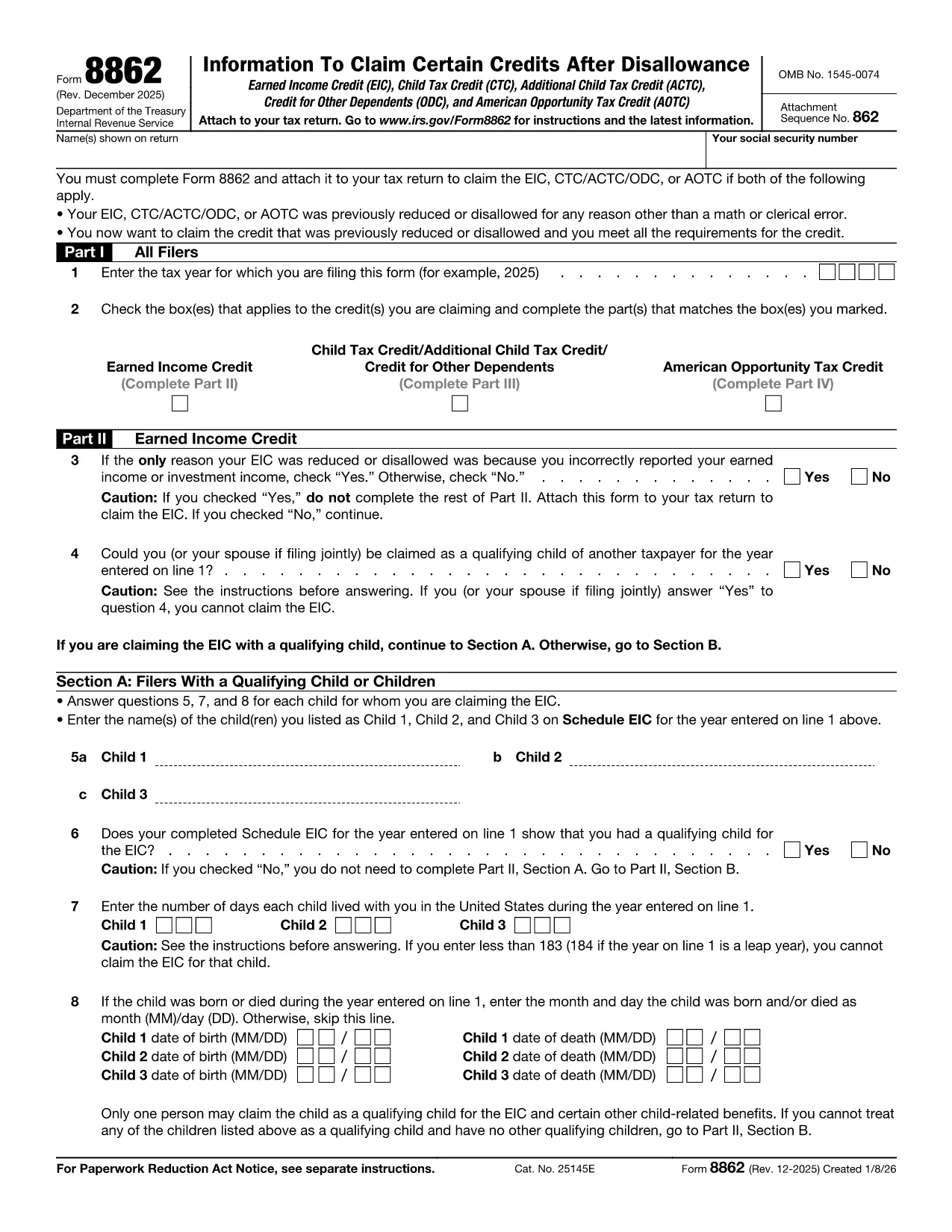
Fillable IRS Form 8862 – Claim for Earned Income Credit

  1. מדינה ארה"ב
  2. שפה אנגלית
  3. פעילות מיסים
  4. מַחלָקָה מס הכנסה
Fillable IRS Form 8862 – Claim for Earned Income Credit

Form 8862, Claim for Earned Income Credit (EIC), is required when the IRS disallows your Earned Income Credit in a prior year and you want to claim it again. Our fillable PDF version lets you enter data directly in the browser, eliminates printing, and reduces errors.

What Is IRS Form 8862?

Form 8862 is an IRS document used to verify that you meet the eligibility criteria for the Earned Income Credit after a previous denial. It collects information about your filing status, qualifying children, and earned income. The form must be attached to your tax return (Form 1040) when you re‑claim the credit.

How to Complete Form 8862 Online

  • Click the "Fill out this form" button on this page.
  • Wait a few seconds while the Formize PDF Filler app loads securely in your browser.
  • Enter the required information in each field – the app highlights required fields and validates numbers.
  • When finished, click Save & Download to get a completed PDF ready to attach to your tax return.

Common Mistakes to Avoid

Even with a fillable form, certain errors can still cause delays:

  • Incorrect Social Security numbers for you or your qualifying children.
  • Misreporting earned income – double‑check wages, self‑employment, and farm income.
  • Leaving any required field blank. The Formize filler will flag missing data before you submit.
  • Using the wrong tax year version – always download the latest PDF (2024 edition at the link below).

Where to Find Help and Resources

If you need guidance, the official IRS instructions for Form 8862 are available on the IRS website. You can also consult a qualified tax professional for complex situations such as multiple qualifying children or prior EIC recapture.

Ready to start? Click the button and let Formize handle the rest.

הוראות

  • טופס 8862 הוראות - הוראות טופס 8862, מידע כדי לדרוש זיכויים מסוימים לאחר ניכוי
שאלות נפוצות
  • Do I need to file Form 8862 every year?

    You only need to file Form 8862 when the IRS has previously denied your Earned Income Credit and you are claiming it again.

  • Can I submit Form 8862 electronically?

    Yes. After completing the fillable PDF, you can attach the PDF to your e‑filed tax return using most tax software.

  • What happens if I make a mistake on Form 8862?

    Mistakes can delay processing of your credit. The Formize filler highlights required fields and checks numeric entries to reduce errors.

  • Is there a fee to use the Formize PDF filler?

    No. The filler is free for all IRS forms hosted on Formize, including Form 8862.

  • Where can I find the official IRS instructions for Form 8862?

    The official instructions are available on the IRS website at https://www.irs.gov/instructions/i8862.

  • Can I print the completed Form 8862 after filling it online?

    Absolutely. After saving the PDF, you can print it or keep the digital copy for electronic filing.

  • Do I need a signature on Form 8862?

    Yes. The form requires your signature. You can sign the PDF digitally after downloading it.

  • What qualifies as earned income for the EIC?

    Earned income includes wages, salaries, tips, self‑employment income, and certain disability payments. Refer to IRS guidelines for full details.

איך ל

כיצד למלא את Form 8862 בחינם, באינטרנט ב-4 שלבים פשוטים:

  1. 1
    Click the Fill Out Button
    Press the "Fill out this form" button on this page to launch the Formize PDF Filler.
  2. 2
    Wait for the Filler to Load
    The secure filler app loads in a few seconds – no download or installation required.
  3. 3
    Enter Your Information
    Complete each highlighted field. The app validates entries and alerts you to any missing required data.
  4. 4
    Save and Download
    When all fields are filled, click "Save & Download" to obtain a completed PDF ready for attachment to your tax return.
Formize אפליקציית מילוי PDF
על אודות

טפסי מס

Form 8862 הוא אחד מטפסי מס שהם מסמכים המשמשים לדיווח על מידע הקשור למיסים לרשות המס הרלוונטית. ישנם סוגים שונים של טפסי מס, כולל טפסי מס פדרליים, מדינתיים ומקומיים, שיכולים להשתנות בהתאם לנסיבות ולמיקומו של משלם המסים.

תכונות

מילוי PDF

הדרך הקלה ביותר למלא טפסי PDF באינטרנט

  • מלא במהירות את Form 8862
    מחפש דרך למלא במהירות את Form 8862 באינטרנט? עם מילוי טופס ה-PDF המקוון שלנו בחינם, תדע כיצד לערוך ולמלא את מסמך ה-PDF הזה תוך פחות מדקה.
  • עורך PDF מקוון קל לשימוש
    נמאס לך להדפיס קבצי PDF כדי שתוכל לערוך אותם, לפני סריקה מחדש ושליחה חזרה? ערוך מסמכי PDF בחינם באינטרנט. השתמש בעורך ה-PDF המקוון שלנו כדי לחסוך בזמן ובנייר.
  • כלים מעולים, כל הפלטפורמות
    תוהה כיצד למלא את Form 8862 ב-Mac, או אולי איך להשתמש בחומר מילוי PDF בחינם? כלי ה-PDF המקוונים שלנו פועלים בכל הפלטפורמות.
  • אחסון קבצים מאובטח
    קבצי "Form 8862" שהושלמו מאוחסנים במסד נתונים מאובטח המנוהל על ידי אירוח Amazon Cloud. אתה יכול למחוק את הקבצים שלך מהמערכת שלנו בכל עת. בכל מקרה, קבצים אלו נמחקים אוטומטית לאחר 24 שעות.
  • צ'אט עם Form 8862
    צ'אט עם "Form 8862" ב-Chatize שהוא עוזר לקורא PDF בחינם. שאל שאלות וקבל תשובות מ-"Form 8862". פשוט לחץ על הלחצן צ'אט עם מסמך למעלה.

מחק הפעלת מילוי

למחוק את הפעלת המילוי שנבחרה? במקרה זה, ההתקדמות שלך במילוי הטופס תאבד.

מחק סשן עריכה

למחוק את סשן העריכה שנבחר? במקרה זה, ההתקדמות שלך ביצירה ועריכה של הטופס תאבד.