
בחר שפה

IRS Form 8928 – Fillable PDF Online

  1. מדינה ארה"ב
  2. שפה אנגלית
  3. פעילות מיסים
  4. מַחלָקָה מס הכנסה
IRS Form 8928 – Fillable PDF Online

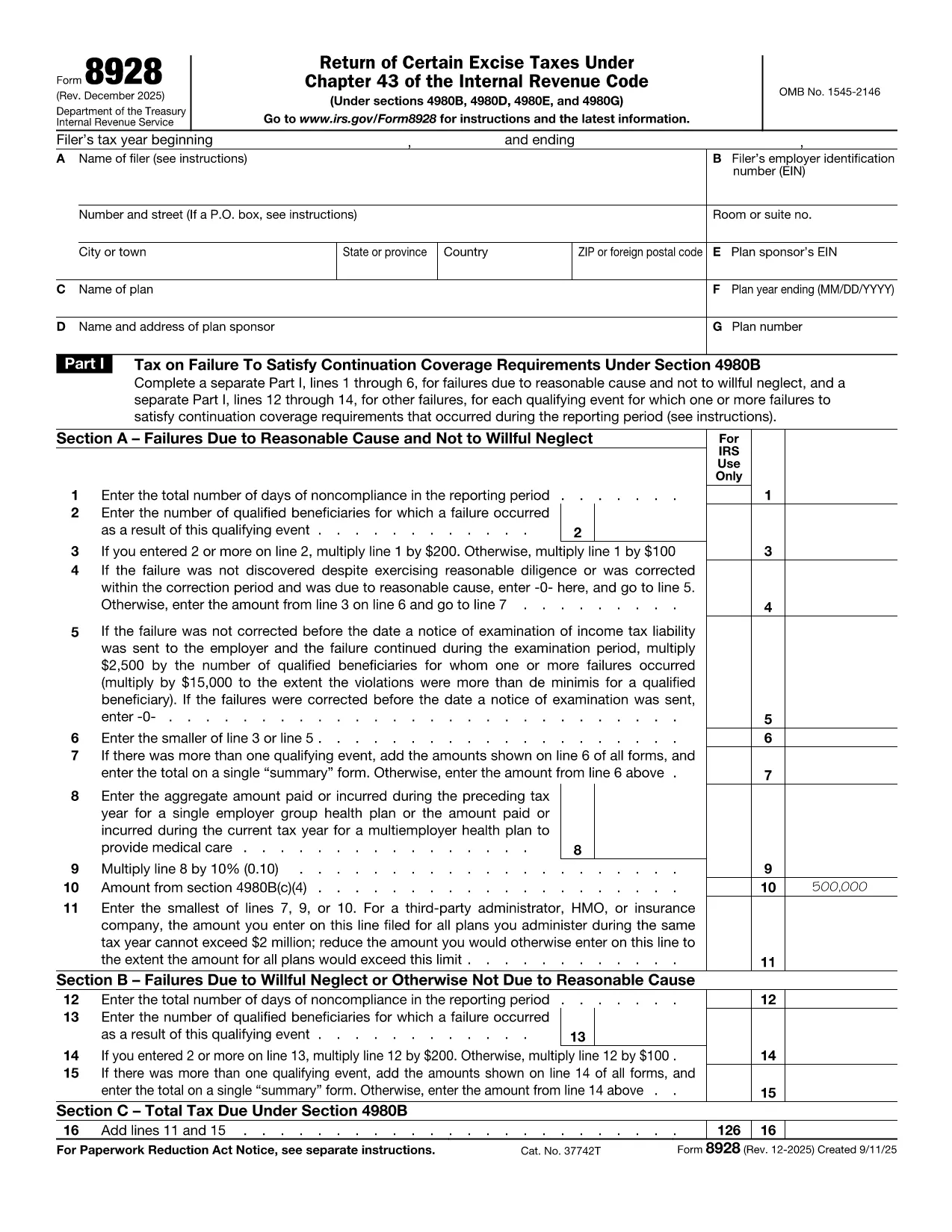
Form 8928, Return of Certain Excise Taxes Under Chapter 43 of the Internal Revenue Code, is used by businesses to report and pay excise taxes on specific fuels, chemicals, and other taxable items. The form must be filed annually and signed under penalties of perjury.

What Is Form 8928?

The IRS requires Form 8928 when you owe excise taxes that fall under Chapter 43, such as taxes on gasoline, diesel fuel, and certain chemicals. The form collects information about the taxpayer, the type of tax, and the amount due.

How to Complete Form 8928 Using Formize

Instead of downloading, printing, and manually filling the PDF, you can complete the form directly in your browser with the Formize PDF Filler:

  1. Click the "Fill out this form" button on this page.
  2. Wait a few seconds while the Formize app loads the fillable PDF.
  3. Enter your information in each field – the interface highlights required sections.
  4. When you’re done, click Save & Download to get a completed PDF ready for e‑filing or printing.

Common Mistakes to Avoid

  • Incorrect EIN: Double‑check the Employer Identification Number; a typo can delay processing.
  • Missing signatures: The form must be signed under penalties of perjury; use the electronic signature option in Formize.
  • Wrong tax code: Verify that the excise tax you’re reporting falls under Chapter 43; other excise taxes use different forms.
  • Incomplete schedules: Attach all required schedules (e.g., Schedule A for fuel taxes) before submitting.

Where to Submit the Completed Form

After you download the filled PDF, mail it to the IRS address listed in the form’s instructions, or submit it electronically through the IRS Modernized e‑File (MeF) system if you have an authorized e‑file provider.

Need a quick start? Click the button below and let Formize do the heavy lifting.

הוראות

  • טופס 8928 הוראות - הוראות טופס 8928, החזרת מסים מסוימים מתחת פרק 43 של קוד ההכנסות הפנימי
שאלות נפוצות
  • What is the purpose of IRS Form 8928?

    Form 8928 reports and pays excise taxes that fall under Chapter 43 of the Internal Revenue Code, such as taxes on gasoline, diesel, and certain chemicals.

  • Can I file Form 8928 electronically?

    Yes. After completing the fillable PDF with Formize, you can submit the PDF through an authorized IRS e‑file provider.

  • Do I need a signature on Form 8928?

    A signature is required under penalties of perjury. Formize provides an electronic signature option that satisfies this requirement.

  • What if I make a mistake after filing?

    Amend the return by filing Form 8928‑X, the amendment form for excise taxes, and attach an explanation of the correction.

  • Is there a filing deadline for Form 8928?

    Form 8928 is generally due by the last day of the month following the end of your tax year, but always check the current IRS instructions for any updates.

  • Do I need to attach schedules?

    Yes. Depending on the type of excise tax, you must attach the appropriate schedules (e.g., Schedule A for fuel taxes).

  • Is the Formize filler free to use?

    Formize offers a free basic filler for most IRS PDFs, including Form 8928. Advanced features may require a subscription.

איך ל

כיצד למלא את Form 8928 בחינם, באינטרנט ב-5 שלבים פשוטים:

  1. 1
    Open the Fillable Form
    Click the "Fill out this form" button on the page. The Formize PDF Filler will open in a new tab.
  2. 2
    Enter Your Information
    Fill each highlighted field with the required data—name, EIN, tax amounts, and any applicable schedules.
  3. 3
    Add Your Signature
    Use the electronic signature tool in Formize to sign under penalties of perjury.
  4. 4
    Save and Download
    When the form is complete, click "Save & Download" to get a PDF you can print or submit electronically.
  5. 5
    Submit to the IRS
    Mail the downloaded PDF to the IRS address in the instructions or upload it via an authorized e‑file provider.
Formize אפליקציית מילוי PDF
על אודות

טפסי מס

Form 8928 הוא אחד מטפסי מס שהם מסמכים המשמשים לדיווח על מידע הקשור למיסים לרשות המס הרלוונטית. ישנם סוגים שונים של טפסי מס, כולל טפסי מס פדרליים, מדינתיים ומקומיים, שיכולים להשתנות בהתאם לנסיבות ולמיקומו של משלם המסים.

תכונות

מילוי PDF

הדרך הקלה ביותר למלא טפסי PDF באינטרנט

  • מלא במהירות את Form 8928
    מחפש דרך למלא במהירות את Form 8928 באינטרנט? עם מילוי טופס ה-PDF המקוון שלנו בחינם, תדע כיצד לערוך ולמלא את מסמך ה-PDF הזה תוך פחות מדקה.
  • עורך PDF מקוון קל לשימוש
    נמאס לך להדפיס קבצי PDF כדי שתוכל לערוך אותם, לפני סריקה מחדש ושליחה חזרה? ערוך מסמכי PDF בחינם באינטרנט. השתמש בעורך ה-PDF המקוון שלנו כדי לחסוך בזמן ובנייר.
  • כלים מעולים, כל הפלטפורמות
    תוהה כיצד למלא את Form 8928 ב-Mac, או אולי איך להשתמש בחומר מילוי PDF בחינם? כלי ה-PDF המקוונים שלנו פועלים בכל הפלטפורמות.
  • אחסון קבצים מאובטח
    קבצי "Form 8928" שהושלמו מאוחסנים במסד נתונים מאובטח המנוהל על ידי אירוח Amazon Cloud. אתה יכול למחוק את הקבצים שלך מהמערכת שלנו בכל עת. בכל מקרה, קבצים אלו נמחקים אוטומטית לאחר 24 שעות.
  • צ'אט עם Form 8928
    צ'אט עם "Form 8928" ב-Chatize שהוא עוזר לקורא PDF בחינם. שאל שאלות וקבל תשובות מ-"Form 8928". פשוט לחץ על הלחצן צ'אט עם מסמך למעלה.

מחק הפעלת מילוי

למחוק את הפעלת המילוי שנבחרה? במקרה זה, ההתקדמות שלך במילוי הטופס תאבד.

מחק סשן עריכה

למחוק את סשן העריכה שנבחר? במקרה זה, ההתקדמות שלך ביצירה ועריכה של הטופס תאבד.