
בחר שפה

IRS Form 970 – Fillable PDF for LIFO Inventory Election

  1. מדינה ארה"ב
  2. שפה אנגלית
  3. פעילות מיסים
  4. מַחלָקָה מס הכנסה
IRS Form 970 – Fillable PDF for LIFO Inventory Election

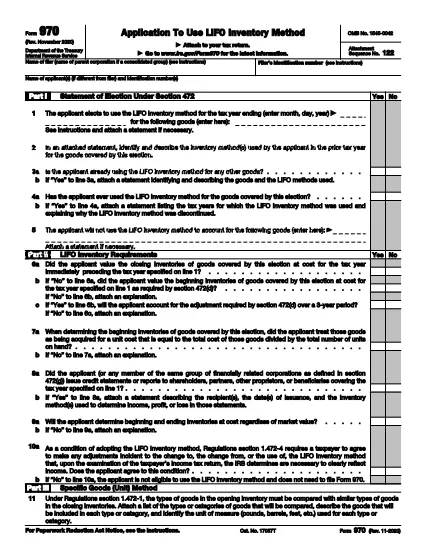
Form 970, Application to Use LIFO Inventory Method, is the official IRS document you file to elect the Last‑In, First‑Out (LIFO) inventory accounting method under Section 472 of the Internal Revenue Code. Whether you’re a corporation, partnership, or sole proprietor, filing Form 970 is the first step to start using LIFO and to protect your election for future tax years.

What Is Form 970 and When Do You Need It?

Form 970 is required the first year you intend to use LIFO for any inventory items. The election is irrevocable without IRS consent, so it’s critical to file accurately and on time with your tax return.

How to Complete the Fillable Form 970 Online

Instead of downloading a static PDF and editing it in a separate program, simply click the "Fill out this form" button on this page. The Formize PDF Filler app will load the fillable version of Form 970, allowing you to enter data directly in your browser.

  • Step 1: Click the "Fill out this form" button.
  • Step 2: Wait a few seconds while the Formize PDF Filler loads.
  • Step 3: Complete each field – name, EIN, tax year, inventory details, and method selection.
  • Step 4: Review for errors, then click Save & Download to get a completed PDF.
  • Step 5: Attach the finished Form 970 to your federal income tax return and file as instructed.

Common Mistakes & Tips for a Successful LIFO Election

Don’t forget the signature. An unsigned Form 970 is rejected.

Provide a detailed inventory analysis. Attach a separate statement showing opening and closing inventories for the first LIFO year.

Choose the correct LIFO method. Whether you use the specific‑goods (unit) method, dollar‑value method, or IPIC method, the corresponding parts of the form must be completed.

Download the Official Form 970 PDF

If you prefer the original IRS PDF, you can download it directly from the link below. The fillable version on Formize mirrors this official document, ensuring compliance with IRS requirements.

Download IRS Form 970 (PDF)

שאלות נפוצות
  • What is the purpose of IRS Form 970?

    Form 970 is used to formally elect the LIFO (Last‑In, First‑Out) inventory method for tax purposes. The election is irrevocable without IRS consent.

  • Who must file Form 970?

    Any taxpayer—individual, partnership, corporation, or S‑corporation—who wants to begin using LIFO for inventory valuation must file Form 970 with the tax return for the first LIFO year.

  • When is the deadline to file Form 970?

    Form 970 must be filed with the tax return for the first year you intend to use LIFO. If missed, you can file an amended return within 12 months of the original filing date.

  • Can I amend a LIFO election after filing Form 970?

    Yes, but only with IRS consent. You must submit a written request and may need to file Form 970 again, depending on the situation.

  • Is there a cost to download or fill Form 970?

    The IRS PDF is free to download. Using Formize’s online filler is also free for basic use; no additional fees are required to complete the form.

  • What are common errors that cause Form 970 to be rejected?

    Missing signature, incomplete inventory analysis, selecting the wrong LIFO method, or failing to attach required statements are the most frequent reasons for rejection.

  • Do I need a professional to complete Form 970?

    While you can complete it yourself, many taxpayers work with a CPA or tax advisor to ensure the election meets IRS requirements and to avoid costly mistakes.

  • Where do I send the completed Form 970?

    Attach Form 970 to your federal income tax return and mail it to the same IRS address where you file your return, or submit it electronically if filing electronically.

איך ל

כיצד למלא את Form 970 בחינם, באינטרנט ב-5 שלבים פשוטים:

  1. 1
    Open the Fillable Form
    Click the "Fill out this form" button on the page. The Formize PDF Filler will launch in your browser.
  2. 2
    Enter Required Information
    Fill in your name, EIN/SSN, tax year, and detailed inventory data exactly as requested on Form 970.
  3. 3
    Select the LIFO Method
    Choose between Specific Goods (Unit), Dollar‑Value, or IPIC method and complete the matching sections.
  4. 4
    Review and Sign
    Double‑check every entry, add your signature electronically, and ensure all required attachments are included.
  5. 5
    Save and Download
    Click "Save & Download" to get a completed PDF you can attach to your federal tax return.
Formize אפליקציית מילוי PDF
על אודות

טפסי מס הכנסה (IRS).

Form 970 הוא אחד מטפסי המס הרשמיים המשמשים בארצות הברית כדי לדווח על הכנסות, לתבוע ניכויים וזיכויים, לחשב חבות מס ולמילוי התחייבויות אחרות הקשורות למס. ה-IRS היא הסוכנות הפדרלית האחראית על ניהול ואכיפת חוקי ההכנסות הפנימיות בארצות הברית.

להלן כמה דוגמאות לטפסים של מס הכנסה:

טופס 1040: זהו טופס החזר מס הכנסה אישי ראשוני המשמש את רוב משלמי המסים. הוא משמש לדיווח על סוגים שונים של הכנסות, לתביעת ניכויים וזיכויים, לחישוב חבות מס, ולקבוע האם הנישום חייב במס נוסף או זכאי להחזר.

טופס 1099: ישנן וריאציות שונות של טופס 1099, כגון 1099-MISC, 1099-INT, 1099-DIV וכו'. טפסים אלו משמשים לדיווח על הכנסות שקיבלו אנשים פרטיים או עסקים ממקורות שונים מלבד עבודה, כגון עבודה עצמאית הכנסה, הכנסה מריבית, הכנסה מדיבידנד והכנסה מדמי שכירות.

טופס W-2: טופס זה משמש את המעסיקים לדיווח על שכר ששולם לעובדים ועל המסים נמכו משכרם. עובדים משתמשים במידע בטופס W-2 כדי להשלים את החזרי המס האישיים שלהם.

טופס 941: מעסיקים משתמשים בטופס זה כדי לדווח על מיסי עבודה, לרבות מס הכנסה פדרלי במקור, מס ביטוח לאומי ומס Medicare, עבור העובדים שלהם.

טופס 1065: טופס זה משמש שותפויות לדיווח על הכנסות, ניכויים וחבות מס. שותפויות עצמן אינן משלמות מס הכנסה; במקום זאת, השותפים מדווחים על חלקם בהכנסות השותפות בהחזרי המס האישיים שלהם.

טופס 1120: זהו טופס החזר מס הכנסה לחברות המשמש את תאגידי C לדיווח על הכנסותיהם, ניכויים, וחבות מס.

טופס 990: טופס זה משמש ארגונים פטורים ממס, כגון עמותות וארגוני צדקה, כדי לדווח על המידע הפיננסי שלהם, פעילויותיהם ועמידתם בחוקי המס.

טופס 8862: טופס זה משמש נישומים אשר תבעו בעבר את זיכוי מס הכנסה (EITC) אבל אסרו את זה, ועכשיו רוצים לתבוע את זה שוב.

אלו הן רק כמה דוגמאות לטפסי מס הכנסה רבים שקיימים למילוי התחייבויות שונות הקשורות למס. הטפסים הספציפיים הנדרשים לאדם או לעסק תלויים בנסיבות הייחודיות, מקורות ההכנסה והניכויים שלהם. מומלץ להתייעץ באתר הרשמי של מס הכנסה (www.irs.gov) או לפנות לייעוץ מס מקצועי כדי לקבל מידע מדויק ועדכני לגבי מס הכנסה ספציפי טפסים הרלוונטיים למצב המס שלך.

תכונות

מילוי PDF

הדרך הקלה ביותר למלא טפסי PDF באינטרנט

  • מלא במהירות את Form 970
    מחפש דרך למלא במהירות את Form 970 באינטרנט? עם מילוי טופס ה-PDF המקוון שלנו בחינם, תדע כיצד לערוך ולמלא את מסמך ה-PDF הזה תוך פחות מדקה.
  • עורך PDF מקוון קל לשימוש
    נמאס לך להדפיס קבצי PDF כדי שתוכל לערוך אותם, לפני סריקה מחדש ושליחה חזרה? ערוך מסמכי PDF בחינם באינטרנט. השתמש בעורך ה-PDF המקוון שלנו כדי לחסוך בזמן ובנייר.
  • כלים מעולים, כל הפלטפורמות
    תוהה כיצד למלא את Form 970 ב-Mac, או אולי איך להשתמש בחומר מילוי PDF בחינם? כלי ה-PDF המקוונים שלנו פועלים בכל הפלטפורמות.
  • אחסון קבצים מאובטח
    קבצי "Form 970" שהושלמו מאוחסנים במסד נתונים מאובטח המנוהל על ידי אירוח Amazon Cloud. אתה יכול למחוק את הקבצים שלך מהמערכת שלנו בכל עת. בכל מקרה, קבצים אלו נמחקים אוטומטית לאחר 24 שעות.
  • צ'אט עם Form 970
    צ'אט עם "Form 970" ב-Chatize שהוא עוזר לקורא PDF בחינם. שאל שאלות וקבל תשובות מ-"Form 970". פשוט לחץ על הלחצן צ'אט עם מסמך למעלה.

מחק הפעלת מילוי

למחוק את הפעלת המילוי שנבחרה? במקרה זה, ההתקדמות שלך במילוי הטופס תאבד.

מחק סשן עריכה

למחוק את סשן העריכה שנבחר? במקרה זה, ההתקדמות שלך ביצירה ועריכה של הטופס תאבד.