
בחר שפה

Fillable Form W‑7 – Application for IRS ITIN

  1. מדינה ארה"ב
  2. שפה אנגלית
  3. פעילות מיסים
  4. מַחלָקָה מס הכנסה
Fillable Form W‑7 – Application for IRS ITIN

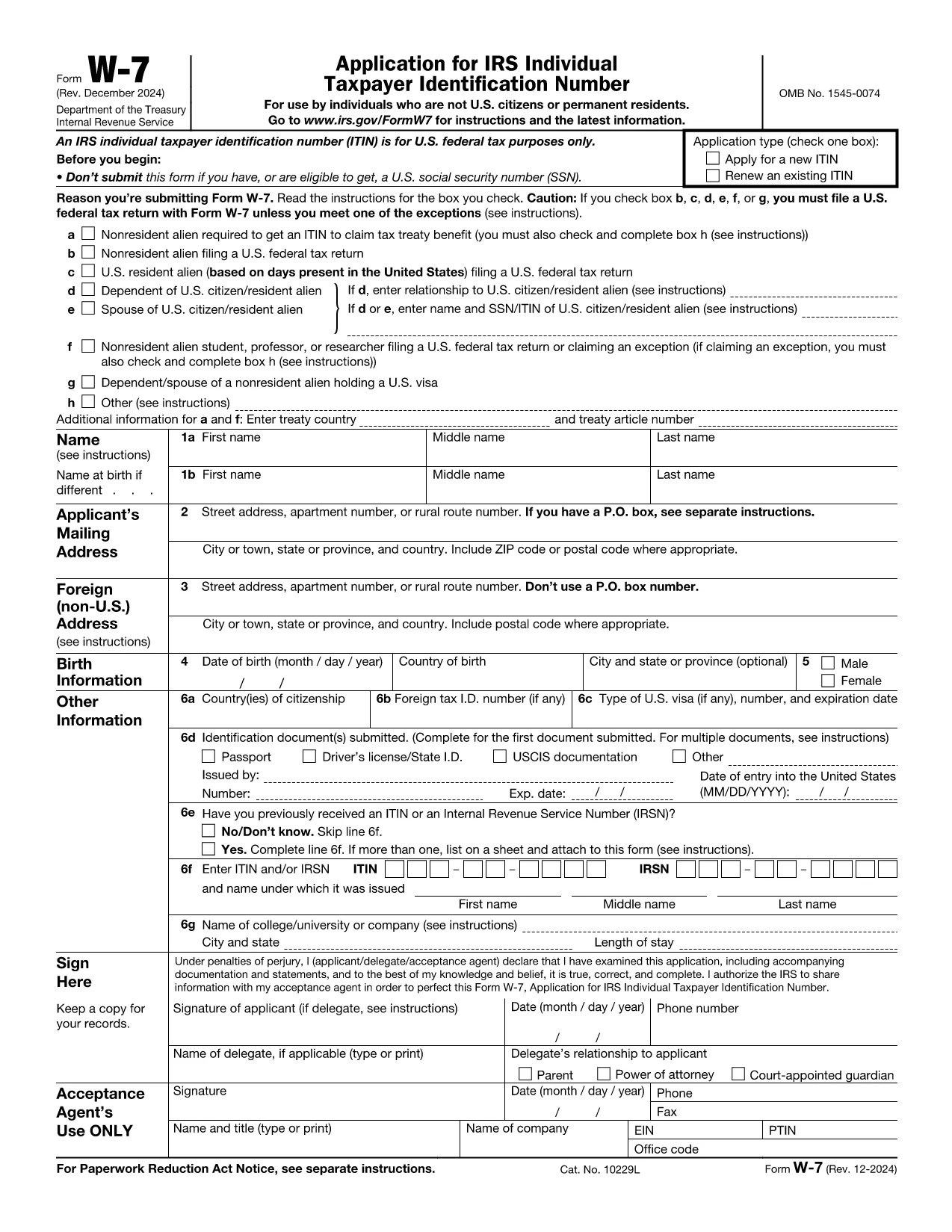
Form W‑7 is the IRS application used to obtain an Individual Taxpayer Identification Number (ITIN) for individuals who are not eligible for a Social Security Number. With Formize you can fill out the official IRS PDF online, save time, and avoid printing errors.

What is Form W‑7?

The Form W‑7 (Application for IRS Individual Taxpayer Identification Number) allows non‑resident aliens, foreign students, dependents, and spouses of U.S. taxpayers to comply with U.S. tax reporting requirements.

Key Requirements & Documents

  • Valid passport (or other accepted ID)
  • Proof of foreign status (visa, birth certificate, etc.)
  • A federal income tax return, unless you qualify for an exception
  • Completed Form W‑7 attached to your return

How to Complete the Form Online

Instead of downloading the PDF, simply click the Fill out this form button on this page. The Formize PDF Filler loads instantly, letting you type directly into each field.

Common Mistakes to Avoid

  • Leaving the “SSN” box checked when you do not have a Social Security Number.
  • Submitting an incomplete list of supporting documents.
  • Using an outdated version of the form (always use the latest PDF from the IRS).
  • Failing to sign and date the form.

Where to Submit Your Application

After you finish the online form, download the completed PDF and mail it with your supporting documents to:

IRS ITIN Operations
P.O. Box 149342
Austin, TX 78714‑9342
United States

You may also use an IRS‑approved Certified Acceptance Agent.

הוראות

  • טופס W-7 הוראות - הוראות טופס W-7, בקשה ל-IRS Individual Taxpayer Identification מספר (שימוש בתיקון אוגוסט 2019 של טופס W-7)
שאלות נפוצות
  • Who needs to file Form W‑7?

    Anyone who is not eligible for a Social Security Number but must file a U.S. federal tax return, claim a tax treaty benefit, or be listed as a dependent/spouse on a U.S. return.

  • Can I submit Form W‑7 electronically?

    The IRS currently accepts only mailed paper submissions, but you can complete the form online with Formize and then print or email the final PDF for mailing.

  • What identification documents are accepted?

    A valid passport is the most common document. Other accepted IDs include national ID cards, foreign driver’s licenses, or a combination of birth certificate and government photo ID.

  • Do I need to attach a tax return with Form W‑7?

    Yes, in most cases you must attach the federal tax return you are filing. Exceptions exist for treaty benefits and certain students; see the form instructions for details.

  • How long does it take to receive an ITIN?

    The IRS typically processes ITIN applications within 7 weeks. If you are applying from a foreign address, allow up to 9 weeks.

  • Is there a fee to file Form W‑7?

    There is no filing fee for the form itself, but you may incur costs for certified copies of documents or for using a Certified Acceptance Agent.

איך ל

כיצד למלא את Form W‑7 בחינם, באינטרנט ב-5 שלבים פשוטים:

  1. 1
    Click the Fill out this form button
    On the Formize page, press the blue “Fill out this form” button to launch the PDF filler.
  2. 2
    Wait for the Formize PDF Filler to load
    The web app loads the official IRS Form W‑7 in a secure viewer. No software download is required.
  3. 3
    Enter your information
    Type directly into each field, using the instructions provided on the form. Use the tab key to move quickly between fields.
  4. 4
    Review and sign
    Double‑check every entry, then add your electronic signature using the built‑in signature tool.
  5. 5
    Save or email the completed form
    When you’re done, click “Download PDF” or “Email to me” and attach the file to your ITIN submission package.
Formize אפליקציית מילוי PDF
על אודות

טפסי מס

Form W‑7 הוא אחד מטפסי מס שהם מסמכים המשמשים לדיווח על מידע הקשור למיסים לרשות המס הרלוונטית. ישנם סוגים שונים של טפסי מס, כולל טפסי מס פדרליים, מדינתיים ומקומיים, שיכולים להשתנות בהתאם לנסיבות ולמיקומו של משלם המסים.

תכונות

מילוי PDF

הדרך הקלה ביותר למלא טפסי PDF באינטרנט

  • מלא במהירות את Form W‑7
    מחפש דרך למלא במהירות את Form W‑7 באינטרנט? עם מילוי טופס ה-PDF המקוון שלנו בחינם, תדע כיצד לערוך ולמלא את מסמך ה-PDF הזה תוך פחות מדקה.
  • עורך PDF מקוון קל לשימוש
    נמאס לך להדפיס קבצי PDF כדי שתוכל לערוך אותם, לפני סריקה מחדש ושליחה חזרה? ערוך מסמכי PDF בחינם באינטרנט. השתמש בעורך ה-PDF המקוון שלנו כדי לחסוך בזמן ובנייר.
  • כלים מעולים, כל הפלטפורמות
    תוהה כיצד למלא את Form W‑7 ב-Mac, או אולי איך להשתמש בחומר מילוי PDF בחינם? כלי ה-PDF המקוונים שלנו פועלים בכל הפלטפורמות.
  • אחסון קבצים מאובטח
    קבצי "Form W‑7" שהושלמו מאוחסנים במסד נתונים מאובטח המנוהל על ידי אירוח Amazon Cloud. אתה יכול למחוק את הקבצים שלך מהמערכת שלנו בכל עת. בכל מקרה, קבצים אלו נמחקים אוטומטית לאחר 24 שעות.
  • צ'אט עם Form W‑7
    צ'אט עם "Form W‑7" ב-Chatize שהוא עוזר לקורא PDF בחינם. שאל שאלות וקבל תשובות מ-"Form W‑7". פשוט לחץ על הלחצן צ'אט עם מסמך למעלה.

מחק הפעלת מילוי

למחוק את הפעלת המילוי שנבחרה? במקרה זה, ההתקדמות שלך במילוי הטופס תאבד.

מחק סשן עריכה

למחוק את סשן העריכה שנבחר? במקרה זה, ההתקדמות שלך ביצירה ועריכה של הטופס תאבד.