
בחר שפה

Fillable Form W‑9S – Request Student or Borrower TIN

  1. מדינה ארה"ב
  2. שפה אנגלית
  3. פעילות מיסים
  4. מַחלָקָה מס הכנסה
Fillable Form W‑9S – Request Student or Borrower TIN

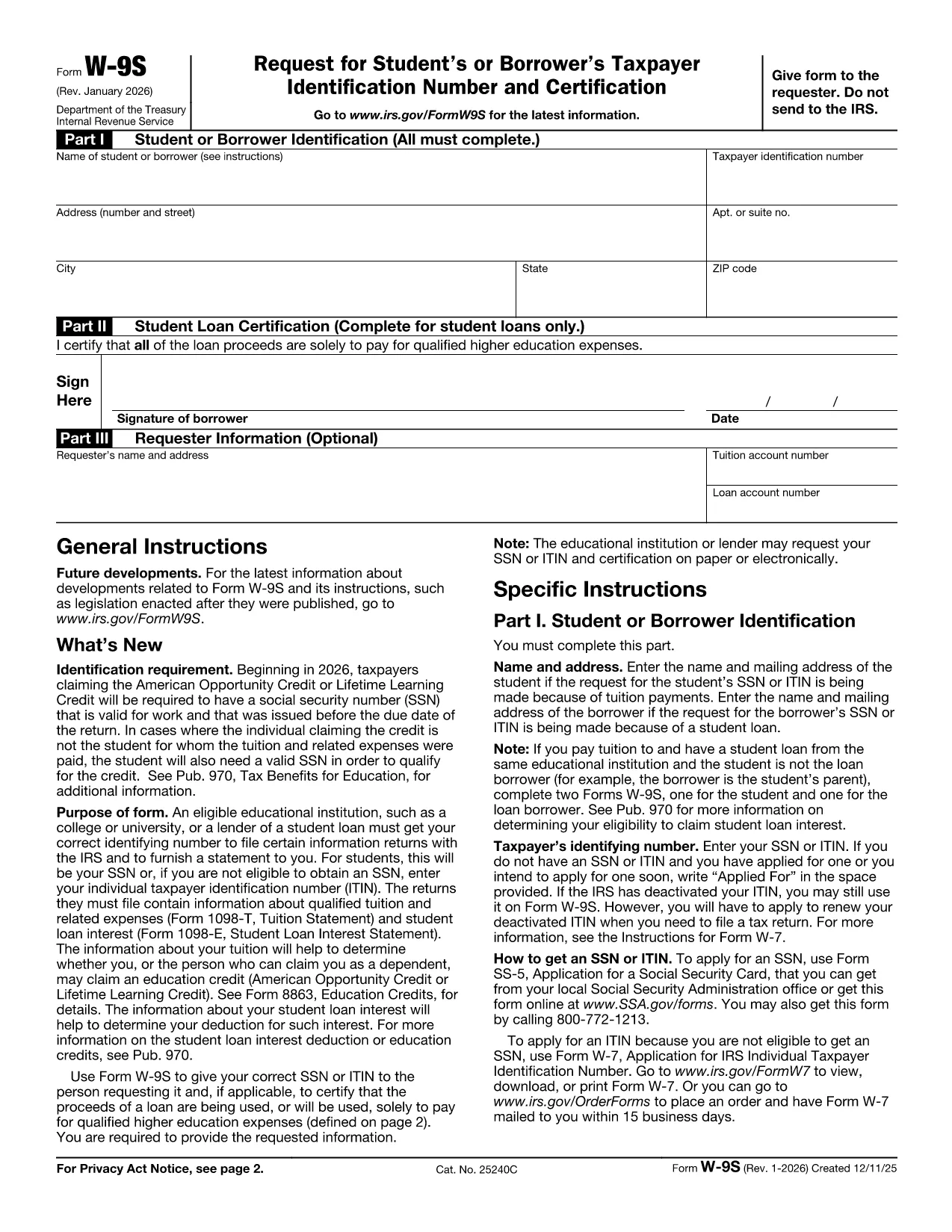
The IRS Form W‑9S, Request for Student's or Borrower's Taxpayer Identification Number and Certification, is used by qualifying educational institutions to collect the TIN of students or borrowers who receive scholarships, grants, or loan interest that must be reported on Forms 1098‑T or 1098‑E.

Our fillable Form W‑9S lets you complete the entire request directly in your browser—no printing, scanning, or PDF editor required. Simply click the “Fill out this form” button, let the Formize PDF Filler load, and start entering the required information.

What Is Form W‑9S and Who Needs It?

Form W‑9S captures the name, address, and Taxpayer Identification Number (TIN) of a student or borrower. It is required when the institution must issue a 1098‑T (tuition statement) or 1098‑E (student loan interest) to the IRS. Both federal and private loan recipients may be asked to submit this form.

How to Complete Form W‑9S Online

Follow these simple steps:

  1. Click the “Fill out this form” button on this page.
  2. Wait for the Formize PDF Filler app to load (usually a few seconds).
  3. Enter the student or borrower’s legal name, TIN (SSN or EIN), and full address.
  4. If you are reporting a loan, complete Part II with the loan certification.
  5. Sign electronically and submit the form according to your school’s instructions.

Common Mistakes to Avoid on Form W‑9S

  • Incorrect TIN: Double‑check the Social Security Number or EIN; a typo will delay processing.
  • Missing Signature: The form is not valid without a signed certification.
  • Out‑of‑date Address: Use the current mailing address to ensure the 1098‑E or 1098‑T reaches the taxpayer.
  • Leaving Part II Blank: Only leave it blank if the request is not for a loan.

Download the Official PDF

If you prefer the original IRS version, you can download it here: Form W‑9S (PDF). Our fillable version mirrors this official layout while adding a seamless online experience.

שאלות נפוצות
  • What is the difference between Form W‑9 and Form W‑9S?

    Form W‑9 is used for general payee information, while Form W‑9S is specifically for students or borrowers who need to report tuition or loan interest to the IRS.

  • Can I use the same TIN for multiple schools?

    Yes. Your Social Security Number or EIN remains the same; each institution will request a separate Form W‑9S for its records.

  • Do I need to file Form W‑9S with the IRS myself?

    No. The educational institution collects the form and uses the information to issue the appropriate 1098‑T or 1098‑E to the IRS.

  • Is an electronic signature accepted on Form W‑9S?

    Yes. The IRS accepts electronic signatures on fillable PDFs as long as the signer certifies the information is correct.

  • What should I do if I make a mistake after submitting?

    Contact your school’s financial aid office immediately. They can provide a corrected Form W‑9S or advise you on the next steps.

  • Is there a fee to use the Formize PDF Filler?

    No. Formize offers free online filling for government forms like Form W‑9S.

איך ל

כיצד למלא את Form W‑9S בחינם, באינטרנט ב-3 שלבים פשוטים:

  1. 1
    Open the Fillable Form
    Click the “Fill out this form” button on the page. The Formize PDF Filler will open in a new window.
  2. 2
    Enter Required Information
    Complete Part I with the student or borrower’s name, TIN, and address. If you have a loan, fill in Part II.
  3. 3
    Sign and Submit
    Add your electronic signature, review the data for accuracy, and follow your institution’s submission instructions.
Formize אפליקציית מילוי PDF
על אודות

טפסי מס פדרליים

Form W‑9S הוא אחד מטפסי המס הפדרליים שהם מסמכים המשמשים לדיווח ולהגשת מס הכנסה פדרלי ל-Internal Revenue Service (IRS) בארצות הברית. טפסים אלו משמשים אנשים פרטיים, עסקים וארגונים כדי לדווח על הכנסותיהם, הניכויים ומידע רלוונטי אחר הדרוש לחישוב חבות המס הפדרלית שלהם.

טופס המס הפדרלי הנפוץ ביותר הוא טופס 1040, המשמש משלמי מס בודדים לדיווח על מס ההכנסה האישי שלהם. טפסים אחרים הנפוצים כוללים את טופס 1065 לשותפויות, טופס 1120 עבור תאגידים, וטופס 990 עבור ארגונים פטורים ממס.

טפסי מס פדרליים מחייבים בדרך כלל משלמי המסים לדווח על מקורות הכנסה שונים, כגון שכר, משכורות וטיפים, כמו גם הכנסות מהשקעות, נכסים להשכרה ומקורות אחרים. הטפסים גם מאפשרים לנישומים לתבוע ניכויים וזיכויים עבור הוצאות שונות, כגון תרומות לצדקה, ריבית על משכנתא והוצאות בריאות.

חשוב להגיש טפסי מס פדרליים במדויק ובזמן, שכן אי ביצוע זה עלול לגרום לקנסות וחיובי ריבית מ-IRS.

תכונות

מילוי PDF

הדרך הקלה ביותר למלא טפסי PDF באינטרנט

  • מלא במהירות את Form W‑9S
    מחפש דרך למלא במהירות את Form W‑9S באינטרנט? עם מילוי טופס ה-PDF המקוון שלנו בחינם, תדע כיצד לערוך ולמלא את מסמך ה-PDF הזה תוך פחות מדקה.
  • עורך PDF מקוון קל לשימוש
    נמאס לך להדפיס קבצי PDF כדי שתוכל לערוך אותם, לפני סריקה מחדש ושליחה חזרה? ערוך מסמכי PDF בחינם באינטרנט. השתמש בעורך ה-PDF המקוון שלנו כדי לחסוך בזמן ובנייר.
  • כלים מעולים, כל הפלטפורמות
    תוהה כיצד למלא את Form W‑9S ב-Mac, או אולי איך להשתמש בחומר מילוי PDF בחינם? כלי ה-PDF המקוונים שלנו פועלים בכל הפלטפורמות.
  • אחסון קבצים מאובטח
    קבצי "Form W‑9S" שהושלמו מאוחסנים במסד נתונים מאובטח המנוהל על ידי אירוח Amazon Cloud. אתה יכול למחוק את הקבצים שלך מהמערכת שלנו בכל עת. בכל מקרה, קבצים אלו נמחקים אוטומטית לאחר 24 שעות.
  • צ'אט עם Form W‑9S
    צ'אט עם "Form W‑9S" ב-Chatize שהוא עוזר לקורא PDF בחינם. שאל שאלות וקבל תשובות מ-"Form W‑9S". פשוט לחץ על הלחצן צ'אט עם מסמך למעלה.

מחק הפעלת מילוי

למחוק את הפעלת המילוי שנבחרה? במקרה זה, ההתקדמות שלך במילוי הטופס תאבד.

מחק סשן עריכה

למחוק את סשן העריכה שנבחר? במקרה זה, ההתקדמות שלך ביצירה ועריכה של הטופס תאבד.