בחר שפה

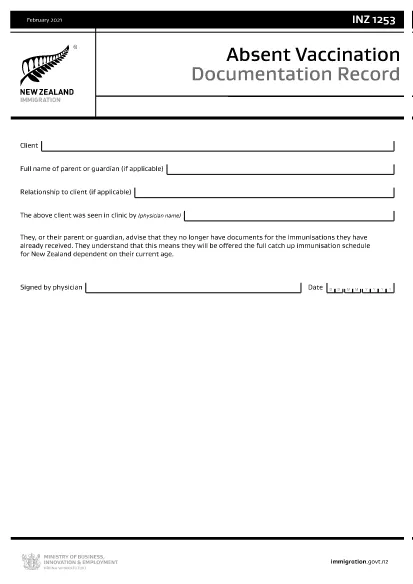
INZ1253 – Absent Vaccination Documentation Record (Fillable PDF)

  1. שפה אנגלית
  2. מדינה ניו זילנד
  3. פעילות בְּרִיאוּת
INZ1253 – Absent Vaccination Documentation Record (Fillable PDF)

The INZ1253 is the official Absent Vaccination Documentation Record used by Immigration New Zealand when an applicant cannot produce proof of previously received immunisations. This form allows the applicant (or a parent/guardian) to declare the missing records and request the appropriate catch‑up vaccination schedule.

What is the INZ1253 Form?

The form is required for anyone applying for a New Zealand visa or residency who does not have the original vaccination certificates. By completing INZ1253 you acknowledge that you will follow the full catch‑up immunisation schedule based on your age.

How to Complete the INZ1253 Online

Instead of downloading, printing, and scanning, you can fill out the form directly on our site:

  • Click the “Fill out this form” button below.
  • Wait a few seconds while the Formize PDF Filler app loads.
  • Enter the required information in the fillable fields (personal details, reason for missing records, etc.).
  • Save the completed PDF to your device or submit it directly to Immigration New Zealand.

Common Mistakes to Avoid

  • Leaving mandatory fields blank – the system will highlight any missing information before you can save.
  • Using an outdated version – always use the latest INZ1253 PDF provided below.
  • Incorrect date formats – follow the DD/MM/YYYY format as shown in the example.
  • Not signing the form – the electronic signature field must be completed before submission.

Where to Submit the Completed Form

After you have saved the filled PDF, attach it to your visa or residency application through the Immigration New Zealand online portal. If you are applying by paper, include the printed form with your supporting documents.

Need help? Review the FAQs below or contact Immigration New Zealand directly.

שאלות נפוצות
  • Do I need to print the INZ1253 form after filling it online?

    No. The Formize filler creates a fully signed PDF that can be uploaded directly to the Immigration New Zealand portal.

  • Can I edit the form after I have saved it?

    Yes. Open the saved PDF again with the Formize filler to make any changes, then re‑save.

  • What if I don’t have any vaccination records at all?

    Select “No records available” in the form and provide a brief explanation. You will be scheduled for the full catch‑up immunisation program.

  • Is the electronic signature legally accepted?

    Immigration New Zealand accepts electronic signatures on the INZ1253 when the form is completed using a certified PDF filler like Formize.

  • How long does it take for Immigration New Zealand to process the form?

    Processing times vary, but most applicants receive a response within 5‑10 business days after submission.

איך ל

כיצד למלא את INZ1253 בחינם, באינטרנט ב-4 שלבים פשוטים:

  1. 1
    Open the Fillable Form
    Click the “Fill out this form” button on the page. The Formize PDF Filler will launch in your browser.
  2. 2
    Enter Your Details
    Complete each highlighted field – personal information, reason for missing vaccination records, and any additional notes.
  3. 3
    Save or Submit
    When all required fields are filled, click “Save PDF” to download the completed form or use the built‑in “Submit” button to send it directly to Immigration New Zealand.
  4. 4
    Confirm Receipt
    Check your email or the immigration portal for a confirmation that the form has been received.
Formize אפליקציית מילוי PDF
על אודות

טפסי בקשה לרפואה רפואית

INZ1253 הוא אחד מטפסי Medicare שהם מסמכים המשמשים בתהליכים שונים הקשורים לתוכנית Medicare, שהיא תוכנית ביטוח בריאות בניהול פדרלי בארצות הברית. Medicare מספקת כיסוי לאנשים זכאים בגילאי 65 ומעלה, כמו גם לאנשים מסוימים עם מוגבלויות או מצבים רפואיים ספציפיים.

כמה צורות רפואיות נפוצות כוללות:

בקשת הרשמה ל-Medicare: טופס זה משמש להגשת בקשה להטבות Medicare. הוא כולל מידע על הפרטים האישיים של הפונה, כגון שם, כתובת, מספר תעודת זהות ופרטים על כיסוי ביטוח בריאות עדכני.

טופסי תביעה של Medicare: טפסים אלה משמשים לבקשת החזר עבור שירותים רפואיים או אספקה ​​המכוסה על ידי Medicare. טפסי תביעה שונים משמשים עבור סוגים שונים של שירותים, כגון שהות בבית חולים (טופס UB-04), שירותי רופא (טופס CMS-1500), או ציוד רפואי עמיד (טופס DMERC).

טפסים של תוכנית תרופות מרשם של Medicare: טפסים אלה משמשים לרישום ל-Medicare Part D, המספק כיסוי לתרופות מרשם. הם בדרך כלל דורשים מידע על התרופות הנלקחות כעת ועשויים לכלול רשימה של תרופות מכוסות עבור התוכנית הספציפית.

טופסי ערעור של Medicare: אם תביעת Medicare נדחתה או אם יש אי הסכמה להחלטת כיסוי, אנשים יכולים להגיש ערעור. הטפסים המשמשים לתהליך הערעור משתנים בהתאם למצב הספציפי ולסוג הכיסוי המעורב של Medicare.

טפסי הרשאת Medicare: טפסים אלה משמשים לאשר שחרור מידע בריאותי מוגן לאנשים או לארגונים הזקוקים לגישה לרשומות הרפואיות למטרות כגון עיבוד תביעות או תיאום טיפול.

טפסי שינוי של Medicare: טפסים אלה משמשים לביצוע שינויים בכיסוי הקיים של Medicare, כגון עדכון מידע אישי, החלפת רופא ראשוני או מעבר לתוכנית אחרת של Medicare Advantage או חלק D של תרופות מרשם.

חשוב לציין שהטפסים והתהליכים של Medicare יכולים להיות מורכבים, ואנשים מוזמנים לבקש סיוע מתוכנית Medicare או איש מקצוע רפואי מהימן כדי להבטיח שהם ממלאים את הטפסים המתאימים במדויק ובזמן.

תכונות

מילוי PDF

הדרך הקלה ביותר למלא טפסי PDF באינטרנט

  • מלא במהירות את INZ1253
    מחפש דרך למלא במהירות את INZ1253 באינטרנט? עם מילוי טופס ה-PDF המקוון שלנו בחינם, תדע כיצד לערוך ולמלא את מסמך ה-PDF הזה תוך פחות מדקה.
  • עורך PDF מקוון קל לשימוש
    נמאס לך להדפיס קבצי PDF כדי שתוכל לערוך אותם, לפני סריקה מחדש ושליחה חזרה? ערוך מסמכי PDF בחינם באינטרנט. השתמש בעורך ה-PDF המקוון שלנו כדי לחסוך בזמן ובנייר.
  • כלים מעולים, כל הפלטפורמות
    תוהה כיצד למלא את INZ1253 ב-Mac, או אולי איך להשתמש בחומר מילוי PDF בחינם? כלי ה-PDF המקוונים שלנו פועלים בכל הפלטפורמות.
  • אחסון קבצים מאובטח
    קבצי "INZ1253" שהושלמו מאוחסנים במסד נתונים מאובטח המנוהל על ידי אירוח Amazon Cloud. אתה יכול למחוק את הקבצים שלך מהמערכת שלנו בכל עת. בכל מקרה, קבצים אלו נמחקים אוטומטית לאחר 24 שעות.
  • צ'אט עם INZ1253
    צ'אט עם "INZ1253" ב-Chatize שהוא עוזר לקורא PDF בחינם. שאל שאלות וקבל תשובות מ-"INZ1253". פשוט לחץ על הלחצן צ'אט עם מסמך למעלה.

מחק הפעלת מילוי

למחוק את הפעלת המילוי שנבחרה? במקרה זה, ההתקדמות שלך במילוי הטופס תאבד.

מחק סשן עריכה

למחוק את סשן העריכה שנבחר? במקרה זה, ההתקדמות שלך ביצירה ועריכה של הטופס תאבד.