
בחר שפה

INZ1262 – Departure Health Check Form (Fillable PDF)

  1. שפה אנגלית
  2. מדינה ניו זילנד
  3. פעילות בְּרִיאוּת
INZ1262 – Departure Health Check Form (Fillable PDF)

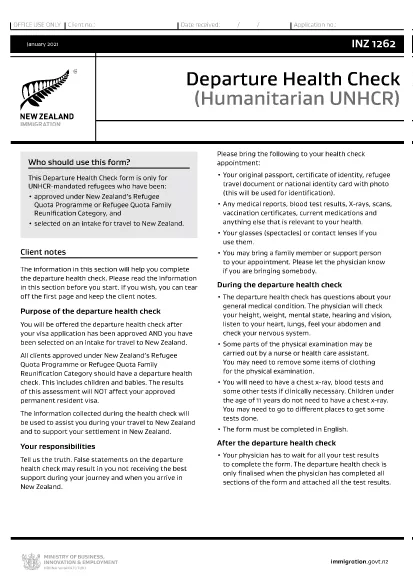
The INZ1262 Departure Health Check is a mandatory form for UNHCR‑mandated refugees who have been approved for a New Zealand permanent‑resident visa under the Refugee Quota Programme or the Refugee Quota Family Reunification Category. It confirms that the applicant meets New Zealand's health requirements before travel.

What Is the INZ1262 Departure Health Check?

This form records medical examinations, vaccinations, and any health conditions that could affect entry into New Zealand. It must be completed by a qualified health professional and signed by the applicant.

How to Fill the INZ1262 Form Online

Instead of downloading the PDF and using a separate editor, simply click the "Fill out this form" button on this page. The Formize PDF Filler app will load the official INZ1262 document, allowing you to type directly into each field.

  • Step 1: Click the fillable‑PDF button.
  • Step 2: Wait a few seconds while Formize loads the form.
  • Step 3: Complete every required field using your keyboard or a touchscreen.
  • Step 4: Review the information for accuracy.
  • Step 5: Save or download the finished PDF to attach to your visa application.

Common Mistakes to Avoid

  • Leaving any mandatory field blank – the form will be rejected.
  • Using an outdated version of the PDF – always use the latest INZ1262 from the official link.
  • Providing incorrect passport or visa numbers.
  • Failing to sign the form digitally or print‑sign after download.

Download the Official INZ1262 PDF

If you prefer to work offline, you can download the official form directly from Immigration New Zealand:

Download INZ1262 PDF

Using Formize’s online filler ensures you always have the most current version and eliminates formatting errors.

שאלות נפוצות
  • Who needs to fill out the INZ1262 form?

    Any UNHCR‑mandated refugee approved for a New Zealand permanent‑resident visa under the Refugee Quota Programme or Family Reunification Category must complete the INZ1262.

  • Can I use a handwritten PDF?

    While a printed, handwritten form is accepted, a fillable PDF reduces errors and speeds up processing.

  • Do I need a medical practitioner’s signature?

    Yes. A qualified health professional must sign the sections that require medical verification.

  • What if I make a mistake after submitting?

    Contact Immigration New Zealand immediately. You may need to submit an amended form with a new reference number.

  • Is there a fee to use the Formize PDF Filler?

    No. Formize provides free online filling for this government form.

  • How long is the INZ1262 valid?

    The health check is valid for the duration of the visa processing period. If your travel is delayed beyond 12 months, a new health assessment may be required.

איך ל

כיצד למלא את INZ1262 בחינם, באינטרנט ב-5 שלבים פשוטים:

  1. 1
    Click the Fillable Form Button
    Press the "Fill out this form" button on the page to launch the Formize PDF Filler.
  2. 2
    Wait for the Form to Load
    The Formize app loads the official INZ1262 PDF within a few seconds.
  3. 3
    Complete All Required Fields
    Enter your personal details, medical information, and signatures directly in the browser.
  4. 4
    Review and Save
    Double‑check the entered data, then click "Save" to download the completed PDF.
  5. 5
    Submit with Your Visa Application
    Attach the saved INZ1262 PDF to your refugee visa file as instructed by Immigration New Zealand.
Formize אפליקציית מילוי PDF
על אודות

טפסי בקשה לרפואה רפואית

INZ1262 הוא אחד מטפסי Medicare שהם מסמכים המשמשים בניהול תוכנית Medicare, שהיא תוכנית ביטוח בריאות פדרלית בארצות הברית בעיקר עבור אנשים בני 65 ומעלה, כמו גם אנשים צעירים יותר עם מוגבלות או רפואי ספציפי תנאים. טפסים אלה משמשים למטרות שונות הקשורות להרשמה, ניהול וגישה להטבות של Medicare. להלן כמה צורות נפוצות של Medicare:

טופסי בקשה ל-Medicare: טפסים אלה, כגון CMS-40B, משמשים להגשת בקשה להטבות Medicare, כולל חלק א' (ביטוח בתי חולים) ו/או חלק ב' (ביטוח רפואי). הם דורשים מידע אישי, כגון שם, כתובת, מספר תעודת זהות ומידע על הכיסוי הנוכחי של ביטוח הבריאות.

טופסי הרשמה ל-Medicare: טפסים אלה, כגון CMS-855B עבור ספקי שירותי בריאות, משמשים אנשי מקצוע בתחום הבריאות, ספקים וארגונים כדי להירשם לתכנית Medicare. הם אוספים מידע על הספק או הארגון והכישורים שלהם להשתתף במדיקייר.

טופסי תביעה של Medicare: טפסים אלה, כגון CMS-1500 או UB-04, משמשים להגשת תביעות להחזר של שירותים רפואיים שניתנו למוטבי Medicare. ספקי שירותי בריאות או ספקים ממלאים טפסים אלה כדי לבקש תשלום עבור שירותים מכוסים.

טפסי תוכנית תרופות מרשם של Medicare: טפסים אלה, כגון CMS-10260, משמשים כדי להירשם לתוכניות תרופות מרשם של Medicare Part D או לביצוע שינויים בתוכניות קיימות. הם דורשים מידע על התרופות שהמוטב נוטל ועל בית המרקחת המועדף עליהם.

טפסי הרשאה של Medicare: טפסים אלה, כגון CMS-10114, משמשים כדי לאשר שחרור מידע בריאותי אישי מרשומות Medicare ליחידים או ארגונים ייעודיים. זה מאפשר למוטבים להעניק גישה לרשומות הרפואיות שלהם למטרות ספציפיות.

טופסי ערעור של Medicare: טפסים אלה, כגון CMS-20027, משמשים לבקשת ערעור אם תביעה נדחתה או אם יש אי הסכמה להחלטת Medicare. הם מספקים תהליך למוטבים או לנציגיהם לבקש סקירה של קביעות כיסוי או החלטות תשלום.

אלו הן רק כמה דוגמאות לצורות השונות של Medicare שקיימות. הטפסים והדרישות הספציפיות עשויות להשתנות, לכן חשוב לעיין באתר האינטרנט הרשמי של Medicare או לפנות לרשות המנהלית של Medicare לקבלת מידע מדויק ועדכני.

תכונות

מילוי PDF

הדרך הקלה ביותר למלא טפסי PDF באינטרנט

  • מלא במהירות את INZ1262
    מחפש דרך למלא במהירות את INZ1262 באינטרנט? עם מילוי טופס ה-PDF המקוון שלנו בחינם, תדע כיצד לערוך ולמלא את מסמך ה-PDF הזה תוך פחות מדקה.
  • עורך PDF מקוון קל לשימוש
    נמאס לך להדפיס קבצי PDF כדי שתוכל לערוך אותם, לפני סריקה מחדש ושליחה חזרה? ערוך מסמכי PDF בחינם באינטרנט. השתמש בעורך ה-PDF המקוון שלנו כדי לחסוך בזמן ובנייר.
  • כלים מעולים, כל הפלטפורמות
    תוהה כיצד למלא את INZ1262 ב-Mac, או אולי איך להשתמש בחומר מילוי PDF בחינם? כלי ה-PDF המקוונים שלנו פועלים בכל הפלטפורמות.
  • אחסון קבצים מאובטח
    קבצי "INZ1262" שהושלמו מאוחסנים במסד נתונים מאובטח המנוהל על ידי אירוח Amazon Cloud. אתה יכול למחוק את הקבצים שלך מהמערכת שלנו בכל עת. בכל מקרה, קבצים אלו נמחקים אוטומטית לאחר 24 שעות.
  • צ'אט עם INZ1262
    צ'אט עם "INZ1262" ב-Chatize שהוא עוזר לקורא PDF בחינם. שאל שאלות וקבל תשובות מ-"INZ1262". פשוט לחץ על הלחצן צ'אט עם מסמך למעלה.

מחק הפעלת מילוי

למחוק את הפעלת המילוי שנבחרה? במקרה זה, ההתקדמות שלך במילוי הטופס תאבד.

מחק סשן עריכה

למחוק את סשן העריכה שנבחר? במקרה זה, ההתקדמות שלך ביצירה ועריכה של הטופס תאבד.