
בחר שפה

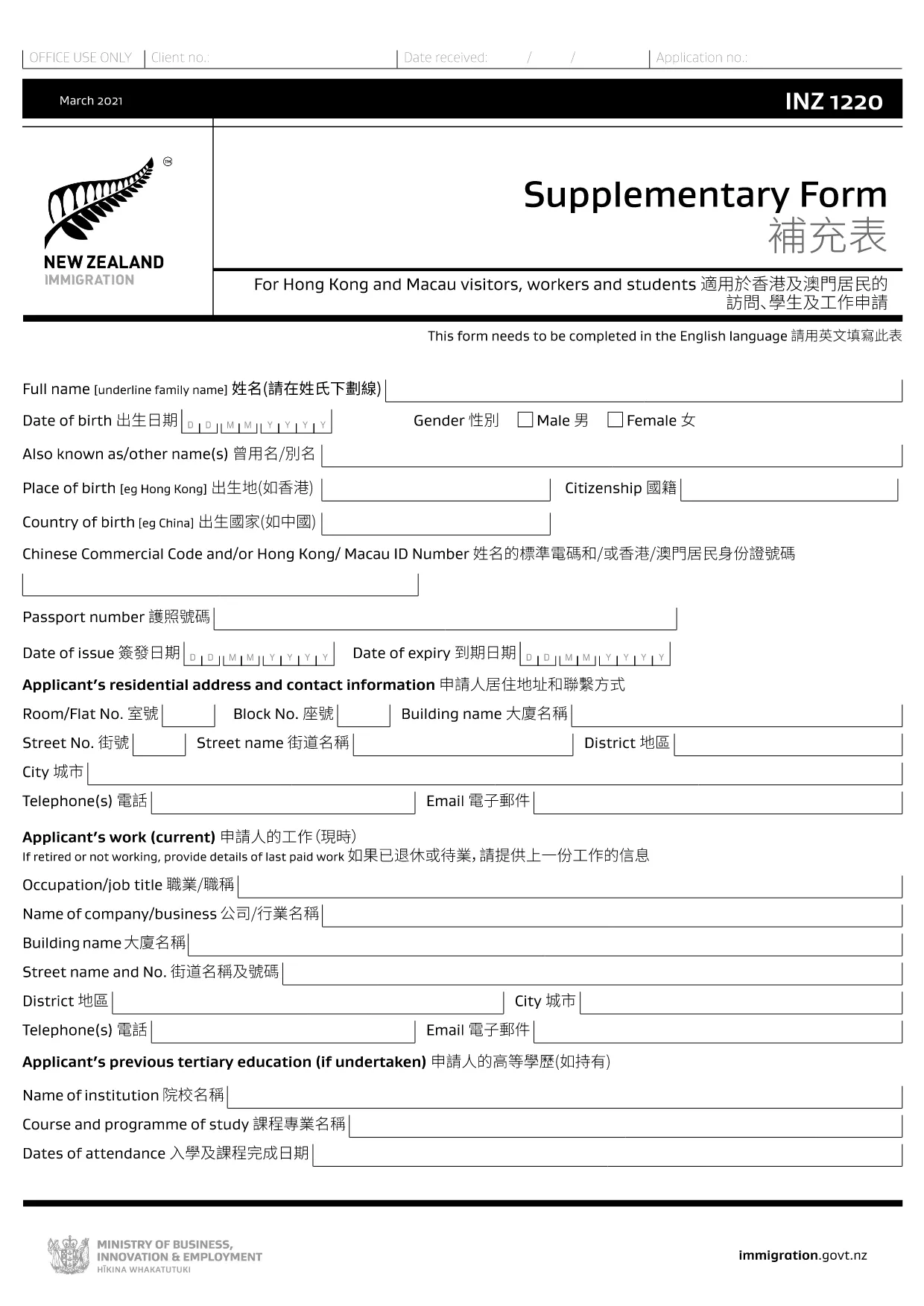
INZ 1220 Supplementary Form – Fillable PDF

  1. מדינה ניו זילנד
  2. שפה אנגלית
  3. פעילות ביקור ותיירות עֲבוֹדָה עלייה לימוד
INZ 1220 Supplementary Form – Fillable PDF

The INZ 1220 Supplementary Form is required by Immigration New Zealand for visitors, workers and students from Hong Kong and Macau who need to provide additional contact details. This fillable PDF lets you complete the form quickly, securely, and without printing.

Our page integrates the Formize PDF Filler app, so you can edit the document directly in your browser. No extra software, no downloads – just click, fill, and submit.

What Is the INZ 1220 Form?

INZ 1220 is a supplementary information sheet that collects the name, address, telephone, and email of a New Zealand contact (friend, family member, or sponsor). It is often requested alongside visa applications to verify local support.

How to Complete the INZ 1220 Online

Follow the simple steps below to fill out the form using Formize:

  • Click the **Fill out this form** button on this page.
  • Wait a few seconds while the Formize PDF Filler loads.
  • Enter the required details in each field – the interface highlights mandatory sections.
  • Review the information for accuracy.
  • Save the completed PDF to your device or download a copy for your records.

Common Mistakes to Avoid

  • Leaving the contact’s phone number incomplete – include country code.
  • Using an outdated email address – Immigration may send important updates.
  • Submitting the form with blank mandatory fields – the filler will flag these before you can save.

Where to Submit the Completed Form

After saving the PDF, attach it to your visa application through the Immigration New Zealand online portal, or email it to the address specified in your application instructions.

FAQs About INZ 1220

Find quick answers to the most common questions below (full FAQ list further down).

שאלות נפוצות
  • Do I need to print the INZ 1220 form?

    No. Using the Formize PDF Filler you can complete the form entirely online and download the finished PDF.

  • What language is the INZ 1220 form in?

    The official form is in English. If you need a translation, you must provide a certified translation alongside the original.

  • Can I save my progress and finish later?

    Yes. While the Formize app is open, you can click **Save** to download a partially‑filled PDF, then reload it later to continue.

  • Is the contact’s New Zealand address mandatory?

    Yes. Immigration requires a full local address (street, city, postal code) to verify your support network.

  • What if I make a mistake after saving?

    Simply reopen the saved PDF in the Formize filler, correct the error, and save a new version.

  • How many pages is the INZ 1220 form?

    The supplementary form is a single‑page PDF, making it quick to fill and attach.

  • Do I need a digital signature?

    A handwritten signature is required. Print the completed PDF, sign it, then scan or take a clear photo to upload.

  • Where can I find help if I’m stuck?

    The Formize filler includes tooltip help for each field. For further assistance, consult the Immigration New Zealand website.

איך ל

כיצד למלא את INZ 1220 בחינם, באינטרנט ב-5 שלבים פשוטים:

  1. 1
    Open the Fillable Form
    Click the **Fill out this form** button on the page. The Formize PDF Filler app will open in a new tab.
  2. 2
    Load the Form
    Wait a few seconds while the INZ 1220 PDF loads. All fields become editable directly in the browser.
  3. 3
    Enter Your Information
    Type the required details (contact name, address, phone, email). Required fields are marked with an asterisk.
  4. 4
    Review and Save
    Check the entered data for errors, then click **Save** to download the completed PDF to your device.
  5. 5
    Submit with Your Visa Application
    Attach the saved INZ 1220 PDF to your Immigration New Zealand online application or email it as instructed.
Formize אפליקציית מילוי PDF
על אודות

טפסי תיירות

INZ 1220 הוא אחד מטפסי תיירות שהם מסמכים המשמשים אנשים או קבוצות שמתכננים לנסוע למטרות תיירות. טפסים אלו עשויים להשתנות בהתאם למדינת היעד או לספק שירותי הנסיעות, אך בדרך כלל הם מכילים מידע על הנוסע, מסלול הטיול שלו וכל פרט רלוונטי אחר.

כמה צורות תיירות נפוצות כוללות:

מסלול טיול: טופס זה מפרט את הפעילויות המתוכננות של הנוסע, כולל תאריכים, שעות ומיקומים של טיסות, מקומות לינה, סיורים ופעילויות אחרות.

בקשת ויזה: מדינות רבות דורשות מתיירים לקבל ויזה לפני הכניסה. טופס הבקשה לויזה בדרך כלל מבקש מידע אישי, פרטי נסיעה ומסמכים תומכים, כגון דרכון, תמונה או דוחות כספיים.

טופס הצהרת בריאות: טופס זה משמש להצהרה על כל מצב רפואי או חשיפה אפשרית למחלות מדבקות, כגון COVID-19. מדינות מסוימות דורשות מנוסעים לספק בדיקת COVID-19 שלילית לפני הכניסה.

טופס ביטוח נסיעות: טופס זה מספק מידע על כיסוי ביטוח הנסיעות של הנוסע, כולל סוג הפוליסה, מגבלות הכיסוי ופרטים ליצירת קשר במקרה חירום.

טופס הצהרת מכס: טופס זה נדרש על ידי מדינות מסוימות כדי להצהיר על כל פריט המובא לארץ, כגון מתנות, מזכרות או מוצרי אלקטרוניקה.

טופס הזמנת לינה: טופס זה מספק מידע על מקומות הלינה של הנוסע, כולל תאריכי השהייה, סוג החדר וכל בקשות מיוחדות.

טופסי תיירות עשויים להידרש על ידי חברות תעופה, סוכנויות נסיעות, מלונות או ספקי שירותי נסיעות אחרים, והם עשויים להיות זמינים בפורמטים אלקטרוניים או ניירים. חשוב לעיין בקפידה ולמלא את כל הטפסים הדרושים כדי להבטיח חווית נסיעה חלקה וללא טרחה.

תכונות

מילוי PDF

הדרך הקלה ביותר למלא טפסי PDF באינטרנט

  • מלא במהירות את INZ 1220
    מחפש דרך למלא במהירות את INZ 1220 באינטרנט? עם מילוי טופס ה-PDF המקוון שלנו בחינם, תדע כיצד לערוך ולמלא את מסמך ה-PDF הזה תוך פחות מדקה.
  • עורך PDF מקוון קל לשימוש
    נמאס לך להדפיס קבצי PDF כדי שתוכל לערוך אותם, לפני סריקה מחדש ושליחה חזרה? ערוך מסמכי PDF בחינם באינטרנט. השתמש בעורך ה-PDF המקוון שלנו כדי לחסוך בזמן ובנייר.
  • כלים מעולים, כל הפלטפורמות
    תוהה כיצד למלא את INZ 1220 ב-Mac, או אולי איך להשתמש בחומר מילוי PDF בחינם? כלי ה-PDF המקוונים שלנו פועלים בכל הפלטפורמות.
  • אחסון קבצים מאובטח
    קבצי "INZ 1220" שהושלמו מאוחסנים במסד נתונים מאובטח המנוהל על ידי אירוח Amazon Cloud. אתה יכול למחוק את הקבצים שלך מהמערכת שלנו בכל עת. בכל מקרה, קבצים אלו נמחקים אוטומטית לאחר 24 שעות.
  • צ'אט עם INZ 1220
    צ'אט עם "INZ 1220" ב-Chatize שהוא עוזר לקורא PDF בחינם. שאל שאלות וקבל תשובות מ-"INZ 1220". פשוט לחץ על הלחצן צ'אט עם מסמך למעלה.

מחק הפעלת מילוי

למחוק את הפעלת המילוי שנבחרה? במקרה זה, ההתקדמות שלך במילוי הטופס תאבד.

מחק סשן עריכה

למחוק את סשן העריכה שנבחר? במקרה זה, ההתקדמות שלך ביצירה ועריכה של הטופס תאבד.