בחר שפה

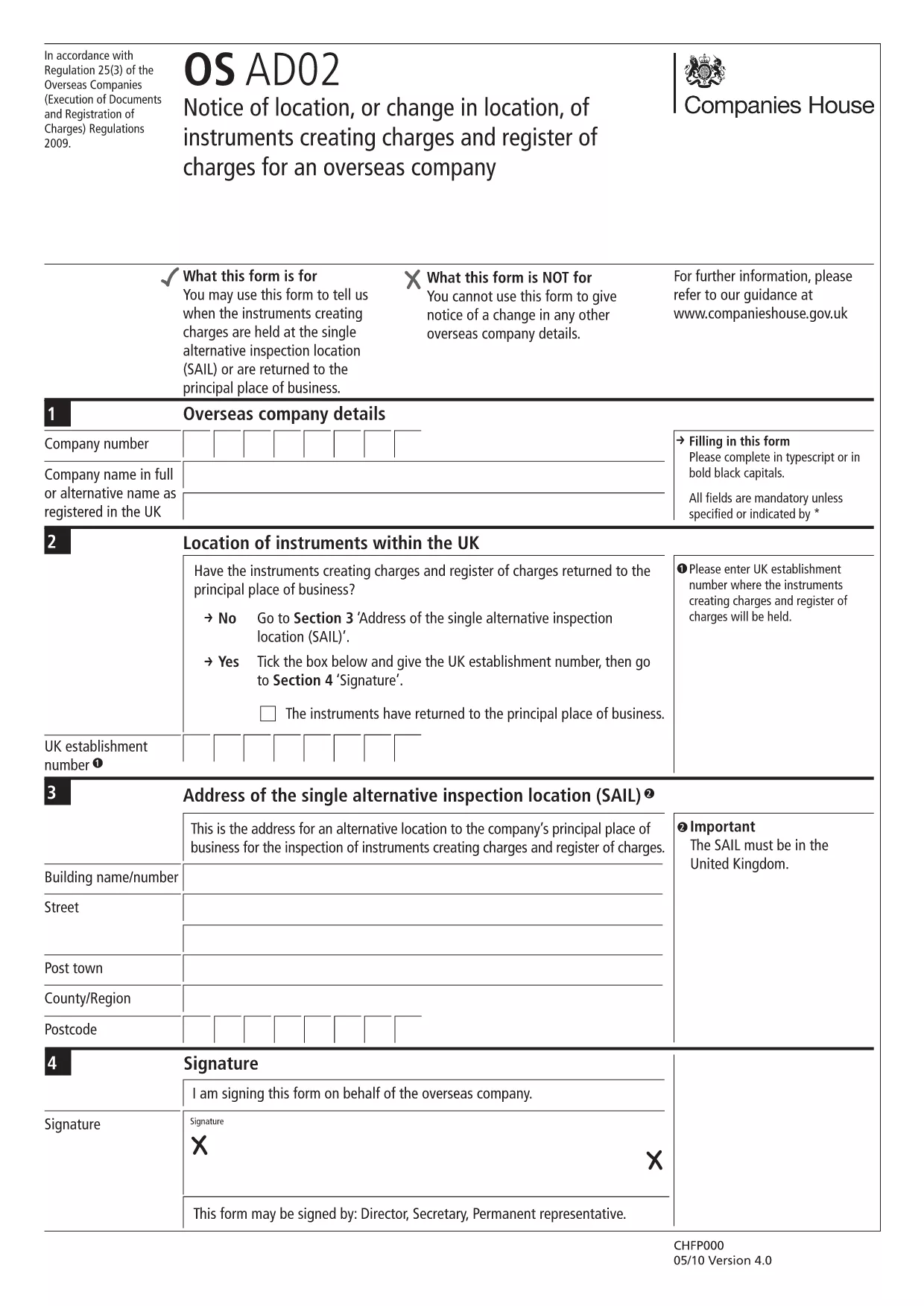
OS AD02 – Notice of Location or Change in Location of Charges

  1. שפה אנגלית
  2. מדינה United Kingdom
  3. פעילות Company Charges
  4. מַחלָקָה Companies House
OS AD02 – Notice of Location or Change in Location of Charges

The OS AD02 (also referenced as en‑ad.02) is the official Companies House form used by overseas companies to notify a change of location for instruments that create charges, and to update the register of charges. This form is required whenever a charge‑creating instrument moves to a new jurisdiction or when the location details need correction.

What is the OS AD02 Form?

OS AD02 captures essential information about the charge, the instrument, and its new location. It ensures the public register remains accurate and that creditors can trace the security interests tied to a company.

How to Complete the OS AD02 Online

Instead of downloading the PDF and editing it manually, simply click the "Fill out this form" button on this page. The Formize PDF Filler app will load the fillable version of the OS AD02, allowing you to enter data directly in your browser.

  • Step 1: Click Fill out this form and wait for the Formize PDF Filler to load.
  • Step 2: Enter the company details, charge reference, and the new location information in the highlighted fields.
  • Step 3: Review each section for accuracy – the filler highlights required fields.
  • Step 4: Click Save & Download to obtain a completed PDF ready for submission.

Common Mistakes & Tips

To avoid delays, watch out for these frequent errors:

  • Leaving the date of change blank – the field is mandatory.
  • Mismatching the charge reference number with the one on the original filing.
  • Using an outdated address format for the new jurisdiction.
  • Failing to sign the form or attach a digital signature where required.

Tip: Use the built‑in validation in the Formize filler; it will flag incomplete or incorrectly formatted entries before you download.

Where to Submit the Completed Form

Once you have the finished PDF, submit it to Companies House via their online filing portal or by post to the address indicated on the form. Keep a copy for your records.

Need help? Refer to the Companies House guidance notes linked at the bottom of the form.

שאלות נפוצות
  • What is the purpose of the OS AD02 form?

    It notifies Companies House of a change in location for instruments that create charges, keeping the public register up‑to‑date.

  • Can I edit the OS AD02 after downloading it?

    Yes, but using the Formize fillable version is faster and reduces errors compared to editing a static PDF.

  • Is a digital signature accepted on the OS AD02?

    Companies House accepts a digital signature if it complies with their e‑signing standards; the Formize filler supports adding a digital signature.

  • How long does it take for Companies House to process the OS AD02?

    Processing typically takes 5‑7 business days after a correct submission, but you can track the status online.

  • What should I do if I make a mistake after submission?

    Submit an amended OS AD02 with the corrected details, clearly marking it as an amendment.

  • Do I need to pay a fee to file OS AD02?

    No, filing the OS AD02 notice of location is free of charge.

  • Can I submit the form on behalf of another company?

    Yes, provided you have proper authorisation and include the authorised signatory’s details.

  • Is the OS AD02 form available in languages other than English?

    The official version is only in English; however, you may attach a certified translation if required.

איך ל

כיצד למלא את OS AD02 בחינם, באינטרנט ב-5 שלבים פשוטים:

  1. 1
    Open the Fillable Form
    Click the "Fill out this form" button on the page. The Formize PDF Filler app will load the OS AD02 directly in your browser.
  2. 2
    Enter Required Information
    Complete each highlighted field: company details, charge reference, old and new locations, and the effective date of the change.
  3. 3
    Validate Your Entries
    Use the built‑in validation to ensure all mandatory fields are filled and formatted correctly.
  4. 4
    Save and Download
    When all data is correct, click "Save & Download" to get a completed PDF ready for submission to Companies House.
  5. 5
    Submit the Form
    Upload the PDF via the Companies House online portal or mail it to the address shown on the form.
Formize אפליקציית מילוי PDF
על אודות

תבנית OS AD02

עם סט התכונות המסורתי לצפייה ומילוי של מסמך PDF, בשילוב עם היתרונות של אפליקציית אינטרנט ופריסה רספונסיבית, תוכל להשלים את OS AD02 בתוך דקות.

תכונות

מילוי PDF

הדרך הקלה ביותר למלא טפסי PDF באינטרנט

  • מלא במהירות את OS AD02
    מחפש דרך למלא במהירות את OS AD02 באינטרנט? עם מילוי טופס ה-PDF המקוון שלנו בחינם, תדע כיצד לערוך ולמלא את מסמך ה-PDF הזה תוך פחות מדקה.
  • עורך PDF מקוון קל לשימוש
    נמאס לך להדפיס קבצי PDF כדי שתוכל לערוך אותם, לפני סריקה מחדש ושליחה חזרה? ערוך מסמכי PDF בחינם באינטרנט. השתמש בעורך ה-PDF המקוון שלנו כדי לחסוך בזמן ובנייר.
  • כלים מעולים, כל הפלטפורמות
    תוהה כיצד למלא את OS AD02 ב-Mac, או אולי איך להשתמש בחומר מילוי PDF בחינם? כלי ה-PDF המקוונים שלנו פועלים בכל הפלטפורמות.
  • אחסון קבצים מאובטח
    קבצי "OS AD02" שהושלמו מאוחסנים במסד נתונים מאובטח המנוהל על ידי אירוח Amazon Cloud. אתה יכול למחוק את הקבצים שלך מהמערכת שלנו בכל עת. בכל מקרה, קבצים אלו נמחקים אוטומטית לאחר 24 שעות.
  • צ'אט עם OS AD02
    צ'אט עם "OS AD02" ב-Chatize שהוא עוזר לקורא PDF בחינם. שאל שאלות וקבל תשובות מ-"OS AD02". פשוט לחץ על הלחצן צ'אט עם מסמך למעלה.

מחק הפעלת מילוי

למחוק את הפעלת המילוי שנבחרה? במקרה זה, ההתקדמות שלך במילוי הטופס תאבד.

מחק סשן עריכה

למחוק את סשן העריכה שנבחר? במקרה זה, ההתקדמות שלך ביצירה ועריכה של הטופס תאבד.