
בחר שפה

Secure Test Declaration – Fillable PDF Form

  1. שפה אנגלית
  2. מדינה ארה"ב
  3. מַחלָקָה משרד זכויות יוצרים
Secure Test Declaration – Fillable PDF Form

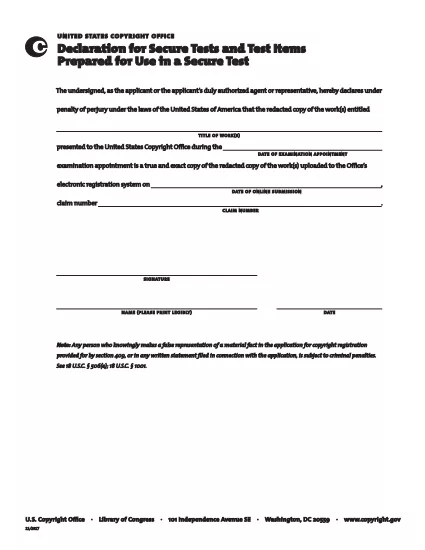
The Secure Test Declaration is a legally‑required statement used by the United States Copyright Office to certify that a test item is protected and will be handled securely. Our fillable PDF version lets you complete the form quickly, accurately, and without installing any extra software.

With Formize’s integrated PDF Filler, you can open the document directly in your browser, enter the required information, and save or print a certified copy. This eliminates the hassle of downloading, editing, and re‑uploading static PDFs.

Below you’ll find a brief overview of the form’s sections, tips for avoiding common errors, and step‑by‑step instructions for completing the declaration online.

What Is a Secure Test Declaration?

A Secure Test Declaration confirms that the test material you are submitting is confidential, that you have the authority to submit it, and that you understand the penalties for false statements. It is commonly required for copyrighted works that involve proprietary testing methods or confidential data.

Key Sections of the Form

  • Applicant Information – Name, address, and contact details.
  • Test Description – Title, purpose, and nature of the test.
  • Security Measures – How the test will be protected.
  • Declaration Statement – Signature line confirming truthfulness.

How to Fill Out the Secure Test Declaration Online

Instead of downloading the PDF and opening it in a separate editor, simply click the "Fill out this form" button on this page. The Formize PDF Filler app will load automatically, allowing you to complete every field directly in your browser.

Common Mistakes to Avoid

  • Leaving required fields blank – the filler will highlight missing information.
  • Using an unofficial signature image – type your name in the signature field for a legally accepted electronic signature.
  • Submitting outdated contact details – double‑check phone numbers and email addresses before saving.

Where to Submit the Completed Form

After saving the completed declaration, you can either:

  1. Upload the PDF through the Copyright Office’s online portal.
  2. Print, sign physically (if required), and mail it to the address listed on the form.

For most users, the electronic submission option is faster and provides immediate confirmation of receipt.

שאלות נפוצות
  • Do I need Adobe Acrobat to fill out the Secure Test Declaration?

    No. Formize’s online PDF Filler works in any modern browser, so you don’t need Acrobat or any other software.

  • Can I edit the form after I’ve saved it?

    Yes. Open the saved PDF with Formize again, make any necessary changes, and re‑save.

  • Is an electronic signature accepted by the Copyright Office?

    For the Secure Test Declaration, an electronic signature entered through the Formize filler is considered valid, provided the form is submitted electronically.

  • What happens if I submit incomplete information?

    The filler will highlight missing required fields before you can save. Submitting an incomplete form may delay processing.

  • Is there a fee to download or use the Secure Test Declaration form?

    The PDF download and online filling are free. Any filing fees are set by the Copyright Office and are paid separately during submission.

איך ל

כיצד למלא את secure test declaration בחינם, באינטרנט ב-4 שלבים פשוטים:

  1. 1
    Open the Fillable Form
    Click the "Fill out this form" button on the page. The Formize PDF Filler loads in a new tab.
  2. 2
    Enter Your Information
    Complete each highlighted field – the filler will guide you through Applicant Information, Test Description, and Security Measures.
  3. 3
    Sign Electronically
    Type your name in the signature field. The system records a timestamp for legal validity.
  4. 4
    Save and Submit
    Click "Save PDF" to download a copy, then upload it to the Copyright Office portal or print and mail as instructed.
Formize אפליקציית מילוי PDF
על אודות

טפסי משרד זכויות יוצרים

secure test declaration הוא אחד מהטפסים הרשמיים המשמשים את משרד זכויות היוצרים של ארצות הברית, מחלקה של ספריית הקונגרס, כדי לרשום ולהגן על זכויות יוצרים. משרד זכויות היוצרים אחראי לניהול חוקי זכויות היוצרים בארצות הברית, לרבות רישום זכויות יוצרים, רישום העברות ורישיונות של זכויות יוצרים ומתן מידע ושירותים הקשורים לזכויות יוצרים.

להלן כמה דוגמאות לטפסים של משרד זכויות היוצרים:

בקשת רישום זכויות יוצרים: זהו הטופס העיקרי המשמש לרישום זכויות יוצרים במשרד זכויות היוצרים של ארה"ב. טפסי בקשה שונים זמינים עבור סוגים שונים של יצירות, כגון יצירות ספרותיות, אמנות פלסטית, יצירות מוזיקליות, הקלטות קול, סרטי קולנוע ועוד. האפליקציה אוספת מידע על היצירה הנרשמת, היוצר, התובע ופרטים רלוונטיים נוספים.

טופסי רישום מסמכים: טפסים אלה משמשים לתיעוד העברות של זכויות יוצרים, כגון הקצאות או רישיונות, עם משרד זכויות היוצרים. הם מספקים דרך לבסס תיעוד ציבורי של העברת בעלות על זכויות יוצרים.

טופס ספריית סוכן ייעודי DMCA: טופס זה משמש לייעוד סוכן במשרד זכויות היוצרים תחת חוק זכויות היוצרים של Digital Millennium (DMCA). הסוכן המיועד אחראי על קבלת וטיפול בהודעות הסרה הקשורות להפרת זכויות יוצרים מקוונות.

לוח הזמנים של עמלות משרד זכויות יוצרים: אמנם לא טופס ספציפי, אך לוח העמלות מספק מידע על העמלות הקשורות לשירותי זכויות יוצרים שונים, לרבות רישום, הקלטה ושירותים קשורים אחרים.

חשוב לציין שהטפסים והדרישות הספציפיות עשויות להשתנות עם הזמן, וייתכן שיידרשו טפסים שונים עבור סוגים שונים של רישומים או שירותים של זכויות יוצרים. מומלץ לבקר באתר הרשמי של משרד זכויות היוצרים האמריקאי (www.copyright.gov) או להתייעץ עם אנשי מקצוע משפטיים המתמחים בדיני זכויות יוצרים כדי לקבל מידע מדויק ועדכני לגבי הטפסים הספציפיים של משרד זכויות היוצרים הרלוונטיים לצרכים שלך הקשורים לזכויות יוצרים.

תכונות

מילוי PDF

הדרך הקלה ביותר למלא טפסי PDF באינטרנט

  • מלא במהירות את secure test declaration
    מחפש דרך למלא במהירות את secure test declaration באינטרנט? עם מילוי טופס ה-PDF המקוון שלנו בחינם, תדע כיצד לערוך ולמלא את מסמך ה-PDF הזה תוך פחות מדקה.
  • עורך PDF מקוון קל לשימוש
    נמאס לך להדפיס קבצי PDF כדי שתוכל לערוך אותם, לפני סריקה מחדש ושליחה חזרה? ערוך מסמכי PDF בחינם באינטרנט. השתמש בעורך ה-PDF המקוון שלנו כדי לחסוך בזמן ובנייר.
  • כלים מעולים, כל הפלטפורמות
    תוהה כיצד למלא את secure test declaration ב-Mac, או אולי איך להשתמש בחומר מילוי PDF בחינם? כלי ה-PDF המקוונים שלנו פועלים בכל הפלטפורמות.
  • אחסון קבצים מאובטח
    קבצי "secure test declaration" שהושלמו מאוחסנים במסד נתונים מאובטח המנוהל על ידי אירוח Amazon Cloud. אתה יכול למחוק את הקבצים שלך מהמערכת שלנו בכל עת. בכל מקרה, קבצים אלו נמחקים אוטומטית לאחר 24 שעות.
  • צ'אט עם secure test declaration
    צ'אט עם "secure test declaration" ב-Chatize שהוא עוזר לקורא PDF בחינם. שאל שאלות וקבל תשובות מ-"secure test declaration". פשוט לחץ על הלחצן צ'אט עם מסמך למעלה.

מחק הפעלת מילוי

למחוק את הפעלת המילוי שנבחרה? במקרה זה, ההתקדמות שלך במילוי הטופס תאבד.

מחק סשן עריכה

למחוק את סשן העריכה שנבחר? במקרה זה, ההתקדמות שלך ביצירה ועריכה של הטופס תאבד.