
בחר שפה

FS Form 197 – Fillable PDF Online

  1. שפה אנגלית
  2. מדינה ארה"ב
  3. מַחלָקָה משרד המשפטים
  4. סוֹכְנוּת חטיבה אזרחית
FS Form 197 – Fillable PDF Online

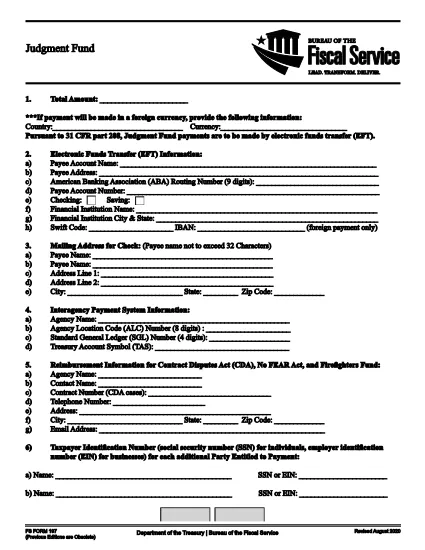
The FS Form 197 is the official Judgment Fund form issued by the U.S. Department of the Treasury’s Bureau of the Fiscal Service. It is used to report and manage claims against the Judgment Fund, a federal resource that pays court‑ordered judgments.

What Is FS Form 197?

FS Form 197 collects essential information about the claimant, the judgment details, and the payment instructions. The form is required for any entity that needs to file a claim against the Judgment Fund.

How to Complete FS Form 197 Online

Instead of printing, scanning, or editing the PDF manually, you can fill the form directly in your browser with Formize’s secure PDF filler:

  1. Click the "Fill out this form" button on this page.
  2. Wait a few seconds while the Formize PDF Filler app loads.
  3. Enter the requested data into each fillable field.
  4. Review your entries for accuracy.
  5. Click Submit to download the completed PDF or print it for mailing.

Common Mistakes to Avoid

  • Leaving required fields blank: The form will not save until all mandatory sections are completed.
  • Incorrect taxpayer identification numbers: Double‑check EIN or SSN entries to prevent processing delays.
  • Mismatched payment amounts: Ensure the amount you request matches the judgment order.
  • Using an outdated version: This page always provides the latest revision (August 2020).

Where to Submit the Completed Form

After you download the filled PDF, mail or fax it to the address listed on the form’s last page. For electronic submissions, follow any agency‑specific instructions that may be provided in accompanying correspondence.

Need help? Review the FAQs below or contact the Bureau of the Fiscal Service directly.

שאלות נפוצות
  • Is FS Form 197 available as a free download?

    Yes. The official form is provided by the U.S. Treasury at no cost and can be accessed through the link below.

  • Can I sign FS Form 197 electronically?

    The form itself does not contain an electronic signature field, but you can print, sign, and scan the completed PDF, or follow any agency‑specific e‑signature guidance.

  • What version of FS Form 197 should I use?

    Use the latest revision dated August 2020. This page always links to the current version.

  • Do I need special software to fill the PDF?

    No. Formize’s online PDF filler works in any modern browser—no additional software is required.

  • Where do I send the completed form?

    Submit the completed PDF to the address or fax number listed on the last page of the form, or follow any specific instructions provided by the Bureau of the Fiscal Service.

  • What if I make a mistake after submitting?

    Contact the Bureau of the Fiscal Service immediately. They may allow you to submit a corrected form or provide guidance on amending your claim.

איך ל

כיצד למלא את FS Form 197 בחינם, באינטרנט ב-4 שלבים פשוטים:

  1. 1
    Open the Fillable Form
    Click the "Fill out this form" button on this page to launch Formize’s PDF filler.
  2. 2
    Load the Formizer App
    Wait a few seconds while the online filler loads the FS Form 197 document.
  3. 3
    Enter Your Information
    Complete each fillable field with accurate data; required fields are marked with an asterisk.
  4. 4
    Review and Save
    Double‑check all entries, then click "Submit" to download the finished PDF or print it directly.
Formize אפליקציית מילוי PDF
על אודות

טפסי משרד המשפטים (DOJ).

FS Form 197 הוא אחד מהטפסים הרשמיים המשמשים את משרד המשפטים של ארצות הברית והחטיבות, הסוכנויות והמרכיבים השונים שלו. ה-DOJ הוא מחלקה מבצעת פדרלית האחראית לאכיפת חוקים פדרליים, הגנה על האינטרסים של ארצות הברית בעניינים משפטיים וניהול צדק.

להלן כמה דוגמאות לטפסים של משרד המשפטים:

בקשה לסיוע פדרלי (SF-424): טופס זה משמש ארגונים המבקשים מענקים פדרליים או סיוע פיננסי המנוהל על ידי DOJ או מרכיביו. הוא אוסף מידע על הארגון, הפרויקט המוצע והתקציב.

טופס תלונה על זכויות אזרח: טופס זה משמש להגשת תלונה למחלקת זכויות האזרח של DOJ בנוגע להפרות לכאורה של חוקי זכויות האזרח, כגון אפליה על בסיס גזע, מין, מוגבלות או מוצא לאומי.

טופס בקשת הודעה לקורבן: טופס זה משמש קורבנות פשע כדי לבקש הודעה על הסטטוס וההליכים של תיק פלילי פדרלי, כחלק מהמאמצים של DOJ לספק מידע ותמיכה לקורבנות פשע.

טפסי הגירה: משרד המנהלים של משרד המשפטים לבדיקת הגירה (EOIR) מנהל בתי משפט להגירה והליכים הקשורים להגירה. טפסים שונים משמשים בהליכים בבתי משפט להגירה, כגון טופס EOIR-42B עבור בקשות לסעד מהרחקה או טופס EOIR-28 עבור ערעורים.

טפסי ATF: ללשכה לאלכוהול, טבק, כלי נשק וחומרי נפץ (ATF), מרכיב של DOJ, יש קבוצה משלה של טפסים למטרות שונות, כפי שהוזכר בתגובה קודמת.

טפסים של מינהל אכיפת הסמים (DEA): ה-DEA, מרכיב נוסף ב-DOJ, משתמש בטפסים משלו לעניינים הקשורים לחומרים מבוקרים, כולל בקשות לדרישות רישום, דיווח ושמירה.

דוגמאות אלו מדגישות כמה קטגוריות של טפסי DOJ, אך הטפסים הספציפיים שבהם משתמש משרד המשפטים יכולים להשתנות בהתאם לחטיבה, הסוכנות או המרכיב המעורבים ולאופי השירותים או ההליכים. מומלץ להתייעץ באתר הרשמי של החטיבה או הסוכנות הספציפית בתוך DOJ או לפנות לייעוץ משפטי כדי לקבל מידע מדויק ועדכני לגבי טפסי DOJ הספציפיים הרלוונטיים למצבך.

תכונות

מילוי PDF

הדרך הקלה ביותר למלא טפסי PDF באינטרנט

  • מלא במהירות את FS Form 197
    מחפש דרך למלא במהירות את FS Form 197 באינטרנט? עם מילוי טופס ה-PDF המקוון שלנו בחינם, תדע כיצד לערוך ולמלא את מסמך ה-PDF הזה תוך פחות מדקה.
  • עורך PDF מקוון קל לשימוש
    נמאס לך להדפיס קבצי PDF כדי שתוכל לערוך אותם, לפני סריקה מחדש ושליחה חזרה? ערוך מסמכי PDF בחינם באינטרנט. השתמש בעורך ה-PDF המקוון שלנו כדי לחסוך בזמן ובנייר.
  • כלים מעולים, כל הפלטפורמות
    תוהה כיצד למלא את FS Form 197 ב-Mac, או אולי איך להשתמש בחומר מילוי PDF בחינם? כלי ה-PDF המקוונים שלנו פועלים בכל הפלטפורמות.
  • אחסון קבצים מאובטח
    קבצי "FS Form 197" שהושלמו מאוחסנים במסד נתונים מאובטח המנוהל על ידי אירוח Amazon Cloud. אתה יכול למחוק את הקבצים שלך מהמערכת שלנו בכל עת. בכל מקרה, קבצים אלו נמחקים אוטומטית לאחר 24 שעות.
  • צ'אט עם FS Form 197
    צ'אט עם "FS Form 197" ב-Chatize שהוא עוזר לקורא PDF בחינם. שאל שאלות וקבל תשובות מ-"FS Form 197". פשוט לחץ על הלחצן צ'אט עם מסמך למעלה.

מחק הפעלת מילוי

למחוק את הפעלת המילוי שנבחרה? במקרה זה, ההתקדמות שלך במילוי הטופס תאבד.

מחק סשן עריכה

למחוק את סשן העריכה שנבחר? במקרה זה, ההתקדמות שלך ביצירה ועריכה של הטופס תאבד.