
בחר שפה

Form 750-F Fillable PDF – Download & Complete Online

  1. שפה אנגלית
  2. מדינה ארה"ב
  3. פעילות Legal Forms
  4. מַחלָקָה משרד המשפטים
Form 750-F Fillable PDF – Download & Complete Online

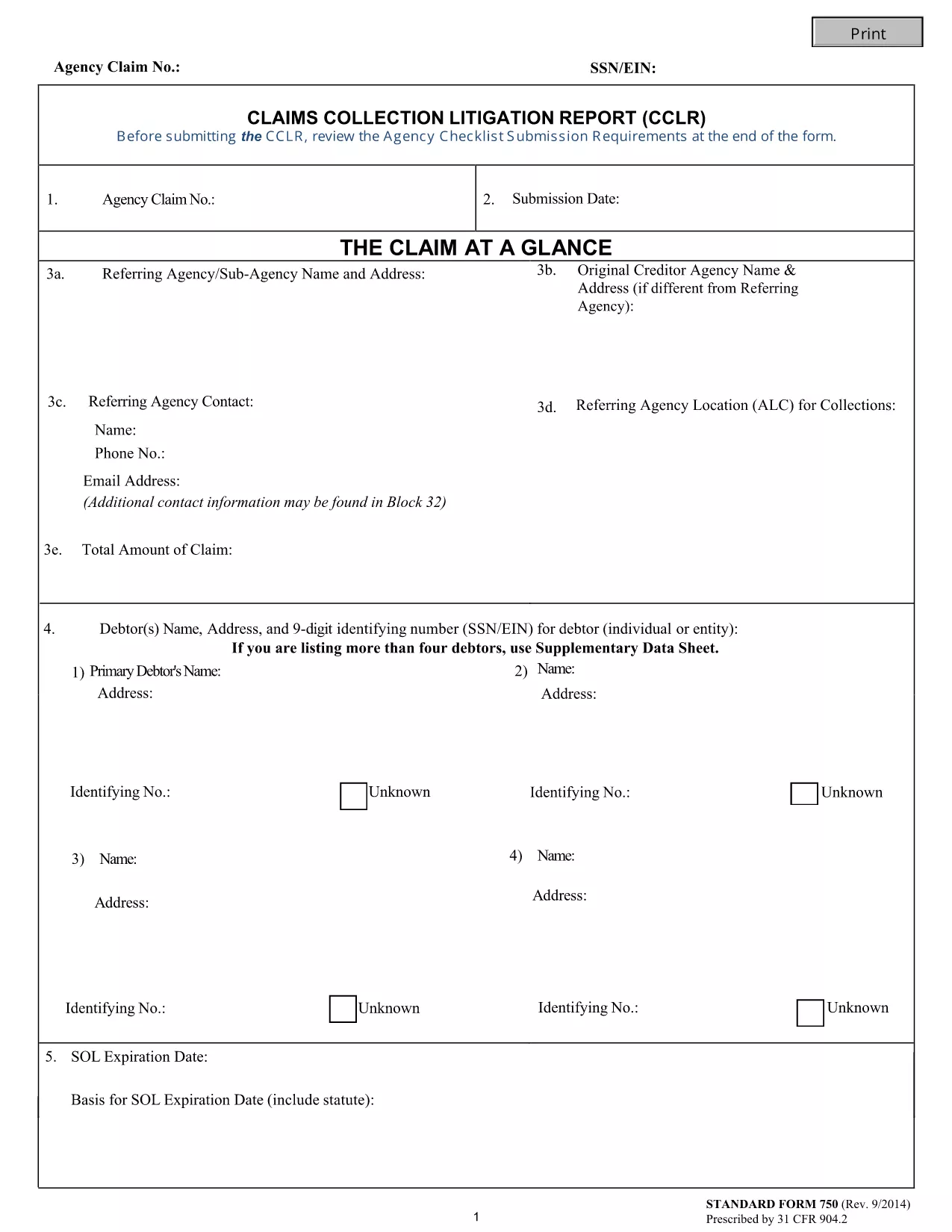
The Form 750-F (Standard Form 750) is the Department of Justice’s official debt‑substantiation report required under 31 CFR 904.2. It is used by government agencies and contractors to document and justify the collection of debts owed to the United States.

Our fillable PDF version lets you complete the form directly in your browser—no Adobe Acrobat or other editor needed. Simply click the button below, let the Formize PDF Filler load, and start typing.

What Is Form 750-F?

Form 750-F collects detailed information about the debtor, the nature of the debt, and the actions taken to recover the amount. It is commonly called the “Debt Substantiation List” and is required for:

  • Federal contract compliance audits
  • Department of Justice investigations
  • Any agency that must prove the validity of a debt before collection

How to Fill Out Form 750-F Online

Follow the step‑by‑step guide below to complete the form quickly and accurately.

Common Mistakes to Avoid

Even small errors can delay processing. Keep these tips in mind:

  • Do not leave required fields blank.
  • Use the exact format for dates (MM/DD/YYYY).
  • Enter the full legal name of the debtor as it appears on official records.
  • Double‑check dollar amounts for commas and decimal points.

Where to Submit the Completed Form

After you have saved the completed PDF, submit it according to the instructions on the covering letter of your agency or the specific contract notice. Most agencies accept electronic uploads through their secure portals.

FAQs About Form 750-F

Find quick answers to the most common questions below. If you need more help, consult your agency’s legal department.

שאלות נפוצות
  • Is Form 750-F required for all federal contracts?

    Only contracts that involve debt recovery or collection actions require Form 750-F. Check your contract clause or contact your contracting officer for confirmation.

  • Can I edit the PDF after I download it?

    Yes, but using the Formize online filler is recommended because it preserves the original formatting and prevents accidental corruption of the file.

  • What should I do if I make a mistake while filling the form?

    You can clear the field and re‑enter the correct information. If you have already saved the PDF, simply open it again in the Formize filler and edit the needed sections.

  • Do I need a digital signature on Form 750-F?

    Most agencies accept an electronic signature generated by the PDF filler. Confirm with your agency whether a handwritten signature is required.

  • How long should I keep a copy of the completed Form 750-F?

    Retain a copy for at least three years, or longer if your agency’s record‑keeping policy specifies a different period.

  • Is there a cost to use the Formize PDF Filler?

    No. The Formize PDF Filler is free for all users accessing fillable forms on Formize.com.

  • Can I submit the form directly from the filler?

    The filler allows you to download the completed PDF. Submission must be done through your agency’s designated portal or mailing address.

איך ל

כיצד למלא את Form 750-F בחינם, באינטרנט ב-5 שלבים פשוטים:

  1. 1
    Click the Fill‑out Button
    Press the “Fill out this form” button on the page. The Formize PDF Filler app will open in a new tab.
  2. 2
    Wait for the Filler to Load
    The app loads the fillable PDF automatically. This usually takes a few seconds.
  3. 3
    Complete All Required Fields
    Enter the requested information exactly as it appears on your source documents. Required fields are marked with an asterisk.
  4. 4
    Review and Save
    Use the built‑in preview to double‑check your entries, then click “Save” to download the completed PDF to your device.
  5. 5
    Submit or Print
    Follow your agency’s instructions to upload the PDF electronically or print and mail a hard copy.
Formize אפליקציית מילוי PDF
על אודות

טפסי משרד המשפטים (DOJ).

Form 750-F הוא אחד מהטפסים הרשמיים המשמשים את משרד המשפטים של ארצות הברית והחטיבות, הסוכנויות והמרכיבים השונים שלו. ה-DOJ הוא מחלקה מבצעת פדרלית האחראית לאכיפת חוקים פדרליים, הגנה על האינטרסים של ארצות הברית בעניינים משפטיים וניהול צדק.

להלן כמה דוגמאות לטפסים של משרד המשפטים:

בקשה לסיוע פדרלי (SF-424): טופס זה משמש ארגונים המבקשים מענקים פדרליים או סיוע פיננסי המנוהל על ידי DOJ או מרכיביו. הוא אוסף מידע על הארגון, הפרויקט המוצע והתקציב.

טופס תלונה על זכויות אזרח: טופס זה משמש להגשת תלונה למחלקת זכויות האזרח של DOJ בנוגע להפרות לכאורה של חוקי זכויות האזרח, כגון אפליה על בסיס גזע, מין, מוגבלות או מוצא לאומי.

טופס בקשת הודעה לקורבן: טופס זה משמש קורבנות פשע כדי לבקש הודעה על הסטטוס וההליכים של תיק פלילי פדרלי, כחלק מהמאמצים של DOJ לספק מידע ותמיכה לקורבנות פשע.

טפסי הגירה: משרד המנהלים של משרד המשפטים לבדיקת הגירה (EOIR) מנהל בתי משפט להגירה והליכים הקשורים להגירה. טפסים שונים משמשים בהליכים בבתי משפט להגירה, כגון טופס EOIR-42B עבור בקשות לסעד מהרחקה או טופס EOIR-28 עבור ערעורים.

טפסי ATF: ללשכה לאלכוהול, טבק, כלי נשק וחומרי נפץ (ATF), מרכיב של DOJ, יש קבוצה משלה של טפסים למטרות שונות, כפי שהוזכר בתגובה קודמת.

טפסים של מינהל אכיפת הסמים (DEA): ה-DEA, מרכיב נוסף ב-DOJ, משתמש בטפסים משלו לעניינים הקשורים לחומרים מבוקרים, כולל בקשות לדרישות רישום, דיווח ושמירה.

דוגמאות אלו מדגישות כמה קטגוריות של טפסי DOJ, אך הטפסים הספציפיים שבהם משתמש משרד המשפטים יכולים להשתנות בהתאם לחטיבה, הסוכנות או המרכיב המעורבים ולאופי השירותים או ההליכים. מומלץ להתייעץ באתר הרשמי של החטיבה או הסוכנות הספציפית בתוך DOJ או לפנות לייעוץ משפטי כדי לקבל מידע מדויק ועדכני לגבי טפסי DOJ הספציפיים הרלוונטיים למצבך.

תכונות

מילוי PDF

הדרך הקלה ביותר למלא טפסי PDF באינטרנט

  • מלא במהירות את Form 750-F
    מחפש דרך למלא במהירות את Form 750-F באינטרנט? עם מילוי טופס ה-PDF המקוון שלנו בחינם, תדע כיצד לערוך ולמלא את מסמך ה-PDF הזה תוך פחות מדקה.
  • עורך PDF מקוון קל לשימוש
    נמאס לך להדפיס קבצי PDF כדי שתוכל לערוך אותם, לפני סריקה מחדש ושליחה חזרה? ערוך מסמכי PDF בחינם באינטרנט. השתמש בעורך ה-PDF המקוון שלנו כדי לחסוך בזמן ובנייר.
  • כלים מעולים, כל הפלטפורמות
    תוהה כיצד למלא את Form 750-F ב-Mac, או אולי איך להשתמש בחומר מילוי PDF בחינם? כלי ה-PDF המקוונים שלנו פועלים בכל הפלטפורמות.
  • אחסון קבצים מאובטח
    קבצי "Form 750-F" שהושלמו מאוחסנים במסד נתונים מאובטח המנוהל על ידי אירוח Amazon Cloud. אתה יכול למחוק את הקבצים שלך מהמערכת שלנו בכל עת. בכל מקרה, קבצים אלו נמחקים אוטומטית לאחר 24 שעות.
  • צ'אט עם Form 750-F
    צ'אט עם "Form 750-F" ב-Chatize שהוא עוזר לקורא PDF בחינם. שאל שאלות וקבל תשובות מ-"Form 750-F". פשוט לחץ על הלחצן צ'אט עם מסמך למעלה.

מחק הפעלת מילוי

למחוק את הפעלת המילוי שנבחרה? במקרה זה, ההתקדמות שלך במילוי הטופס תאבד.

מחק סשן עריכה

למחוק את סשן העריכה שנבחר? במקרה זה, ההתקדמות שלך ביצירה ועריכה של הטופס תאבד.