
בחר שפה

DS-157 Supplemental Nonimmigrant Visa Application – Fillable PDF

  1. שפה אנגלית
  2. מדינה ארה"ב
  3. מַחלָקָה משרד החוץ
  4. פעילות אשרות
DS-157 Supplemental Nonimmigrant Visa Application – Fillable PDF

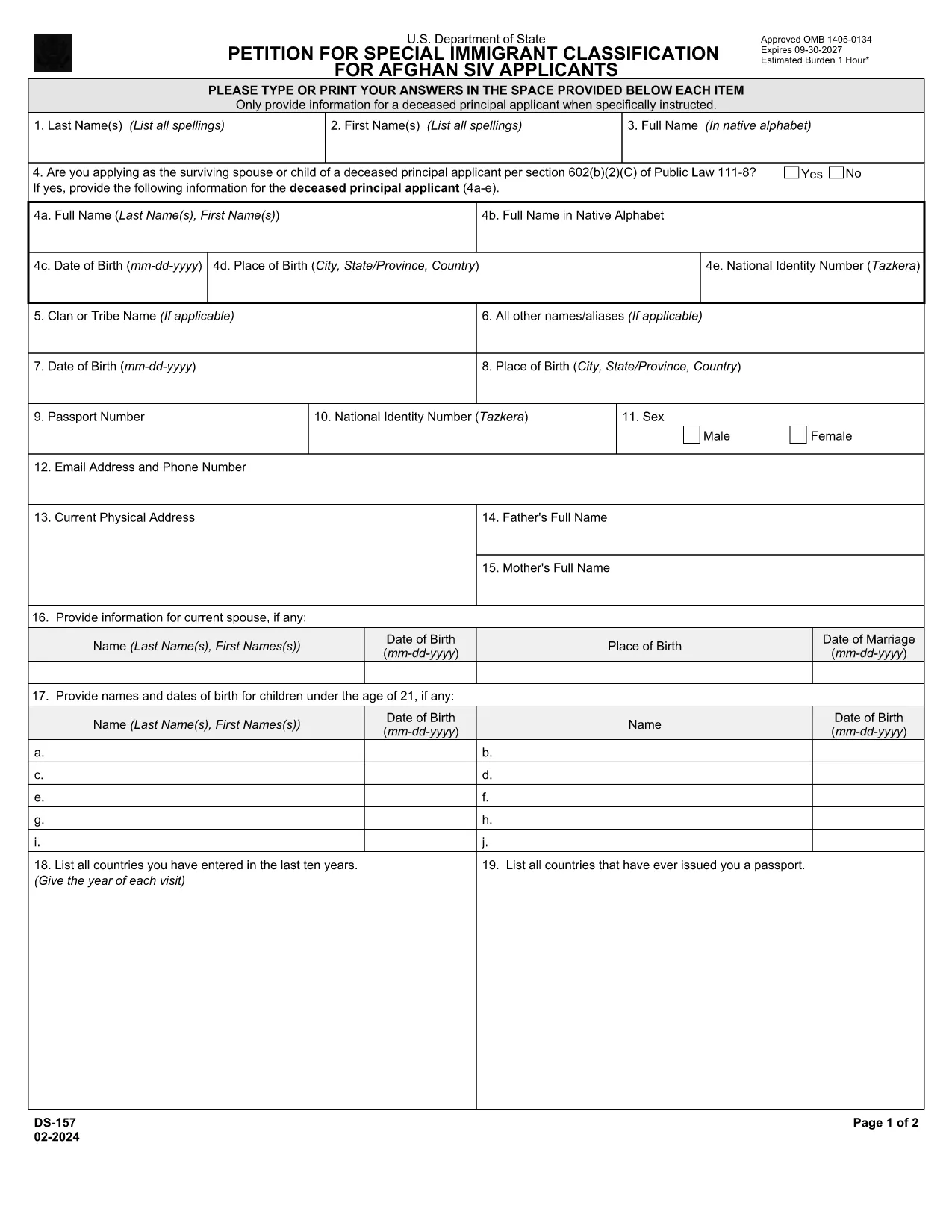
The DS-157 (Supplemental Nonimmigrant Visa Application) is required for certain male visa applicants, especially Afghan Special Immigrant Visa (SIV) candidates. It collects detailed personal, employment, and travel information that supports the main DS-160 application.

What is the DS-157 Form?

Issued by the U.S. Department of State, the DS-157 is a supplemental questionnaire that must be submitted with your visa packet. It is a fillable PDF that can be completed electronically, printed, signed, and attached to your visa interview documents.

How to Fill the DS-157 Online with Formize

Formize provides a secure, browser‑based PDF filler so you never need to download, print, or scan the form. Follow these steps:

  • Click the **"Fill out this form"** button on this page.
  • Wait a few seconds while the Formize PDF Filler app loads.
  • Enter your information in the highlighted fields. Use the tab key or click to move between sections.
  • When finished, click **"Save & Download"** to get a copy you can print or email.
  • Sign the form with your finger (touchscreen) or type your signature, then download the completed PDF.

Common Mistakes to Avoid

  • Leaving fields blank – every question must be answered, even if the answer is “None” or “N/A”.
  • Incorrect dates – double‑check birth dates, travel dates, and employment periods.
  • Illegible signatures – use the built‑in e‑signature tool for a clear, legal signature.
  • Mismatched information – ensure details match those on your DS‑160 and supporting documents.

Where to Submit the Completed Form

Print the filled DS-157, sign it in ink if you printed a hard copy, and attach it to your visa interview packet. Submit the package to the U.S. Embassy or Consulate handling your case. Some posts now accept the PDF electronically; verify the specific instructions on your appointment notice.

Download the Official PDF

For reference or offline use, you can download the official, government‑issued PDF directly from the Department of State:

Download DS-157 PDF

Using Formize’s online filler saves you time, reduces errors, and eliminates the need for a scanner.

שאלות נפוצות
  • Who must complete the DS-157 form?

    All male non‑immigrant visa applicants between ages 16‑45, including Afghan SIV applicants, must submit a DS-157 in addition to the DS‑160.

  • Is the DS-157 form available in languages other than English?

    The official form is only provided in English. If you need translation assistance, you must provide an accurate English version for the U.S. Embassy.

  • Can I submit the DS-157 electronically?

    Some U.S. posts accept an electronic PDF, but most still require a printed, signed copy. Check the instructions on your appointment notice.

  • Do I need a notarized signature on the DS-157?

    No notarization is required. A regular signature (ink or e‑signature) is sufficient as long as it matches the signature on your other visa documents.

  • What happens if I make a mistake on the DS-157?

    Correct the error by crossing out the mistake neatly, writing the correct information, and initialing the change. If the mistake is extensive, download a fresh copy and refill the form.

  • How long is the DS-157 valid?

    The DS-157 is tied to a specific visa application. If your application is withdrawn or denied, you must obtain a new form for any future applications.

איך ל

כיצד למלא את ds-157 בחינם, באינטרנט ב-4 שלבים פשוטים:

  1. 1
    Open the Formize filler
    Click the "Fill out this form" button on the page. The Formize PDF Filler will open in a new tab.
  2. 2
    Enter your information
    Type directly into each highlighted field. Use the tab key or click to move to the next question.
  3. 3
    Add your signature
    Use the built‑in e‑signature tool to sign with your finger or mouse. The signature is legally binding.
  4. 4
    Save and download
    When all fields are complete, click "Save & Download" to get a copy of the filled PDF. Print it if a hard copy is required.
Formize אפליקציית מילוי PDF
על אודות

טפסי ויזה

ds-157 הוא אחד מטפסי ויזה שהם מסמכים המשמשים להגשת בקשה לאשרת כניסה למדינה זרה. ויזה היא מסמך המאפשר לאזרח זר להיכנס, לשהות ולעיתים לעבוד במדינה זרה למשך פרק זמן מוגדר. הטפסים והדרישות המדויקות לקבלת ויזה משתנים בהתאם למדינה ולסוג הויזה.

טופסי ויזה דורשים בדרך כלל מידע אישי כגון שם, תאריך לידה ומידע על דרכון, כמו גם מידע על מטרת ואורך הטיול, היעד המיועד, והאם למבקש סורבה בעבר ויזה או גורש ממדינה. הטפסים עשויים לדרוש גם מסמכים תומכים כגון דרכון, תמונות והוכחה לתמיכה כספית.

בארצות הברית, טפסי הויזה הנפוצים ביותר הם הטפסים DS-160 ו-DS-260. טופס DS-160 משמש להגשת בקשה לאשרת מהגר, בעוד טופס DS-260 משמש להגשת בקשה לאשרת מהגר. טפסים אלה דורשים מידע מפורט על ההיסטוריה האישית והנסיעות של המבקש, כמו גם תיעוד תומך כגון דרכון, מסלול טיול ורישומים פיננסיים.

למדינות אחרות עשויות להיות צורות ודרישות שונות של ויזה, אך התהליך הבסיסי כולל בדרך כלל מילוי בקשת ויזה, מתן תיעוד תומך והשתתפות בראיון עם קצין קונסולרי בשגרירות או קונסוליה של ארה"ב. חשוב לציין שתהליך הגשת בקשה לויזה יכול להיות מורכב ואורך זמן, ומומלץ לאנשים המבקשים לויזה להתייעץ עם עורך דין הגירה או איש מקצוע מוסמך אחר על מנת לוודא שכל הטפסים והדרישות הנדרשים מתקיימים.

תכונות

מילוי PDF

הדרך הקלה ביותר למלא טפסי PDF באינטרנט

  • מלא במהירות את ds-157
    מחפש דרך למלא במהירות את ds-157 באינטרנט? עם מילוי טופס ה-PDF המקוון שלנו בחינם, תדע כיצד לערוך ולמלא את מסמך ה-PDF הזה תוך פחות מדקה.
  • עורך PDF מקוון קל לשימוש
    נמאס לך להדפיס קבצי PDF כדי שתוכל לערוך אותם, לפני סריקה מחדש ושליחה חזרה? ערוך מסמכי PDF בחינם באינטרנט. השתמש בעורך ה-PDF המקוון שלנו כדי לחסוך בזמן ובנייר.
  • כלים מעולים, כל הפלטפורמות
    תוהה כיצד למלא את ds-157 ב-Mac, או אולי איך להשתמש בחומר מילוי PDF בחינם? כלי ה-PDF המקוונים שלנו פועלים בכל הפלטפורמות.
  • אחסון קבצים מאובטח
    קבצי "ds-157" שהושלמו מאוחסנים במסד נתונים מאובטח המנוהל על ידי אירוח Amazon Cloud. אתה יכול למחוק את הקבצים שלך מהמערכת שלנו בכל עת. בכל מקרה, קבצים אלו נמחקים אוטומטית לאחר 24 שעות.
  • צ'אט עם ds-157
    צ'אט עם "ds-157" ב-Chatize שהוא עוזר לקורא PDF בחינם. שאל שאלות וקבל תשובות מ-"ds-157". פשוט לחץ על הלחצן צ'אט עם מסמך למעלה.

מחק הפעלת מילוי

למחוק את הפעלת המילוי שנבחרה? במקרה זה, ההתקדמות שלך במילוי הטופס תאבד.

מחק סשן עריכה

למחוק את סשן העריכה שנבחר? במקרה זה, ההתקדמות שלך ביצירה ועריכה של הטופס תאבד.