
בחר שפה

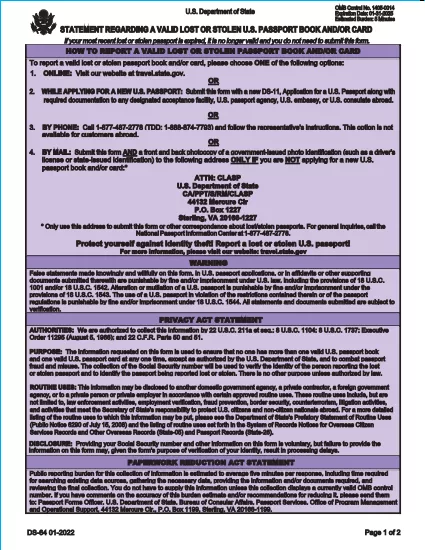
DS-64 Statement Regarding a Lost or Stolen U.S. Passport (Fillable PDF)

  1. שפה אנגלית
  2. מדינה ארה"ב
  3. מַחלָקָה משרד החוץ
DS-64 Statement Regarding a Lost or Stolen U.S. Passport (Fillable PDF)

The DS-64 is the official U.S. Department of State form used to report a lost or stolen passport. Once submitted, the passport is immediately invalidated, preventing fraud and protecting your identity.

What Is the DS-64 Form?

DS-64, titled Statement Regarding a Lost or Stolen Passport, collects personal details, passport information, and a description of how the passport was lost or stolen. It is required whether you plan to request a replacement (DS‑11) or simply need the record of loss.

Why Use Formize’s Fillable PDF Filler?

  • Instant online filling: No need to download, print, and hand‑write.
  • Auto‑save: Your progress is saved in the browser, so you never lose data.
  • Error‑checking: Real‑time validation reduces mistakes.
  • Secure: All data stays on your device; Formize never stores personal information.

Step‑by‑Step Guide to Complete DS-64

Follow the simple steps below to fill, sign, and download the form.

Common Mistakes to Avoid

  • Leaving the passport number blank when you know it – the number is essential for cancellation.
  • Using colored ink or handwritten corrections – Formize requires black‑ink digital entry.
  • Forgetting to indicate whether you are submitting a replacement application (DS‑11).

Where to Submit Your Completed Form

After you download the completed DS‑64 PDF, you can:

  • Mail it to the address printed on the form if you are not applying for a new passport.
  • Include it with your DS‑11 application when requesting a replacement.
  • Submit it in person at a regional passport agency.

There is no fee to submit DS‑64 alone; fees apply only when you request a replacement passport.

שאלות נפוצות
  • Can I submit DS‑64 online?

    No. The DS‑64 must be printed, signed, and submitted by mail or in person. Formize only provides a fillable PDF to simplify completion.

  • Is there a fee to file DS‑64?

    There is no fee to report a lost or stolen passport with DS‑64. Fees apply only when you request a replacement passport.

  • What if I don’t know my passport number?

    Enter ‘Unknown’ in the passport number field and provide as much other identifying information as possible.

  • Do I need a notary for DS‑64?

    No. The form only requires your signature; notarization is not required.

  • How long does it take for the passport to be invalidated?

    Once the State Department receives the DS‑64, the passport is typically canceled within a few business days.

  • Can a parent fill out DS‑64 for a minor?

    Yes. A parent or legal guardian may complete the form on behalf of a minor, signing in the appropriate section.

  • What should I do if my passport was expired when it was lost?

    You do not need to submit DS‑64 for an expired passport, but you may still do so to have a record of the loss.

  • Will I receive confirmation that my passport is canceled?

    The State Department does not send a formal confirmation, but the passport will be marked as invalid in their system.

איך ל

כיצד למלא את DS-64 בחינם, באינטרנט ב-5 שלבים פשוטים:

  1. 1
    Open the Fillable Form
    Click the **Fill out this form** button on the page. The Formize PDF Filler app will load instantly in your browser.
  2. 2
    Enter Your Information
    Type your personal details, passport number, and loss description directly into the fields. All required fields are highlighted.
  3. 3
    Review & Sign
    Use the built‑in signature tool to sign the form digitally, then review each section for accuracy.
  4. 4
    Download or Print
    When you’re satisfied, click **Download PDF** to save a copy or **Print** to produce a hard copy for mailing.
  5. 5
    Submit the Form
    Mail or bring the completed DS‑64 to the address shown on the form, or attach it to your DS‑11 replacement application.
Formize אפליקציית מילוי PDF
על אודות

טפסי משרד החוץ (DOS).

DS-64 הוא אחד מטפסי הבקשה המשמשים את מחלקת המדינה של ארצות הברית (DOS) לאיסוף מידע ועיבוד שירותים שונים הקשורים לנסיעות בינלאומיות, אשרות, דרכונים ושירותים קונסולריים. ה-DOS אחראי על ניהול מדיניות החוץ של ארה"ב, יחסים בינלאומיים ומתן שירותים לאזרחי ארה"ב ולאזרחים זרים.

להלן כמה דוגמאות לטפסים של משרד החוץ:

טופסי בקשה לדרכון: טפסים אלה משמשים להגשת בקשה לדרכון אמריקאי, שהוא מסמך רשמי שהונפק על ידי הממשלה המאפשר לאנשים לטייל ברחבי העולם. טפסי בקשה לדרכון אוספים מידע אישי, פרטים על אזרחות, זהות ומידע נדרש אחר.

טופסי בקשה לויזה ללא מהגרים: ה-DOS מפקח על הנפקת אשרות ללא מהגרים, המאפשרות לאזרחים זרים לבקר זמנית בארצות הברית למטרות שונות כגון תיירות, עסקים, לימודים או עבודה. טפסי בקשה לויזה ללא מהגרים, כגון DS-160, DS-156 או DS-260, משמשים לאיסוף מידע על הפרטים האישיים של המבקש, היסטוריית הנסיעות, מטרת הנסיעה ומידע רלוונטי אחר.

טפסי בקשה לוויזת מהגרים: עבור אנשים המבקשים להגר לארצות הברית, נעשה שימוש בטפסי בקשה לוויזת מהגרים. טפסים אלה אוספים מידע מפורט על ההיסטוריה האישית של הפונה, בני משפחה, היסטוריית תעסוקה ומידע רלוונטי אחר. דוגמאות כוללות את טופס DS-260 להגירה משפחתית או טופס DS-230 לזוכים בהגרלת ויזת גיוון.

טופס דיווח קונסולרי על לידה בחו"ל (CRBA): נעשה שימוש בטופס זה לתעד לידת ילד אזרח ארה"ב בחו"ל להורים אזרחים ארה"ב. הוא אוסף מידע על הילד, ההורים ותיעוד תומך.

טפסי תצהיר תמיכה: כאשר נותן חסות למהגר לארה"ב, אזרח ארה"ב או תושב קבע חוקי יצטרך להגיש טופס תצהיר תמיכה. טופס זה, כגון I-864 או I-134, משמש כדי להדגים את היכולת הכלכלית לתמוך במהגר המתכוון ולמנוע מהם להפוך לחיוב ציבורי.

טפסי שירותים קונסולריים: ה-DOS מספק שירותים קונסולריים שונים לאזרחי ארה"ב ולאזרחים זרים, כגון שירותים נוטריונים, בקשות לסיוע חירום או ויתור על אזרחות אמריקאית. טפסים ספציפיים משמשים עבור שירותים אלה, לרבות טפסים DS-11, DS-3053 או DS-4079, בהתאם לאופי השירות המבוקש.

חשוב לציין שהטפסים הספציפיים שבהם משתמש משרד החוץ האמריקאי יכולים להשתנות עם הזמן, ושירותים שונים עשויים לדרוש טפסים שונים. מומלץ לבקר באתר הרשמי של משרד החוץ של ארה"ב או להתייעץ עם השגרירות או הקונסוליה הקרובה ביותר של ארה"ב לקבלת המידע העדכני והמדויק ביותר לגבי הטפסים הספציפיים הנדרשים לשירותים שונים.

תכונות

מילוי PDF

הדרך הקלה ביותר למלא טפסי PDF באינטרנט

  • מלא במהירות את DS-64
    מחפש דרך למלא במהירות את DS-64 באינטרנט? עם מילוי טופס ה-PDF המקוון שלנו בחינם, תדע כיצד לערוך ולמלא את מסמך ה-PDF הזה תוך פחות מדקה.
  • עורך PDF מקוון קל לשימוש
    נמאס לך להדפיס קבצי PDF כדי שתוכל לערוך אותם, לפני סריקה מחדש ושליחה חזרה? ערוך מסמכי PDF בחינם באינטרנט. השתמש בעורך ה-PDF המקוון שלנו כדי לחסוך בזמן ובנייר.
  • כלים מעולים, כל הפלטפורמות
    תוהה כיצד למלא את DS-64 ב-Mac, או אולי איך להשתמש בחומר מילוי PDF בחינם? כלי ה-PDF המקוונים שלנו פועלים בכל הפלטפורמות.
  • אחסון קבצים מאובטח
    קבצי "DS-64" שהושלמו מאוחסנים במסד נתונים מאובטח המנוהל על ידי אירוח Amazon Cloud. אתה יכול למחוק את הקבצים שלך מהמערכת שלנו בכל עת. בכל מקרה, קבצים אלו נמחקים אוטומטית לאחר 24 שעות.
  • צ'אט עם DS-64
    צ'אט עם "DS-64" ב-Chatize שהוא עוזר לקורא PDF בחינם. שאל שאלות וקבל תשובות מ-"DS-64". פשוט לחץ על הלחצן צ'אט עם מסמך למעלה.

מחק הפעלת מילוי

למחוק את הפעלת המילוי שנבחרה? במקרה זה, ההתקדמות שלך במילוי הטופס תאבד.

מחק סשן עריכה

למחוק את סשן העריכה שנבחר? במקרה זה, ההתקדמות שלך ביצירה ועריכה של הטופס תאבד.