בחר שפה

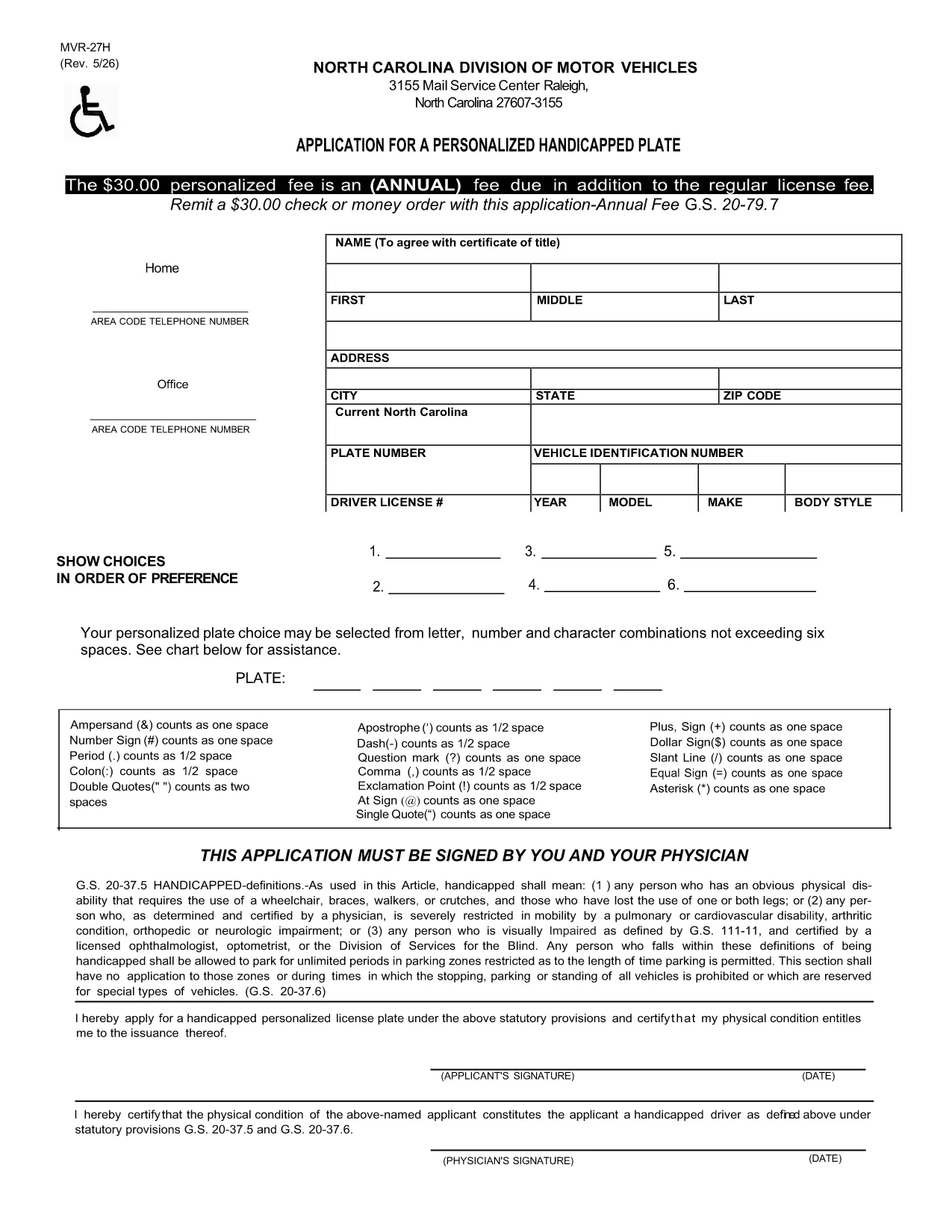
MVR-27H Fillable PDF – North Carolina Vehicle Record Form

  1. שפה אנגלית
  2. מדינה ארה"ב
  3. פעילות Vehicle Records
  4. מַחלָקָה משרד התחבורה
MVR-27H Fillable PDF – North Carolina Vehicle Record Form

The MVR-27H is the official Motor Vehicle Record request used by the North Carolina Department of Transportation (NCDOT). Whether you need a driving history for an employer, insurance company, or personal records, this form gathers the required information quickly and securely.

What Is the MVR-27H Form?

The MVR-27H requests a detailed driving record for a specific driver. It is commonly used for:

  • Employer background checks
  • Insurance underwriting
  • Legal proceedings

The form requires basic personal data, driver’s license number, and the purpose of the request. Because it is a state‑issued document, the form must be completed accurately to avoid processing delays.

How to Fill Out the MVR-27H Online with Formize

Instead of downloading a static PDF and searching for a separate editor, you can fill the form directly on our page using the Formize PDF Filler app. Follow these simple steps:

  1. Click the **"Fill out this form"** button below.
  2. Wait a few seconds while the Formize PDF Filler loads the MVR-27H template.
  3. Enter your information in the highlighted fields. The app automatically saves your progress.
  4. Review the completed form for any errors.
  5. Click **"Download Completed PDF"** to save a copy or **"Submit"** if you have a secure upload option.

Common Mistakes & Tips for a Successful Submission

  • Incorrect License Number: Double‑check the driver’s license number; a single digit error can cause a rejection.
  • Missing Signature: The Formize app includes a digital signature field—make sure to sign before downloading.
  • Unclear Purpose: Specify the exact reason (e.g., "Insurance underwriting") to meet NCDOT requirements.
  • Outdated Contact Info: Provide a current phone number and email so the Department can reach you if needed.

Where to Submit the Completed Form

After you download the filled PDF, mail or fax it to the address listed on the form’s last page. For faster processing, you may also submit it through the NCDOT online portal if you have an account.

Need help? Review the FAQs below or contact the NCDOT directly.

שאלות נפוצות
  • What does MVR-27H stand for?

    MVR‑27H is the Motor Vehicle Record request form used by the North Carolina Department of Transportation to provide detailed driving histories.

  • Can I fill out the MVR-27H on a mobile device?

    Yes. The Formize PDF Filler works on smartphones and tablets, allowing you to complete the form from any browser.

  • Do I need a PDF editor to use the fillable form?

    No. The form is fully fillable online through the Formize app; no additional software is required.

  • How long does it take for NCDOT to process the request?

    Processing typically takes 5‑7 business days after the completed form is received, but times may vary during peak periods.

  • Is there a fee for submitting the MVR-27H?

    Yes, the NCDOT charges a nominal processing fee. Check the last page of the form for the current amount and accepted payment methods.

  • What should I do if I make a mistake after downloading?

    You can reopen the saved PDF in the Formize app, correct the error, and download a new version. Alternatively, fill out a fresh form using the "Fill out this form" button.

  • Where can I find the official instructions for MVR-27H?

    The official instructions are included on the last page of the PDF linked below and on the NCDOT website.

איך ל

כיצד למלא את MVR-27H בחינם, באינטרנט ב-4 שלבים פשוטים:

  1. 1
    Open the Fillable Form
    Click the "Fill out this form" button on the page. The Formize PDF Filler app will load the MVR-27H template automatically.
  2. 2
    Enter Your Information
    Type your details into each highlighted field. The app saves your entries in real time.
  3. 3
    Review & Sign
    Check all fields for accuracy, then use the digital signature box to sign the document.
  4. 4
    Download or Submit
    Press "Download Completed PDF" to save a copy, or use the provided submission options to send the form to NCDOT.
Formize אפליקציית מילוי PDF
על אודות

תבנית MVR-27H

עם סט התכונות המסורתי לצפייה ומילוי של מסמך PDF, בשילוב עם היתרונות של אפליקציית אינטרנט ופריסה רספונסיבית, תוכל להשלים את MVR-27H בתוך דקות.

תכונות

מילוי PDF

הדרך הקלה ביותר למלא טפסי PDF באינטרנט

  • מלא במהירות את MVR-27H
    מחפש דרך למלא במהירות את MVR-27H באינטרנט? עם מילוי טופס ה-PDF המקוון שלנו בחינם, תדע כיצד לערוך ולמלא את מסמך ה-PDF הזה תוך פחות מדקה.
  • עורך PDF מקוון קל לשימוש
    נמאס לך להדפיס קבצי PDF כדי שתוכל לערוך אותם, לפני סריקה מחדש ושליחה חזרה? ערוך מסמכי PDF בחינם באינטרנט. השתמש בעורך ה-PDF המקוון שלנו כדי לחסוך בזמן ובנייר.
  • כלים מעולים, כל הפלטפורמות
    תוהה כיצד למלא את MVR-27H ב-Mac, או אולי איך להשתמש בחומר מילוי PDF בחינם? כלי ה-PDF המקוונים שלנו פועלים בכל הפלטפורמות.
  • אחסון קבצים מאובטח
    קבצי "MVR-27H" שהושלמו מאוחסנים במסד נתונים מאובטח המנוהל על ידי אירוח Amazon Cloud. אתה יכול למחוק את הקבצים שלך מהמערכת שלנו בכל עת. בכל מקרה, קבצים אלו נמחקים אוטומטית לאחר 24 שעות.
  • צ'אט עם MVR-27H
    צ'אט עם "MVR-27H" ב-Chatize שהוא עוזר לקורא PDF בחינם. שאל שאלות וקבל תשובות מ-"MVR-27H". פשוט לחץ על הלחצן צ'אט עם מסמך למעלה.

מחק הפעלת מילוי

למחוק את הפעלת המילוי שנבחרה? במקרה זה, ההתקדמות שלך במילוי הטופס תאבד.

מחק סשן עריכה

למחוק את סשן העריכה שנבחר? במקרה זה, ההתקדמות שלך ביצירה ועריכה של הטופס תאבד.