
בחר שפה

Form 5839 – Physician’s Statement and Authorization (Fillable PDF)

  1. שפה אנגלית
  2. מדינה ארה"ב
  3. פעילות רשיון נהיגה
  4. מדינה מיזורי
Form 5839 – Physician’s Statement and Authorization (Fillable PDF)

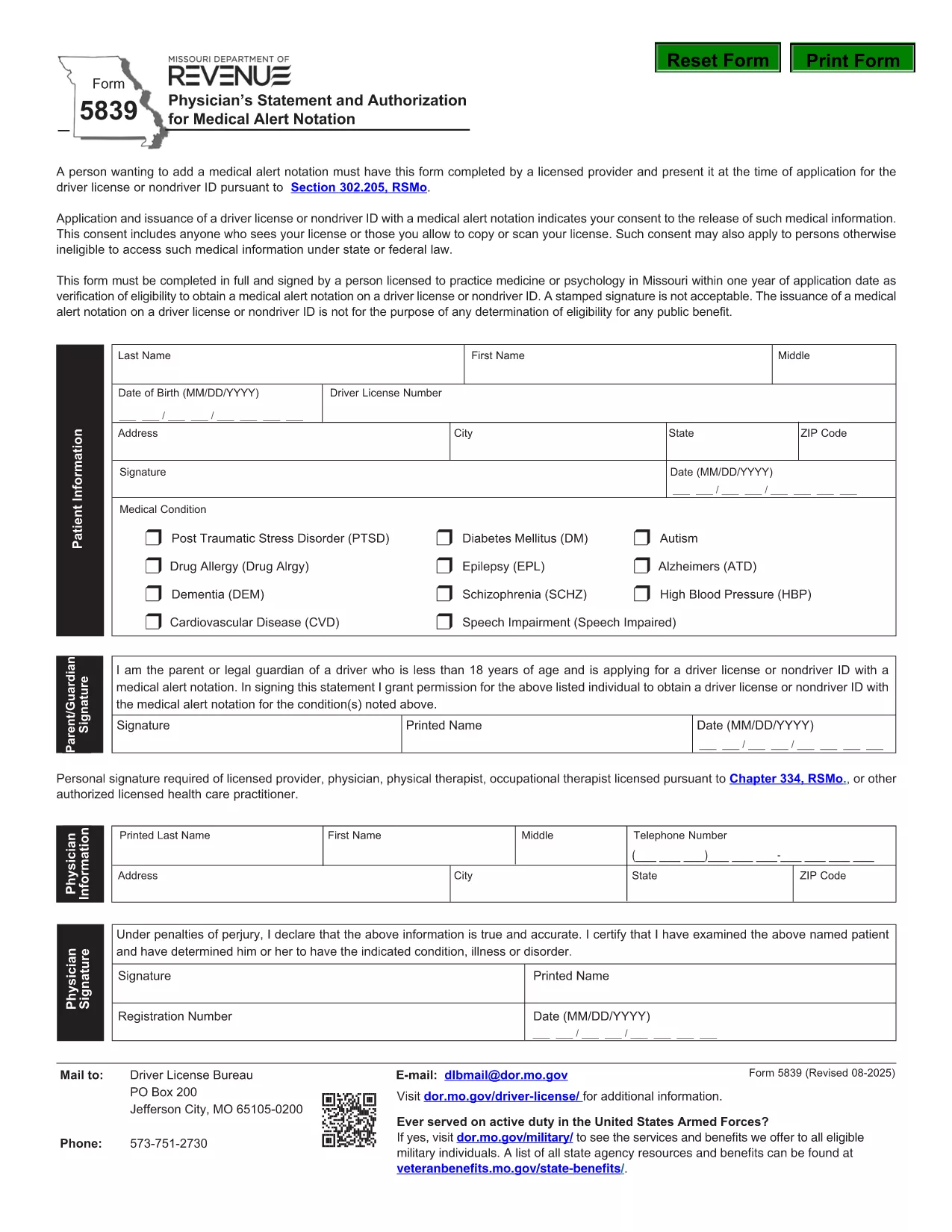
Form 5839 is the official Missouri Physician’s Statement and Authorization required when you want a medical alert notation placed on a driver’s license or non‑driver ID. The form must be completed by a licensed health‑care provider and presented at the time of application.

What Is Form 5839 and Who Needs It?

This form is used under Section 302.205, RSMo to certify medical conditions that affect driving ability. It is typically needed by individuals with conditions such as epilepsy, diabetes, vision impairments, or any health issue that the Missouri Department of Revenue deems relevant for a medical alert.

How to Complete Form 5839 Online

Instead of downloading the PDF and editing it manually, simply click the "Fill out this form" button on this page. The Formize PDF Filler app will load, allowing you to complete every field directly in your browser. Once finished, you can save or print the completed form.

Common Mistakes to Avoid on Form 5839

  • Leaving any required fields blank – the form will be rejected.
  • Using an unsigned or non‑licensed provider’s signature.
  • Providing outdated contact information for the physician.
  • Submitting a scanned copy with low resolution; use the online filler for a clear PDF.

Where to Submit the Completed Form

After filling out Form 5839, bring the printed copy (or a saved electronic version) to your local Missouri Department of Revenue office when applying for or renewing a driver’s license or ID. The office will verify the medical information before adding the alert notation.

FAQs About Form 5839

Below are answers to the most common questions about this form. For more details, refer to the downloadable PDF linked at the bottom of the page.

שאלות נפוצות
  • Who is authorized to sign Form 5839?

    Only a licensed physician, osteopathic doctor, or other qualified health‑care professional can sign the form.

  • Can I submit a scanned copy of the form?

    Yes, but the scan must be clear and legible. Using the online Formize filler ensures a high‑quality PDF.

  • Do I need to attach medical records?

    Generally no, unless the Department of Revenue specifically requests supporting documentation.

  • How long does the medical alert stay on my license?

    The alert remains until the physician provides a new statement indicating the condition has resolved.

  • Is there a fee to file Form 5839?

    No separate fee is charged for the medical statement; any standard licensing fees still apply.

  • What if my physician’s signature is missing?

    The form will be rejected. Contact the physician to obtain a proper signature before submission.

איך ל

כיצד למלא את Form 5839 בחינם, באינטרנט ב-4 שלבים פשוטים:

  1. 1
    Click the Fill‑out Button
    Press the "Fill out this form" button on the page. The Formize PDF Filler loads in your browser.
  2. 2
    Enter All Required Information
    Complete each field – patient details, physician’s credentials, and the medical condition description.
  3. 3
    Save or Print the Completed Form
    When all sections are filled, click "Save" to download a copy or "Print" to obtain a hard‑copy for submission.
  4. 4
    Submit to the Missouri Department of Revenue
    Take the printed form (or a saved PDF) to your local DMV office when applying for or renewing your license.
Formize אפליקציית מילוי PDF
על אודות

טפסי בקשה לרישיון נהיגה

Form 5839 הוא אחד מטפסי רישיון נהיגה שהם מסמכים המשמשים להגשת בקשה לרישיון נהיגה או לבקשת שירותים שונים הקשורים לרישיון נהיגה. טפסים אלה מסופקים בדרך כלל על ידי המחלקה או הסוכנות האחראית להנפקת רישיונות נהיגה באזור שיפוט ספציפי, כגון המחלקה לכלי רכב (DMV) בארצות הברית.

טפסי רישיון נהיגה נפוצים כוללים:

בקשת רישיון נהיגה: טופס זה משמש להגשת בקשה לרישיון נהיגה חדש או לחידוש רישיון נהיגה קיים. זה בדרך כלל דורש מידע אישי כגון שם, כתובת, תאריך לידה ומספר תעודת זהות.

מסמכי זיהוי: תחומי שיפוט מסוימים דורשים מסמכי זיהוי ספציפיים כדי לאמת את זהות המבקש ותושבותו. אלה עשויים לכלול טפסים כגון תעודת לידה, דרכון או תעודת ביטוח לאומי.

בדיקת ראייה: בקשות רבות לרישיון נהיגה דורשות טופס בדיקת ראייה, שבו איש מקצוע רפואי מורשה או מומחה לטיפולי עיניים מאשר שהמבקש עומד בדרישות הראייה המינימליות לנהיגה.

טפסי השכלת נהג: במקרים מסוימים, ייתכן שאנשים יצטרכו לספק הוכחה על סיום קורס חינוך נהג, כגון תעודת השלמת השכלת נהג או טופס חתום על ידי מדריך.

הערכה רפואית: מצבים רפואיים מסוימים עשויים לדרוש מילוי טפסים נוספים על ידי איש מקצוע בתחום הבריאות. טפסים אלו מאמתים את כשירותו הגופני והנפשי של הפונה לנהוג.

טופס שינוי כתובת: אם בעל רישיון נהיגה עובר לכתובת חדשה, ייתכן שיהיה עליו למלא טופס שינוי כתובת כדי לעדכן את פרטי רישיון הנהיגה שלו.

ניתן לקבל טפסי רישיון נהיגה ממשרד DMV המקומי או להוריד מאתר האינטרנט שלהם. חשוב למלא בקפידה ולהגיש את הטפסים הנדרשים יחד עם כל המסמכים התומכים על מנת להבטיח תהליך של בקשה או שירות חלק.

תכונות

מילוי PDF

הדרך הקלה ביותר למלא טפסי PDF באינטרנט

  • מלא במהירות את Form 5839
    מחפש דרך למלא במהירות את Form 5839 באינטרנט? עם מילוי טופס ה-PDF המקוון שלנו בחינם, תדע כיצד לערוך ולמלא את מסמך ה-PDF הזה תוך פחות מדקה.
  • עורך PDF מקוון קל לשימוש
    נמאס לך להדפיס קבצי PDF כדי שתוכל לערוך אותם, לפני סריקה מחדש ושליחה חזרה? ערוך מסמכי PDF בחינם באינטרנט. השתמש בעורך ה-PDF המקוון שלנו כדי לחסוך בזמן ובנייר.
  • כלים מעולים, כל הפלטפורמות
    תוהה כיצד למלא את Form 5839 ב-Mac, או אולי איך להשתמש בחומר מילוי PDF בחינם? כלי ה-PDF המקוונים שלנו פועלים בכל הפלטפורמות.
  • אחסון קבצים מאובטח
    קבצי "Form 5839" שהושלמו מאוחסנים במסד נתונים מאובטח המנוהל על ידי אירוח Amazon Cloud. אתה יכול למחוק את הקבצים שלך מהמערכת שלנו בכל עת. בכל מקרה, קבצים אלו נמחקים אוטומטית לאחר 24 שעות.
  • צ'אט עם Form 5839
    צ'אט עם "Form 5839" ב-Chatize שהוא עוזר לקורא PDF בחינם. שאל שאלות וקבל תשובות מ-"Form 5839". פשוט לחץ על הלחצן צ'אט עם מסמך למעלה.

מחק הפעלת מילוי

למחוק את הפעלת המילוי שנבחרה? במקרה זה, ההתקדמות שלך במילוי הטופס תאבד.

מחק סשן עריכה

למחוק את סשן העריכה שנבחר? במקרה זה, ההתקדמות שלך ביצירה ועריכה של הטופס תאבד.