
בחר שפה

Pennsylvania DL-201 Certification of Motor Vehicle Judgment (Fillable PDF)

  1. שפה אנגלית
  2. מדינה ארה"ב
  3. פעילות רשיון נהיגה
  4. מדינה פנסילבניה
Pennsylvania DL-201 Certification of Motor Vehicle Judgment (Fillable PDF)

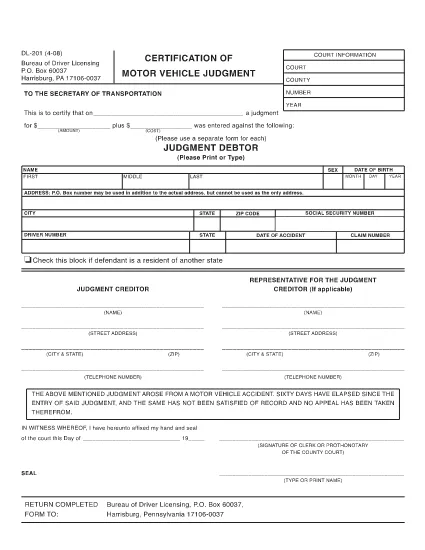
The DL-201 is Pennsylvania's official Certification of Motor Vehicle Judgment. It is required when you need to certify a judgment, lien, or other legal action related to a vehicle registered in PA. Instead of printing, printing, and mailing, you can now fill the form instantly online with Formize’s secure PDF filler.

What Is the DL-201 Form?

The DL-201 is issued by the Pennsylvania Department of Transportation (PennDOT). It records details such as the judgment amount, the vehicle identification number (VIN), and the parties involved. The form is commonly used by attorneys, lienholders, and private individuals to prove a legal claim against a vehicle.

How to Complete the DL-201 Online

Follow these simple steps to fill out the DL-201 without leaving your browser:

  1. Click the "Fill out this form" button on this page.
  2. Wait a few seconds while the Formize PDF Filler app loads the official DL-201 PDF.
  3. Enter the required information into each fillable field (judgment details, VIN, parties, etc.).
  4. Review your entries, then click Submit to download the completed PDF.

Common Mistakes to Avoid

  • Leaving fields blank: Every field marked with an asterisk (*) is mandatory.
  • Incorrect VIN format: Use the 17‑character VIN exactly as it appears on the vehicle title.
  • Mismatched names: Ensure the legal names match the judgment documents.
  • Wrong date format: Use MM/DD/YYYY throughout the form.

Where to Submit the Completed Form

After you download the filled PDF, mail or fax it to the PennDOT Bureau of Driver Licensing at the address printed on the form. Some courts also accept the form electronically; check with your local jurisdiction.

Download the Official PDF

If you prefer to work offline, you can download the official, uneditable version of the DL-201 below. The online filler will use the same document, guaranteeing compliance with PennDOT standards.

Download DL-201 PDF (official)

שאלות נפוצות
  • Is the DL-201 form available as a fillable PDF?

    Yes. Formize provides an online fillable version that mirrors the official Pennsylvania DL-201 PDF.

  • Do I need a PDF editor to complete the DL-201?

    No. The Formize PDF Filler works directly in your browser—no additional software is required.

  • Can I save my progress and finish the form later?

    The online filler does not store data. Complete the form in one session, then download the finished PDF.

  • What should I do if I make a mistake after downloading?

    Open the downloaded PDF in any PDF editor, correct the error, and re‑save. Alternatively, refill the form using the online filler.

  • Where do I send the completed DL-201?

    Mail or fax the completed form to the PennDOT Bureau of Driver Licensing address printed on the form, or follow any court‑specific instructions.

  • Is there a filing fee for the DL-201?

    PennDOT does not charge a fee for the DL-201 itself, but related court or lien filing fees may apply.

  • Can I use the DL-201 for vehicles registered in other states?

    The DL-201 is specific to Pennsylvania. Other states have their own certification forms.

איך ל

כיצד למלא את DL-201 בחינם, באינטרנט ב-3 שלבים פשוטים:

  1. 1
    Open the Fillable Form
    Click the "Fill out this form" button on the page. The Formize PDF Filler app will open the DL-201 automatically.
  2. 2
    Enter Your Information
    Complete each fillable field with the required data (judgment details, VIN, parties, dates, etc.).
  3. 3
    Save or Print
    After reviewing, click "Submit" to download the completed PDF. You can then print, mail, or fax it as required.
Formize אפליקציית מילוי PDF
על אודות

טפסי בקשה לרישיון נהיגה

DL-201 הוא אחד מטפסי רישיון נהיגה שהם מסמכים המשמשים בתהליך של קבלת או חידוש רישיון נהיגה, שהוא מסמך רשמי שהונפקו על ידי הממשלה, המתיר לאנשים להפעיל רכב מנועי בכבישים ציבוריים. טפסים אלה עשויים להשתנות בהתאם לתחום השיפוט, אך הם כוללים בדרך כלל את הדברים הבאים:

טופס בקשה: טופס זה משמש להגשת בקשה לרישיון נהיגה ובדרך כלל מבקש מידע אישי כגון שם, כתובת, תאריך לידה ומספר תעודת זהות.

תיעוד זיהוי: יחד עם טופס הבקשה, אנשים נדרשים בדרך כלל לספק מסמכי זיהוי ספציפיים כדי להוכיח את זהותם, תושבותם ונוכחותם המשפטית במדינה. אלה עשויים לכלול דרכון תקף, תעודת לידה, כרטיס ביטוח לאומי או תעודה מזהה אחרת שהונפקה על ידי הממשלה.

הוכחת תושבות: תחומי שיפוט רבים דורשים מהמועמדים לספק הוכחת תושבות, כגון חשבון חשמל, הסכם שכירות או דף חשבון בנק, כדי לאמת את כתובתם.

טופס בדיקה רפואית: תחומי שיפוט מסוימים עשויים לדרוש בדיקה רפואית כדי לוודא שהמבקש עומד בדרישות הגופניות והנפשיות הדרושות לנהיגה בטוחה. בדרך כלל, איש מקצוע רפואי ממלא טופס זה.

טופס השלמת השכלת נהג: עבור נהגים ראשונים, ייתכן שתידרש השלמת תוכנית לימודים לנהג. לעתים קרובות יש צורך בטופס או תעודה המעידים על סיום מוצלח כדי להגיש בקשה לרישיון נהיגה.

טופס בדיקת ראייה: בדיקת ראייה מתבצעת בדרך כלל במהלך תהליך הבקשה לרישיון הנהיגה. רופא עיניים או צוות מורשה יעריך את חדות הראייה של הפונה וימלא את הטופס הנדרש.

טפסים אלה זמינים בדרך כלל במחלקה המקומית לכלי רכב (DMV) או בסוכנות ממשלתית מקבילה האחראית על רישוי נהיגה. חשוב לבדוק את הדרישות והטפסים הספציפיים החלים על תחום השיפוט שלך, מכיוון שהם יכולים להשתנות.

תכונות

מילוי PDF

הדרך הקלה ביותר למלא טפסי PDF באינטרנט

  • מלא במהירות את DL-201
    מחפש דרך למלא במהירות את DL-201 באינטרנט? עם מילוי טופס ה-PDF המקוון שלנו בחינם, תדע כיצד לערוך ולמלא את מסמך ה-PDF הזה תוך פחות מדקה.
  • עורך PDF מקוון קל לשימוש
    נמאס לך להדפיס קבצי PDF כדי שתוכל לערוך אותם, לפני סריקה מחדש ושליחה חזרה? ערוך מסמכי PDF בחינם באינטרנט. השתמש בעורך ה-PDF המקוון שלנו כדי לחסוך בזמן ובנייר.
  • כלים מעולים, כל הפלטפורמות
    תוהה כיצד למלא את DL-201 ב-Mac, או אולי איך להשתמש בחומר מילוי PDF בחינם? כלי ה-PDF המקוונים שלנו פועלים בכל הפלטפורמות.
  • אחסון קבצים מאובטח
    קבצי "DL-201" שהושלמו מאוחסנים במסד נתונים מאובטח המנוהל על ידי אירוח Amazon Cloud. אתה יכול למחוק את הקבצים שלך מהמערכת שלנו בכל עת. בכל מקרה, קבצים אלו נמחקים אוטומטית לאחר 24 שעות.
  • צ'אט עם DL-201
    צ'אט עם "DL-201" ב-Chatize שהוא עוזר לקורא PDF בחינם. שאל שאלות וקבל תשובות מ-"DL-201". פשוט לחץ על הלחצן צ'אט עם מסמך למעלה.

מחק הפעלת מילוי

למחוק את הפעלת המילוי שנבחרה? במקרה זה, ההתקדמות שלך במילוי הטופס תאבד.

מחק סשן עריכה

למחוק את סשן העריכה שנבחר? במקרה זה, ההתקדמות שלך ביצירה ועריכה של הטופס תאבד.