
בחר שפה

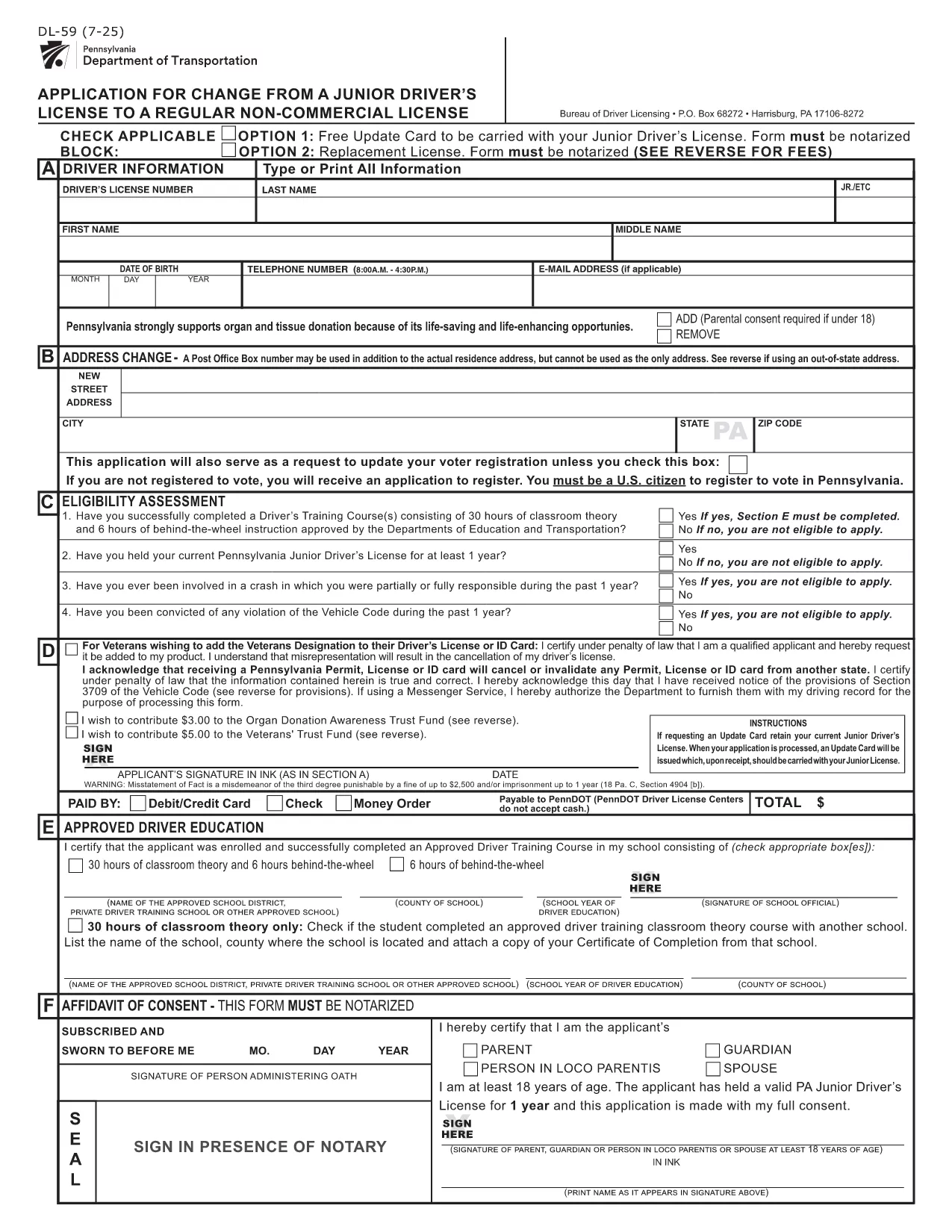
PennDOT DL-59 – Junior Driver License Upgrade Form

  1. שפה אנגלית
  2. מדינה ארה"ב
  3. פעילות רשיון נהיגה
  4. מדינה פנסילבניה
PennDOT DL-59 – Junior Driver License Upgrade Form

The DL-59 is the Pennsylvania Department of Transportation (PennDOT) application used to change a junior driver’s license to a regular non‑commercial license. Whether you’re turning 18, adding a new class, or simply need an updated ID, the DL-59 streamlines the process.

What Is the DL-59 Form?

This official PennDOT PDF collects personal details, eye color, height, and the new license class you’re requesting. It must be signed and, in some cases, notarized before submission.

How to Complete the DL-59 Online

Instead of downloading, printing, and scanning, use Formize’s built‑in PDF filler:

  1. Click the "Fill out this form" button on this page.
  2. Wait a few seconds while the Formize PDF Filler app loads.
  3. Enter the required information directly into the fillable fields.
  4. Review the completed form for accuracy.
  5. Save or print the finished PDF and submit it to PennDOT.

Common Mistakes to Avoid

  • Leaving the eye color or height fields blank – PennDOT uses these as fraud‑prevention identifiers.
  • Forgetting to sign the form in the designated area.
  • Submitting an outdated address; always double‑check your mailing address.
  • Not notarizing when a notary seal is required (e.g., certain name changes).

Where to Submit Your Completed Form

Mail the finished DL-59 to the address listed on the form or deliver it in person to any PennDOT Driver License Center. Include the appropriate fee (usually $12‑$17) unless you qualify for a free update.

Download the Official Fillable PDF

If you prefer the traditional route, you can still download the official form below. It is fully fillable and compatible with most PDF editors.

שאלות נפוצות
  • Who needs to fill out the DL-59 form?

    Anyone who holds a Pennsylvania junior driver’s license and wants to upgrade to a regular non‑commercial license, typically after turning 18 or adding a new class.

  • Is the DL-59 form free?

    The form itself is free to download, but PennDOT charges a processing fee (usually $12‑$17) unless you qualify for a fee‑waiver update.

  • Do I need a notary for the DL-59?

    A notary is required only if the form includes a name change or other circumstances that PennDOT specifies. Check the form’s instructions.

  • Can I submit the DL-59 electronically?

    PennDOT currently accepts only printed and mailed or in‑person submissions. Use the fillable PDF to avoid errors before printing.

  • How long does it take to process the upgrade?

    Processing typically takes 7‑10 business days after PennDOT receives the completed form and payment.

  • What documents should I attach?

    Include proof of residency, a copy of your current junior license, and any required fee payment receipt.

  • What if I make a mistake after submitting?

    Contact your local PennDOT Driver License Center to request a correction; you may need to submit a new DL-59.

איך ל

כיצד למלא את DL-59 בחינם, באינטרנט ב-5 שלבים פשוטים:

  1. 1
    Open the Fillable Form
    Click the "Fill out this form" button on the page. The Formize PDF Filler will open in a new window.
  2. 2
    Enter Your Information
    Type directly into each highlighted field—personal details, eye color, height, and the new license class.
  3. 3
    Review and Sign
    Double‑check every entry, then use the built‑in signature tool to add your signature.
  4. 4
    Save or Print
    Save the completed PDF to your device or print it for submission to PennDOT.
  5. 5
    Submit to PennDOT
    Mail or deliver the form along with any required fees to the address shown on the PDF.
Formize אפליקציית מילוי PDF
על אודות

טפסי בקשה לרישיון נהיגה

DL-59 הוא אחד מטפסי רישיון נהיגה שהם מסמכים המשמשים בתהליך של קבלת או חידוש רישיון נהיגה, שהוא מסמך רשמי שהונפקו על ידי הממשלה, המתיר לאנשים להפעיל רכב מנועי בכבישים ציבוריים. טפסים אלה עשויים להשתנות בהתאם לתחום השיפוט, אך הם כוללים בדרך כלל את הדברים הבאים:

טופס בקשה: טופס זה משמש להגשת בקשה לרישיון נהיגה ובדרך כלל מבקש מידע אישי כגון שם, כתובת, תאריך לידה ומספר תעודת זהות.

תיעוד זיהוי: יחד עם טופס הבקשה, אנשים נדרשים בדרך כלל לספק מסמכי זיהוי ספציפיים כדי להוכיח את זהותם, תושבותם ונוכחותם המשפטית במדינה. אלה עשויים לכלול דרכון תקף, תעודת לידה, כרטיס ביטוח לאומי או תעודה מזהה אחרת שהונפקה על ידי הממשלה.

הוכחת תושבות: תחומי שיפוט רבים דורשים מהמועמדים לספק הוכחת תושבות, כגון חשבון חשמל, הסכם שכירות או דף חשבון בנק, כדי לאמת את כתובתם.

טופס בדיקה רפואית: תחומי שיפוט מסוימים עשויים לדרוש בדיקה רפואית כדי לוודא שהמבקש עומד בדרישות הגופניות והנפשיות הדרושות לנהיגה בטוחה. בדרך כלל, איש מקצוע רפואי ממלא טופס זה.

טופס השלמת השכלת נהג: עבור נהגים ראשונים, ייתכן שתידרש השלמת תוכנית לימודים לנהג. לעתים קרובות יש צורך בטופס או תעודה המעידים על סיום מוצלח כדי להגיש בקשה לרישיון נהיגה.

טופס בדיקת ראייה: בדיקת ראייה מתבצעת בדרך כלל במהלך תהליך הבקשה לרישיון הנהיגה. רופא עיניים או צוות מורשה יעריך את חדות הראייה של הפונה וימלא את הטופס הנדרש.

טפסים אלה זמינים בדרך כלל במחלקה המקומית לכלי רכב (DMV) או בסוכנות ממשלתית מקבילה האחראית על רישוי נהיגה. חשוב לבדוק את הדרישות והטפסים הספציפיים החלים על תחום השיפוט שלך, מכיוון שהם יכולים להשתנות.

תכונות

מילוי PDF

הדרך הקלה ביותר למלא טפסי PDF באינטרנט

  • מלא במהירות את DL-59
    מחפש דרך למלא במהירות את DL-59 באינטרנט? עם מילוי טופס ה-PDF המקוון שלנו בחינם, תדע כיצד לערוך ולמלא את מסמך ה-PDF הזה תוך פחות מדקה.
  • עורך PDF מקוון קל לשימוש
    נמאס לך להדפיס קבצי PDF כדי שתוכל לערוך אותם, לפני סריקה מחדש ושליחה חזרה? ערוך מסמכי PDF בחינם באינטרנט. השתמש בעורך ה-PDF המקוון שלנו כדי לחסוך בזמן ובנייר.
  • כלים מעולים, כל הפלטפורמות
    תוהה כיצד למלא את DL-59 ב-Mac, או אולי איך להשתמש בחומר מילוי PDF בחינם? כלי ה-PDF המקוונים שלנו פועלים בכל הפלטפורמות.
  • אחסון קבצים מאובטח
    קבצי "DL-59" שהושלמו מאוחסנים במסד נתונים מאובטח המנוהל על ידי אירוח Amazon Cloud. אתה יכול למחוק את הקבצים שלך מהמערכת שלנו בכל עת. בכל מקרה, קבצים אלו נמחקים אוטומטית לאחר 24 שעות.
  • צ'אט עם DL-59
    צ'אט עם "DL-59" ב-Chatize שהוא עוזר לקורא PDF בחינם. שאל שאלות וקבל תשובות מ-"DL-59". פשוט לחץ על הלחצן צ'אט עם מסמך למעלה.

מחק הפעלת מילוי

למחוק את הפעלת המילוי שנבחרה? במקרה זה, ההתקדמות שלך במילוי הטופס תאבד.

מחק סשן עריכה

למחוק את סשן העריכה שנבחר? במקרה זה, ההתקדמות שלך ביצירה ועריכה של הטופס תאבד.