
בחר שפה

Virginia DMV DMS-004 Fillable PDF – Payment Authorization Form

  1. מדינה ארה"ב
  2. שפה אנגלית
  3. פעילות רשיון נהיגה
  4. מדינה וירג'יניה
Virginia DMV DMS-004 Fillable PDF – Payment Authorization Form

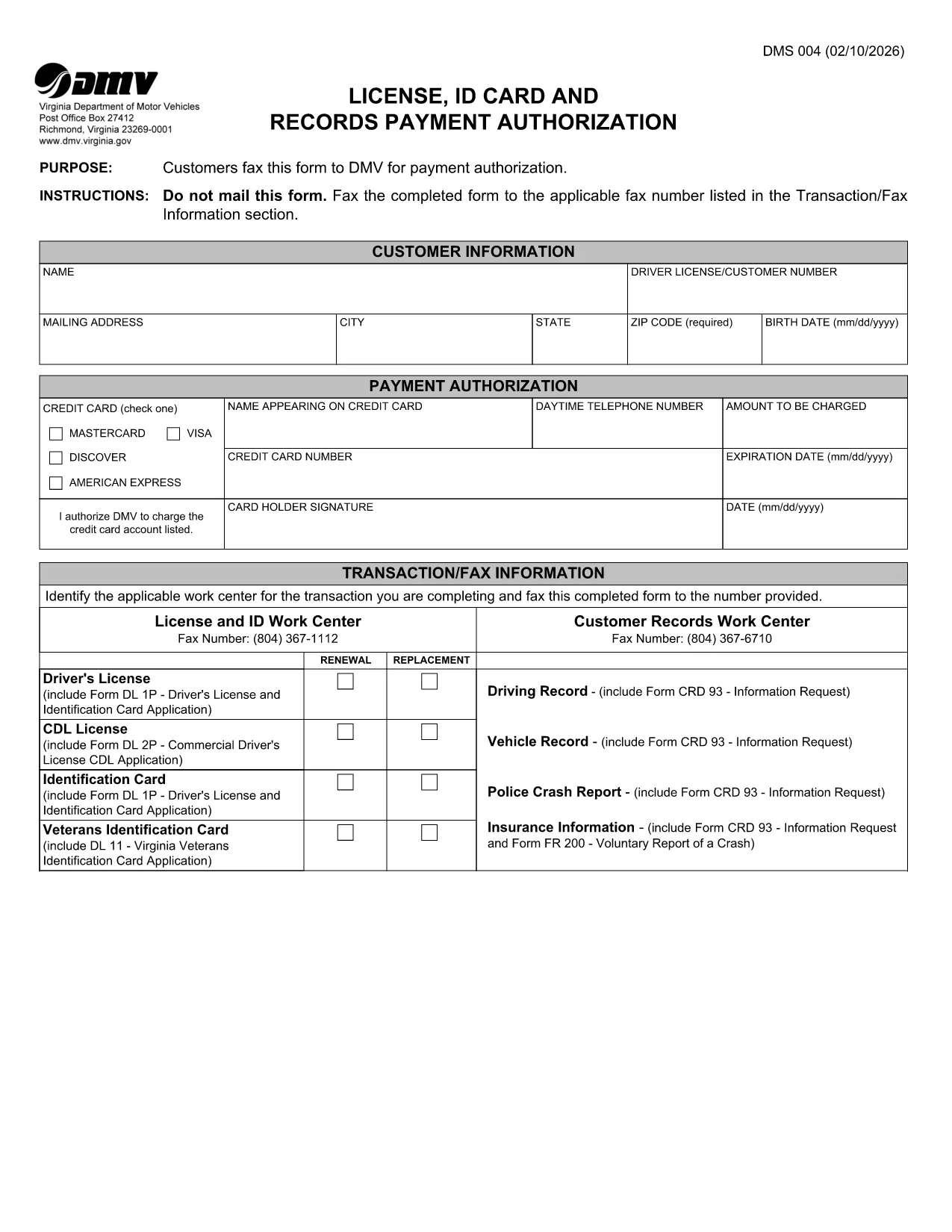
The DMS-004 is the official Virginia Department of Motor Vehicles (DMV) form used to authorize payment for a driver's license, ID card, or records request. This fillable PDF lets you complete the payment authorization quickly, without printing or faxing.

Our online Formize PDF Filler loads the DMS-004 directly in your browser, so you can type, sign, and submit the form in minutes. No additional software is required.

What Is the DMS-004 Form?

The DMS-004, titled "License, ID Card and Records Payment Authorization," captures:

  • Applicant’s personal information (name, address, driver’s license number)
  • Details of the requested service (license renewal, new ID, record copy)
  • Payment method and authorization signature

It is required whenever you need to pay the DMV for a license, ID card, or official record request.

How to Fill Out DMS-004 Online with Formize

Follow the simple steps below to complete the form without ever leaving the page.

Common Mistakes to Avoid

Even a tiny error can delay processing. Keep these tips in mind:

  • Double‑check the driver’s license number – a single digit off will cause a rejection.
  • Use a valid credit or debit card number; the form does not accept expired cards.
  • Sign exactly where the signature box appears; digital signatures are accepted.
  • Do not leave any mandatory fields blank; the Formize validator will highlight them.

Where to Submit the Completed Form

After you finish, you have two options:

  • Fax – The form automatically generates a fax‑ready PDF you can send to the number listed in the “Transaction/Fax Information” section.
  • Upload – Use the Virginia DMV online portal to upload the completed PDF directly.

Both methods are accepted, but the online upload is faster and provides an instant confirmation.

שאלות נפוצות
  • What is the purpose of the DMS-004 form?

    The DMS-004 authorizes the Virginia DMV to process payment for a driver's license, state ID card, or official records request.

  • Can I fill out DMS-004 on a mobile device?

    Yes. The Formize PDF Filler is fully responsive, allowing you to complete the form on smartphones or tablets.

  • Is a digital signature accepted?

    A digital signature created within the Formize app meets the DMV’s requirements and is treated the same as a handwritten signature.

  • Do I need to print the form after filling it out?

    No. You can fax the completed PDF directly from the app or upload the file to the DMV’s online portal.

  • What payment methods are accepted on DMS-004?

    The form accepts credit or debit card numbers. Ensure the card is current and has sufficient funds.

  • How long does it take for the DMV to process the form?

    Processing is typically 2–3 business days after the DMV receives the completed and authorized form.

  • Can I save a draft and finish later?

    Yes. The Formize app allows you to save a draft locally in your browser and return to it anytime before submission.

  • What should I do if I make a mistake?

    Edit the field directly in the Formize app before final submission. If you have already submitted, contact the Virginia DMV to request a correction.

איך ל

כיצד למלא את DMS-004 בחינם, באינטרנט ב-4 שלבים פשוטים:

  1. 1
    Open the Fillable Form
    Click the "Fill out this form" button on the page. The Formize PDF Filler app loads the DMS-004 directly in your browser.
  2. 2
    Enter Your Information
    Type in all required fields: personal details, service requested, and payment information. The form validates entries in real time.
  3. 3
    Add Your Digital Signature
    Use your mouse, trackpad, or touchscreen to sign in the signature box. Formize captures a secure digital signature.
  4. 4
    Review and Submit
    Click the "Review" button to ensure no fields are missing. Then choose to either fax the PDF automatically or download it for online upload to the Virginia DMV portal.
Formize אפליקציית מילוי PDF
על אודות

טפסי בקשה לרישיון נהיגה

ברוב המדינות, חובה להחזיק ברישיון נהיגה לפני שתוכלו לצאת לכביש. הוצאת רישיון נהיגה היא אבן דרך חשובה לכל מי שרוצה לנהוג ברכב.

DMS-004 הוא אחד מטפסי הבקשה לרישיון נהיגה שהם מסמכים המשמשים לאיסוף מידע מאנשים שרוצים להגיש בקשה לרישיון נהיגה. הוא מכיל בדרך כלל שדות של שם המבקש, תאריך לידה, מספר תעודת זהות, פרטי התקשרות, כמו גם היסטוריית רישיון הנהיגה והניסיון שלו.

תכונות

מילוי PDF

הדרך הקלה ביותר למלא טפסי PDF באינטרנט

  • מלא במהירות את DMS-004
    מחפש דרך למלא במהירות את DMS-004 באינטרנט? עם מילוי טופס ה-PDF המקוון שלנו בחינם, תדע כיצד לערוך ולמלא את מסמך ה-PDF הזה תוך פחות מדקה.
  • עורך PDF מקוון קל לשימוש
    נמאס לך להדפיס קבצי PDF כדי שתוכל לערוך אותם, לפני סריקה מחדש ושליחה חזרה? ערוך מסמכי PDF בחינם באינטרנט. השתמש בעורך ה-PDF המקוון שלנו כדי לחסוך בזמן ובנייר.
  • כלים מעולים, כל הפלטפורמות
    תוהה כיצד למלא את DMS-004 ב-Mac, או אולי איך להשתמש בחומר מילוי PDF בחינם? כלי ה-PDF המקוונים שלנו פועלים בכל הפלטפורמות.
  • אחסון קבצים מאובטח
    קבצי "DMS-004" שהושלמו מאוחסנים במסד נתונים מאובטח המנוהל על ידי אירוח Amazon Cloud. אתה יכול למחוק את הקבצים שלך מהמערכת שלנו בכל עת. בכל מקרה, קבצים אלו נמחקים אוטומטית לאחר 24 שעות.
  • צ'אט עם DMS-004
    צ'אט עם "DMS-004" ב-Chatize שהוא עוזר לקורא PDF בחינם. שאל שאלות וקבל תשובות מ-"DMS-004". פשוט לחץ על הלחצן צ'אט עם מסמך למעלה.

מחק הפעלת מילוי

למחוק את הפעלת המילוי שנבחרה? במקרה זה, ההתקדמות שלך במילוי הטופס תאבד.

מחק סשן עריכה

למחוק את סשן העריכה שנבחר? במקרה זה, ההתקדמות שלך ביצירה ועריכה של הטופס תאבד.