
בחר שפה

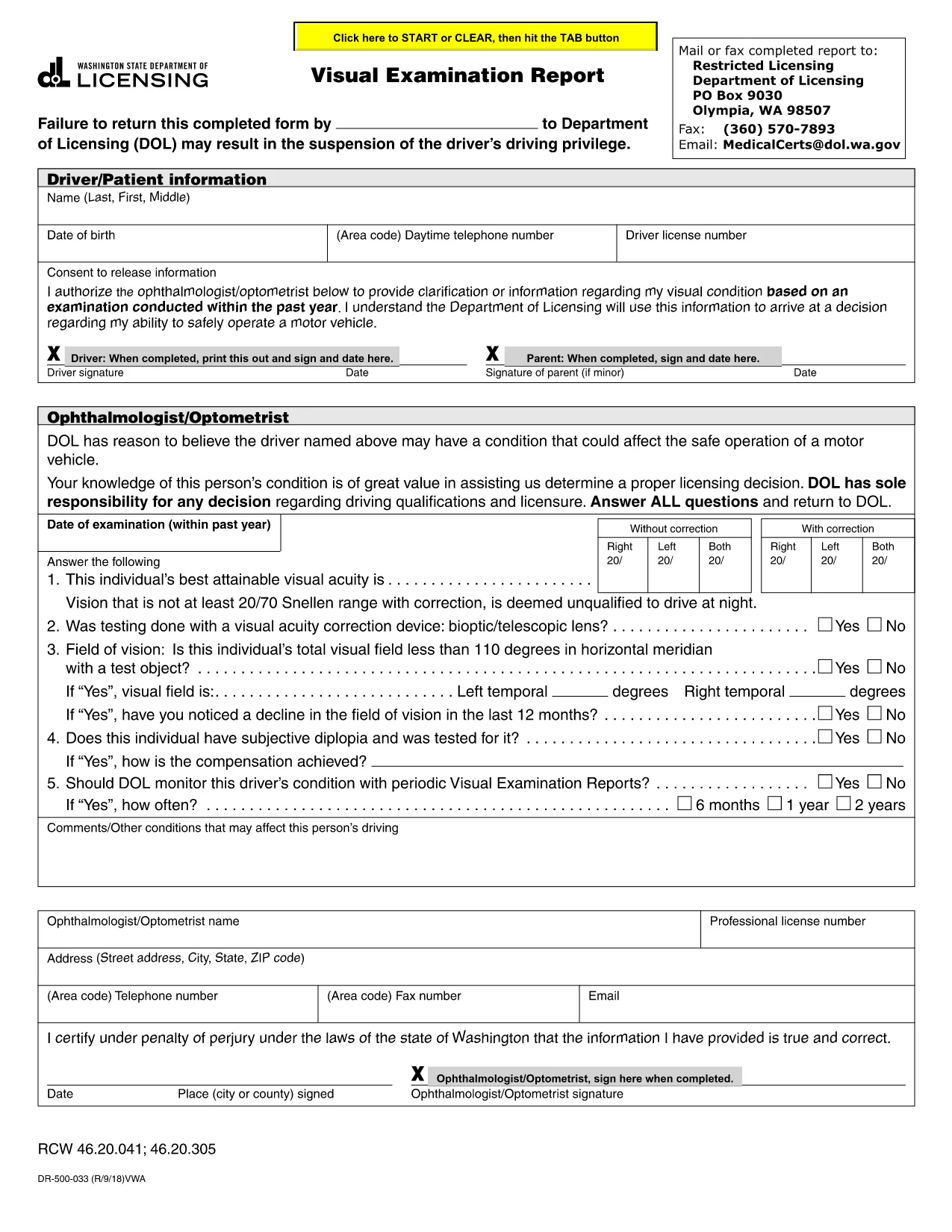
Visual Examination Report – Fillable PDF for Washington State Drivers

  1. שפה אנגלית
  2. מדינה ארה"ב
  3. פעילות רשיון נהיגה
  4. מדינה וושינגטון
Visual Examination Report – Fillable PDF for Washington State Drivers

The Visual Examination Report is a mandatory medical form used by the Washington State Department of Licensing (DOL) to verify that a driver meets the vision standards required for a valid driver’s license. Historically, drivers had to print, fill out by hand, and mail the form, but with Formize’s fillable PDF you can complete it online in minutes.

What Is the Visual Examination Report?

This form collects essential information about a driver’s visual acuity, field of vision, and any corrective lenses required. A licensed physician, optometrist, or ophthalmologist must sign the report, confirming that the driver meets the state’s vision requirements.

Why Use a Fillable PDF Form?

  • Fast & secure: No printing or scanning required.
  • Auto‑save: Your progress is saved as you type.
  • Built‑in validation: Prevents missing or incorrect entries.
  • Direct submission: Download the completed PDF and upload it to the DOL portal or attach it to an email.

Step‑by‑Step Guide to Completing the Report

Follow the simple steps below to finish the Visual Examination Report using Formize’s PDF filler.

Common Mistakes to Avoid

  • Leaving the physician’s signature section blank.
  • Entering vision numbers without the required units (e.g., 20/40 instead of 20/40).
  • Submitting an outdated form version – always use the latest PDF provided below.

Where to Submit Your Completed Form

After you download the filled PDF, you can:

  • Upload it directly to the Washington DOL online portal.
  • Mail it to the address listed on the form.
  • Bring a printed copy to your nearest licensing office.

Need help? Review the FAQs below or contact your eye‑care professional for clarification.

שאלות נפוצות
  • Who can complete the Visual Examination Report?

    Only a licensed physician, optometrist, or ophthalmologist authorized to practice in Washington can fill out and sign the report.

  • Do I need to print the form after filling it online?

    No. You can download the completed PDF and upload it directly to the DOL website, or email it to the licensing office.

  • What vision standards must I meet?

    Washington requires a visual acuity of at least 20/40 in each eye, with or without corrective lenses, and a normal field of vision.

  • Can I use a scanned copy of a handwritten form?

    A scanned handwritten form is accepted but may cause processing delays. Using the fillable PDF ensures faster review.

  • How long is the Visual Examination Report valid?

    The report is valid for 12 months from the date of the physician’s signature. After that, a new exam is required.

  • What should I do if I make a mistake while filling the form?

    Use the “Reset” button in the Formize filler to clear the field, or simply edit the incorrect entry before downloading.

  • Is there a fee to submit the Visual Examination Report?

    There is no separate fee for the report itself, but the Washington DOL may charge a processing fee for license renewal or replacement.

איך ל

כיצד למלא את visual examination report בחינם, באינטרנט ב-5 שלבים פשוטים:

  1. 1
    Open the Fillable Form
    Click the “Fill out this form” button on the page. The Formize PDF Filler app will open in a new tab.
  2. 2
    Wait for the Filler to Load
    The app loads the visual examination report automatically. This may take a few seconds depending on your connection.
  3. 3
    Enter the Required Information
    Complete each field – driver details, vision test results, and physician’s certification. Use the drop‑down menus where provided.
  4. 4
    Review and Sign
    Double‑check all entries for accuracy. The physician can add a digital signature directly in the filler.
  5. 5
    Download or Submit
    When finished, click “Download PDF” to save a copy or use the “Submit” button to send it straight to the Washington DOL portal.
Formize אפליקציית מילוי PDF
על אודות

טפסי בקשה לרישיון נהיגה

visual examination report הוא אחד מטפסי רישיון נהיגה שהם מסמכים המשמשים בתהליך של קבלת או חידוש רישיון נהיגה, שהוא מסמך רשמי שהונפקו על ידי הממשלה, המתיר לאנשים להפעיל רכב מנועי בכבישים ציבוריים. טפסים אלה עשויים להשתנות בהתאם לתחום השיפוט, אך הם כוללים בדרך כלל את הדברים הבאים:

טופס בקשה: טופס זה משמש להגשת בקשה לרישיון נהיגה ובדרך כלל מבקש מידע אישי כגון שם, כתובת, תאריך לידה ומספר תעודת זהות.

תיעוד זיהוי: יחד עם טופס הבקשה, אנשים נדרשים בדרך כלל לספק מסמכי זיהוי ספציפיים כדי להוכיח את זהותם, תושבותם ונוכחותם המשפטית במדינה. אלה עשויים לכלול דרכון תקף, תעודת לידה, כרטיס ביטוח לאומי או תעודה מזהה אחרת שהונפקה על ידי הממשלה.

הוכחת תושבות: תחומי שיפוט רבים דורשים מהמועמדים לספק הוכחת תושבות, כגון חשבון חשמל, הסכם שכירות או דף חשבון בנק, כדי לאמת את כתובתם.

טופס בדיקה רפואית: תחומי שיפוט מסוימים עשויים לדרוש בדיקה רפואית כדי לוודא שהמבקש עומד בדרישות הגופניות והנפשיות הדרושות לנהיגה בטוחה. בדרך כלל, איש מקצוע רפואי ממלא טופס זה.

טופס השלמת השכלת נהג: עבור נהגים ראשונים, ייתכן שתידרש השלמת תוכנית לימודים לנהג. לעתים קרובות יש צורך בטופס או תעודה המעידים על סיום מוצלח כדי להגיש בקשה לרישיון נהיגה.

טופס בדיקת ראייה: בדיקת ראייה מתבצעת בדרך כלל במהלך תהליך הבקשה לרישיון הנהיגה. רופא עיניים או צוות מורשה יעריך את חדות הראייה של הפונה וימלא את הטופס הנדרש.

טפסים אלה זמינים בדרך כלל במחלקה המקומית לכלי רכב (DMV) או בסוכנות ממשלתית מקבילה האחראית על רישוי נהיגה. חשוב לבדוק את הדרישות והטפסים הספציפיים החלים על תחום השיפוט שלך, מכיוון שהם יכולים להשתנות.

תכונות

מילוי PDF

הדרך הקלה ביותר למלא טפסי PDF באינטרנט

  • מלא במהירות את visual examination report
    מחפש דרך למלא במהירות את visual examination report באינטרנט? עם מילוי טופס ה-PDF המקוון שלנו בחינם, תדע כיצד לערוך ולמלא את מסמך ה-PDF הזה תוך פחות מדקה.
  • עורך PDF מקוון קל לשימוש
    נמאס לך להדפיס קבצי PDF כדי שתוכל לערוך אותם, לפני סריקה מחדש ושליחה חזרה? ערוך מסמכי PDF בחינם באינטרנט. השתמש בעורך ה-PDF המקוון שלנו כדי לחסוך בזמן ובנייר.
  • כלים מעולים, כל הפלטפורמות
    תוהה כיצד למלא את visual examination report ב-Mac, או אולי איך להשתמש בחומר מילוי PDF בחינם? כלי ה-PDF המקוונים שלנו פועלים בכל הפלטפורמות.
  • אחסון קבצים מאובטח
    קבצי "visual examination report" שהושלמו מאוחסנים במסד נתונים מאובטח המנוהל על ידי אירוח Amazon Cloud. אתה יכול למחוק את הקבצים שלך מהמערכת שלנו בכל עת. בכל מקרה, קבצים אלו נמחקים אוטומטית לאחר 24 שעות.
  • צ'אט עם visual examination report
    צ'אט עם "visual examination report" ב-Chatize שהוא עוזר לקורא PDF בחינם. שאל שאלות וקבל תשובות מ-"visual examination report". פשוט לחץ על הלחצן צ'אט עם מסמך למעלה.

מחק הפעלת מילוי

למחוק את הפעלת המילוי שנבחרה? במקרה זה, ההתקדמות שלך במילוי הטופס תאבד.

מחק סשן עריכה

למחוק את סשן העריכה שנבחר? במקרה זה, ההתקדמות שלך ביצירה ועריכה של הטופס תאבד.