
בחר שפה

IRS Form 15110 – Fillable PDF (Additional Child Tax Credit)

  1. מדינה ארה"ב
  2. שפה אנגלית
  3. פעילות מיסים
  4. מַחלָקָה IRS
IRS Form 15110 – Fillable PDF (Additional Child Tax Credit)

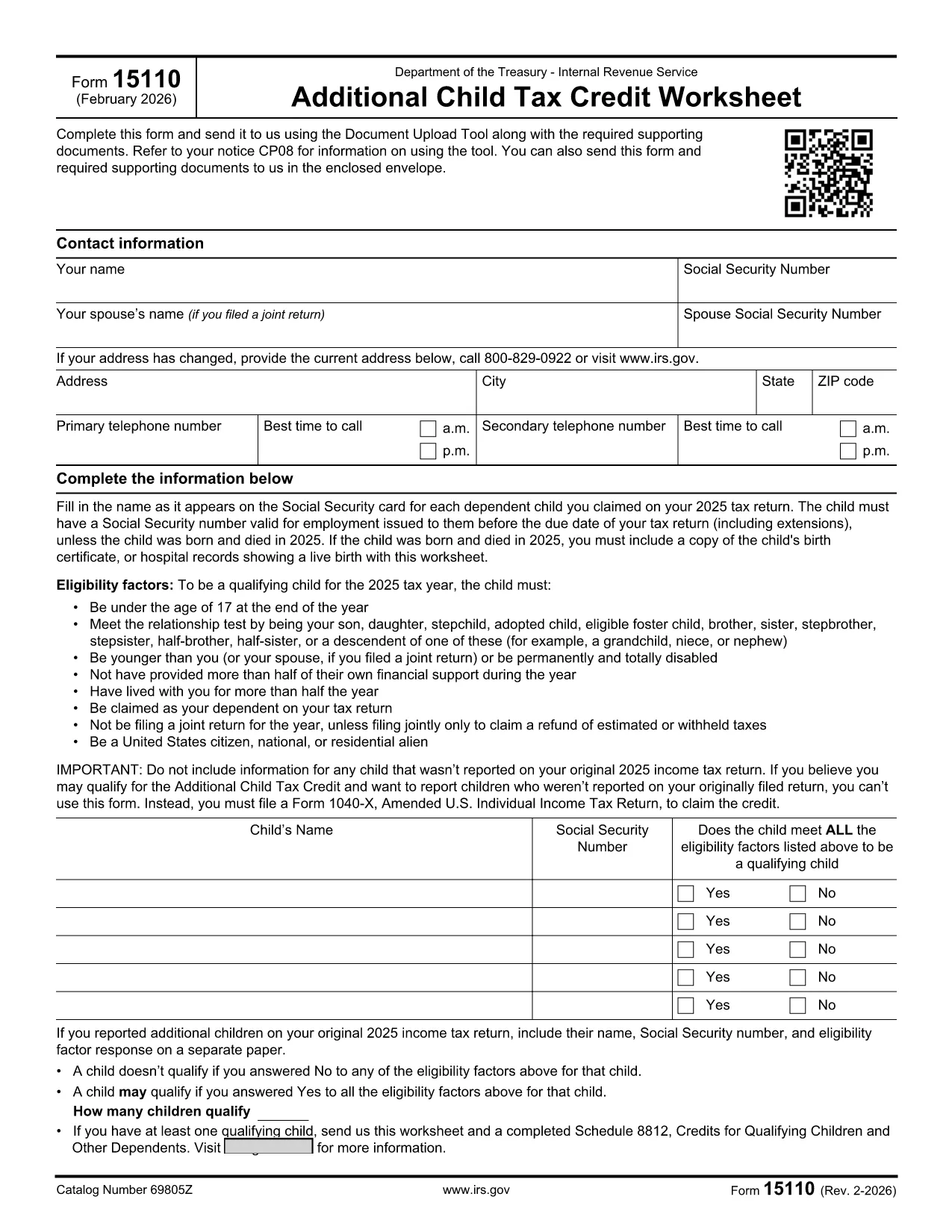
Form 15110 is the Additional Child Tax Credit Worksheet the IRS sends when you receive a CP08 notice. It lets you claim any refundable portion of the child tax credit that wasn’t captured on your original return.

What Is Form 15110 and When Do You Need It?

This one‑page worksheet collects:

  • Taxpayer contact information
  • Social Security numbers for you, your spouse, and each qualifying child
  • Eligibility details for each child (age, relationship, residency, etc.)

If the IRS has told you to complete Form 15110, you must return it with any required supporting documents to claim the additional credit.

How to Complete Form 15110 Online with Formize

Instead of printing, printing, and scanning, use our Formize PDF Filler – a secure, browser‑based editor that works on any device.

  1. Click the "Fill out this form" button on this page.
  2. Wait a few seconds while the Formize PDF Filler app loads the fillable PDF.
  3. Enter your information exactly as it appears on your tax return.
  4. Review each field for accuracy; the filler highlights required fields.
  5. When you’re done, click Save & Download to get a completed PDF you can attach to your CP08 response.

Common Mistakes & Tips for a Smooth Submission

  • Social Security numbers: Double‑check every SSN. A missing or transposed digit will delay processing.
  • Child eligibility: Verify that each child is under 17, lives with you > ½ year, and is a U.S. citizen or resident.
  • Address changes: Use the most recent address on your last filed return; update it in the form if needed.
  • Signature: The fillable PDF allows you to type a digital signature. Make sure it’s legible.
  • Supporting documents: Attach any required proof (e.g., birth certificates) as separate PDFs when you upload your response.

Download the Official Fillable PDF

Need the original PDF for offline use? Click the link below to download the IRS‑provided fillable version.

Download IRS Form 15110 (PDF)

שאלות נפוצות
  • Do I need a special program to open Form 15110?

    No. With Formize you can fill out the form directly in your web browser. If you prefer, you can also download the PDF and use any standard PDF reader.

  • What is a CP08 notice?

    A CP08 notice is sent by the IRS when they need additional information to process your claim for the Additional Child Tax Credit. The notice includes Form 15110.

  • Can I use an ITIN instead of an SSN for my children?

    No. For the child tax credit and additional child tax credit, each qualifying child must have a Social Security Number before the tax return due date.

  • How many children can I list on Form 15110?

    You can list up to three qualifying children on a single Form 15110 worksheet. If you have more, you must submit additional worksheets.

  • What happens if I make a mistake on the form?

    Errors can delay your refund. Review the form carefully, use the built‑in validation in Formize, and correct any mistakes before submitting.

  • Is there a filing deadline for Form 15110?

    You should return the completed Form 15110 as soon as possible after receiving the CP08 notice. Late submissions may result in a reduced credit.

  • Do I need to attach proof of residency for each child?

    Typically the IRS only requires the worksheet, but if they request additional documentation, you may need to provide school records, medical bills, or a lease showing the child lived with you > ½ year.

איך ל

כיצד למלא את IRS Form 15110 בחינם, באינטרנט ב-4 שלבים פשוטים:

  1. 1
    Open the Fillable Form
    Click the "Fill out this form" button on the page. The Formize PDF Filler will load the Form 15110 directly in your browser.
  2. 2
    Enter Your Information
    Fill in all required fields—name, SSN, address, and each child's details. Required fields are highlighted in red.
  3. 3
    Review and Save
    Double‑check every entry, then click "Save & Download" to get a completed PDF you can attach to your CP08 response.
  4. 4
    Submit to the IRS
    Upload the completed PDF (and any supporting documents) using the IRS Document Upload Tool or mail it in the envelope provided with the notice.
Formize אפליקציית מילוי PDF
על אודות

טפסי מס

IRS Form 15110 הוא אחד מטפסי מס שהם מסמכים המשמשים לדיווח מידע על הכנסה, ניכויים וחבות מס של אדם פרטי או עסק לרשות המס הרלוונטית. טפסים אלו נחוצים כדי לעמוד בחוקי המס ולמלא חובות מס. טפסי מס משתנים בהתאם למדינה ולדרישות המס הספציפיות הקיימות. להלן כמה סוגים נפוצים של טפסי מס:

טופסי מס פרטניים: טפסים אלה משמשים משלמי מס בודדים לדיווח על הכנסתם האישית ולתבוע ניכויים, זיכויים ופטורים. דוגמאות כוללות את טופס 1040 בארצות הברית או את טופס החזר מס להערכה עצמית בבריטניה.

טופסי מס לעסקים: טופסי מס לעסקים משמשים חברות, שותפויות או עצמאים כדי לדווח על הכנסות העסק, ההוצאות ומידע אחר הקשור למס. דוגמאות כוללות את הטופס Schedule C (רווח או הפסד מעסקים) בארצות הברית או טופס CT600 (החזר מס חברה) בבריטניה.

טפסי מס שכר: טפסים אלה משמשים מעסיקים לדיווח על השכר, המשכורות והמסים שנמשכו מתלושי השכר של העובדים שלהם. דוגמאות כוללות טופס W-2 בארצות הברית או טופס P60 בבריטניה.

טפסי מס מכירה: טפסי מס מכירה משמשים עסקים לדיווח ולשליחת מס מכירה שנגבה על סחורות או שירותים החייבים במס. טפסי מס המכירה הספציפיים משתנים לפי תחום שיפוט.

טפסי מס ערך מוסף (מע"מ): טפסי מע"מ משמשים במדינות המטילות מס ערך מוסף כדי לדווח ולהעביר מע"מ שנגבה על מכירות ולתבוע זיכויים במע"מ על רכישות. דוגמאות כוללות את טפסי החזרי מע"מ המשמשים במדינות רבות.

טפסי מס משוער: טפסי מס משוער משמשים לדיווח ולשלם מסים משוערים על הכנסה שאינה כפופה לניכוי במקור, כגון הכנסה מעצמאים או הכנסה מהשקעות.

אלו הן רק כמה דוגמאות לטפסי מס רבים שעשויים להתקיים. הטפסים הספציפיים הנדרשים תלויים בחוקי המס ובתקנות במדינה או בשטח השיפוט שלך. חשוב לעיין בהנחיות רשות המסים או לפנות לייעוץ מקצועי כדי לקבוע אילו טפסים מתאימים למצבך.

תכונות

מילוי PDF

הדרך הקלה ביותר למלא טפסי PDF באינטרנט

  • מלא במהירות את IRS Form 15110
    מחפש דרך למלא במהירות את IRS Form 15110 באינטרנט? עם מילוי טופס ה-PDF המקוון שלנו בחינם, תדע כיצד לערוך ולמלא את מסמך ה-PDF הזה תוך פחות מדקה.
  • עורך PDF מקוון קל לשימוש
    נמאס לך להדפיס קבצי PDF כדי שתוכל לערוך אותם, לפני סריקה מחדש ושליחה חזרה? ערוך מסמכי PDF בחינם באינטרנט. השתמש בעורך ה-PDF המקוון שלנו כדי לחסוך בזמן ובנייר.
  • כלים מעולים, כל הפלטפורמות
    תוהה כיצד למלא את IRS Form 15110 ב-Mac, או אולי איך להשתמש בחומר מילוי PDF בחינם? כלי ה-PDF המקוונים שלנו פועלים בכל הפלטפורמות.
  • אחסון קבצים מאובטח
    קבצי "IRS Form 15110" שהושלמו מאוחסנים במסד נתונים מאובטח המנוהל על ידי אירוח Amazon Cloud. אתה יכול למחוק את הקבצים שלך מהמערכת שלנו בכל עת. בכל מקרה, קבצים אלו נמחקים אוטומטית לאחר 24 שעות.
  • צ'אט עם IRS Form 15110
    צ'אט עם "IRS Form 15110" ב-Chatize שהוא עוזר לקורא PDF בחינם. שאל שאלות וקבל תשובות מ-"IRS Form 15110". פשוט לחץ על הלחצן צ'אט עם מסמך למעלה.

מחק הפעלת מילוי

למחוק את הפעלת המילוי שנבחרה? במקרה זה, ההתקדמות שלך במילוי הטופס תאבד.

מחק סשן עריכה

למחוק את סשן העריכה שנבחר? במקרה זה, ההתקדמות שלך ביצירה ועריכה של הטופס תאבד.